

A platform dedicated to providing unbiased reviews of newly launched applications, analyzing everything from their features to their full potential.
info@scoutforge.net© 2026 Scoutforge. All rights reserved.
A platform dedicated to providing unbiased reviews of newly launched applications, analyzing everything from their features to their full potential.
info@scoutforge.net© 2026 Scoutforge. All rights reserved.
A platform dedicated to providing unbiased reviews of newly launched applications, analyzing everything from their features to their full potential.
info@scoutforge.net© 2026 Scoutforge. All rights reserved.
Cycling through all six. Tap any point to stop.
Measured on six things
AI UI design canvas for vibe design – describe, iterate, ...
Design tokens help maintain contrast and scales. Canvas supports multiple viewports. Limited explicit WCAG or screen reader mentions.
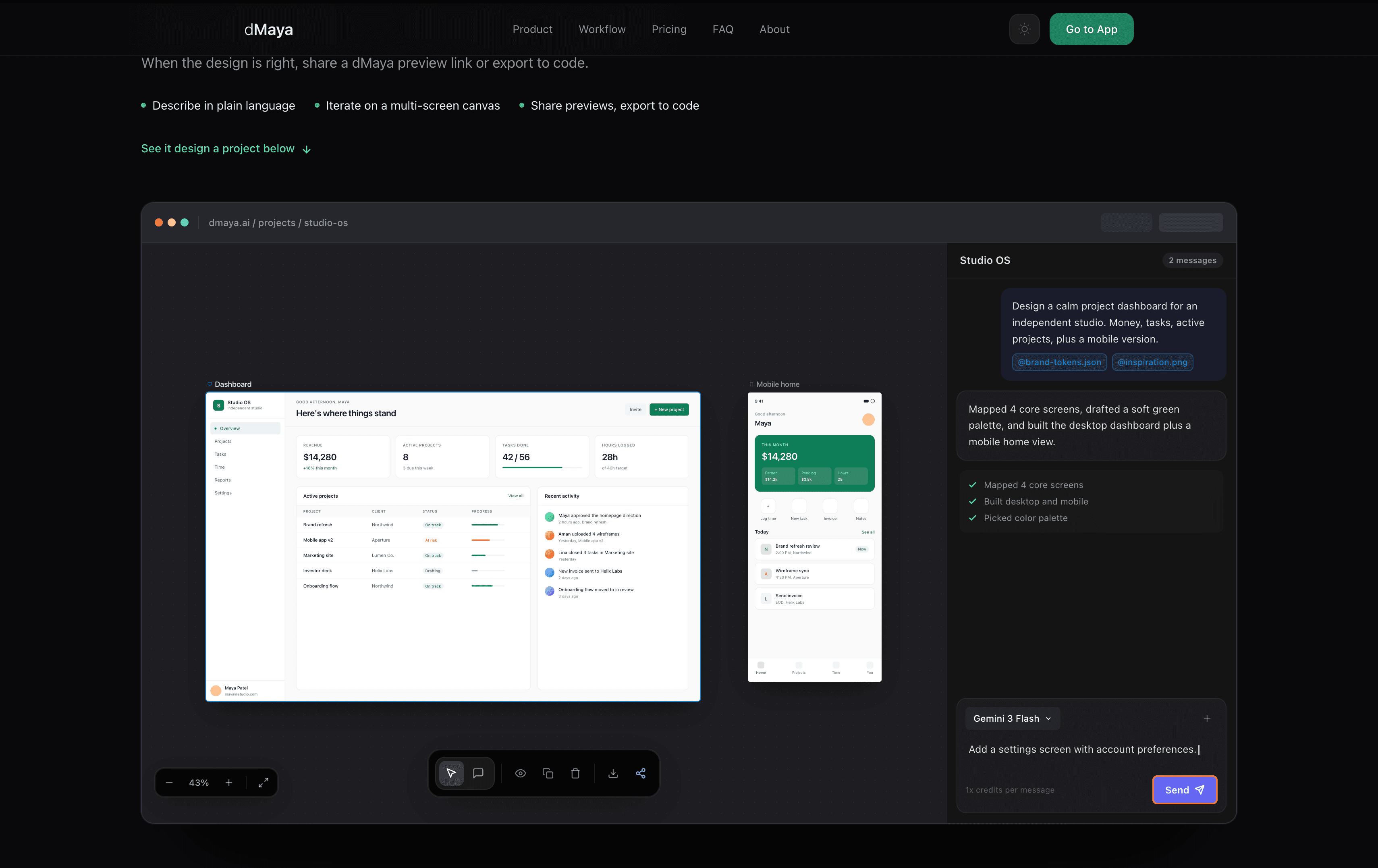
dMaya is a vibe design platform that lets you describe a product in plain language and watch it generate real, editable UI screens on a multi-screen canvas. You can iterate through chat, attach brand files or inspiration images, and when the design is right, share a preview link or export to React + Tailwind code. It supports multiple AI models (Gemini, Claude, GPT, Kimi) with no lock-in, and includes features like design tokens, components, plan and research modes, and a shareable preview chrome for client feedback. Perfect for founders, product people, designers, agencies, and anyone who needs to go from idea to UI fast without manual design work.
Drawn from the product itself, not from a survey.
Demographic
Solo founders and early-stage startups
Pain points
Need rapid UI mockups to test ideas or pitch to investors, but lack design skills or budget for a designer.
Primary needs
Fast, editable UI generation from text descriptions; ability to iterate quickly; no design experience required.
Demographic
Product managers and operators
Pain points
Spend too much time in design review cycles, waiting for mocks or handoff; need to communicate product vision visually.
Primary needs
Collaborative design canvas with comments; version control; shareable previews; code export for engineering.
Demographic
UX/UI designers and agencies
Pain points
Manual screen creation is time-consuming; clients often request many changes; need to maintain design consistency.
Primary needs
AI-assisted screen generation; design tokens and reusable components; multi-model support; export to code for handoff.
Demographic
Marketers and growth teams
Pain points
Need landing pages and product screenshots quickly for campaigns, but design resources are scarce.
Primary needs
High-quality UI mockups from simple descriptions; brand consistency; exportable assets.
Written by AI from measured evidence, scored out of 100.
dMaya is one of the more mature AI UI tools in 2026. Its multi-screen canvas, persistent chat, synced tokens/components, and high-quality React + Tailwind export make it more than a novelty. It's particularly strong for rapid iteration and client collaboration without requiring Figma expertise. While not perfect (credit costs, occasional AI drift), it delivers on the promise of going from plain-language description to editable, exportable UI faster than traditional design workflows. Solid choice for startups, agencies, and product operators who value speed and consistency over pixel-perfect manual control.
Plain language prompts, persistent chat iteration, @mentions for references, plan/research modes, and ⌘K search make it intuitive even for non-designers. Preview links are client-friendly.
Beautiful multi-screen canvas with synced design tokens, components, and clean frames for desktop/mobile. Inline editing and visual variants feel premium and cohesive.
Generates screens quickly with fast models like Gemini Flash. Credit system (22 per screen) and model selection balance speed vs quality. Multi-screen output is efficient.
Shareable preview links without requiring accounts. No major red flags mentioned. Enterprise-level details not highlighted on site.
Design tokens help maintain contrast and scales. Canvas supports multiple viewports. Limited explicit WCAG or screen reader mentions.
Strong for solo founders and PMs needing fast mocks. Growing in agency/freelance space. Multi-model support and React+Tailwind export aid adoption. Credit-based pricing may limit heavy teams.
dMaya nails the 'vibe design' promise with a polished multi-screen canvas that feels more like a real design tool than a prompt playground. You describe a product, attach brand assets or inspiration, and it spits out editable screens in desktop and mobile frames. Chat iteration is persistent and contextual, with @mentions for referencing files or previous screens. Design tokens (colors, typography, spacing) are declared once and sync everywhere—huge for consistency. Components stay reusable. Inline edits (AI or manual) and variant generation reduce friction. It's genuinely usable for non-designers while giving pros enough control. Compared to pure text-to-image tools, this feels like a proper workspace.
Generation is snappy on default models (Gemini Flash), with most screens appearing in seconds. Premium models like Claude Opus or GPT-5.5 deliver better results at higher credit cost (up to 10x). The credit system (roughly 454 designs/month on Pro) is transparent but can add up. Security is adequate for previews and sharing, though no SOC2 or advanced controls are prominently advertised. Export to clean React + Tailwind is a standout—production-quality rather than placeholder code. This combination of speed and reliable handoff sets it apart from tools that only output pretty pictures.
Token system indirectly supports accessibility through consistent scales and colors, but there's little evidence of built-in contrast checking or ARIA generation. Growth potential is high for solo founders, product teams, and agencies who need to move from idea to investor-ready mocks or client previews quickly. The lack of model lock-in (Gemini, Claude, GPT, Kimi) is smart. Target users—founders without design budgets, PMs tired of review cycles, marketers needing landing page assets—will appreciate the preview chrome and version-like canvas. It's positioned well against more rigid tools, though heavier teams may find credit limits constraining.
Conclusion
If you're a solo founder pitching next week or an agency juggling client revisions, dMaya can genuinely accelerate your process. It's not replacing senior designers, but it removes the blank-canvas problem and the endless handoff loops. Worth trying if your workflow involves lots of 'what if we tried this vibe?' conversations.
Named competitors, point by point. Nobody paid to appear here or to be left out.
 dMaya dMaya |  Figma AI Figma AI |  Galileo AI Galileo AI |  Uizard Uizard | google stitch | |
|---|---|---|---|---|---|
| Text-to-UI Generation | Multi-screen canvas + persistent chat iteration | Prompt-based inside Figma, strong integration but less standalone canvas | Fast text-to-editable designs, now evolved into Google Stitch | Strong text + sketch-to-UI, good for wireframes | Google's AI design tool (ex-Galileo), prompt + image to Figma/code |
| Code Export | Production-quality React + Tailwind for screens & components | HTML/CSS and integration with coding tools via MCP | Clean code export, Figma plugin support | Code export available, quality varies | HTML/CSS code export |
| Collaboration & Previews | Shareable preview links (no account needed), comments, canvas-based | Native Figma collaboration, real-time | Limited native collab, better as Figma companion | Real-time collaboration, Figma plugin | Exports to Figma for collaboration |
| Model Flexibility | Multiple models (Gemini, Claude, GPT, Kimi), agent chooses, no lock-in | Primarily Figma's integrated AI models | Uses various models, now under Google/Gemini | Proprietary AI models | Powered by Gemini |
Figma AI
Generates UI designs from text prompts within Figma, but dMaya offers a dedicated vibe design canvas with multi-model agent and seamless code export.
Galileo AI
AI-powered UI design tool that turns text into editable designs, but dMaya provides more flexible iteration via chat and a broader model selection.
Uizard
AI design tool that converts sketches and wireframes into UI, while dMaya focuses on text-to-design with strong collaborative features.
google stitch
Comparing options? See dMaya alternatives, scored side by side
What the review was written against. A verdict with no sources is an opinion.

Uni-1 is an advanced multimodal text-to-image AI model th...

Fast, open-source AI video generator with 4K support, mul...

A free online AI-powered tool that instantly converts ima...

HeyVid AI is a free all-in-one AI video and image generat...

Private on-device dictation for Apple-silicon Macs.

An AI-powered photo restoration app that brings old, blur...

An AI-powered patent drafting assistant that acts like a ...

AI face swap online with no subscription, pay per use.

Export all your Apple Voice Memos to one text file.

AI writer that fact-checks before writing, with real sour...

MygomSEO is an AI marketing agent that audits your site, writes SEO content, publishes to 12+ CMS platforms, posts to social, and monitors rankings 24/7.

AI-powered business plan generator that creates investor-...
A platform dedicated to providing unbiased reviews of newly launched applications, analyzing everything from their features to their full potential.
info@scoutforge.net© 2026 Scoutforge. All rights reserved.
