Cycling through all six. Tap any point to stop.
Measured on six things
Enterprise-grade IMAP email backup and migration tool for...
Design
58Dense legacy-vendor landing page with badge strips and tabbed sections. Screenshots suggest a functional but dated Windows-style UI; nothing visually distinctive versus Shoviv or SysTools.
Screenshots
1 / 1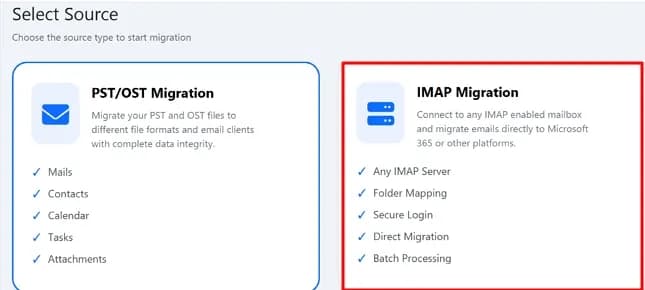
About this app
I've spent years watching IT teams struggle with email migrations, and DRS Softech's IMAP Backup Tool is one of those utilities that quietly does exactly what it promises. It's a dedicated IMAP migration and backup solution that connects to virtually any IMAP-enabled mailbox—Gmail, Yahoo, Zoho, Outlook.com, GoDaddy, Rackspace, AOL—and either exports mail to 9+ file formats (PST, PDF, JSON, MBOX, DOC, DOCX, EML, MSG, CSV) or migrates it live to Office 365, Google Workspace, or another IMAP server. What stands out is the batch/CSV mode for processing hundreds or thousands of mailboxes at once, plus incremental migration that skips already-transferred data—a genuine time-saver on large projects. The built-in preview shows folder-wise email counts before you commit, and advanced date/mail filters plus duplicate removal give you fine-grained control. There's even a PST/OST migration mode for local Outlook archives. The learnings curve is gentle, and the real-time dashboard plus detailed ...
Key features
- 1Batch/CSV mode for backing up or migrating hundreds of IMAP mailboxes in one run.
- 2Incremental migration that skips already-transferred data on repeat passes.
- 3Export to 9+ formats (PST, PDF, JSON, MBOX, DOC, DOCX, EML, MSG, CSV) or migrate live to Office 365, Google Workspace, or another IMAP server.
Target customer profile
Drawn from the product itself, not from a survey.
Demographic
IT administrators managing enterprise mailboxes
Pain points
Migrating hundreds of mailboxes manually is slow and error-prone
Primary needs
Batch/CSV processing, incremental migration, accurate reporting
Demographic
Managed service providers (MSPs)
Pain points
Juggling multiple client email platforms and formats efficiently
Primary needs
Multi-format export, server-to-server migration, flexible licensing
Demographic
Small business owners changing hosting providers
Pain points
Losing folder structure and email history during server moves
Primary needs
Folder hierarchy preservation, simple setup, affordable pricing
Demographic
Individual users backing up personal mailboxes
Pain points
No easy way to archive Gmail/Yahoo mail locally
Primary needs
One-click backup to PST/PDF, app password support
Scout Review
Written by AI from measured evidence, scored out of 100.
DRS Softech's IMAP Backup Tool is a competent, narrowly-scoped migration utility that does the boring work well on paper: connect any IMAP mailbox, preview folder counts, filter, deduplicate, then export to nine formats or push live to Office 365 and Google Workspace. The batch/CSV mode and incremental migration are the features that matter for MSPs and IT admins, and they're clearly present. The marketing site is fast and technically well-secured, but visually dated and light on third-party proof — the 19K downloads and 732 reviews are self-reported, and there's no SOC 2 or independent audit trail. Against Shoviv and SysTools it competes on format breadth and batch scale rather than anything structurally unique. A solid mid-tier pick for a Windows-based migration project, not a category leader.
Measure by measure
Usability
63Clear feature list, mailbox tree preview before committing, trial download and user manual available. No live demo or web app, so evaluation requires installing a desktop client first.
Design
58Dense legacy-vendor landing page with badge strips and tabbed sections. Screenshots suggest a functional but dated Windows-style UI; nothing visually distinctive versus Shoviv or SysTools.
Speed
82Lighthouse mobile 92/100 (LCP 2.6s, TBT 77ms) and desktop 97/100. The marketing site loads fast and cleanly, though that says nothing about the desktop tool's own throughput.
Security
74Strong header hygiene (HSTS, CSP, frame protection, 10/12 checklist points) and a no-data-collection claim. SPF and DMARC are missing, and no SOC 2, ISO or pen-test documentation is published.
Accessibility
70Lighthouse 90/100, but images lack alt text, several links have no discernible name, and there's no main landmark. No accessibility statement or WCAG conformance claim found on the page.
Growth
62Real, recurring problem (IMAP migrations at scale) with concrete differentiators: batch/CSV mode, incremental migration, 9+ formats. Crowded category against Shoviv, SysTools and MailStore.
Improvement areas
- No SPF or DMARC records on the domain; no published SOC 2, ISO 27001, or penetration test documentation.
- Accessibility gaps: images without alt text, links without discernible names, no main landmark.
- Traction claims (19K+ downloads, 732 reviews, 45+ awards) are self-reported with no third-party verification.
Design & Usability
DRS Softech's IMAP Backup Tool presents itself like a utility from an earlier era of software marketing: badge strips, award counts, a five-tab product page, and screenshots of a dense Windows-style interface. It's not ugly, but it's indistinguishable from Shoviv or SysTools at a glance. Usability is where it earns credit — the mailbox tree preview showing folder-level email counts before you commit is a genuinely thoughtful touch, and the Single Account versus Batch/CSV split maps cleanly to how IT admins actually work. The trial download and user manual lower the barrier, but there's no live demo or web interface, so evaluating the tool means installing a desktop client first. For a migration utility that's normal, but it does mean the landing page carries all the persuasion weight.
Speed & Security
The marketing site is genuinely fast: Lighthouse mobile 92/100 with a 2.6s LCP and 77ms total blocking time, desktop 97/100. That's a well-built page, though it tells you nothing about how quickly the desktop tool moves a 50GB mailbox. Security is above average for the category: HTTPS enforced, HSTS, CSP, frame protection and a full header suite give it 10 of 12 checklist points, and the site explicitly claims no credentials or email content are collected or stored. The gaps are SPF and DMARC on the domain, plus the absence of any published SOC 2, ISO 27001 or penetration test documentation. For a tool that handles mailbox credentials at enterprise scale, that paperwork matters more than the header score.
Accessibility & Growth
Accessibility lands at 90/100 on automated checks, but the failures are the familiar ones: images without alt attributes, links with no discernible name, no main landmark, and visible labels that don't match accessible names. There's no accessibility statement or WCAG claim anywhere on the page. Growth is the more interesting question. The problem — migrating hundreds of IMAP mailboxes without losing folder structure — is real and recurring, and the product names specific differentiators: batch/CSV processing, incremental migration that skips already-transferred data, nine export formats, and a PST/OST mode for local archives. The category is crowded though: Shoviv and SysTools sell nearly identical feature sets, and MailStore owns the compliance-and-retention angle. DRS Softech's wedge is breadth of formats plus batch scale at what is likely a lower price, which is a real position but not a moat.
Conclusion
If you're an IT admin staring down a few hundred IMAP mailboxes and a deadline, this tool's batch mode and incremental sync are exactly the right shape for the job, and the trial lets you verify it before paying. Go in expecting a desktop utility with a dated interface and no compliance paperwork, and you'll get what you paid for. If your project is compliance-driven or you need audited retention, MailStore is the safer conversation. Otherwise, download the trial, run it against a test mailbox, and let the folder-count preview tell you whether it's worth the license.
Suggestions for improvement
- Publish SPF and DMARC records for drssoftech.com — the only two security checklist items missing.
- Add alt text to images and accessible names to links; the 90/100 Lighthouse score hides real screen-reader gaps.
- Replace self-reported download and review counts with a verifiable third-party source like G2 or Capterra.
- Add a short video walkthrough of the batch/CSV migration flow — the current video tab is the least-used asset on the page.
Alternatives comparison
Named competitors, point by point. Nobody paid to appear here or to be left out.
 DRS Softech IMAP Backup Tool DRS Softech IMAP Backup Tool |  Mailstore Mailstore |  Shoviv IMAP Backup Tool Shoviv IMAP Backup Tool |  SysTools IMAP Migration SysTools IMAP Migration | |
|---|---|---|---|---|
| Batch / multi-mailbox processing | Yes — Single Account and Batch/CSV mode | Yes — multi-mailbox archiving via MailStore Server | Yes — batch mode for multiple mailboxes | Yes — batch migration supported |
| Export file formats | 9+ formats: PST, PDF, JSON, MBOX, DOC, DOCX, EML, MSG, CSV | Proprietary archive store plus EML/MSG/PST export | PST, MSG, EML, MBOX, PDF, HTML, CSV and more | PST, MSG, EML, MBOX, PDF and others |
| Incremental / delta migration | Yes — skips previously migrated data | Yes — incremental archiving | Not a headline feature | Not a headline feature |
| Direct cloud migration (O365 / Google Workspace) | Yes — Office 365 and Google Workspace with admin/single login | Archive-focused; not a primary migration tool | Yes — Office 365 and Google Workspace | Yes — Office 365 and Google Workspace |
| Compliance / audit documentation | Not published | Strong — built for legal retention and compliance | Limited public documentation | Limited public documentation |
Mailstore
Email archiving and backup solution for compliance and long-term retention across multiple clients.
Shoviv IMAP Backup Tool
IMAP backup and migration utility supporting multiple formats and cloud destinations.
SysTools IMAP Migration
Tool for backing up and migrating IMAP mailboxes to various formats and email clients.
Comparing options? See DRS Softech IMAP Backup Tool alternatives, scored side by side
More Online Backup apps
View all Online Backup
PCDOTS PST Converter
85Convert Outlook PST files to 16 formats and clouds withou...

yourdrive
84YourDrive is a self-hosted file manager and media timeline that runs entirely on your own infrastructure. Organize files in nested folders, move them with drag-and-drop, search instantly, and browse photos and videos by month and year. Files stream straight to your own AWS S3, Azure Blob, MinIO, Cloudflare R2 or Wasabi storage. Install with one command. Free for personal use; teams pay per server, not per seat.
PCDOTS Email Recovery Software
83Recovers emails from corrupt mailboxes across 50+ platforms.

Alcazar Dead Man's Switch
82An encrypted digital legacy service that securely deliver...

App-Vault
81Encrypted photo and file vault for iPhone. AES-256 on device, pattern lock, decoy vault and calculator disguise. No account, no cloud.
PCDOTS Thunderbird Converter
81Recover and migrate Thunderbird profiles & MBOX files wit...

SysInfo Office 365 Export to PST Tool
80Export Exchange Online, on-premises, and hybrid mailboxes...

RemoteDrive by FileZilla Pro
80Integrates cloud storage into macOS Finder for seamless file management across services like Google Drive and Dropbox.

SysInfo Google Workspace Backup Tool
80Backup and migrate Google Workspace data locally or to ot...

S3FileHub
80A user-friendly web app for managing AWS S3 storage with AI summarization and analytics.

SysInfo Email Migration Tool
80Bulk email migration and backup tool for 5 sources with f...

Filifly
79A secure, web-based file sharing platform with end-to-end encryption and no login requirements for quick transfers.


A platform dedicated to providing unbiased reviews of newly launched applications, analyzing everything from their features to their full potential.
info@scoutforge.net© 2026 Scoutforge. All rights reserved.
