Cycling through all six. Tap any point to stop.
Measured on six things
Export Exchange Online, on-premises, and hybrid mailboxes...
Design
58Average but functional marketing site: clear dual CTAs, consistent use-case cards and a readable spec table. Undermined by text-dense hero copy, low-contrast inline icons and a placeholder-looking 'Type to Search' field.
Screenshots
1 / 1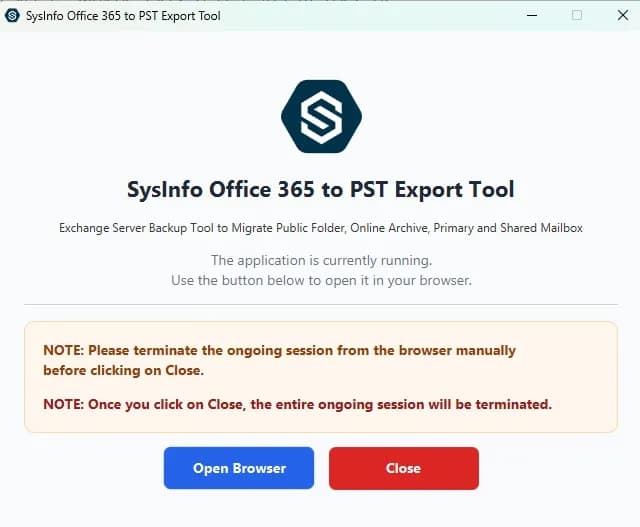
About this app
SysInfo Office 365 Export to PST Tool is a dedicated utility for administrators who need a reliable way to back up or migrate Microsoft 365 mailbox data. It connects to Exchange Online, on-premises Exchange, and hybrid environments via Microsoft EWS, so you can export Primary, Archive, Shared, and Public mailboxes without needing Outlook installed. The tool gives you two clear paths: a local PST backup for on-device retention, or an online Office 365-to-Office 365 migration. What I really appreciate is the granular control — date filters, duplicate removal, skip-previously-migrated, and even a 'Free Server Space' option to purge items after export. The live dashboard and detailed logs keep you informed at every step, and the Results history is a lifesaver for audits. It's built for IT admins, MSPs, and compliance teams who need repeatable, verifiable exports. The interface is straightforward enough that you don't need deep Exchange expertise to get started, though the scope of featu...
Key features
- 1Export Exchange Online, on-premises and hybrid mailboxes to PST via Microsoft EWS, no Outlook required.
- 2Granular filters: date ranges, remove duplicates, skip previously migrated, exclude empty folders, Free Server Space purge.
- 3Live transfer dashboard, detailed logs and Results history for audit-ready, repeatable exports.
Target customer profile
Drawn from the product itself, not from a survey.
Demographic
IT administrators in mid-to-large enterprises
Pain points
Manual mailbox exports are error-prone and time-consuming; need audit-ready records
Primary needs
Reliable bulk export with filters, logs, and PST/Office 365 destination options
Demographic
Managed service providers (MSPs) managing multiple tenants
Pain points
Switching between tools for different mailboxes; inconsistent export results
Primary needs
Multi-tenant support, technician licensing, and repeatable export workflows
Demographic
Compliance and legal teams requiring data preservation
Pain points
Native eDiscovery exports lack granular control; need verifiable local copies
Primary needs
Selective mailbox export with timestamp preservation and detailed audit logs
Scout Review
Written by AI from measured evidence, scored out of 100.
SysInfo Office 365 Export to PST Tool is a long-standing (domain since 2010) Windows/Mac utility for exporting Exchange Online, on-premises and hybrid mailboxes to PST or another M365 mailbox via EWS. The site is fast (92 mobile / 100 desktop Lighthouse) and reasonably secured (10/12 headers, HSTS, CSP, DMARC), with a clear dual-CTA hero and a 30-day moneyback trial. It loses points on a text-dense, average-looking marketing page, no browser demo, four real accessibility failures despite a 97 score, and no published compliance certifications — the thing compliance buyers care about most. The idea itself is solid and aimed at a paying, recurring need.
Measure by measure
Usability
62Free download, software guide, video and a 30-day moneyback trial lower the risk for admins. But dense, repetitive feature copy, competing CTAs and no browser-based demo make evaluation slower than it should be.
Design
58Average but functional marketing site: clear dual CTAs, consistent use-case cards and a readable spec table. Undermined by text-dense hero copy, low-contrast inline icons and a placeholder-looking 'Type to Search' field.
Speed
82Lighthouse mobile 92/100 (LCP 2.9s, CLS 0, TBT 109ms) and desktop 100/100. Zero layout shift and low blocking time make the marketing page genuinely snappy for a content-heavy site.
Security
74HTTPS enforced with HSTS, CSP, Referrer-Policy, Permissions-Policy, SPF and DMARC (10/12 header checks). Missing frame protection and X-Content-Type-Options; no published SOC 2/ISO or security page found.
Accessibility
79Lighthouse accessibility 97/100, but four real failures: non-sequential headings, no main landmark, role=presentation conflicts and mismatched accessible names. No WCAG statement or multi-language support found.
Growth
63Specific, paying segment (IT admins, MSPs, compliance) with a real recurring need — M365 offboarding, legal holds, tenant migrations. Clear differentiators vs. EDB-only and generic migration tools, but a crowded niche.
Improvement areas
- No published SOC 2/ISO or security page despite handling mailbox and legal-hold data.
- Missing frame protection and X-Content-Type-Options headers; four Lighthouse accessibility failures.
- No browser-based demo; evaluation requires installing a desktop app.
- Text-dense marketing page with placeholder-looking nav search and low-contrast inline icons.
Design & Usability
The marketing site is competent, not memorable. The visual audit calls it average: a standard SaaS hero with a 4.9-star badge, green Free Download and blue Purchase Now buttons, four use-case cards and a compact spec table. What drags it down is density — long paragraphs under every bullet, low-contrast inline icons, and a nav search field labeled 'Type to Search' that reads like an unfinished widget. Usability is better than design: free download, software guide, video and a 30-day moneyback guarantee give admins a low-risk path. But there's no browser demo, and the repetitive feature copy plus competing CTAs make evaluation slower than it needs to be for a tool whose whole pitch is 'repeatable, verifiable exports.'
Speed & Security
Speed is the standout. Lighthouse scores 92/100 on mobile (LCP 2.9s, CLS 0, TBT 109ms, FCP 1.9s) and a perfect 100 on desktop — impressive for a page this text-heavy, and zero layout shift means nothing jumps while you read. Security is good but not airtight: HTTPS is enforced with HSTS, CSP, Referrer-Policy, Permissions-Policy, SPF and DMARC, hitting 10 of 12 header checks. The two misses are frame protection and X-Content-Type-Options, both trivial to add. More importantly, no SOC 2, ISO 27001, pen-test report or dedicated security page surfaced — for a tool that touches mailbox data and legal holds, that's the gap compliance buyers will ask about first.
Accessibility & Growth
Accessibility lands at 97/100 on Lighthouse, which sounds better than it is: four audits still fail — headings out of sequence, no <main> landmark, role=presentation conflicts, and visible labels that don't match accessible names. Those are semantic fixes, not cosmetic ones, and they matter for screen reader users navigating a long marketing page. No WCAG conformance statement or multi-language support was found. Growth is the more interesting story. The target is specific and pays: IT admins, MSPs and compliance teams doing Exchange Online, on-prem and hybrid mailbox exports with audit logs. The differentiators are concrete — EWS-based export, skip-previously-migrated, Free Server Space purge, Results history. The category has genuine headroom because M365 offboarding, legal holds and tenant migrations are recurring, compliance-driven needs. The limit is that the niche is crowded with Stellar, Aid4Mail and Kernel selling similar shovels.
Conclusion
If you're an IT admin or MSP who needs repeatable, logged mailbox exports across Exchange Online and hybrid, this is a credible option with a low-risk trial and a vendor that's been around over a decade. Go in expecting to install and test rather than click a demo, and ask the vendor directly for their security posture — SOC 2, data handling, where credentials live — before you point it at a tenant holding legal-hold mail. The product's pitch is verifiability; hold it to that standard.
Suggestions for improvement
- Publish a security/compliance page: SOC 2 or ISO status, data-handling and credential-storage details, and a contact for security questionnaires.
- Add frame protection (X-Frame-Options or CSP frame-ancestors) and X-Content-Type-Options: nosniff — two trivial header fixes.
- Fix the four Lighthouse a11y failures: sequential headings, a <main> landmark, role conflicts, and matching accessible names on labeled controls.
- Offer a browser-based demo or sandbox so admins can evaluate the export workflow before installing a desktop app.
Alternatives comparison
Named competitors, point by point. Nobody paid to appear here or to be left out.
 SysInfo Office 365 Export to PST Tool SysInfo Office 365 Export to PST Tool |  Stellar Converter for EDB Stellar Converter for EDB |  Aid4Mail Aid4Mail |  Kernel Export Office 365 to PST Kernel Export Office 365 to PST | |
|---|---|---|---|---|
| Exports live Exchange Online mailboxes | Yes — via Microsoft EWS | No — offline EDB files only | Yes — general migration | Yes — Office 365 to PST |
| Supports on-premises and hybrid Exchange | Yes — Online, on-prem, hybrid | On-prem EDB only | Broad, general-purpose | Limited on-prem/hybrid |
| Skip-previously-migrated and Free Server Space filters | Yes — both included | Not applicable (offline) | Not highlighted | Date filters only |
| Audit-ready logs and Results history | Live dashboard, logs, Results history | Conversion log | Migration logs | Export log |
Stellar Converter for EDB
Converts Exchange EDB files to PST, but focuses on offline EDB rather than live Exchange Online or hybrid environments.
Aid4Mail
A general-purpose email migration tool that supports Office 365 to PST, but lacks Exchange-specific filters like skip-previously-migrated and free server space.
Kernel Export Office 365 to PST
Exports Office 365 mailboxes to PST with date filters, but does not support on-premises or hybrid Exchange environments as broadly.
Comparing options? See SysInfo Office 365 Export to PST Tool alternatives, scored side by side
More Online Backup apps
View all Online Backup
PCDOTS PST Converter
85Convert Outlook PST files to 16 formats and clouds withou...

yourdrive
84YourDrive is a self-hosted file manager and media timeline that runs entirely on your own infrastructure. Organize files in nested folders, move them with drag-and-drop, search instantly, and browse photos and videos by month and year. Files stream straight to your own AWS S3, Azure Blob, MinIO, Cloudflare R2 or Wasabi storage. Install with one command. Free for personal use; teams pay per server, not per seat.
PCDOTS Email Recovery Software
83Recovers emails from corrupt mailboxes across 50+ platforms.

Alcazar Dead Man's Switch
82An encrypted digital legacy service that securely deliver...

App-Vault
81Encrypted photo and file vault for iPhone. AES-256 on device, pattern lock, decoy vault and calculator disguise. No account, no cloud.
PCDOTS Thunderbird Converter
81Recover and migrate Thunderbird profiles & MBOX files wit...

RemoteDrive by FileZilla Pro
80Integrates cloud storage into macOS Finder for seamless file management across services like Google Drive and Dropbox.

SysInfo Google Workspace Backup Tool
80Backup and migrate Google Workspace data locally or to ot...

S3FileHub
80A user-friendly web app for managing AWS S3 storage with AI summarization and analytics.

SysInfo Email Migration Tool
80Bulk email migration and backup tool for 5 sources with f...

Filifly
79A secure, web-based file sharing platform with end-to-end encryption and no login requirements for quick transfers.

Softaken Data Recovery Software
79Recover deleted files from Windows with ease.


A platform dedicated to providing unbiased reviews of newly launched applications, analyzing everything from their features to their full potential.
info@scoutforge.net© 2026 Scoutforge. All rights reserved.
