Cycling through all six. Tap any point to stop.
Measured on six things
Backup and migrate Google Workspace data locally or to ot...
Design
57Dense, template-era marketing page: text-heavy hero, six stacked checkmarks, three identical migration cards. The product dashboard shown in media looks cleaner than the site selling it.
Screenshots
1 / 1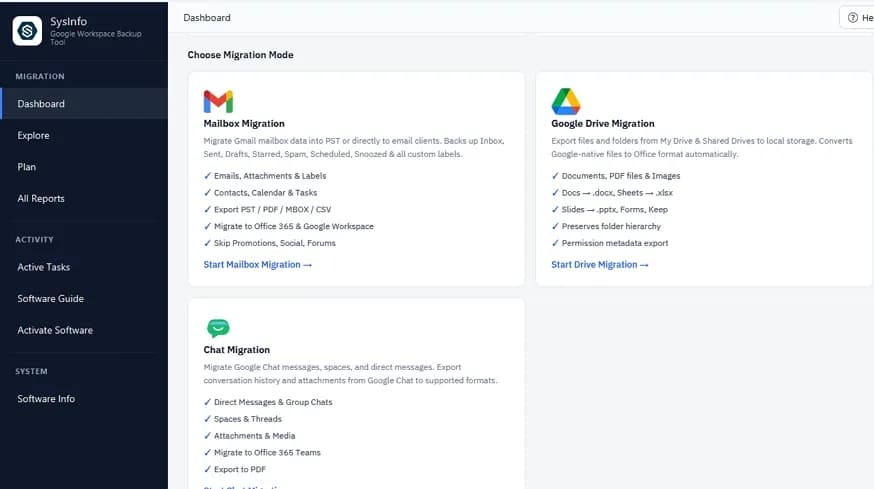
About this app
SysInfo Google Workspace Backup Tool is a comprehensive solution for backing up and migrating Google Workspace data, including Gmail, Drive, Chats, Contacts, and Calendars. It supports multiple authentication modes such as OAuth, IMAP, and Admin DWD, and offers batch processing via CSV for enterprise-scale migrations. The tool preserves folder hierarchy, labels, and metadata, and allows export to PST, PDF, MBOX, CSV, or direct migration to Google Workspace, Microsoft 365, and Exchange Server. With features like delta sync, duplicate elimination, and detailed reporting, it ensures secure, local processing without storing credentials on third-party servers. Available for Windows, Mac, and Linux, it caters to IT admins, MSPs, and businesses needing reliable data protection and compliance.
Key features
- 1Backup and migrate Gmail, Drive, Chats, Contacts and Calendars with folder hierarchy, labels and metadata preserved
- 2CSV batch mapping and Admin DWD authentication for enterprise-scale, multi-mailbox migrations
- 3Delta sync, duplicate elimination and detailed audit-trail reports for compliance and resume-on-failure
- 4Export to PST, PDF, MBOX, CSV or migrate directly to Google Workspace, Microsoft 365 and Exchange Server
- 5Local processing with no credentials stored on third-party servers; Windows, Mac and Linux builds
Target customer profile
Drawn from the product itself, not from a survey.
Demographic
IT Administrators and Managed Service Providers (MSPs)
Pain points
Complex migrations between domains, data loss risks, lack of centralized management for large user bases.
Primary needs
Scalable batch migration, domain-wide authentication, and detailed audit trails for compliance.
Demographic
Enterprises undergoing mergers and acquisitions
Pain points
Merging multiple Google Workspace accounts into one tenant, preserving permissions and data structure.
Primary needs
Seamless migration with mapping, minimal downtime, and zero data loss.
Demographic
Legal and compliance teams
Pain points
Need for secure, long-term archiving of emails and chats for audits and litigation.
Primary needs
Export to PDF/PST with metadata preservation, and read-only access to data.
Demographic
Small businesses and individual users
Pain points
Risk of accidental deletion, account hacks, or need for local backups of cloud data.
Primary needs
Affordable, easy-to-use backup solution with selective export and local storage options.
Scout Review
Written by AI from measured evidence, scored out of 100.
SysInfo Google Workspace Backup Tool is a mature, feature-dense migration utility wearing a dated marketing page. The engineering underneath looks solid: 96/100 mobile performance, 10/12 security headers, and a feature set that covers the hard parts of Workspace migration — CSV batch mapping, domain-wide delegation, delta sync, duplicate removal, and audit trails across Gmail, Drive and Chats. The site undersells all of it with a text-heavy hero, repetitive card layouts, and accessibility gaps that a 94 Lighthouse score papers over. For IT admins and MSPs doing M&A integrations or compliance archiving, the capability is there. The trust signals — audits, accessibility statements, a modern front door — are what's missing.
Measure by measure
Usability
63Free download for Windows/Mac/Linux, plus Software Guide, Video and Specification tabs give real self-serve onboarding. But the page buries the CTA under paragraphs and a search box nobody asked for.
Design
57Dense, template-era marketing page: text-heavy hero, six stacked checkmarks, three identical migration cards. The product dashboard shown in media looks cleaner than the site selling it.
Speed
88Lighthouse mobile 96/100 (LCP 2.7s, CLS 0, TBT 52ms) and desktop 99/100. Genuinely fast for a page this content-heavy — no lag complaints surfaced in the evidence.
Security
74HTTPS enforced with HSTS, CSP, Referrer-Policy and Permissions-Policy; SPF and DMARC set; 10/12 header checks. Missing frame protection and nosniff. No published SOC 2 or audit found.
Accessibility
70Lighthouse a11y 94/100, but real failures: low contrast text, out-of-order headings, no main landmark, mismatched accessible names. No WCAG statement published.
Growth
62Real, budgeted problem (M&A migrations, compliance archiving) with concrete wedges: CSV batch mapping, Admin DWD, delta sync, audit trails. Takeout can't do migration — but the category is crowded.
Improvement areas
- No published SOC 2, ISO 27001 or penetration-test report despite handling organization-wide mailbox credentials
- Homepage hero is text-heavy and repetitive; identical card layouts and checkmark lists reduce scannability
- Accessibility failures: contrast, heading order, missing main landmark, mismatched accessible names; no WCAG statement
- Missing X-Frame-Options and X-Content-Type-Options headers; no multi-language UI claim
Design & Usability
The marketing page is stuck in 2016: a light-blue gradient hero, a paragraph nobody finishes, and six checkmarks stacked like a shopping list. The three migration-mode cards are identical down to the teal icon, so nothing tells your eye what matters. What saves it is the product itself — the dashboard in the media image has a clean dark sidebar and logical grouping. Usability is decent where it counts: free download on three platforms, a Software Guide, a video, and a Specification tab. The problem is the path there. CTAs sit below a wall of text, and a 'Type to Search' box in the nav adds clutter without adding value on a single-product page.
Speed & Security
Speed is the standout. Lighthouse puts mobile at 96/100 with a 2.7s LCP, zero layout shift and 52ms total blocking time; desktop hits 99. For a page carrying this much copy, that's real engineering or a very good CDN — either way it works. Security is above average but not airtight: HTTPS enforced, HSTS, CSP, Referrer-Policy and Permissions-Policy all present, SPF and DMARC configured, 10 of 12 header checks passed. The gaps are frame protection and X-Content-Type-Options. More importantly, for a tool that authenticates into every mailbox in an organization, there's no published SOC 2, ISO 27001 or third-party penetration test in the evidence. 'Zero data stored on servers' is a good claim; an audit report would make it a credible one.
Accessibility & Growth
Accessibility lands at 70: the automated score is 94, but the failing audits are the ones that matter to real users — insufficient contrast, headings out of sequence, no main landmark, and visible labels that don't match accessible names. No WCAG conformance statement is published, and no multi-language UI is claimed. Growth is the most interesting dimension. The problem is real and budgeted: mergers, domain consolidations, litigation holds. The wedges are concrete — CSV batch mapping, Admin DWD authentication, delta sync, duplicate elimination, audit trails — and the only listed alternative, Google Takeout, exports data but can't migrate it, filter it, or log it. The limit is competition: this is a crowded category of migration utilities, and SysInfo's differentiation is feature depth rather than anything structural.
Conclusion
If you're an IT admin staring down a domain consolidation with 400 mailboxes and a deadline, this tool's feature list reads like it was written by someone who has actually done that job. Batch CSV mapping, DWD auth, resume-and-dedupe on interrupted jobs, and export logs for compliance are exactly the things that break in a naive migration. The free download means you can validate the workflow before committing budget. What you can't validate from the site is the security posture beyond headers — no SOC 2, no pen-test report, no accessibility statement. For a tool that holds the keys to every mailbox in a company, that's the gap worth closing before the next enterprise deal asks for it.
Suggestions for improvement
- Publish a SOC 2 Type II or ISO 27001 report and link it from the security section — enterprise buyers will ask.
- Rebuild the hero: one sentence, one CTA, and move the six checkmarks into a grouped feature grid with distinct icons.
- Fix the failing a11y audits: contrast ratios, sequential headings, a main landmark, and matching accessible names.
- Add X-Frame-Options and X-Content-Type-Options headers — two lines of config for two free checklist points.
Alternatives comparison
Named competitors, point by point. Nobody paid to appear here or to be left out.
 SysInfo Google Workspace Backup Tool SysInfo Google Workspace Backup Tool |  Google Takeout Google Takeout | |
|---|---|---|
| Migration to another Workspace, Microsoft 365 or Exchange | Yes — direct migration to Google Workspace, Microsoft 365 and Exchange Server | No — export/download only, no migration targets |
| Export formats | PST, PDF, MBOX, CSV plus direct platform migration | ZIP archives of Google-native formats (mbox for Gmail) |
| Batch / multi-user processing | CSV batch mapping and Admin DWD auth for many mailboxes at once | Per-account export; no batch or admin-wide mapping |
| Delta sync and duplicate elimination | Yes — resume checks, delta sync and duplicate removal | No — full re-export each time |
| Audit trails and reporting | Detailed log reports: completed, skipped, failed items | None |
| Price | Paid license with free download trial and 30-day moneyback | Free |
Comparing options? See SysInfo Google Workspace Backup Tool alternatives, scored side by side
More Online Backup apps
View all Online Backup
PCDOTS Email Recovery Software
83Recovers emails from corrupt mailboxes across 50+ platforms.

Alcazar Dead Man's Switch
82An encrypted digital legacy service that securely deliver...

App-Vault
81Encrypted photo and file vault for iPhone. AES-256 on device, pattern lock, decoy vault and calculator disguise. No account, no cloud.
PCDOTS Thunderbird Converter
81Recover and migrate Thunderbird profiles & MBOX files wit...

RemoteDrive by FileZilla Pro
80Integrates cloud storage into macOS Finder for seamless file management across services like Google Drive and Dropbox.

S3FileHub
80A user-friendly web app for managing AWS S3 storage with AI summarization and analytics.

Filifly
79A secure, web-based file sharing platform with end-to-end encryption and no login requirements for quick transfers.

Softaken Data Recovery Software
79Recover deleted files from Windows with ease.

SysInfo Office 365 Backup Tool
79Backup and export Office 365 mailboxes to PST, MBOX, PDF,...

Very Good Calendar Sync
78Privacy-first on-device Mac calendar sync tool.

ArchiveMind
78Private, local-first catalogue and search for large file ...
PCDOTS Evernote File Converter
77Convert Evernote ENEX, HTML, MHT exports to PDF, DOCX, Ma...


A platform dedicated to providing unbiased reviews of newly launched applications, analyzing everything from their features to their full potential.
info@scoutforge.net© 2026 Scoutforge. All rights reserved.
