Cycling through all six. Tap any point to stop.
Measured on six things
Easymotion is an AI motion graphics generator and map animation maker for content creators, editors, founders and marketers. Create SaaS promos, flowcharts, animated charts, UI explainers, quizzes, flight routes, location pins, and flag highlights from prompts, images, sheets, or PDFs. Refine style, timing, labels, and layout through chat, then export MP4 or MOV, including transparent background videos. Supports 16:9, 9:16, 1:1 and 4:5 aspect ratios.
Growth
38Active changelog since May 2026 and self-reported 10K+ users. No independent reviews, GitHub activity, or third-party traction signals after search.
Screenshots
1 / 2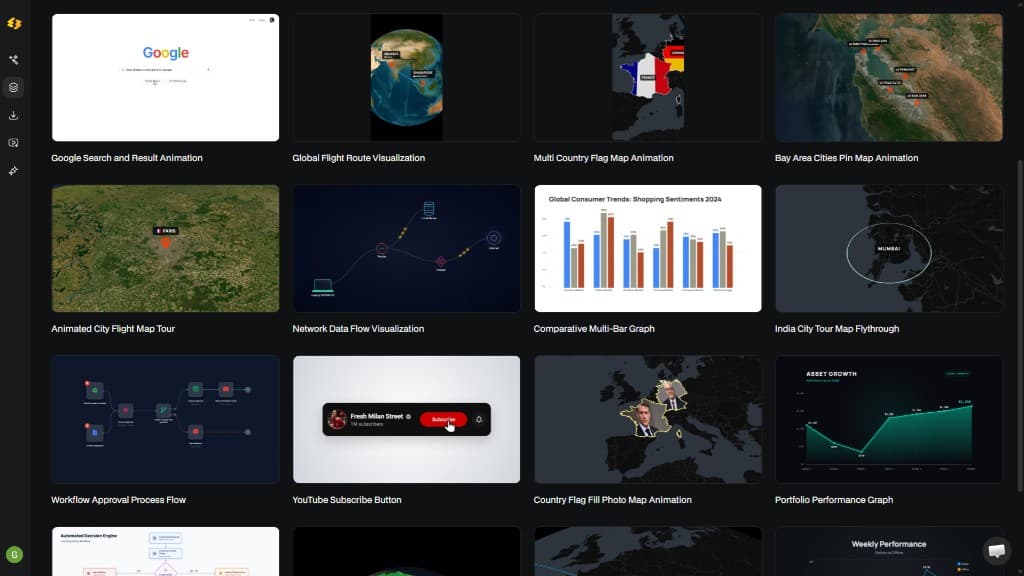
About this app
Easymotion is an AI motion graphics generator and map animation platform for content creators, editors, founders, and marketers. It helps users turn ideas, prompts, images, PDFs, spreadsheets, and static visuals into professional animated videos without complex timeline editing. Create SaaS product promos, animated charts, flowcharts, UI explainers, quizzes, and visual storytelling content in minutes. Easymotion also supports map animations, including flight routes, location pins, flag highlights, and geographic storytelling visuals. Users can refine animations through AI-powered chat by adjusting colors, pacing, labels, layouts, and visual styles. The platform includes premium templates and exports videos as MP4 or MOV, including transparent background videos. Supports 16:9, 9:16, 1:1, and 4:5 aspect ratios for YouTube, TikTok, Instagram Reels, presentations, and marketing campaigns.
Key features
- 1AI chat + Edit Panel for refining motion graphics, maps, charts from prompts, images, CSV, or PDFs
- 2Map animations (flight routes, pins, flags) and transparent MOV exports at multiple aspect ratios
- 3Credit-based plans starting at $10/mo with free template testing and 7-day money-back guarantee
Target customer profile
Drawn from the product itself, not from a survey.
Demographic
YouTubers & Content Creators
Pain points
Spending hours in After Effects to produce motion graphics for videos; difficulty keeping up with posting schedule.
Primary needs
Quick, professional motion graphics to boost engagement and grow channels.
Demographic
Video Editors
Pain points
Motion graphics eat up entire days; templates often don't fit client needs.
Primary needs
Customizable, AI-generated graphics in minutes to work 3x faster.
Demographic
Marketers & Social Media Managers
Pain points
Waiting on designers creates bottlenecks; need to iterate quickly on video ads and social posts.
Primary needs
Self-service tool to create on-brand videos in-house and ship campaigns same-day.
Scout Review
Written by AI from measured evidence, scored out of 100.
Easymotion targets the exact pain of motion graphics and map animations by replacing timeline editing with AI chat and templates. It delivers on the promise of rapid iteration for YouTubers, editors, and marketers who need on-brand video without hiring specialists. The free tier and credit model are transparent, and recent feature updates (reference clips, SVG logo animation, PDF briefs) show active development. Weaknesses are typical of an early product: mobile speed, accessibility polish, and independent validation of traction claims.
Measure by measure
Usability
68Free tier lets you test templates and exports immediately. Chat-based workflow plus CSV/PDF uploads and Edit Panel keep iteration fast without timelines.
Design
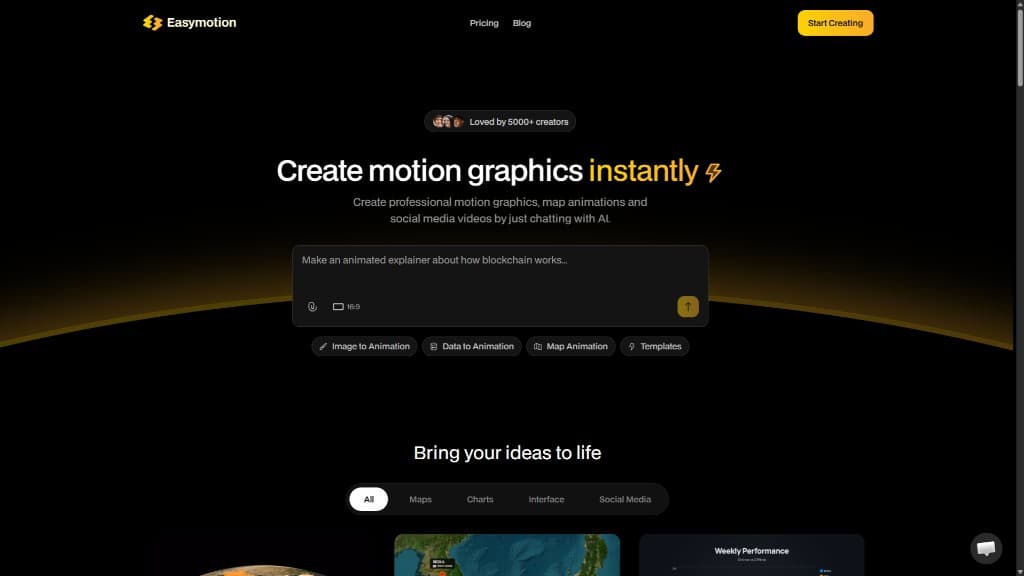
70Clean dark theme with yellow CTAs and a strong example gallery proving map/chart outputs. Minor polish issues like overlapping prompt card and low-contrast text.
Speed
58Mobile Lighthouse 62/100 dragged by 7.2s LCP. Desktop hits 88. No user complaints or benchmarks surfaced; recent changelog added export time estimates.
Security
48HTTPS + HSTS + SPF/DMARC in place. Missing CSP and other headers; zero public audits or compliance claims despite encryption mentions.
Accessibility
55Lighthouse 85/100 but three concrete failures on buttons, contrast, and labels. No WCAG docs or multi-language support details found.
Growth
38Active changelog since May 2026 and self-reported 10K+ users. No independent reviews, GitHub activity, or third-party traction signals after search.
Improvement areas
- Mobile performance (7.2s LCP) and missing security headers need attention
- Accessibility failures on buttons, contrast, and labels should be fixed
- Independent reviews and verified traction data are currently absent
Design & Usability
Easymotion's homepage leans into proof-of-output with a gallery of recognizable map and chart animations rather than vague stock footage. The prompt-first interface and immediate input pills (Image, Data, Map, Templates) make the core workflow obvious. Free tier access to templates and watermarked exports lowers the barrier, while the Edit Panel and chat refinement support quick iteration without learning After Effects timelines. Minor visual friction exists around the floating prompt card and subheadline contrast, but the overall flow feels purpose-built for creators who want results in minutes rather than hours.
Speed & Security
Performance is mixed: desktop Lighthouse scores are solid at 88, but mobile LCP of 7.2 seconds will frustrate users on slower connections. Security is baseline—HTTPS and HSTS are present, yet the absence of CSP and other protective headers plus zero published audits keeps the score modest. The product is young, so the lack of third-party compliance reports is expected rather than alarming, but it remains table-stakes rather than a differentiator.
Accessibility & Growth
Accessibility shows an automated 85 but concrete failures on button names, contrast, and form labels. No public WCAG statement or keyboard/screen-reader testing details appear on the site. Growth is early-stage: consistent July 2026 changelog activity and social profiles exist, yet independent reviews and community signals are absent. The 10K+ creator claim is unverified and typical marketing language for a product launched only a few months ago.
Conclusion
For creators tired of After Effects timelines or Canva's animation limits, Easymotion offers a genuine shortcut. It won't replace professional motion designers for complex work, but it removes the bottleneck for social content, data explainers, and quick promos. The tool is still maturing, yet the direction is clear and the execution already useful.
Suggestions for improvement
- Add a public security page or SOC 2 roadmap to build trust with enterprise users.
- Fix the three Lighthouse accessibility failures before scaling marketing.
- Publish real user case studies or review collection to replace self-reported creator counts.
- Optimize mobile LCP below 4 seconds to improve signup conversion on phones.
Alternatives comparison
Named competitors, point by point. Nobody paid to appear here or to be left out.
 Easymotion Easymotion |  Adobe After Effects Adobe After Effects |  Canva Canva |  Animaker Animaker | |
|---|---|---|---|---|
| AI chat-based generation of motion graphics and map animations | Yes - prompt, image, CSV, PDF to animated video via chat | No - manual timeline and keyframes required | Limited - basic animations only, no advanced map or data motion | No - drag-and-drop templates, limited AI |
| Map animation support (flight routes, pins, geographic storytelling) | Yes - dedicated map animation mode with routes and flags | Yes - possible but requires complex manual work | Limited - basic maps, no dynamic routes or data viz | Limited - static maps in templates only |
| Transparent background (alpha) video export | Yes - MOV with alpha channel supported | Yes - full control over alpha exports | No - limited or no alpha export options | Limited - some templates support transparency |
Adobe After Effects
Professional motion graphics software with a steep learning curve; Easymotion generates similar results via chat in minutes without any design skills.
Canva
Simpler drag-and-drop design tool but limited to basic animations; Easymotion creates dynamic, 3D, and data-driven motion graphics with AI.
Animaker
Online animation tool with drag-and-drop; Easymotion offers more advanced AI-powered options like map animations and CSV data visualization.
Comparing options? See Easymotion alternatives, scored side by side
Sources
What the review was written against. A verdict with no sources is an opinion.
More Design & Creativity apps
View all Design & Creativity
RoomCreator
92An AI-powered interior and exterior design tool that tran...

What the GIF
89Frame-perfect video-to-GIF maker that runs entirely in yo...

TranscriptYou
88Free YouTube transcript generator with timestamps and AI ...

RestorePhotosApp
88An AI-powered photo restoration app that brings old, blur...

Portrait Gift
88AI-powered personalized face swap art platform creating c...

ButterKit
82macOS app for App Store screenshots: 3D mockups, auto-tra...

BeartIMAGE
88BeartIMAGE is a free, web-based image processing platform engineered for fast, bulk photo editing and conversion directly in your browser.

Pixelimg
88A free online AI-powered tool that instantly converts ima...

Coloring Pages Pro
87A massive collection of free printable coloring pages for...

QRocodile
87Design And Animate QR Codes People Want to Scan

FaceSwapAI
87AI face swap for photos, videos, GIFs with free trial.

Book Cover Generator
87AI book cover generator for indie authors—turn your story...


A platform dedicated to providing unbiased reviews of newly launched applications, analyzing everything from their features to their full potential.
info@scoutforge.net© 2026 Scoutforge. All rights reserved.
