Cycling through all six. Tap any point to stop.
Measured on six things
Shuffle mapped styles, sprinkle hearts or arrows, or switch a few letters to leet. No cross-script lookalikes—only planned Unicode and ASCII.
Growth
54A real, specific problem with genuine platform-by-platform guidance as a wedge, but it competes head-on with LingoJam and YayText in a free, low-switching-cost category.
Screenshots
1 / 1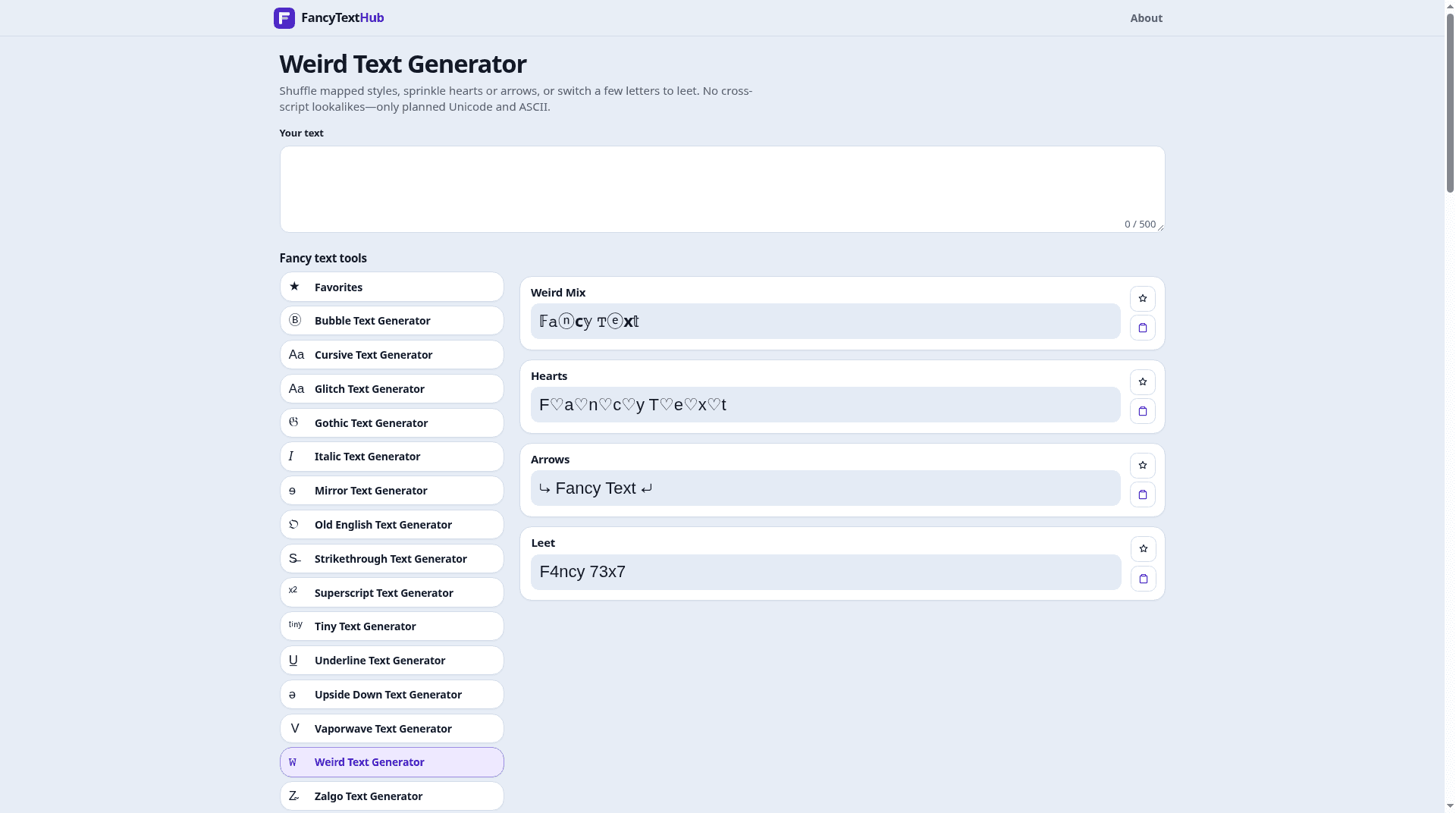
About this app
FancyTextHub is a free online collection of text generators that turn ordinary letters into stylish Unicode you can copy and paste. The Weird Text Generator lets you shuffle mapped styles, sprinkle hearts or arrows, or switch a few letters to leet. It uses only planned Unicode and ASCII—no cross-script lookalikes. Type a name or a short line, compare the style cards, and copy the version you want for a display name, bio, caption, or chat message. The conversion runs entirely in your browser; nothing you type is uploaded, and you do not need to install a font. Because these results are Unicode characters, some apps or devices may show empty boxes or strip the style, so the site encourages checking a paste on the phone other people will use. Login names and important details should stay in ordinary letters. FancyTextHub is a typography and fun-text tool, not a font installer or a guarantee that every platform will keep the effect.
Key features
- 1Weird Mix: deterministic shuffle across four mapped Unicode styles, regenerable via Shuffle seed.
- 2Hearts and Arrows: decorative symbols joined between or around letters, with character-count warnings.
- 3Leet: selective a/b/e/g/i/o/s/t/z substitution that survives on phones that box the mix.
- 4Client-side conversion: nothing typed is uploaded, no font install required.
- 5Platform-specific guidance for Instagram bios, TikTok nicknames, and WhatsApp chats.
Target customer profile
Drawn from the product itself, not from a survey.
Demographic
Social media influencers and content creators (Instagram, TikTok)
Pain points
Want profiles and captions to stand out but risk unreadable text and platform filters
Primary needs
Eye-catching bios and nicknames that are still somewhat readable and safe for search
Demographic
Gen Z and millennial casual users who love aesthetic text
Pain points
Bored by plain text; want fun, personalized messages without technical hassle
Primary needs
Quick, free, browser-based text styling with hearts, arrows, or leet for chats and posts
Demographic
Digital marketers and community managers
Pain points
Need engaging copy that stops scrolling but must avoid rendering issues across devices
Primary needs
Testable, copy-paste text effects for campaigns, announcements, and social engagement
Scout Review
Written by AI from measured evidence, scored out of 100.
FancyTextHub's Weird Text Generator is a competent, honest little utility with unusually thoughtful copy about where Unicode styling fails. The tool is clean and fast on desktop, the accessibility work is real, and the platform-specific advice is better than most competitors bother with. The self-inflicted wound is the demo: the hero output shows the exact missing-glyph boxes the site warns about, which undercuts trust at the worst moment. Security is solid-but-unremarkable, mobile has a layout-shift problem, and the growth story is a real wedge in a crowded free category.
Measure by measure
Usability
58Obvious primary action and instant side-by-side style comparison, but copy/favorite icons are tiny and low-contrast, and empty-state outputs give no hint that typing changes them.
Design
57Clean, legible tool UI with a disciplined purple accent and consistent output cards, but the product's own demo shows missing-glyph boxes and the About/footer areas read as unfinished.
Speed
68Desktop Lighthouse 100/100 and mobile 76/100 with a fast 901ms FCP and 31ms TBT, but a CLS of 0.542 means the page visibly jumps as it loads.
Security
62HTTPS enforced with CSP, frame protection, and a full header set, and conversion is client-side only; but no HSTS, no SPF/DMARC, and no published audit or security page.
Accessibility
79Lighthouse accessibility audit scores a perfect 100/100, and the site deliberately avoids stacked-mark zalgo for screen-reader friendliness; no formal WCAG statement published.
Growth
54A real, specific problem with genuine platform-by-platform guidance as a wedge, but it competes head-on with LingoJam and YayText in a free, low-switching-cost category.
Improvement areas
- Live demo outputs show missing-glyph boxes, contradicting the product's own warnings.
- Mobile CLS of 0.542 causes visible layout shift during load.
- Copy/favorite icons are tiny and low-contrast; empty state gives no typing cue.
- No HSTS, SPF, or DMARC; no published accessibility statement or security page.
Design & Usability
The tool itself is well-organized: a large input, a left rail of style families, and four output cards you can compare at a glance, with a restrained purple accent that keeps the palette disciplined. The problem is that the demo undermines the product — the live Weird Mix and Hearts previews show missing-glyph boxes, which is precisely the failure the copy spends paragraphs warning about. Usability is decent but the copy and favorite icons are tiny and low-contrast, and the empty state shows placeholder text with no cue that typing will populate it. The About section is a dense gray wall that hides genuinely useful platform advice.
Speed & Security
Speed is a tale of two devices: desktop Lighthouse hits a perfect 100/100, while mobile lands at 76/100 with a fast 901ms FCP and 31ms TBT but a CLS of 0.542 — the page visibly shifts as it settles, which is the one metric worth fixing. Security is reasonable for a client-side utility: HTTPS enforced, CSP, frame protection, and a full header set, with conversion running entirely in the browser so nothing typed is uploaded. The gaps are HSTS, SPF, and DMARC, plus the absence of any published security page or audit — normal for an indie tool, but not a strength.
Accessibility & Growth
Accessibility is the standout: a perfect 100/100 Lighthouse audit and a deliberate design choice to avoid stacked-mark zalgo so screen readers cope better, though no formal WCAG statement is published. Growth is the harder question. The problem is real — Unicode styles break across devices and platforms — and the site's platform-by-platform guidance (Instagram bio vs. TikTok nickname vs. WhatsApp) is a genuine differentiator. But it competes directly with LingoJam and YayText, both free and established, and nothing here creates switching costs or network effects. The domain is barely weeks old, so traction is context, not a verdict.
Conclusion
If you need a weird-text generator that won't get your account flagged for homoglyph spoofing and actually tells you which platforms will eat your styling, this is a genuinely useful pick. Fix the demo glyphs, tighten the mobile CLS, and publish a short accessibility note, and it moves from 'solid' to 'recommended.'
Suggestions for improvement
- Fix the missing-glyph boxes in the live Weird Mix, Hearts, and Arrows demo outputs — the hero should not show the failure mode.
- Reduce the 0.542 mobile CLS by reserving space for output cards and the footer badge grid before they render.
- Add HSTS, SPF, and DMARC records; they are cheap and close most of the 8/12 header gap.
- Publish a short accessibility statement and a WCAG conformance note to back up the perfect Lighthouse score.
Alternatives comparison
Named competitors, point by point. Nobody paid to appear here or to be left out.
 FancyTextHub Weird Text Generator |  LingoJam |  YayText | |
|---|---|---|---|
| Core weird-text styling | Weird Mix, Hearts, Arrows, Leet via deterministic mapped Unicode | Broad weird-text styles including zalgo and glitch | Bold, italic, fancy fonts and decorative Unicode options |
| Platform-specific rendering guidance | Detailed Instagram/TikTok/WhatsApp advice on boxes and stripping | Minimal; primarily a generator interface | Some platform notes, less granular |
| Homoglyph / spoofing avoidance | Explicitly avoids Cyrillic/Greek lookalikes | Offers zalgo/glitch; not positioned around spoofing | Unicode styling focus, not anti-spoofing |
| Client-side privacy | Conversion runs entirely in browser; nothing uploaded | Browser-based generator | Browser-based styling tool |
| Accessibility posture | Lighthouse 100/100; avoids stacked-mark zalgo for screen readers | Zalgo/glitch styles can be screen-reader hostile | Standard Unicode styling; no stated a11y focus |
LingoJam
Free online text generator with various fonts and weird text styles, including zalgo and glitch.
YayText
Unicode text styling tool with bold, italic, fancy fonts, and decorative options for social media.
Comparing options? See FancyTextHub Weird Text Generator alternatives, scored side by side
More Entertainment & Fun apps
View all Entertainment & Fun
SheetScroll
90> You play; SheetScroll turns the page. It listens through the microphone or a MIDI piano and holds the page until it's sure where you are.

Pushup RPG: Fitness Quest
90Pushup RPG is a camera-based push-up counter and fitness RPG for home workouts. Real push-ups and squats become attacks as you defeat 48 foes across 8 biomes, earn XP and loot, join guilds, and battle in live 40-second duels. Free on iOS and Android.

Flag Maker
89Free browser flag maker: 28 layouts, 197 country templates, SVG/PNG/HOI4 TGA—no account.

Peanut Tennis
89Find tennis courts & tournaments in Australia

TUNL - Cave Flyer
89A hold-to-thrust cave flyer with a new daily level, ghost races, and a global leaderboard.

Cantoro
88Custom AI songs with a name, heard free before paying $4....

How Long Timer
88HowLongHowManyDays.com is a free online countdown timer that lets you track the time remaining until specific times, dates, holidays, and special even

Video to Frames
88Free browser video frame extractor: PNG, JPG, or WebP, nothing uploaded.

i Word Unscrambler
88Free Word Unscramble for scrabble and words games.

AI Dance Trend
88Turn one photo into a 10-second AI dance video — no app, ...

Random Movie Generator
88Free random movie picker from 142k+ films—no sign-up.

FaceSwapAI
87AI face swap for photos, videos, GIFs with free trial.


A platform dedicated to providing unbiased reviews of newly launched applications, analyzing everything from their features to their full potential.
info@scoutforge.net© 2026 Scoutforge. All rights reserved.
