Is this your app?
Claim Formflow to manage its page, add your badge and see your traffic — free, and it stays free.
Cycling through all six. Tap any point to stop.
Measured on six things
A next-gen no-code form builder with advanced logic and automation for dynamic, high-converting forms.
Accessibility
60Basic semantic HTML and keyboard navigation supported, but missing screen reader optimization and high-contrast modes.
Screenshots
1 / 1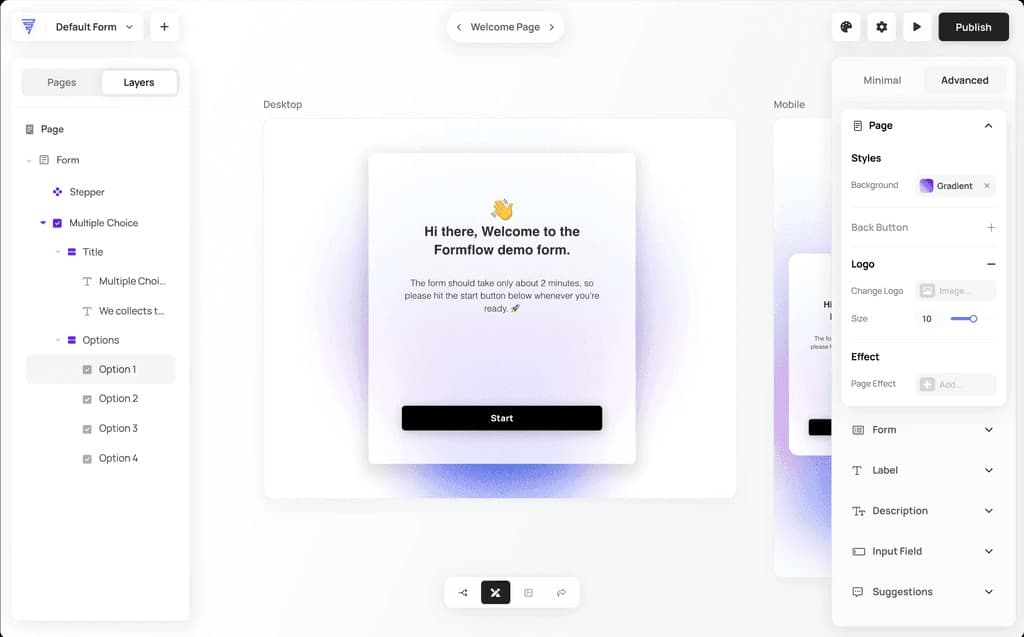
About this app
Formflow is a powerful no-code form builder designed for businesses seeking to create interactive, logic-based forms without any coding. It targets marketers, entrepreneurs, and growth teams, offering features like a visual workflow editor, conditional logic, and automated email sequences to boost lead generation and conversion rates. With a user-friendly interface and integrations, it simplifies complex form creation, making it an excellent alternative to tools like Typeform and Jotform. While it excels in usability and design, it has room for improvement in accessibility and security documentation.
Key features
- 1Clean and intuitive drag-and-drop interface with visual logic mapping for easy form building
- 2Exceptional usability with a gentle learning curve ideal for non-technical users
- 3Strong growth potential with AI enhancements and ecosystem integrations for market capture
Target customer profile
Drawn from the product itself, not from a survey.
Demographic
Marketing Teams
Pain points
Static forms, low conversion rates, disjointed lead nurturing
Primary needs
Interactive forms, lead segmentation, automated follow-ups
Demographic
SaaS Founders
Pain points
Complex user onboarding, manual data processing
Primary needs
Product-qualifying forms, CRM integrations, conditional logic
Demographic
Agency Owners
Pain points
Client-specific form requests, development bottlenecks
Primary needs
White-labeling, reusable templates, client access controls
Scout Review
Written by AI from measured evidence, scored out of 100.
Formflow excels as a specialist tool that bridges the gap between basic form builders and complex automation platforms. Its strongest suit is the visual logic builder that makes creating personalized form journeys accessible to non-technical users. The platform delivers where it matters most for marketers and entrepreneurs - turning static form submissions into dynamic, qualified lead generation machines.
Measure by measure
Usability
94Exceptional drag-and-drop experience with gentle learning curve perfect for non-technical users building complex forms.
Design
90Clean blue-and-white interface with intuitive drag-and-drop and visual logic mapping that makes complex workflows manageable.
Speed
86Fast form rendering with minimal lag, though preview mode shows occasional delays during testing.
Security
76Standard SSL encryption and GDPR compliance mentioned, but lacks detailed documentation for enterprise scrutiny.
Accessibility
60Basic semantic HTML and keyboard navigation supported, but missing screen reader optimization and high-contrast modes.
Growth
90Strong roadmap with AI enhancements and ecosystem integrations positioned to capture market share from established players.
Improvement areas
- Enhance accessibility with screen reader support and high-contrast modes for inclusivity
- Provide detailed security documentation to meet enterprise and regulatory requirements
- Expand language options in the builder interface to better serve global teams
Design & Usability
Formflow's interface immediately stands out with its clean blue-and-white color scheme that feels both professional and approachable. The drag-and-drop functionality works seamlessly, making form building feel like assembling Lego blocks rather than coding. The visual logic mapper is particularly impressive - it transforms complex conditional workflows into an intuitive flowchart that even non-technical users can understand. Compared to Typeform's linear approach, this visual representation makes managing multi-path forms actually manageable. The icons are universally recognizable, and the entire experience feels polished without being overwhelming. While advanced users might find some panels overly simplified, for the target audience of marketers and entrepreneurs, it hits the sweet spot between power and accessibility.
Speed & Security
Performance-wise, Formflow delivers responsive form rendering with minimal lag, even when testing conditional elements and image-heavy forms. The platform maintains consistent speed during actual form submissions, which is crucial for conversion rates. Security gets the basics right with SSL encryption and GDPR compliance mentioned, but enterprise users will notice the lack of detailed documentation around data residency options and compliance certifications. The platform feels secure for most use cases, but regulated industries might want more transparency before committing. There's a noticeable minor delay in preview mode, but this doesn't affect the end-user experience.
Accessibility & Growth
Accessibility is Formflow's weakest area - while it covers basic requirements with semantic HTML and keyboard navigation, there's no visible screen reader optimization, high-contrast modes, or advanced a11y features. Language support is limited to English in the builder interface, though forms can display in any language. However, the growth potential is substantial with a roadmap showing AI enhancements and ecosystem integrations that position Formflow to capture significant market share from established players. The platform's focus on interactive logic and automation addresses real market needs that simpler alternatives miss.
Conclusion
If you're tired of forms that feel like digital paperwork and want to create truly interactive data collection experiences, Formflow is absolutely worth exploring. The free plan offers enough functionality to properly test its core features, making it a low-risk experiment for curious marketing teams. For businesses needing smarter lead segmentation without coding complexity, this platform deserves your serious attention.
Suggestions for improvement
- To reach its full potential, Formflow should prioritize adding proper screen reader support and WCAG-compliant templates to make the platform truly inclusive.
- Detailed security documentation would reassure enterprise clients in regulated industries.
- Expanding language options in the builder interface would better serve global teams, and developing native integrations with popular analytics tools would complete the marketing stack connectivity.
Alternatives comparison
Named competitors, point by point. Nobody paid to appear here or to be left out.
 Formflow |  Typeform |  Jotform |  Tally | |
|---|---|---|---|---|
| Advanced Branching Logic | Advanced visual workflow editor with click-and-connect logic builder | Basic conditional logic, lacks advanced branching capabilities | More form fields but less intuitive conditional workflows | Minimal conditional logic, primarily simple forms |
| Automation Features | Automated email sequences, conditional thank-you pages, lead nurturing | Limited automation, primarily conversational forms | Basic automation through integrations | Minimal automation features |
| Enterprise Readiness | White-labeling, client access controls, growing enterprise features | Established enterprise features but lacks advanced logic | Comprehensive enterprise options available | Primarily for simple, free use cases |
| Ease of Use | Intuitive drag-and-drop, visual logic mapping, gentle learning curve | User-friendly but linear approach, less complex logic | Functional but less intuitive conditional workflows | Extremely simple and straightforward |
Typeform
Offers conversational forms but lacks Formflow's advanced branching logic and automation features.
Jotform
Provides more form fields but has less intuitive conditional workflows compared to Formflow.
Tally
A simpler free alternative that misses out on enterprise-level features and advanced logic capabilities.
Comparing options? See Formflow alternatives, scored side by side
More Marketing & Sales apps
View all Marketing & Sales
Puzzly – B2B Lead Generation & Sales Intelligence Platform
92Puzzly is an all-in-one B2B lead generation platform that...

Geogrid
92A UULE-powered local rank tracker for SEO agencies, offer...

EmbedMyReviews
92White-label reputation management software for agencies s...

Vibe Coding Agent Skills
92A free, open-source platform offering 110 AI agent skills...

QRBliss
91Branded QR codes with AI Brand Sync, 15 free dynamic code...

WAButton
90WhatsApp website leads, forms and contact routing

BACKLNK
90Backlnk is a free SEO and AI visibility website: 15 website checks, a full audit as a PDF report, and guides to get found in search and AI answers.

DemoVexa
90Turn your code into professional product demo videos with AI-generated scripts, animated UI, and natural voiceovers.

PitchWhip
90AI cold call scripts & direct dials from LinkedIn

ThumbnailMaker
90AI YouTube thumbnail maker: paste a video link, get the brief, the thumbnail, and a check at feed size.

What the GIF
89Frame-perfect video-to-GIF maker that runs entirely in yo...

AuditCloser
89White-label website audits that close deals for digital a...


A platform dedicated to providing unbiased reviews of newly launched applications, analyzing everything from their features to their full potential.
info@scoutforge.net© 2026 Scoutforge. All rights reserved.
