Cycling through all six. Tap any point to stop.
Measured on six things
Free, no-signup AI videos from text or paired images, with motion guidance and built-in audio.
Security
40HTTPS is enforced and SPF is set, but HSTS, CSP, frame protection, Referrer-Policy and secure cookies are all missing, DMARC is absent, and no compliance or security page is published. 3/13 checklist points.
Screenshots
1 / 1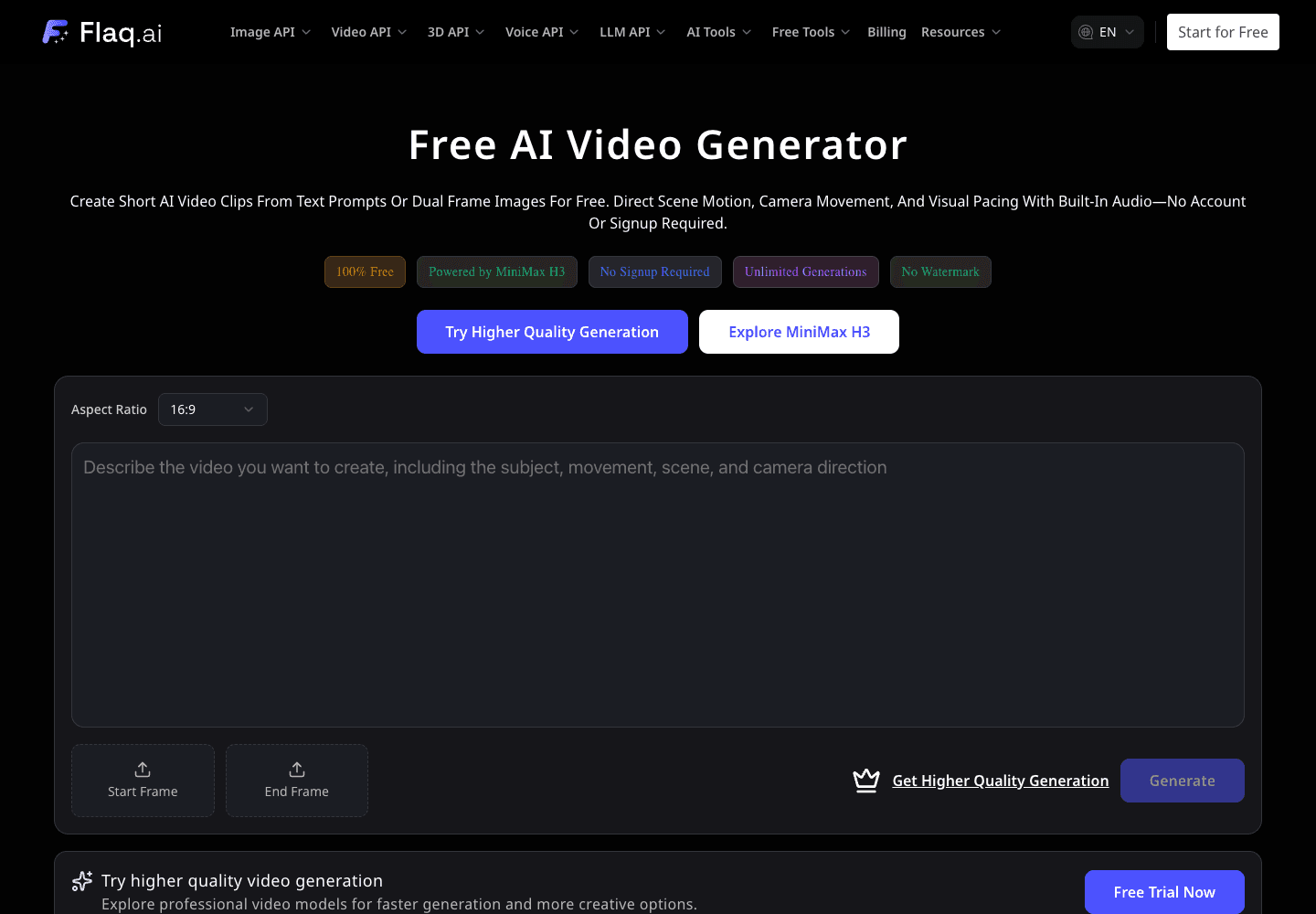
About this app
Flaq AI’s Free AI Video Generator is a browser-based tool for making short AI video clips from a text prompt or a pair of start and end images. It is powered by MiniMax H3 and supports landscape (16:9), vertical (9:16), and square (1:1) aspect ratios. Describe the scene, lighting, shot size, and camera movement in plain language to guide motion. The tool generates a video with matching ambient audio, which you can preview, refine by adjusting the prompt, and download. It runs without an account or signup and is designed for creators and teams exploring short-form social content, product concepts, moving storyboards, pitch decks, tutorials, and presentation visuals. For broader projects, Flaq AI also provides other browser-based creative tools and video APIs.
Key features
- 1Text-to-video and dual-frame (start/end image) animation in the browser, no signup required.
- 2Landscape 16:9, vertical 9:16 and square 1:1 aspect ratios with prompt-guided camera direction.
- 3Built-in ambient audio generated alongside the video; preview, refine and download clips.
- 4Powered by MiniMax H3; unified API layer for image, video, 3D, voice and LLM models.
Target customer profile
Drawn from the product itself, not from a survey.
Demographic
Social media creators and short-form video producers
Pain points
Need quick motion concepts for short-form posts and campaign experiments.
Primary needs
Create short clips from text or two reference frames, then preview and refine them with ambient audio.
Demographic
Marketing and advertising teams
Pain points
Need to explore product-reveal concepts before committing to production.
Primary needs
Prototype scenes, pacing, and camera movement with prompt-guided AI video.
Demographic
Storyboard artists and video production teams
Pain points
Static storyboards do not show motion, timing, or camera direction.
Primary needs
Make moving reference clips from text or start-and-end images for storyboards and pitch decks.
Demographic
Educators and presentation creators
Pain points
Need supporting motion visuals for explainers, tutorials, and presentations.
Primary needs
Create short supporting clips in landscape, portrait, or square formats with ambient audio.
Scout Review
Written by AI from measured evidence, scored out of 100.
Flaq AI's Free AI Video Generator does the one thing it promises: you land, type a prompt or drop two frames, and get a short clip with ambient audio, no account needed. The generator-first hero and consistent dark UI make that obvious in seconds. The problems are all around the edges — a modal on load, an affiliate banner, a paid upsell bar under a '100% free' claim, and a nav that reads like a developer platform catalogue rather than a video tool. Technically, the 16.9s LCP is the biggest red flag, and the security header posture (3/13) is thin for a tool that accepts uploads. Accessibility is genuinely strong at 96/100. It's a competent free tool wrapped in a busy page.
Measure by measure
Usability
62No signup, prompt-first layout and a clear output placeholder make the core flow obvious. But a modal on load and a paid upsell bar under a '100% free' tool add friction right where trust is built.
Design
58Generator-first hero is the right call and the dark palette is consistent, but low-contrast tag pills, a nine-item developer nav, a green banner and an affiliate block all fight the tool for attention.
Speed
44Lighthouse mobile 58/100 with a 16.9s LCP, desktop 46/100. FCP at 1.6s and TBT 336ms are fine, but the largest paint is nearly seven times the 'good' threshold.
Security
40HTTPS is enforced and SPF is set, but HSTS, CSP, frame protection, Referrer-Policy and secure cookies are all missing, DMARC is absent, and no compliance or security page is published. 3/13 checklist points.
Accessibility
79Lighthouse accessibility lands at 96/100 with a single contrast failure, which lines up with the dim tag pills and tiny captions. No WCAG statement or a11y docs found, but the automated baseline is strong.
Growth
58Real, specific wedge — free, no-signup, no-watermark text-to-video plus dual-frame control — with a credits/API upsell path. But 'free AI video generator' is a crowded shelf and the model vendors are the competition.
Improvement areas
- 16.9s mobile LCP and 46/100 desktop Lighthouse performance need real optimization.
- Security headers at 3/13 — no CSP, HSTS, frame protection or DMARC.
- On-load modal and affiliate banner compete with the core tool for attention.
- Low-contrast tag pills and 10–12px captions fail the contrast audit.
Design & Usability
The strongest design decision is putting the generator in the hero: prompt field, aspect-ratio control and Start/End Frame tiles are all visible in the first screen, so the product's job is obvious immediately. The dark palette and indigo CTA are applied consistently. What drags it down is everything around the tool — a nine-item nav spanning Image/Video/3D/Voice/LLM APIs, a green announcement bar, an affiliate banner and a Seedream modal all competing for the same eyeballs. Usability is genuinely good at the core: no signup, a muted Generate button that signals the required step, and an output placeholder that sets expectations. The friction is self-inflicted — a modal on load and a 'try higher quality' upsell bar sitting directly under a tool that advertises '100% free, no signup'.
Speed & Security
Speed is the weak spot. Lighthouse mobile scores 58/100 with an LCP of 16.9 seconds — nearly seven times the 'good' threshold — while desktop scores even lower at 46/100. FCP (1.6s) and TBT (336ms) are acceptable, so the problem is a heavy largest element, likely hero media or blocking resources. Security is thin: HTTPS is enforced and SPF is configured, but HSTS, CSP, frame protection, X-Content-Type-Options, Referrer-Policy, Permissions-Policy and secure cookies are all absent, DMARC is missing, and no security page, SOC 2 or bug bounty is published. That's 3 of 13 checklist points. For a tool that takes user-uploaded start/end frames, the missing CSP and frame protection are worth fixing before anything else.
Accessibility & Growth
Accessibility is the standout: Lighthouse scores 96/100, with the only failing audit being insufficient color contrast — which matches the dim tag pills and 10–12px captions the visual audit flagged. No WCAG statement or a11y documentation is published, and multi-language support is limited to a nav selector. Growth is a judgement on the idea: the wedge is real and specific (free, no-signup, no-watermark text-to-video with dual-frame control on MiniMax H3), and there's a clear monetization path through credits and the unified API. But 'free AI video generator' is one of the most crowded shelves in software, and the underlying model vendors are themselves competitors. The free tool reads as a funnel for the paid API business, which is fine — it just means the free tool alone isn't the moat.
Conclusion
If you want a quick motion concept without signing up, this works and costs nothing. If you're evaluating it as infrastructure, the missing CSP/HSTS/DMARC and the 16.9s load time are the things to fix first. The free tool is clearly a funnel for the paid API — that's a legitimate model, but the page should stop pretending otherwise with the '100% free' pills sitting next to an upsell bar.
Suggestions for improvement
- Fix the 16.9s LCP — compress or lazy-load the hero media and audit render-blocking resources.
- Add HSTS, CSP, X-Content-Type-Options, Referrer-Policy and DMARC; publish a security page.
- Remove or defer the on-load modal and move the affiliate banner below the feature grid.
- Raise contrast on the tag pills and bump the 10–12px captions to a readable size.
Alternatives comparison
Named competitors, point by point. Nobody paid to appear here or to be left out.
 Free AI Video Generator by Flaq AI |  |  |  |  | |
|---|---|---|---|---|---|
| Free tier without signup | Yes — no account required | Not specified | Not specified | Not specified | Not specified |
| Text-to-video generation | Yes | Not specified | Not specified | Not specified | Not specified |
| Dual-frame (start/end image) animation | Yes | Not specified | Not specified | Not specified | Not specified |
| Aspect ratio options | 16:9, 9:16, 1:1 | Not specified | Not specified | Not specified | Not specified |
| Built-in ambient audio | Yes | Not specified | Not specified | Not specified | Not specified |
| Watermark on free output | No watermark claimed | Not specified | Not specified | Not specified | Not specified |
| Paid API / credits model | Yes — pay-as-you-go credits, no expiry | Not specified | Not specified | Not specified | Not specified |
Comparing options? See Free AI Video Generator by Flaq AI alternatives, scored side by side
More AI Generations apps
View all AI Generations
Uni-1 by Luma AI
92Uni-1 is an advanced multimodal text-to-image AI model th...

LTX 2.3 AI Video Generator
91Fast, open-source AI video generator with 4K support, mul...

Gerty
91Private, local AI assistant for Mac that runs offline

DemoVexa
90Turn your code into professional product demo videos with AI-generated scripts, animated UI, and natural voiceovers.

All of Us
89Add deceased loved ones to photos with AI and see free pr...

Voqusa
89Transcribe social media video and audio links into text (free signup, 5 free credits, then pay-as-you-go)

HeyVid AI
88HeyVid AI is a free all-in-one AI video and image generat...

IraVoice
88Private on-device dictation for Apple-silicon Macs.

Pixelimg
88A free online AI-powered tool that instantly converts ima...

OBVELO
88Privacy gateway that masks personal data in LLM traffic

RestorePhotosApp
88An AI-powered photo restoration app that brings old, blur...

tradutor de mangá com IA
88O tradutor de mangá com IA traduz capítulos em lote, personaliza textos e oferece edição visual para estúdios.


A platform dedicated to providing unbiased reviews of newly launched applications, analyzing everything from their features to their full potential.
info@scoutforge.net© 2026 Scoutforge. All rights reserved.
