Cycling through all six. Tap any point to stop.
Measured on six things
Remove or reset Outlook PST passwords without Outlook.
Security
41HTTPS is enforced and SPF is set, but HSTS, CSP, frame protection, Referrer-Policy, Permissions-Policy and DMARC are all missing — 3/13 checklist points, no published audit.
Screenshots
1 / 6
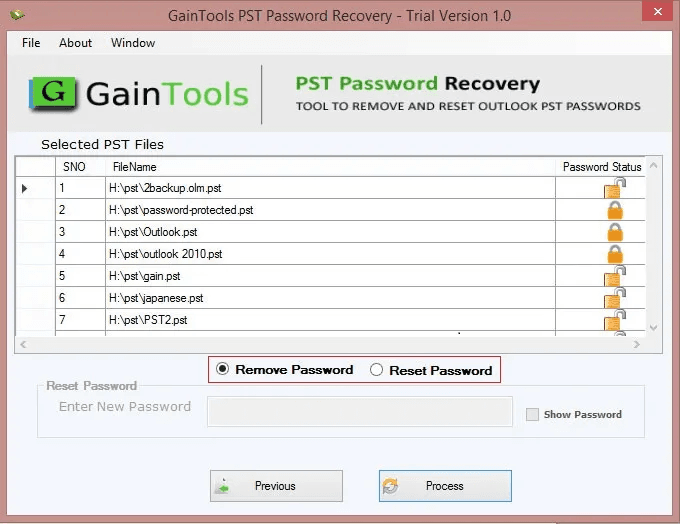
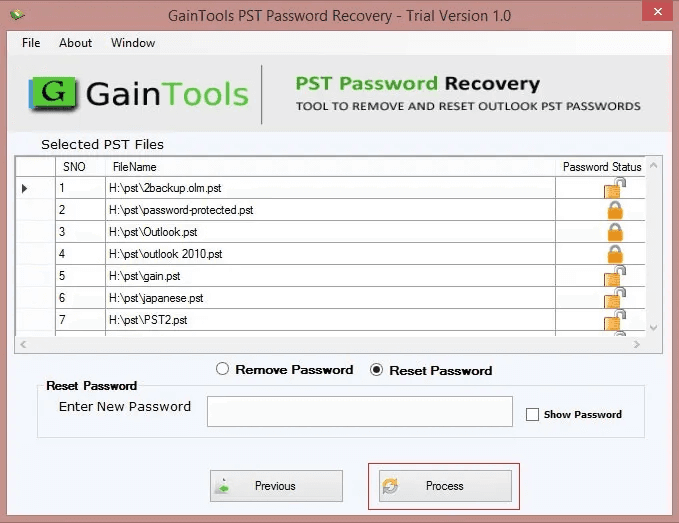
About this app
GainTools PST Password Recovery is a powerful tool that recovers the password for a PST file. If users have forgotten the password to a locked file in a PST file, then this tool is the ideal solution for them. This software works on the Windows platform and is extremely easy to use. Features Easy and user-friendly interface: The interface of PST Password Recovery is very simple and user-friendly, so anyone can use it without technical knowledge. Support for all Outlook versions: This tool is fully compatible with all major versions of MS Outlook, such as Outlook 2021, 2019, 2016, 2013, 2010, 2007, etc. Fast password recovery: This tool performs password recovery at high speed, allowing you to quickly recover your passwords. Multiple language support: This tool is perfect for users around the world, as it is available in multiple languages. The software works on all major Windows operating systems (such as Windows 11, 10, 8, 7, Vista, and XP), providing users with wide compatibility.
Key features
- 1Recovers, removes, and resets passwords on password-protected Outlook PST files, including bulk multi-file processing.
- 2Works independently of Microsoft Outlook — no Outlook installation required to unlock PST files.
- 3Supports ANSI and UNICODE PST files across Outlook 2021 down to 2002 and Windows 11 down to XP.
Target customer profile
Drawn from the product itself, not from a survey.
Demographic
IT Professionals
Pain points
Managing multiple password-protected PST files, forgotten passwords
Primary needs
Batch password removal, compatibility with various Outlook versions
Demographic
Small Business Owners
Pain points
Locked out of critical business emails, no technical expertise
Primary needs
Easy-to-use tool, quick recovery without Outlook installation
Demographic
Individual Users
Pain points
Forgotten personal PST passwords, data inaccessibility
Primary needs
Affordable solution, ability to reset password to a new one
Scout Review
Written by AI from measured evidence, scored out of 100.
GainTools PST Password Recovery is a single-purpose Windows utility that does one thing: unlock password-protected Outlook PST files. It's fast — Lighthouse mobile 98/100, LCP 1.2s — and the trial is a tiny 2.41 MB download with no registration, backed by a $29 lifetime license and a 30-day refund window. The three-step screenshot guide makes the workflow obvious. Where it falls short: the app UI is a bare Windows Forms window, the marketing site repeats itself with duplicate screenshot sections and icon-less feature boxes, and security is thin at 3/13 header checklist points with no published audit. Accessibility is 95/100 but fails on button naming. The idea is real but narrow, and the market is crowded. If you have a locked PST file and $29, it'll probably do the job. If you need compliance documentation or a polished experience, look elsewhere.
Measure by measure
Usability
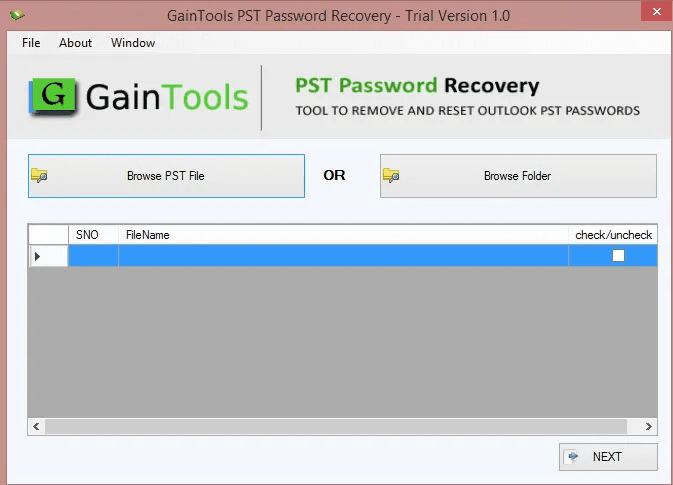
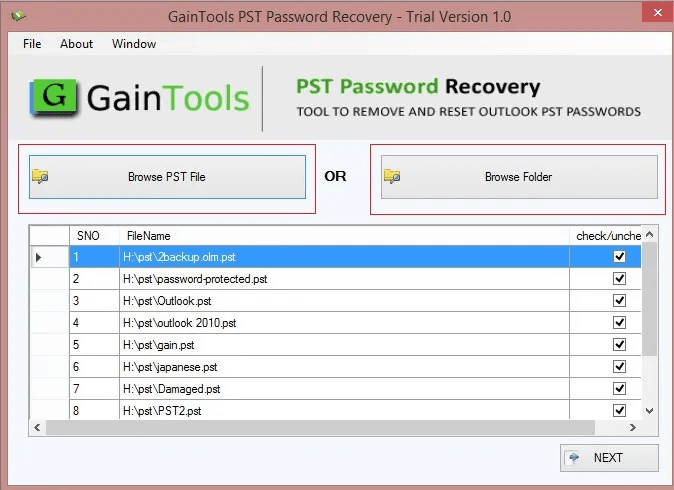
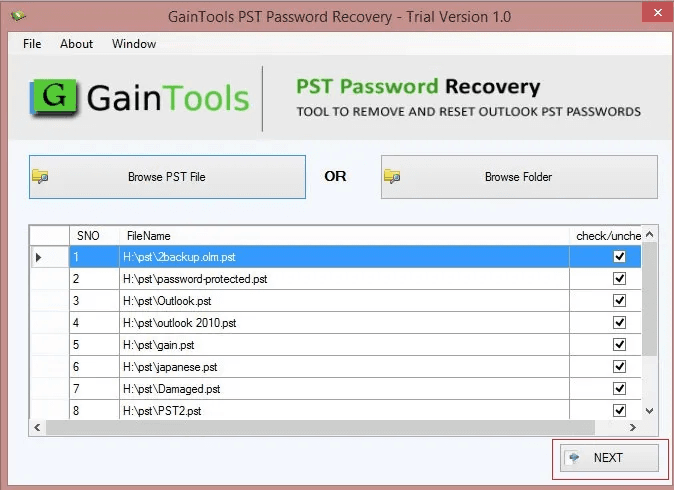
62Three-step screenshot guide, a 2.41 MB no-registration trial, and a $29 lifetime license make the path to value short. Help depth and a live demo are unverified.
Design
56Dark navy hero with a 3D box render and green CTAs reads clean, but eight identical icon-less feature boxes and a bare Windows Forms app UI drag it to average.
Speed
82Lighthouse mobile 98/100 (LCP 1.2s, CLS 0, TBT 151ms) is genuinely fast; desktop trails at 71/100. Small 2.41 MB installer keeps the download light.
Security
41HTTPS is enforced and SPF is set, but HSTS, CSP, frame protection, Referrer-Policy, Permissions-Policy and DMARC are all missing — 3/13 checklist points, no published audit.
Accessibility
78Lighthouse a11y 95/100, but two real failures: buttons without accessible names and visible labels not matching accessible names. No WCAG statement; software claims multi-language.
Growth
54A real, narrow problem — locked PST files — with bulk removal and reset-to-new-password as concrete wedges. Established vendor since 2017, but the category is small and crowded.
Improvement areas
- Security hardening: add HSTS, CSP, frame protection, Referrer-Policy, Permissions-Policy, and DMARC; publish a security page.
- Accessibility: fix unnamed buttons and mismatched visible/accessible labels flagged by Lighthouse.
- Site design: replace the eight identical icon-less hero feature boxes and consolidate duplicate screenshot sections.
- Documentation: expand the Guide tab beyond three screenshots and add a live demo or deeper help center.
Design & Usability
GainTools PST Password Recovery is a Windows desktop utility wrapped in a marketing site that does the job without much flair. The homepage opens with a dark navy hero, a 3D product box, and green CTAs — competent, if generic. Below the fold it unravels: eight identical icon-less feature boxes form a text wall, and the actual app screenshots show a plain Windows Forms window with gray panels and basic list views. That's the product's real design, and it's utilitarian at best. Usability is stronger. A three-step screenshot guide gives a direct onboarding cue, the trial is a 2.41 MB download with no registration, and the $29 lifetime license with a 30-day money-back guarantee is a low-risk entry. The site claims 24/7 support and a Guide tab, but neither the depth of the help center nor a live demo could be verified from the fetched content. The 4.8/5 rating from 252 reviews is self-published on the product's own page, not an independent source. For a single-purpose utility, the flow from landing page to working trial is short and clear — that's the part that matters, and it mostly works.
Speed & Security
Speed is the standout. Google's Lighthouse lab run scored the site 98/100 on mobile with an LCP of 1.2s, zero layout shift, and a 151ms total blocking time. Desktop came in lower at 71/100, which is an odd inversion but still fine. The installer is only 2.41 MB, so the download itself is quick. Security is where the site is thin. The HTTP probe confirms HTTPS is enforced and an SPF record exists, but that's 3 of 13 checklist points. HSTS, Content-Security-Policy, frame protection, X-Content-Type-Options, Referrer-Policy, Permissions-Policy, and DMARC are all absent, and no secure-cookie flag was detected. There is no published SOC 2, ISO 27001, penetration test, or bug bounty program in the fetched content. For a tool that handles password-protected email archives — sensitive data by any measure — the lack of a security page or compliance disclosure is a real gap, not just an unverified one. The basics are in place; the hardening is not.
Accessibility & Growth
Accessibility scores well on automated checks: Lighthouse returned 95/100. But the two failing audits are meaningful — buttons without accessible names, and visible text labels that don't match their accessible names. Those are exactly the failures that break screen-reader navigation, and they suggest the site was built for sighted mouse users. No WCAG conformance statement or accessibility page was found, and while the software claims multi-language support, the site itself is English-only. Growth is a judgement about the idea. The problem is real and specific: people get locked out of password-protected PST files and need back in. GainTools differentiates with bulk removal, reset-to-new-password, and operation without Outlook installed — concrete wedges. But the category is narrow and crowded with free and low-cost alternatives, and the buyer is someone who forgot a password once. The vendor has been at it since 2017, which shows staying power, but the ceiling on 'recover a forgotten PST password' is low. It's a competent niche utility, not a platform.
Conclusion
The verdict depends entirely on what you need. As a utility, GainTools PST Password Recovery is fast, cheap, and gets you into a locked PST file without Outlook installed — bulk removal and password reset are genuine conveniences. As a piece of software you'd trust with sensitive email archives, it's under-hardened: no HSTS, no CSP, no DMARC, no security page, no audit. The design is functional but dated, and the site's repetition suggests marketing effort outpaced product polish. For an individual or small business owner locked out of a personal archive, the low price and short trial make it an easy experiment. For an IT professional managing many password-protected PST files in a regulated environment, the missing compliance signals are a legitimate blocker. Try the trial first — it costs nothing but a 2.41 MB download — and decide whether the workflow fits before paying.
Suggestions for improvement
- Publish a security page and add the missing headers: HSTS, CSP, frame protection, Referrer-Policy, and DMARC.
- Fix the two Lighthouse a11y failures by giving every button an accessible name and matching visible labels to accessible names.
- Replace the eight identical icon-less hero feature boxes with a scannable layout using icons and shorter copy.
- Consolidate the duplicate 'Screenshots' sections and add a real help center or live demo beyond the three-step guide.
Alternatives comparison
Named competitors, point by point. Nobody paid to appear here or to be left out.
 GainTools PST Password Recovery Tool GainTools PST Password Recovery Tool | ||
|---|---|---|
| Pricing model | $29 lifetime license, 30-day money-back guarantee, free trial available | Not available — no alternative details provided |
| Bulk PST password removal | Yes — load unlimited PST files and recover/reset passwords at once | Not available — no alternative details provided |
| Requires Microsoft Outlook installed | No — standalone utility works without Outlook installed | Not available — no alternative details provided |
| Platform support | Windows only (11, 10, 8, 7, Vista, XP); no macOS or Linux | Not available — no alternative details provided |
| Security and compliance disclosures | HTTPS and SPF only; no SOC 2, ISO, pen test, or security page published | Not available — no alternative details provided |
Comparing options? See GainTools PST Password Recovery Tool alternatives, scored side by side
More Security apps
View all Security
OBVELO
88Privacy gateway that masks personal data in LLM traffic

ProcessSpy
87A native macOS process explorer and advanced monitor that...

Sidenty
87Sidenty is a professional digital identity protection ser...

Sanctix
85Sanctions screening with verifiable SHA-256 audit trails.

eGuard
84Verifiable parental controls for families in the Philippines

Privacy Requests
84DSAR management software for small teams.

Archonum
84Real-device browser automation for AI agents

VaultKeepR
84Password manager with no email, no account, no tracking. ...

Noden
84Native macOS SSH, SFTP & RDP client with a Keychain-backe...

PCDOTS Email Recovery Software
83Recovers emails from corrupt mailboxes across 50+ platforms.

CertAssist.io
83Simple, affordable compliance certification for ISO 27001...

Traceback
83Reveal No Caller ID, unknown numbers, and private callers...


A platform dedicated to providing unbiased reviews of newly launched applications, analyzing everything from their features to their full potential.
info@scoutforge.net© 2026 Scoutforge. All rights reserved.
