Cycling through all six. Tap any point to stop.
Measured on six things
Private, local-first image texture workbench.
Growth
62Real problem (privacy, simplicity) with clear wedge vs. heavy tools; but crowded category and limited differentiation beyond local-first.
Screenshots
1 / 1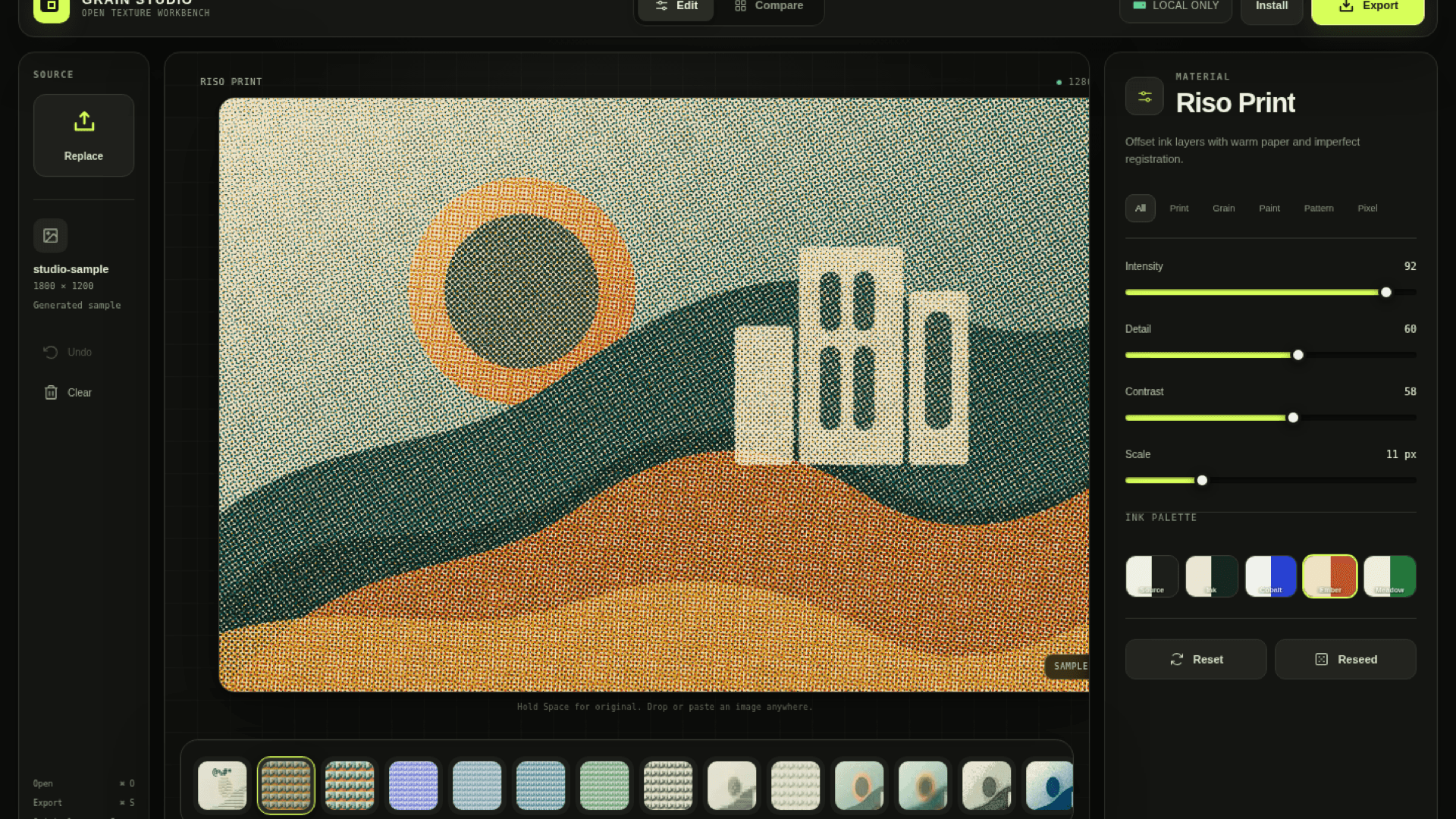
About this app
Grain Studio is a free, open-source, local-first image texture workbench for designers, illustrators, photographers, and indie creators. It applies 25 tactile effects—including grain, paper, film, risograph, halftone, and print textures—inside the browser. Source images stay on the device, controls update in real time, and completed work exports at high resolution.
Key features
- 125 tactile effects including grain, paper, film, risograph, halftone, and print textures.
- 2Local-first processing: source images never leave the device.
- 3Real-time preview with adjustable controls and high-resolution export.
Target customer profile
Drawn from the product itself, not from a survey.
Demographic
Designers and illustrators creating tactile digital artwork and graphics
Pain points
Need flexible texture controls without uploading source files or relying on heavyweight desktop tools.
Primary needs
Private browser-based effects, real-time previews, and high-resolution exports.
Demographic
Photographers and photo editors adding analog texture to digital images
Pain points
Need controllable film and paper texture effects in a lightweight workflow.
Primary needs
Fast local processing, adjustable effects, and export-ready results.
Demographic
Indie makers and developers creating product visuals and launch assets
Pain points
Need quick, consistent texture treatments without a complex design stack.
Primary needs
A free browser tool with repeatable controls and no account requirement.
Scout Review
Written by AI from measured evidence, scored out of 100.
Grain Studio is a polished, free, open-source texture workbench that nails its core promise: tactile effects without uploading your images. The editor is well-designed, fast, and accessible, with a strong local-first ethos. The homepage and docs are weaker, and the security headers could be tightened, but for a free tool, it's a solid choice for designers who value privacy and simplicity. It won't replace Photoshop for pros, but it's a delightful niche tool that's worth a bookmark.
Measure by measure
Usability
72Clear CTA, live preview, no account needed; local-first flow is simple. Docs are minimal but app is intuitive.
Design
70Polished, cohesive dark editor UI with clear hierarchy; homepage has sparse below-fold and tiny footer text.
Speed
70Lighthouse 85/100 desktop, LCP 2.1s, CLS 0.008, TBT 74ms — fast and stable. Local processing keeps interactions snappy.
Security
72HTTPS, HSTS, and several security headers present; CSP and frame protection missing. No compliance certifications found.
Accessibility
80Lighthouse 96/100; only contrast issue. Keyboard support likely but not documented; no multi-language.
Growth
62Real problem (privacy, simplicity) with clear wedge vs. heavy tools; but crowded category and limited differentiation beyond local-first.
Improvement areas
- Homepage below-fold content is sparse and footer text is low-contrast.
- Documentation is minimal; more guides and tutorials would help.
- Security headers missing CSP and frame protection.
Design & Usability
Grain Studio's design is a cut above typical indie tools: the editor's dark theme with clear panel separation (source, preview, materials) feels professional, and the live preview is a genuine usability win. The homepage, however, squanders that goodwill with a sparse below-fold and a footer that's practically invisible. Usability is strong for the core loop — open, tweak, export — but documentation is thin, relying on a repo link rather than real guides. For a free tool, the lack of onboarding is forgivable; the app is intuitive enough to skip it.
Speed & Security
Performance is a highlight: Lighthouse desktop 85/100 with LCP 2.1s and negligible CLS means the marketing site is fast, and the local-first architecture ensures the editor itself isn't hostage to network latency. Security is solid for a static site — HTTPS, HSTS, and several headers are in place — but the absence of CSP and frame protection is a minor gap, and there's no published compliance or audit trail. For a tool that processes images locally, the privacy angle is a genuine strength, even if the security posture isn't enterprise-grade.
Accessibility & Growth
Accessibility is impressive: a 96/100 Lighthouse score with only a contrast issue shows real care, though the lack of an explicit WCAG statement and multi-language support leaves room for improvement. Growth potential is moderate: the problem (privacy-friendly texture effects) is real, and the local-first, open-source angle is a differentiator against Photoshop, Canva, and Fotor. But the category is crowded, and the wedge is narrow — it may capture privacy-conscious creators but faces an uphill battle against free, feature-rich incumbents. The idea has legs, but it's a niche sprint, not a marathon.
Conclusion
If you're a designer tired of uploading your art to yet another server, Grain Studio is a breath of fresh air. It's not perfect — the site needs polish and the docs need depth — but the core experience is genuinely good. Give it a try; your images stay on your device, and your textures come out looking great. Just don't expect it to dethrone the giants overnight.
Suggestions for improvement
- Add a proper documentation section with tutorials and texture recipes.
- Improve homepage below-fold content with more screenshots or use cases.
- Implement CSP and frame protection headers for better security.
- Add a keyboard navigation guide and an explicit accessibility statement.
Alternatives comparison
Named competitors, point by point. Nobody paid to appear here or to be left out.
 Grain Studio Grain Studio |  Adobe Photoshop Adobe Photoshop |  Canva Canva |  Fotor Fotor | |
|---|---|---|---|---|
| Local-first processing (no upload) | Yes, all processing in-browser | No, desktop app but requires install | No, cloud-based uploads | No, cloud-based uploads |
| Price | Free and open-source | Subscription (e.g., $22.99/mo) | Freemium, Pro from $12.99/mo | Freemium, Pro from $8.99/mo |
| Texture effects library | 25 effects (grain, paper, film, etc.) | Extensive filters and plugins | Limited texture effects | Texture and film-grain effects |
| Real-time preview | Yes, live updates | Yes, but requires rendering | Yes, but slower for large images | Yes, but with upload delays |
| Export resolution | High-resolution export | Up to 300,000 px | Up to 300 DPI (Pro) | Up to 4K (Pro) |
Adobe Photoshop
Professional image editor with filters and texture workflows.
Canva
Browser-based design platform with photo effects and templates.
Fotor
Online photo editor with texture and film-grain effects.
Comparing options? See Grain Studio alternatives, scored side by side
More Design & Creativity apps
View all Design & Creativity
RoomCreator
92An AI-powered interior and exterior design tool that tran...

What the GIF
89Frame-perfect video-to-GIF maker that runs entirely in yo...

ButterKit
82macOS app for App Store screenshots: 3D mockups, auto-tra...

RestorePhotosApp
88An AI-powered photo restoration app that brings old, blur...

Portrait Gift
88AI-powered personalized face swap art platform creating c...

BeartIMAGE
88BeartIMAGE is a free, web-based image processing platform engineered for fast, bulk photo editing and conversion directly in your browser.

TranscriptYou
88Free YouTube transcript generator with timestamps and AI ...

Pixelimg
88A free online AI-powered tool that instantly converts ima...

FaceSwapAI
87AI face swap for photos, videos, GIFs with free trial.

Coloring Pages Pro
87A massive collection of free printable coloring pages for...

QRocodile
87Design And Animate QR Codes People Want to Scan

TryInk
86Try on a tattoo on your own body photo before you book.


A platform dedicated to providing unbiased reviews of newly launched applications, analyzing everything from their features to their full potential.
info@scoutforge.net© 2026 Scoutforge. All rights reserved.
