Cycling through all six. Tap any point to stop.
Measured on six things
Free, open-source WordPress security plugin
Security
38HTTPS enforced but no HSTS, CSP, or frame protection; SPF present, DMARC absent. Local-first claims are strong but unverified by audits.
Screenshots
1 / 1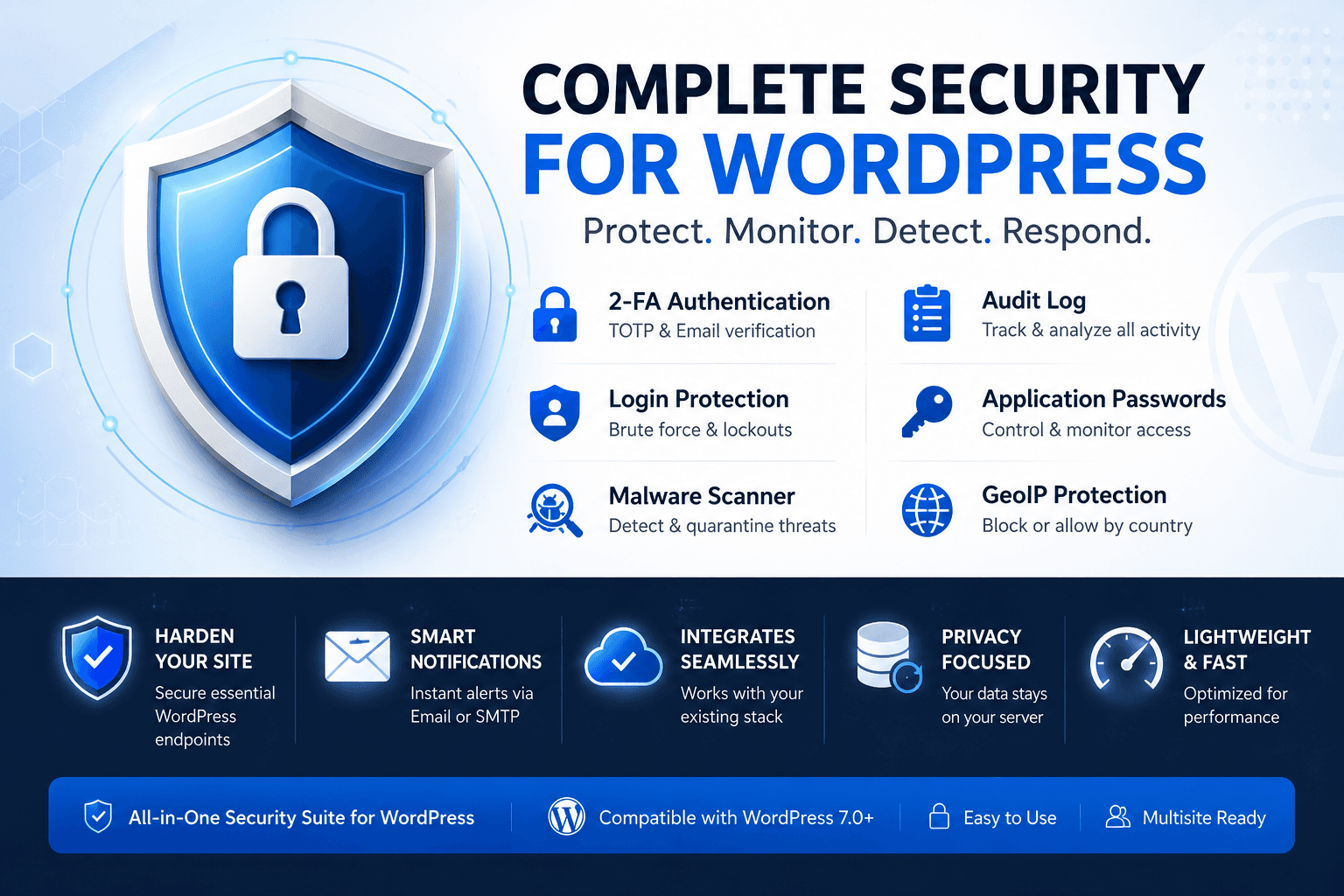
About this app
Hard Guard Security is a comprehensive, free, and open-source WordPress security plugin that prioritizes user privacy and control. It offers a six-layer protection suite including login protection with 2FA, an audit log, local malware scanning, GeoIP access control, application password control, and hardening/recovery tools. Unlike many security plugins, Hard Guard processes all data locally, ensuring no telemetry or scan results are sent to the developer. Optional integrations (like country.is and Cloudflare Turnstile) are fully disclosed and can be enabled as needed. It's ideal for WordPress site owners who want robust security without sacrificing data privacy. The plugin is actively maintained, with a clear changelog and documentation.
Key features
- 1Six-layer protection: login 2FA, audit log, local scanner, GeoIP control, app passwords, hardening tools
- 2Local-first processing with no telemetry or developer cloud; optional connections disclosed and admin-controlled
- 3Multisite support with per-site or network activation; open-source with clear changelog and docs
Target customer profile
Drawn from the product itself, not from a survey.
Demographic
WordPress site owners (freelancers, small business owners) who manage their own websites and are concerned about security but also value privacy.
Pain points
Worried about brute-force attacks and malware; dislike plugins that collect data or send site information to third parties; need a cost-effective solution.
Primary needs
Comprehensive security features (2FA, scanning, lockdowns) that are free or open-source; local processing to keep data private; easy setup and clear documentation.
Demographic
Web developers and agencies that build and maintain WordPress sites for clients, often managing multiple sites (multisite).
Pain points
Need scalable security solutions that can be deployed across multiple sites; require detailed audit logs for client reporting; concerned about client data privacy.
Primary needs
Multisite support, network-wide activation, configurable security modules, local-first approach to avoid liability, and open source for transparency.
Demographic
Privacy-conscious individuals and organizations (e.g., GDPR-compliant companies, NGOs) that handle sensitive data and cannot risk data leaks.
Pain points
Legal and ethical concerns about data storage and third-party processing; need to ensure compliance with privacy regulations; want to avoid cloud-based security services.
Primary needs
Local storage of logs and scan results, no telemetry, transparent external connections, and open source for auditability.
Scout Review
Written by AI from measured evidence, scored out of 100.
Hard Guard Security is a privacy-first WordPress security plugin that delivers a solid, if unpolished, feature set: 2FA, audit logs, local malware scanning, GeoIP control, and hardening tools, all processed locally with no telemetry. The documentation is thorough, and the local-first approach is a genuine differentiator in a market dominated by cloud-dependent rivals. However, the site's design is average, security headers are incomplete, and accessibility is unaddressed. Growth potential exists in the privacy niche, but traction is unverified. It's a competent tool for privacy-conscious site owners, though it needs polish and proof of adoption to compete with established names.
Measure by measure
Usability
64Clear module-based docs with recovery steps and backup guidance; no onboarding wizard or live demo, but feature grid aids navigation.
Design
58Clean blue palette and icon grid aid scanning, but generic shield clipart, missing hero CTA, and cramped dark band cap it at average.
Speed
62Lightweight static homepage with minimal JS; no performance benchmarks available, but local scanning could strain large sites.
Security
38HTTPS enforced but no HSTS, CSP, or frame protection; SPF present, DMARC absent. Local-first claims are strong but unverified by audits.
Accessibility
52Responsive layout and clear icons, but no WCAG statement, small text in dark band, and uniform icon style reduce distinction.
Growth
58Privacy-first WordPress security is a real niche with GDPR tailwinds; local-first differentiates from cloud-dependent rivals, but no traction evidence yet.
Improvement areas
- Security headers on the site itself (HSTS, CSP, frame protection) are missing — needs alignment with its security brand
- No onboarding wizard or live demo; setup requires manual configuration despite good docs
- Accessibility is unaddressed — no WCAG statement, low contrast in dark band, uniform icons reduce distinction
Design & Usability
Hard Guard Security presents a functional but unremarkable interface. The blue palette is consistent and the six-layer feature grid aids quick scanning, but the hero's generic shield clipart and missing primary CTA undermine polish. Usability is stronger: each module links to dedicated docs with recovery procedures, backup guidance, and clear configuration steps. The absence of an onboarding wizard or live demo means new users face a manual setup, though the documentation compensates. The dark navy benefit band's small text hurts readability, and the bottom compatibility bar is informative but visually cluttered. Overall, it's a tool built for function over flair — competent for its audience but not memorable.
Speed & Security
The homepage is lightweight — mostly text and icons with minimal JavaScript — suggesting fast load times, though no performance benchmarks are published. The plugin's local scanning could be resource-intensive on large sites, but no user complaints about lag were found. Security is a mixed bag: HTTPS is enforced, but HSTS, CSP, and frame protection are absent, and DMARC is missing despite SPF being present. The local-first architecture is a genuine privacy strength — no telemetry, no developer cloud, with optional connections (country.is, Turnstile) disclosed and admin-controlled. However, without a published security audit or bug bounty, the plugin's own security posture remains unverified. For a security product, that's a notable gap.
Accessibility & Growth
Accessibility is average at best: the site is responsive and icons aid scanning, but there's no WCAG statement, keyboard navigation is unmentioned, and the dark band's small text risks contrast failures. Growth potential is more promising. The privacy-first positioning directly addresses GDPR and data-sovereignty concerns, differentiating it from Wordfence, Sucuri, and iThemes, which rely on cloud processing. The open-source nature and multisite support appeal to agencies and privacy-conscious NGOs. However, with no visible community, funding, or user reviews, traction is unproven. The idea has headroom — privacy is a growing concern — but execution and adoption remain the open questions.
Conclusion
For WordPress owners who prioritize data privacy and want a free, open-source alternative to cloud-based security plugins, Hard Guard Security is worth a look. The local-first architecture and clear documentation are strong points. But before relying on it, verify its security posture — the missing HSTS and CSP headers on its own site are a red flag. If the project gains community traction and publishes audits, it could carve a real niche. For now, it's a promising underdog with a solid foundation and room to grow.
Suggestions for improvement
- Add a visible 'Download' CTA button to the hero section to reduce friction for new users.
- Publish a security audit or bug bounty program to build trust in the plugin's own security.
- Implement HSTS, CSP, and frame protection headers on the site to match its security-focused brand.
- Add an accessibility statement and improve contrast in the dark benefit band.
Alternatives comparison
Named competitors, point by point. Nobody paid to appear here or to be left out.
 Hard Guard Security |  Wordfence Security |  Sucuri Security |  iThemes Security (formerly Better WP Security) | |
|---|---|---|---|---|
| Data processing location | Local-first; no telemetry or developer cloud; optional external services disclosed | Sends some data to Wordfence cloud for threat intelligence | Cloud-based processing; relies on Sucuri's cloud platform | Cloud-based features; commercial plugin with recurring fees |
| Pricing model | Free and open-source; no license key or paid features | Free tier with premium paid tiers | Paid service; subscription-based | Commercial plugin with recurring fees |
| 2FA support | TOTP, email codes, recovery codes, role-based enforcement | Supports 2FA via TOTP and email | 2FA available but cloud-dependent | 2FA included in premium plans |
| Malware scanning | Local scanner with integrity, permissions, and malware checks; quarantine on server | Cloud-assisted scanning with premium tier for real-time | Cloud-based scanning and malware removal | Malware scanning included in premium plans |
| Multisite support | Supported; per-site or network activation | Supported in premium tier | Supported via cloud dashboard | Supported in premium plans |
Wordfence Security
A popular WordPress security plugin with firewall, malware scanning, and login security, but it sends some data to the Wordfence cloud and has premium tiers.
Sucuri Security
A cloud-based security platform offering malware removal, monitoring, and a website firewall, but it's a paid service and relies on cloud processing.
iThemes Security (formerly Better WP Security)
Provides 2FA, malware scanning, and login protection, but it's now a commercial plugin with recurring fees and cloud-based features.
Comparing options? See Hard Guard Security alternatives, scored side by side
More Security apps
View all Security
issued.live
89Free certificate transparency search and SSL lookup with ...

kosa8
88Sealed VMs for AI agents with instant rewind, audit trails & zero key exposureSealed VMs for AI agents with instant rewind and audit tr...

OBVELO
88Privacy gateway that masks personal data in LLM traffic

C2PA Lab
87Free C2PA Content Credentials Checker

Xsilent Vault: Hide Photos
87Private Android vault for photos, videos, PDFs and files, with no required account, no ads and no mandatory cloud.

Magery Forge
87Weekly security audits for vibe-coded sites, explained in...

Sidenty
87Sidenty is a professional digital identity protection ser...

ProcessSpy
87A native macOS process explorer and advanced monitor that...

Tokitool
87Free, private browser tools for images, chats, QR codes, ...

Basalt
86Eighteen PDF tools in one native Mac window: merge, split, compress, OCR, Bates numbering, forms, signing and redaction. Offline. $29 once.

PromptTrace
85Free hands-on AI security labs for prompt injection and L...

Sanctix
85Sanctions screening with verifiable SHA-256 audit trails.


A platform dedicated to providing unbiased reviews of newly launched applications, analyzing everything from their features to their full potential.
info@scoutforge.net© 2026 Scoutforge. All rights reserved.
