Cycling through all six. Tap any point to stop.
Measured on six things
Unblur photos and upscale them to 4K, no signup
Security
52HTTPS enforced with SPF and DMARC, but zero of the standard hardening headers (no HSTS, CSP, frame protection) and no published audit or security page. Table stakes only.
Screenshots
1 / 1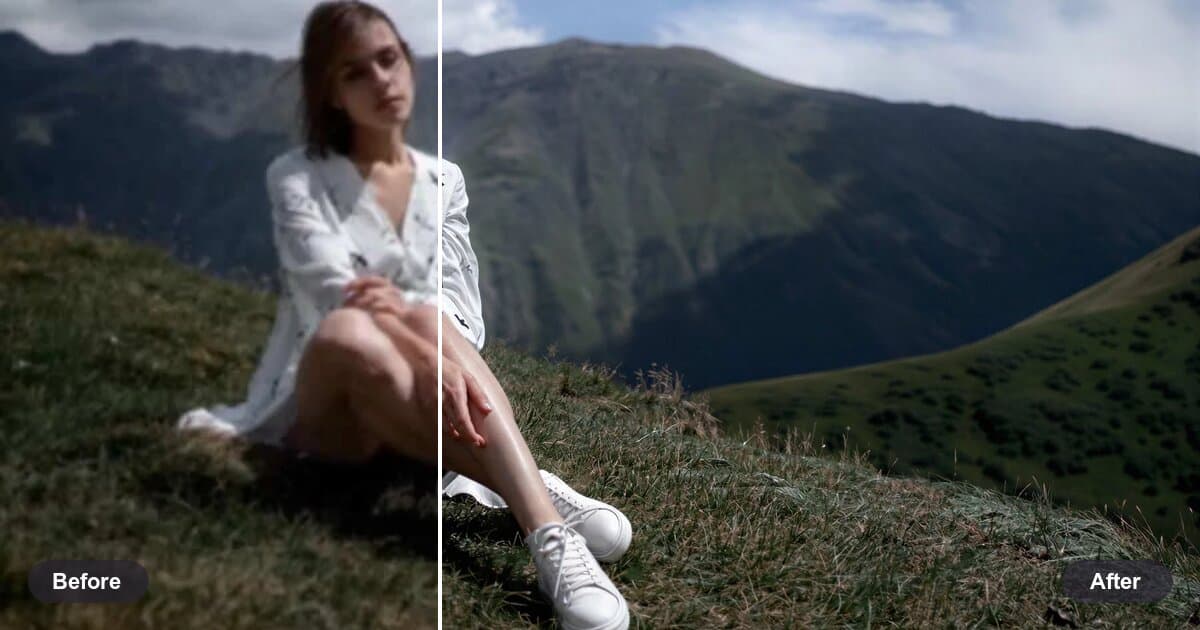
About this app
HD Image Enhancer is an online AI photo enhancer that sharpens blurry images, restores details, and upscales photos to HD or 4K. Free daily usage is available without signup.
Key features
- 1One-click AI enhancement: sharpen blurry photos, remove JPEG artifacts and restore detail without signup.
- 2Upscale to 4K on the free plan, 8K on paid plans with a 16K maximum output.
- 330 free credits daily (7 images) with no account required; batch processing on VIP plans.
Target customer profile
Drawn from the product itself, not from a survey.
Demographic
People who want to unblur photos and upscale them to 4K in the browser, with no signup required.
Pain points
Blurry photos need sharpening, detail restoration, and upscaling to HD or 4K without signup.
Primary needs
An online AI tool that sharpens blurry images, restores details, and upscales photos to HD or 4K.
Scout Review
Written by AI from measured evidence, scored out of 100.
HD Image Enhancer is a competent, fast, no-signup AI upscaler with an honest free tier and a homepage that tries harder than the category average. The core offer is clear and the credit math is transparent. What holds it back is finish: placeholder icons in a trust section, before/after samples too small to prove the claim, pale microcopy that fails contrast, and a security posture that stops at HTTPS. None of these are fatal for an early consumer tool, but together they make a product that works better than it looks.
Measure by measure
Usability
68No-signup upload with limits stated inline, a three-step how-it-works, and a FAQ that actually answers credit math. Small pale body text drags down scanning on the long scroll.
Design
56Editorial serif hero and a consistent card system give it character, but empty icon circles, near-invisible before/after thumbnails and a half-width FAQ make it read unfinished.
Speed
88Lighthouse 99 mobile / 100 desktop with LCP 2.2s, CLS 0 and TBT 35ms. Genuinely fast for an image tool with a draggable slider and sample grids on the homepage.
Security
52HTTPS enforced with SPF and DMARC, but zero of the standard hardening headers (no HSTS, CSP, frame protection) and no published audit or security page. Table stakes only.
Accessibility
78Lighthouse a11y 96/100 with a single contrast failure, matching the pale grey microcopy seen in the visual audit. No WCAG statement or a11y page published.
Growth
58Real, broad demand and a genuine wedge — 7 free images a day with no signup and 4K output — but upscaling is a crowded, commoditized category with little lock-in.
Improvement areas
- Security headers are largely absent (no HSTS, CSP, frame protection) and no audit or security page is published.
- Placeholder icons in the trust section and before/after samples too small to demonstrate the core claim.
- Small pale grey helper text fails the contrast audit and hurts scanning on long pages.
Design & Usability
The homepage has more personality than most AI tool templates — a serif headline, a working before/after slider, and a card system applied with discipline. The problem is the details: three 'Your Images Stay Yours' cards ship with empty lavender circles where icons belong, the sample before/after thumbnails are too small to show the difference the whole page is selling, and the FAQ sits in a narrow column with a blank right side. Usability is stronger. Upload limits are stated before you try, the three-step flow is scannable, and the FAQ answers the credit question honestly — 30 credits, 4 per image, 7 images a day, reset at midnight UTC. The drag is legibility: helper text and card descriptions are small and pale, which hurts scanning on a long page.
Speed & Security
Speed is the standout. Lighthouse gives it 99 on mobile and a perfect 100 on desktop, with LCP 2.2s, zero layout shift and 35ms total blocking time — impressive for a page carrying a draggable comparison slider and six sample grids. Security is the weak flank. HTTPS is enforced and SPF/DMARC are in place, but there is no HSTS, no CSP, no frame protection, no X-Content-Type-Options, no Referrer-Policy and no Permissions-Policy — four of twelve checklist points. No SOC 2, ISO or pen-test claim appears anywhere on the site, and there is no security page. For a tool that asks you to upload personal photos, that's a thin posture, though not unusual for an early-stage consumer utility.
Accessibility & Growth
Accessibility scores 96/100 on Lighthouse with exactly one failing audit: insufficient background/foreground contrast. That matches the visual audit's note about small pale grey helper text, so it's a real, fixable issue rather than a phantom. There's no accessibility statement or WCAG claim, and no evidence of multi-language support. Growth is a judgment on the idea: the problem — blurry photos, old scans, low-res product shots — is real and broad, and the wedge is concrete. Seven free images a day with no signup and 4K output is a genuinely lower-friction offer than most competitors. But AI upscaling is a commoditized category with dozens of near-identical tools and browser extensions, and nothing here creates switching costs. The domain is roughly three months old with a single Twitter profile, so traction is context, not a verdict.
Conclusion
If you need to unblur a photo right now without making an account, this does the job and does it fast. If you're evaluating it as a long-term tool for a catalogue or print workflow, wait for the security headers, the accessibility fix and a real pricing page before committing. The foundation — speed, a clear free tier, a working demo — is solid. The polish is what's missing.
Suggestions for improvement
- Replace the empty lavender circles in the trust section with real icons — placeholder content in production undermines the whole 'your images are safe' message.
- Enlarge or zoom the before/after sample thumbnails so the difference is visible at card size; right now the core claim is unprovable on the page.
- Darken the helper and card description text to pass the contrast audit and improve scanning on the long scroll.
- Add HSTS, CSP and frame protection headers, and publish a short security/data-handling page for a tool that accepts personal photo uploads.
Alternatives comparison
Named competitors, point by point. Nobody paid to appear here or to be left out.
 HD Image Enhancer |  | |
|---|---|---|
| Free tier without signup | Yes — 30 credits/day, 7 images, no account | Not specified in provided details |
| Maximum free output resolution | 4K free; 8K paid, 16K max | Not specified in provided details |
| Batch processing | VIP plans only | Not specified in provided details |
| Supported input formats | JPG, PNG, WEBP, HEIC | Not specified in provided details |
Comparing options? See HD Image Enhancer alternatives, scored side by side
More AI Generations apps
View all AI Generations
Uni-1 by Luma AI
92Uni-1 is an advanced multimodal text-to-image AI model th...

Gerty
91Private, local AI assistant for Mac that runs offline

LTX 2.3 AI Video Generator
91Fast, open-source AI video generator with 4K support, mul...

DemoVexa
90Turn your code into professional product demo videos with AI-generated scripts, animated UI, and natural voiceovers.

All of Us
89Add deceased loved ones to photos with AI and see free pr...

Voqusa
89Transcribe social media video and audio links into text (free signup, 5 free credits, then pay-as-you-go)

Pixelimg
88A free online AI-powered tool that instantly converts ima...

IraVoice
88Private on-device dictation for Apple-silicon Macs.

OBVELO
88Privacy gateway that masks personal data in LLM traffic

tradutor de mangá com IA
88O tradutor de mangá com IA traduz capítulos em lote, personaliza textos e oferece edição visual para estúdios.

HeyVid AI
88HeyVid AI is a free all-in-one AI video and image generat...

RestorePhotosApp
88An AI-powered photo restoration app that brings old, blur...


A platform dedicated to providing unbiased reviews of newly launched applications, analyzing everything from their features to their full potential.
info@scoutforge.net© 2026 Scoutforge. All rights reserved.
