Cycling through all six. Tap any point to stop.
Measured on six things
Local-first runtime control for AI coding agents
Speed
58Lighthouse mobile 65/100 with LCP 4.2s — above the 2.5s good threshold — though CLS is a clean 0 and TBT is a modest 420ms. The page is heavier than a docs-first dev tool needs to be. No user complaints about latency in collected evidence.
Screenshots
1 / 1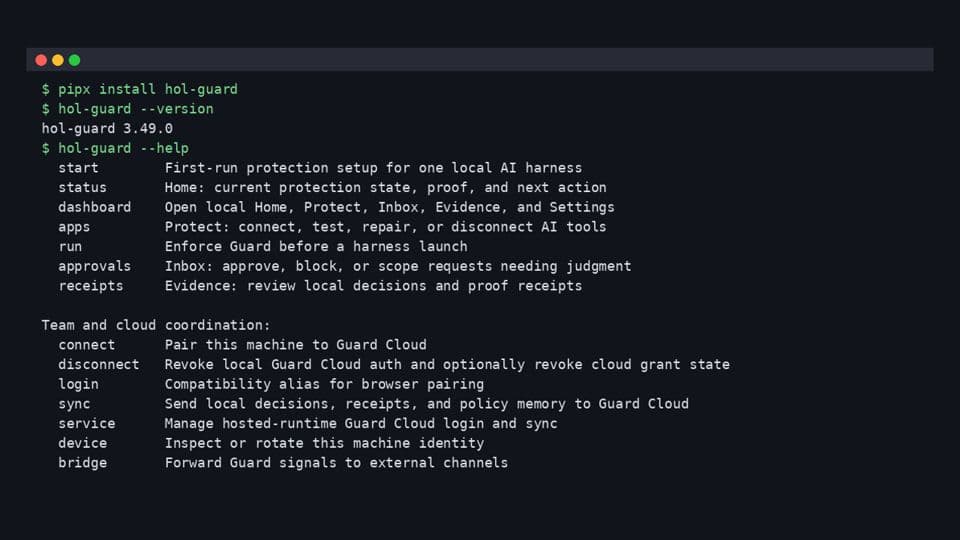
About this app
Letting an AI coding agent drive your terminal is fast, but you still want a say in what it touches. HOL Guard is local-first runtime control that runs on your own machine alongside Claude Code, Codex and Cursor. Routine work keeps flowing; risky shell commands, secret reads, MCP calls and package installs are held until you approve or deny them, based on the policy you set. Local HOL Guard is free and open source under Apache-2.0, and Guard Cloud is an optional paid add-on. Get started with: pipx install hol-guard && hol-guard init. HOL Guard is not a gateway or a network firewall, and it does not claim to stop every prompt injection; Scan is not a safety guarantee. Made by HOL.
Key features
- 1Local-first runtime approval for risky agent actions: shell commands, secret reads, MCP calls, package installs
- 2Free Apache-2.0 local tier with offline support and no account required; install via `pipx install hol-guard`
- 3Optional Guard Cloud from $4.99/mo (Solo) to $30/seat/mo (Team) for sync, shared policy and team workflows
- 4Harness integrations for Claude Code, Codex, Cursor, OpenCode, Antigravity CLI, Hermes and OpenClaw
- 5Six decision guides and three comparisons with visible review expiry dates at /guard/guides
Target customer profile
Drawn from the product itself, not from a survey.
Demographic
Individual developers using AI coding agents
Pain points
Worried an agent will run a destructive shell command, read secrets or install an unexpected package
Primary needs
A free, local approval step for risky agent actions
Demographic
Engineering teams adopting Claude Code, Codex or Cursor
Pain points
Need consistent rules for what agents may do on developer machines
Primary needs
Policies that run locally, with optional paid Guard Cloud
Demographic
Developers who connect MCP servers to their agents
Pain points
Unsure which MCP tool calls an agent will make
Primary needs
MCP calls paused for approval per policy
Demographic
Open-source and security-minded developers
Pain points
Want auditable tooling that runs on their own machine
Primary needs
Apache-2.0 open source tool installed with pipx
Scout Review
Written by AI from measured evidence, scored out of 100.
HOL Guard is a local-first runtime control for AI coding agents — it pauses risky shell commands, secret reads, MCP calls and package installs until you approve them, with a free Apache-2.0 local tier and optional Guard Cloud from $4.99/mo. The positioning is sharp and the landing page backs it with a real terminal demo. Design and usability land in the high 60s to low 70s: confident visual language, honest FAQ, decent docs, held back by small polish issues and harness-dependent setup. Speed is the soft spot at 58 (LCP 4.2s). Security sits at 63 — solid headers, no CSP, no published audit. Accessibility is 82 on automated checks with real contrast and labeling failures. Growth is 64: a genuine wedge in a growing category, with integration coverage as the ceiling.
Measure by measure
Usability
68Install is one pipx line, uninstall is documented, and the FAQ answers the awkward questions (offline? what leaves my machine?). Six decision guides with review expiry dates beat most competitors' docs. Onboarding still depends on harness-specific setup, which the site admits.
Design
71Dark, confident landing page with a realistic macOS terminal demo showing real blocked commands (rm -rf, cat ~/.aws/credentials). Red/green status language is consistent. Held back by a dense hero paragraph, a dead dropdown chevron, and a cramped six-row intercepts list.
Speed
58Lighthouse mobile 65/100 with LCP 4.2s — above the 2.5s good threshold — though CLS is a clean 0 and TBT is a modest 420ms. The page is heavier than a docs-first dev tool needs to be. No user complaints about latency in collected evidence.
Security
639/13 header checklist points with HSTS, DMARC, SPF, frame protection and secure cookies all present. Missing CSP and HTTPS enforcement flagged by the probe. Apache-2.0 source and a clear 'nothing leaves my machine' data story help; no SOC 2 or audit published.
Accessibility
82Lighthouse accessibility 97/100 — strong. Two real failures remain: insufficient color contrast and visible text labels without matching accessible names. No WCAG conformance statement or a11y page found, so the ceiling stays below the top of the band.
Growth
64Real, specific wedge: runtime approval for agent actions, not dependency scanning. Snyk, Socket and npm audit look at packages; Guard looks at what the agent is about to do. Free local tier plus $4.99-$30/seat cloud is a sane ladder.
Improvement areas
- No Content-Security-Policy header and HTTPS enforcement flagged missing by the probe
- Lighthouse mobile performance 65/100 with LCP 4.2s — heavier than a docs-first dev tool needs
- Two accessibility failures: insufficient color contrast and visible labels without matching accessible names
- No published SOC 2, ISO or third-party audit; no per-harness coverage matrix on the site
Design & Usability
Design and usability are the strongest pair here. The homepage does the hard thing well: it shows a real terminal with real blocked commands instead of a stock illustration, and the red/green language carries from hero to intercepts. Install is a single pipx line, uninstall is documented, and the FAQ preempts the obvious objections about offline use and data leaving the machine. The six decision guides with visible review expiry dates are a genuinely above-average docs move for a product this young. What holds both scores back is polish and depth: a dead nav chevron, a cramped intercepts list, and a setup story that still leans on 'depends on your harness.'
Speed & Security
Speed is the weakest measured dimension: Lighthouse mobile 65/100 with a 4.2s LCP, well past the 2.5s threshold, though CLS is a clean 0 and TBT is a modest 420ms. For a docs-first developer tool that's heavier than it needs to be. Security is more interesting: 9/13 header checklist points with HSTS, DMARC, SPF, frame protection and secure cookies present, but no CSP and HTTPS enforcement flagged as missing — an odd gap for a security product. The Apache-2.0 source and the explicit 'nothing leaves my machine by default' data story are real strengths. No SOC 2, ISO, or published audit was found, which is normal at this stage but caps the score.
Accessibility & Growth
Accessibility scores well on automation — 97/100 — but two real failures remain: insufficient color contrast and visible text labels without matching accessible names. Those matter here because the red/green status pills carry the product's entire story, and contrast is exactly where that breaks for low-vision users. No WCAG statement was found. Growth is the most defensible dimension: the wedge is specific and real. Snyk, Socket and npm audit scan dependencies; Guard intercepts what the agent is about to do. The free local tier plus a $4.99-$30/seat cloud ladder is a sane monetization path, and the target segment — developers running Claude Code, Codex and Cursor — is growing. The limit is integration treadmill risk: every harness is a maintenance surface, and coverage gaps are the product's own admitted weakness.
Conclusion
If you're running Claude Code, Codex or Cursor on a machine with real credentials on it, HOL Guard is worth the pipx install — the free local tier costs you nothing but a line in your shell, and the approval step is exactly the kind of friction you want before an agent runs rm -rf. The paid cloud tier only makes sense once you're juggling multiple machines or a team. What would move this from 'good' to 'excellent': a published CSP, a real accessibility pass on the status pills, and a coverage matrix that tells you exactly which events each harness supports before you install.
Suggestions for improvement
- Add a Content-Security-Policy header — a security product shipping without one is a credibility gap.
- Fix the two Lighthouse a11y failures: contrast on the red/green status pills and accessible names on labeled controls.
- Publish a per-harness coverage matrix (which events Guard evaluates for Claude Code vs Codex vs Cursor) instead of 'depends on your harness.'
- Trim the hero paragraph and add spacing to the six-row 'Live intercepts' list; remove or wire up the dead nav chevron.
Alternatives comparison
Named competitors, point by point. Nobody paid to appear here or to be left out.
 HOL Guard HOL Guard |  Snyk Snyk |  Socket Socket | npm audit | |
|---|---|---|---|---|
| Primary security model | Local-first runtime approval of agent actions (shell, secrets, MCP, installs) | Static/dependency vulnerability scanning across code and packages | Supply-chain security for open-source packages at install time | Built-in npm command reporting known dependency vulnerabilities |
| When it acts | Before an agent action executes (runtime, on your machine) | During development and CI, on code and dependency manifests | At package install time, before code lands in your tree | On demand or in CI, against the installed dependency tree |
| Free tier | Yes — free forever on one machine, Apache-2.0 open source | Yes — limited free plan with monthly test caps | Yes — free tier for individual developers | Yes — bundled with npm, no account needed |
| Runs locally / offline | Yes — local enforcement works offline; cloud is optional | CLI runs locally but vulnerability data requires network | Primarily cloud-based analysis | Runs locally but queries the npm registry for advisories |
| Open source | Yes — Apache-2.0 | No — proprietary SaaS | No — proprietary SaaS | Yes — part of the open-source npm CLI |
| Team policy / shared rules | Yes — Guard Cloud Team plan at $30/seat/mo | Yes — org-level policies on paid plans | Yes — team plans with org-wide alerts | No — per-project configuration only |
Snyk
Developer security platform for scanning code and dependencies.
Socket
Supply-chain security for open-source packages.
npm audit
Built-in npm command that reports known vulnerabilities in dependencies.
Comparing options? See HOL Guard alternatives, scored side by side
More Security apps
View all Security
OBVELO
88Privacy gateway that masks personal data in LLM traffic

Sidenty
87Sidenty is a professional digital identity protection ser...

ProcessSpy
87A native macOS process explorer and advanced monitor that...

PromptTrace
85Free hands-on AI security labs for prompt injection and L...

Sanctix
85Sanctions screening with verifiable SHA-256 audit trails.

eGuard
84Verifiable parental controls for families in the Philippines

yourdrive
84YourDrive is a self-hosted file manager and media timeline that runs entirely on your own infrastructure. Organize files in nested folders, move them with drag-and-drop, search instantly, and browse photos and videos by month and year. Files stream straight to your own AWS S3, Azure Blob, MinIO, Cloudflare R2 or Wasabi storage. Install with one command. Free for personal use; teams pay per server, not per seat.

Noden
84Native macOS SSH, SFTP & RDP client with a Keychain-backe...

Archonum
84Real-device browser automation for AI agents

Privacy Requests
84DSAR management software for small teams.

VaultKeepR
84Password manager with no email, no account, no tracking. ...

Insomnia
84Autonomous AI pentesting suite with 7-agent red team, 275...


A platform dedicated to providing unbiased reviews of newly launched applications, analyzing everything from their features to their full potential.
info@scoutforge.net© 2026 Scoutforge. All rights reserved.
