Cycling through all six. Tap any point to stop.
Measured on six things
Right-click any file or folder and choose Lock with Hushbox. It stays in its folder, AES-256 encrypted, until Touch ID opens it. $9 once.
Security
52Strong product-side crypto story (AES-256 disk images, Apple tools, no cloud, no account) but the website ships only 4/12 security headers and publishes no audits or compliance claims.
Screenshots
1 / 3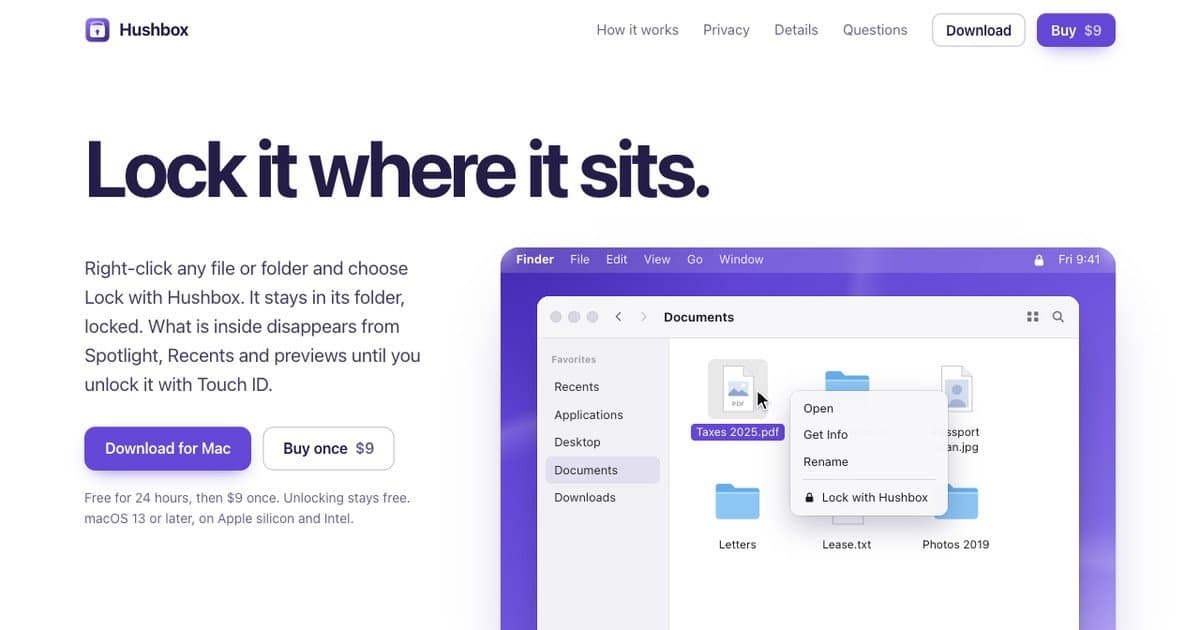
About this app
Right-click any file or folder in Finder and choose Lock with Hushbox. It stays right where it is, locked. What is inside disappears from Spotlight, Recents and previews until you unlock it with Touch ID or your Hushbox password. Each locked item is an AES-256 encrypted disk image made with Apple's own tools, so it opens even without Hushbox. The original is deleted only after the locked copy is checked byte for byte. Hushbox locks itself when the screen locks, the Mac sleeps or after idle time, and asks before closing apps with unsaved work. No account, no cloud. Free for 24 hours, then $9 once; unlocking stays free. macOS 13 or later.
Key features
- 1Right-click any file or folder in Finder to lock it in place with AES-256 encryption.
- 2Locked items disappear from Spotlight, Recents, and previews until unlocked with Touch ID or password.
- 3Auto-locks on screen lock, sleep, or idle time; asks before closing apps with unsaved work.
- 4No account, no cloud; locked items are standard disk images openable without Hushbox.
- 524-hour full trial, then $9 once for 2 Macs with free updates; unlocking stays free.
Target customer profile
Drawn from the product itself, not from a survey.
Scout Review
Written by AI from measured evidence, scored out of 100.
Hushbox is a focused, well-executed Mac utility with a genuinely distinct pitch: lock any file or folder in place from the Finder right-click menu, no vault, no account, no cloud, and the locked item is a standard AES-256 disk image you can open without the app. The landing page communicates that in seconds with accurate Finder mockups and disciplined branding. Speed is strong, accessibility is nearly perfect, and the 24-hour full trial with permanently free unlocking is a fair deal. The gaps are real but fixable: no help center or docs, a repetitive below-the-fold layout, and a website that ships only 4/12 security headers with no published audits — a mismatch for a privacy product. At $9 once for two Macs, it's an easy recommendation for Mac users who want frictionless file locking without adopting a new workflow.
Measure by measure
Usability
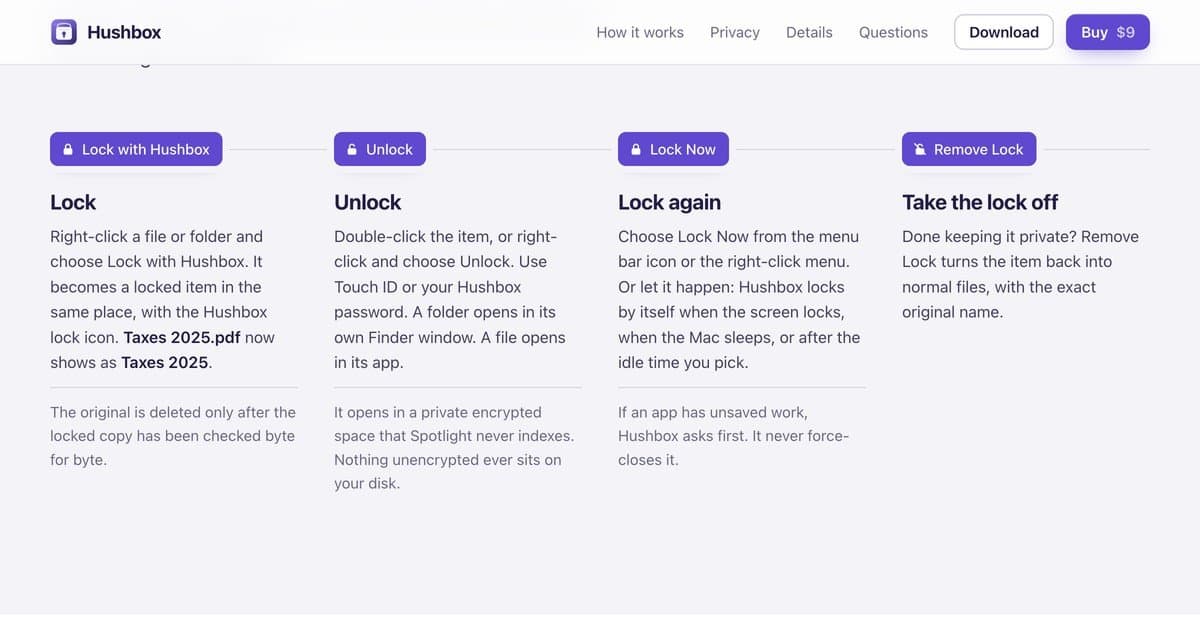
66Four numbered steps with screenshots make the lock/unlock flow obvious, and the 24-hour full trial with free unlocking lowers risk. No real docs or help center beyond the homepage.
Design
70Polished, cohesive landing page with accurate Finder mockups and disciplined purple branding. Held back by cramped hero CTAs and repetitive four-column sections below the fold.
Speed
74Lighthouse desktop 94 and mobile 85 with zero layout shift and low blocking time. Mobile LCP of 3.6s is the one soft spot on an otherwise snappy marketing page.
Security
52Strong product-side crypto story (AES-256 disk images, Apple tools, no cloud, no account) but the website ships only 4/12 security headers and publishes no audits or compliance claims.
Accessibility
80Lighthouse a11y 97/100 with only contrast and accessible-name failures. No WCAG statement or multi-language support, but the site is clean and keyboard-friendly.
Growth
58Real, specific wedge: lock files in place via Finder right-click, no vault, no account, no cloud, files openable without the app. Sharp $9 one-time price. Category is crowded but this angle is distinct.
Improvement areas
- No help center or documentation beyond the homepage; password recovery limits need a real page.
- Website ships only 4/12 security headers (no HSTS, CSP, frame protection, Referrer-Policy).
- Two Lighthouse accessibility failures: contrast ratio and visible label/accessible name mismatch.
- Repetitive four-column layout below the fold and cramped hero CTAs reduce visual polish.
Design & Usability
Hushbox's site does the hard part well: it shows the actual Finder right-click menu with a locked Taxes 2025.pdf, so you understand the product in about four seconds. The purple accent is used consistently across icons, buttons, and window chrome, and the four numbered steps (Lock, Unlock, Lock Now, Remove Lock) walk through the workflow without a wall of text. The 24-hour full trial and the promise that unlocking stays free even if you never buy are genuinely reassuring. Where it slips: the hero CTAs are crammed under a dense paragraph, and below the fold the page repeats the same four-column layout so many times it starts to blur. There's also no real documentation or help center — just the homepage and a 'Step by step' link — which matters for a tool whose whole pitch is 'no password recovery.'
Speed & Security
Speed is a genuine strength: Lighthouse desktop 94 and mobile 85, CLS of zero, TBT of 36ms. The only blemish is a 3.6-second mobile LCP, which is fine but not exceptional. Security is a split verdict. On the product side the story is strong and specific: AES-256 encrypted disk images built with Apple's own tools, no custom format, no account, no cloud, and a documented way to open locked items without Hushbox at all. On the website side it's thin — HTTPS and SPF/DMARC are present, but HSTS, CSP, frame protection, X-Content-Type-Options, Referrer-Policy, and Permissions-Policy are all missing (4/12 on the header checklist), and there are no published audits, SOC 2, or bug bounty. For a privacy product, the marketing site should match the app's seriousness.
Accessibility & Growth
Accessibility scores 97/100 on Lighthouse with only two failing audits — a contrast ratio and a visible label whose accessible name doesn't match. Those are fixable in an afternoon. There's no WCAG statement or multi-language support, but the site is clean and the native app inherits macOS accessibility. Growth is the most interesting question. The wedge is real and specific: lock a file where it sits, via the right-click menu, with no vault to open and no account to create. That's a meaningfully different pitch from vault-style competitors, and the $9 one-time price for two Macs with free updates is sharp against subscription tools. The category is crowded and the domain is only months old, so traction is minimal — but the idea itself has a clear reason to exist and a clear reason to pick it over the alternatives.
Conclusion
If you've ever wanted to lock a single folder without dragging it into a vault app, Hushbox is the shortest path from 'I want this private' to 'it's locked.' The product story is honest and the pricing is fair. The work ahead is on the website: tighten the hero, break up the repeated grids, publish real docs, and ship the security headers a privacy tool should have. Do that and this goes from a clever $9 utility to a genuinely trustworthy one.
Suggestions for improvement
- Add a real help center or docs page covering password recovery limits, Time Machine restores, and what happens if Hushbox is uninstalled.
- Ship HSTS, CSP, frame protection, X-Content-Type-Options, Referrer-Policy, and Permissions-Policy on the marketing site.
- Fix the two Lighthouse a11y failures: contrast ratio and the visible label/accessible name mismatch.
- Vary the below-the-fold layout and give the hero CTAs breathing room so the page doesn't read as four identical grids.
Alternatives comparison
Named competitors, point by point. Nobody paid to appear here or to be left out.
 Hushbox Hushbox | ||
|---|---|---|
| Pricing model | $9 once for 2 Macs, free updates; 24h full trial; unlocking always free | Not specified in provided data |
| Encryption approach | AES-256 encrypted disk images via Apple's own tools; openable without the app | Not specified in provided data |
| Account / cloud requirement | No account, no cloud; everything on-device | Not specified in provided data |
| Finder integration | Right-click Lock with Hushbox directly in Finder; no vault window | Not specified in provided data |
| Auto-lock behavior | Locks on screen lock, sleep, or configurable idle time (5/15/30/60 min) | Not specified in provided data |
Comparing options? See Hushbox alternatives, scored side by side
More Security apps
View all Security
OBVELO
88Privacy gateway that masks personal data in LLM traffic

Sidenty
87Sidenty is a professional digital identity protection ser...

ProcessSpy
87A native macOS process explorer and advanced monitor that...

PromptTrace
85Free hands-on AI security labs for prompt injection and L...

Sanctix
85Sanctions screening with verifiable SHA-256 audit trails.

eGuard
84Verifiable parental controls for families in the Philippines

yourdrive
84YourDrive is a self-hosted file manager and media timeline that runs entirely on your own infrastructure. Organize files in nested folders, move them with drag-and-drop, search instantly, and browse photos and videos by month and year. Files stream straight to your own AWS S3, Azure Blob, MinIO, Cloudflare R2 or Wasabi storage. Install with one command. Free for personal use; teams pay per server, not per seat.

Noden
84Native macOS SSH, SFTP & RDP client with a Keychain-backe...

Archonum
84Real-device browser automation for AI agents

Privacy Requests
84DSAR management software for small teams.

VaultKeepR
84Password manager with no email, no account, no tracking. ...

Insomnia
84Autonomous AI pentesting suite with 7-agent red team, 275...


A platform dedicated to providing unbiased reviews of newly launched applications, analyzing everything from their features to their full potential.
info@scoutforge.net© 2026 Scoutforge. All rights reserved.
