Cycling through all six. Tap any point to stop.
Measured on six things
Turn your pet into a cartoon, a painting or a hero
Security
52HTTPS enforced with SPF and DMARC, and uploads auto-delete after 24 hours. But only 4/12 header checklist points: no HSTS, CSP, frame protection or Referrer-Policy. No audit claims.
Screenshots
1 / 1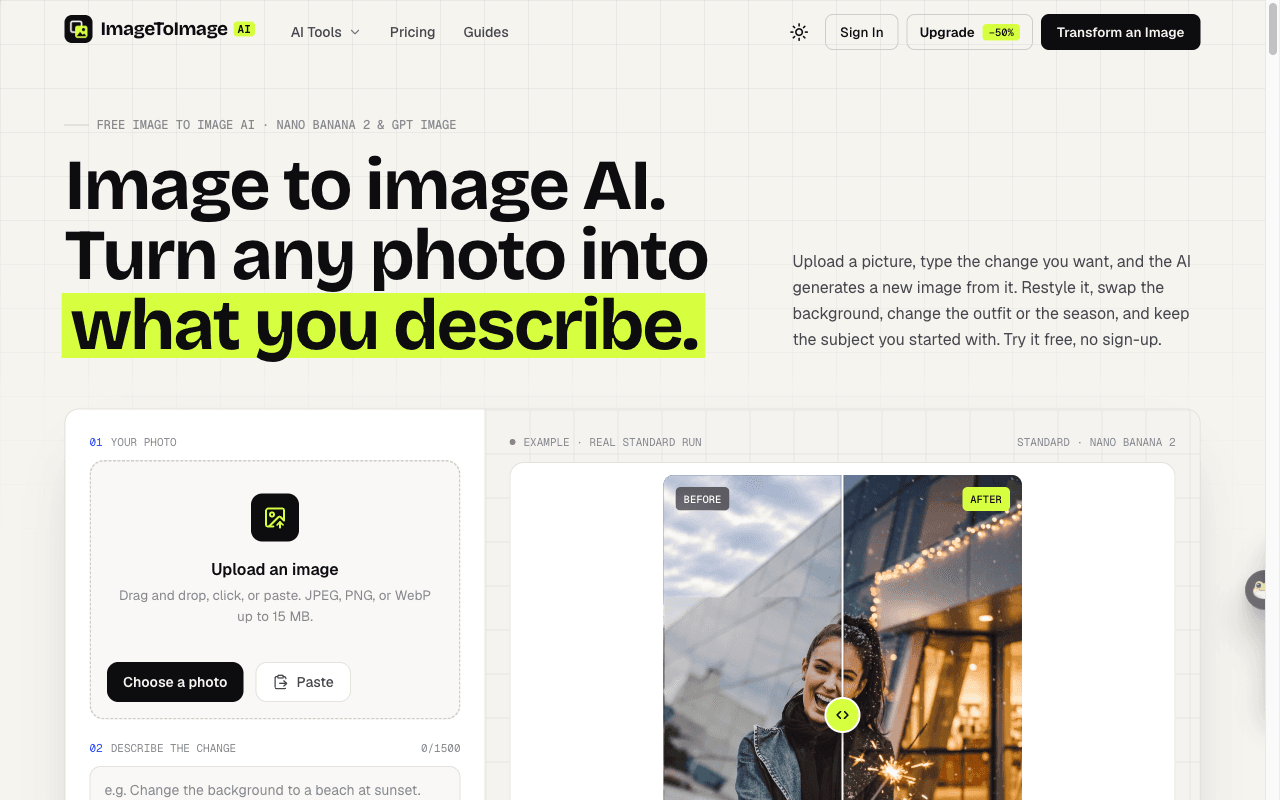
About this app
Pet photos are some of the most fun to transform. With ImageToImage AI you can turn your dog into a cartoon character, give your cat a Renaissance oil portrait, or place them in a snowy scene for a holiday card. Because the AI starts from your photo, the markings and expression that make your pet yours carry through to the result. Upload a photo of your dog or cat and turn it into a cartoon, watercolor or oil portrait that still looks like your pet. ImageToImage AI is a browser-based image to image editor: upload a photo, describe the change, and the AI (Nano Banana 2 or GPT Image) edits it while keeping the subject. One-click tools cover photo to cartoon, painting, sketch, image extending, object removal and photo restoration. Free daily runs, no sign-up; credit packs from $2.99.
Key features
- 1Image-to-image editing on Nano Banana 2 and GPT Image with Standard, Pro and HD 4K tiers.
- 2One-click restyles: photo to cartoon, painting, sketch, plus extend, object removal and restoration.
- 3No sign-up free daily run; credit packs from $2.99 that never expire, Pro at $15/month for 400 credits.
Target customer profile
Drawn from the product itself, not from a survey.
Demographic
Online sellers and small e-commerce owners
Pain points
Product photos look flat and studio reshoots are expensive
Primary needs
Turn one plain product shot into lifestyle scenes for listings and ads
Demographic
Social media creators and influencers
Pain points
Constant demand for fresh, stylized visuals on a tight budget
Primary needs
Fast restyles, background swaps and outfit changes without sign-up friction
Demographic
Job seekers and professionals needing headshots
Pain points
Casual selfies don't fit a polished LinkedIn or resume profile
Primary needs
Convert a casual photo into a professional headshot while keeping the face intact
Demographic
Interior design hobbyists and homeowners
Pain points
Hard to visualize a room restyle without hiring a designer
Primary needs
Restyle a room photo in different styles while preserving the layout
Demographic
Hobbyists and casual AI tinkerers
Pain points
Most AI image tools gate everything behind accounts and subscriptions
Primary needs
Free, no-sign-up experimentation with anime, figurine and seasonal edits
Scout Review
Written by AI from measured evidence, scored out of 100.
ImageToImage AI is a focused photo-to-photo editor built on Nano Banana 2 and GPT Image, and it's honest about what it does: upload a photo, describe the change, keep the subject. The landing page earns trust with real before/after examples and printed prompts rather than stock renders. Usability is the standout — no sign-up, prompt chips, before/after sliders, and pricing that lists a credit cost for every single tool. Speed is solid on measured runs. The gaps are security headers (4/12) and a handful of accessibility failures that undercut an otherwise strong 91 audit score. Growth is credible but not defensible: the no-sign-up, cheap-credits angle is real, and it's also the easiest thing for a bigger player to copy.
Measure by measure
Usability
74No sign-up to try, idea chips to beat the blank prompt, before/after slider on every result, and 7-day history when signed in. Clear pricing with per-run credit costs.
Design
72Clean 3-step flow, six real before/after examples with the exact prompts, and a light/dark toggle. Dense top nav with 10+ tool links clutters an otherwise polished page.
Speed
70Lighthouse mobile 87/100 (LCP 3.3s, CLS 0.006, TBT 146ms) and desktop 86/100. LCP is the weak spot; the rest of the vitals are clean.
Security
52HTTPS enforced with SPF and DMARC, and uploads auto-delete after 24 hours. But only 4/12 header checklist points: no HSTS, CSP, frame protection or Referrer-Policy. No audit claims.
Accessibility
70Lighthouse a11y 91/100, but failing audits include buttons without accessible names, low contrast text, and mismatched visible/accessible labels. No a11y statement or multi-language support found.
Growth
62Real problem, specific segments (sellers, creators, headshots, interiors), and a genuine wedge: no-sign-up free runs plus $2.99 credit packs against subscription-gated incumbents.
Improvement areas
- Security headers score 4/12 — missing HSTS, CSP, frame protection, Referrer-Policy and Permissions-Policy.
- Accessibility audit fails on unnamed buttons, low contrast, and mismatched visible/accessible labels.
- Top navigation crams 10+ tool links into one bar, diluting focus on the core generator.
Design & Usability
The landing page does the hard part well: six before/after pairs with the exact prompts printed underneath, so you can see what the tool actually does before you touch it. The three-step flow (upload, describe, generate) is obvious at a glance, and the prompt idea chips mean you're never staring at an empty box. No sign-up to try is the real usability win — one free Standard image a day anonymously, ten credits if you sign in. Pricing is unusually legible for this category: every tool has a credit cost listed, packs never expire, and Pro is $15/month for 400 credits. The drag is the navigation — ten-plus tool links crammed into one top bar makes a focused tool feel like a Swiss army knife with too many blades.
Speed & Security
Measured Lighthouse runs land at 87 mobile and 86 desktop, with FCP at 1.1s and CLS at 0.006 — the page paints fast and doesn't jump around. The one soft number is LCP at 3.3s, which is the hero doing the heavy lifting. Security is the weakest measured dimension: HTTPS is enforced and SPF/DMARC are in place, and the site commits to deleting uploads and results after 24 hours, which is the right instinct for a photo tool. But the header probe returns 4/12 — no HSTS, no CSP, no frame protection, no Referrer-Policy, no Permissions-Policy. For a product that asks you to upload personal photos, that's a thin shell around the thing that matters most.
Accessibility & Growth
Automated accessibility scores 91/100, which sounds great until you read the failing audits: buttons with no accessible name, insufficient color contrast, and visible labels that don't match their accessible names. Those are exactly the failures that make a screen reader experience confusing rather than broken, and they're cheap to fix. There's no accessibility statement and no multi-language support in the site content. On growth, the idea holds up better than most in this crowded category: the problem is real, the segments are named specifically (e-commerce sellers, creators, headshot seekers, interior hobbyists), and the wedge — free no-sign-up runs plus $2.99 credit packs — is a genuine contrast with Midjourney's Discord-and-subscription model and Adobe's Creative Cloud tether. The limit is that the wedge is a pricing and friction choice, not a moat; Canva already has the editor and the audience to bolt this on.
Conclusion
If you want to restyle a product shot, cartoon a cat, or fake a LinkedIn headshot without making an account, this does the job and tells you the price up front. Before you upload anything sensitive, know that the security headers are thin and the 24-hour deletion promise is a policy, not an audited guarantee. Fix the header set and the three failing a11y audits and this moves from 'nice free tool' to 'actually trustworthy free tool.'
Suggestions for improvement
- Add HSTS, CSP, X-Frame-Options, Referrer-Policy and Permissions-Policy — the probe scores 4/12 and these are cheap wins.
- Give every button an accessible name and fix the contrast failures flagged in the Lighthouse audit.
- Publish a short security/privacy page explaining the 24-hour deletion and how uploads are handled.
- Collapse the 10+ tool links into grouped menus so the generator stays the focus of the page.
Alternatives comparison
Named competitors, point by point. Nobody paid to appear here or to be left out.
 ImageToImage AI |  Midjourney |  Adobe Firefly |  Canva Magic Edit | |
|---|---|---|---|---|
| Free tier without an account | Yes — 1 free Standard image/day anonymous, 10 credits/day signed in | No — subscription required | Limited free credits, Adobe account required | Free plan available, account required |
| Dedicated photo-to-photo editing flow | Yes — upload, describe, generate with before/after slider | Partial — primarily text-prompt driven | Yes — generative fill and edit inside Creative Cloud | Yes — Magic Edit inside a full design editor |
| Entry price | Credit packs from $2.99; Pro $15/month for 400 credits | Subscription only, roughly $10+/month | Tied to Adobe subscription tiers | Free tier; Pro subscription for full AI features |
| One-click preset tools | Cartoon, painting, sketch, restoration, extend, object removal, room design, hairstyle, clothes | Style references and parameters, no preset tool menu | Generative fill, expand, and text effects presets | Magic Edit, Magic Eraser, background remover inside editor |
| Upload retention policy stated | Uploads and results auto-delete after 24 hours | Images stored in gallery by default | Governed by Adobe privacy terms | Stored in account workspace |
Midjourney
A top-tier AI image generator known for artistic quality, but it primarily works from text prompts and lacks a dedicated, simple photo-to-photo editing flow.
Adobe Firefly
Adobe's generative AI suite with strong editing tools integrated into Creative Cloud, but it is tied to Adobe subscriptions and offers less frictionless free access.
Canva Magic Edit
Canva's built-in AI editing features let you modify photos inside a full design editor, but standalone image-to-image restyling is less focused than a dedicated tool.
Comparing options? See ImageToImage AI alternatives, scored side by side
More AI Generations apps
View all AI Generations
Uni-1 by Luma AI
92Uni-1 is an advanced multimodal text-to-image AI model th...

Gerty
91Private, local AI assistant for Mac that runs offline

LTX 2.3 AI Video Generator
91Fast, open-source AI video generator with 4K support, mul...

DemoVexa
90Turn your code into professional product demo videos with AI-generated scripts, animated UI, and natural voiceovers.

All of Us
89Add deceased loved ones to photos with AI and see free pr...

Voqusa
89Transcribe social media video and audio links into text (free signup, 5 free credits, then pay-as-you-go)

Pixelimg
88A free online AI-powered tool that instantly converts ima...

IraVoice
88Private on-device dictation for Apple-silicon Macs.

OBVELO
88Privacy gateway that masks personal data in LLM traffic

tradutor de mangá com IA
88O tradutor de mangá com IA traduz capítulos em lote, personaliza textos e oferece edição visual para estúdios.

HeyVid AI
88HeyVid AI is a free all-in-one AI video and image generat...

RestorePhotosApp
88An AI-powered photo restoration app that brings old, blur...


A platform dedicated to providing unbiased reviews of newly launched applications, analyzing everything from their features to their full potential.
info@scoutforge.net© 2026 Scoutforge. All rights reserved.
