Cycling through all six. Tap any point to stop.
Measured on six things
MacMister MBOX Converter for Mac – Convert MBOX to PST, EML, MSG, PDF, HTML, and More.
Accessibility
46Lighthouse accessibility 74/100 with 8 failing audits: insufficient color contrast, unnamed buttons and links, non-sequential headings, prohibited ARIA, tabindex > 0, and undersized touch targets. No WCAG statement or multi-language support found.
Screenshots
1 / 1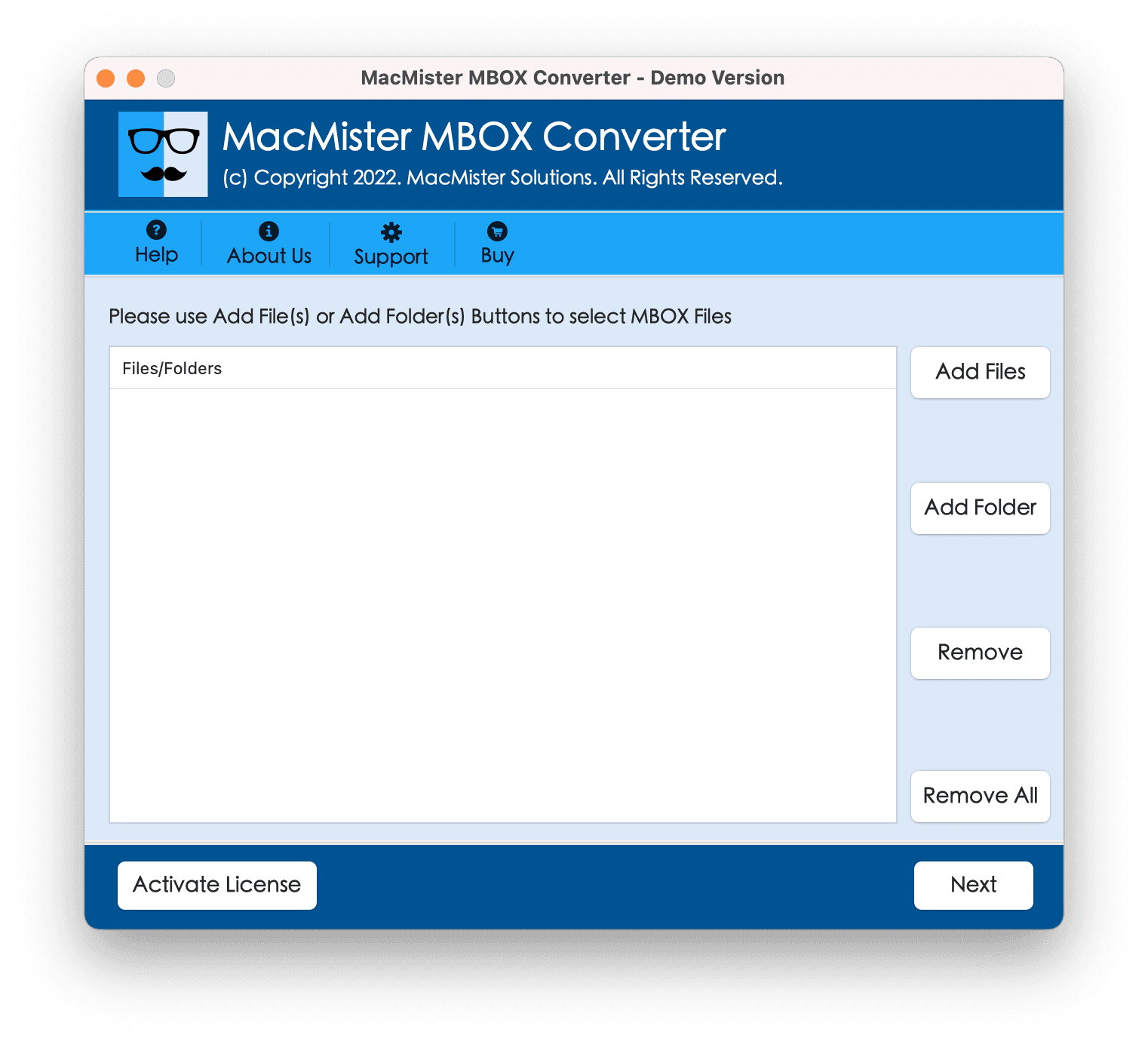
About this app
MacMister MBOX Converter for Mac is a specialized utility designed to simplify the migration and conversion of MBOX files on macOS. Whether you're transitioning from Apple Mail, Thunderbird, or Google Takeout, this tool offers a seamless way to export your emails to a wide array of formats including PST, PDF, EML, MSG, CSV, and more. It also supports direct migration to popular email services like Gmail, Yahoo, Office 365, and IMAP servers, ensuring your data is where you need it. The software emphasizes data integrity, preserving folder structures, metadata, attachments, and inline images throughout the conversion process. With features like batch conversion, flexible file naming options, and real-time progress tracking, it caters to both individual users and IT professionals. Its intuitive interface and low system requirements make it accessible even for non-technical users. The free trial version allows you to convert up to 25 emails per folder, giving you a risk-free way to eval...
Key features
- 1Convert MBOX files to 15+ formats including PST, PDF, EML, MSG, CSV, HTML, DOCX, and OLM.
- 2Direct migration to Gmail, Office 365, Google Workspace, Yahoo, IMAP servers, and other cloud platforms.
- 3Batch conversion via Add Folder, folder hierarchy preservation, metadata and attachment retention, and multiple file naming options.
Target customer profile
Drawn from the product itself, not from a survey.
Demographic
IT administrators and email migration specialists
Pain points
Managing large-scale email migrations without data loss, ensuring minimal downtime
Primary needs
Batch conversion of multiple MBOX files, preservation of metadata and folder hierarchy
Demographic
Small business owners and professionals switching email clients
Pain points
Difficulty in transferring old emails to a new platform, risk of losing important attachments
Primary needs
Seamless export to cloud platforms like Gmail or Office 365, reliable and secure conversion
Demographic
Home users and freelancers with archived emails
Pain points
Limited technical expertise, need for a simple and cost-effective solution
Primary needs
User-friendly interface, affordable one-time purchase, free trial to test functionality
Scout Review
Written by AI from measured evidence, scored out of 100.
MacMister MBOX Converter for Mac is a focused, competent email migration utility that does one job and mostly does it well. The homepage is cohesive and the workflow is clearly documented, but the app UI looks a decade old and the accessibility audit is rough — eight failing checks including unnamed buttons and poor contrast. Speed is a genuine strength (Lighthouse mobile 87/100, CLS 0), and security headers are 10/12, though DMARC and any compliance story are missing. The free demo caps at 25 emails per folder, which is enough to test but not to trust. Growth is real but narrow: MBOX migration is a one-time task, and the one-time license is a smart wedge against Aid4Mail and SysTools, but the customer list shrinks with every successful migration. A solid tool for a specific moment, not a platform.
Measure by measure
Usability
62Clear 4-step workflow and an 11-step guide page, plus a 25-email free demo and 30-day money-back guarantee. But the guide is text-only, the demo screenshot shows no drag-and-drop or progress affordance, and dense feature lists overwhelm first-timers.
Design
58Homepage is cohesive with a consistent blue accent and clear hero hierarchy, but the app UI screenshot looks a decade old — heavy blue header, sparse list pane, Windows-style buttons on macOS. Dense below-fold text blocks hurt scannability.
Speed
68Lighthouse mobile 87/100 with LCP 2.7s, CLS 0, TBT 52ms; desktop 84/100. Stable and low-blocking, mid-band LCP for a marketing site. No user complaints about site lag or published converter benchmarks found.
Security
74HTTP probe shows HTTPS enforced with HSTS, CSP, frame protection, X-Content-Type-Options, Referrer-Policy, and SPF — 10/12 checklist points. Permissions-Policy and DMARC are missing, and no SOC 2, ISO, or pen-test claims were found.
Accessibility
46Lighthouse accessibility 74/100 with 8 failing audits: insufficient color contrast, unnamed buttons and links, non-sequential headings, prohibited ARIA, tabindex > 0, and undersized touch targets. No WCAG statement or multi-language support found.
Growth
58Real, specific problem — MBOX migration on macOS without Outlook — with 15+ output formats and direct cloud/IMAP export. One-time license and unlimited data size differentiate it from SysTools and Aid4Mail, but the wedge is narrow.
Improvement areas
- Modernize the dated app UI and add screenshots to the text-only 11-step guide page.
- Fix eight failing accessibility audits: unnamed buttons/links, contrast, heading order, ARIA, and touch targets.
- Add DMARC, a Permissions-Policy header, and a published security/compliance page for archive handling.
- Expand the free demo beyond 25 emails per folder so users can validate a real migration before purchasing.
Design & Usability
MacMister MBOX Converter for Mac looks like a competent utility wearing a dated suit. The homepage is cohesive — consistent blue accent, clear hero, recognizable file-format icons — but the app screenshot reveals a 2010s-era interface with a heavy blue header, a mostly empty list pane, and Windows-style buttons sitting awkwardly on macOS. Below the fold, dense text blocks and 4-6 line feature cards make scanning a chore. Usability is better than the visuals suggest: a clear 4-step workflow, an 11-step guide page, a 25-email free demo, and a 30-day money-back guarantee. The guide is text-only with no rendered screenshots, and the demo view shows no drag-and-drop or progress indicator, so first-timers are left to click and hope. It works, but it doesn't feel like it wants to be used.
Speed & Security
Speed is the quiet win here. Lighthouse mobile performance lands at 87/100 with LCP 2.7s, CLS 0, and TBT 52ms; desktop sits at 84/100. The page is stable and low-blocking, and no user complaints about site lag surfaced in the collected evidence. Security is solid on the transport layer: HTTPS enforced with HSTS, CSP, frame protection, X-Content-Type-Options, Referrer-Policy, and SPF — 10 of 12 checklist points. The gaps are Permissions-Policy and DMARC, and there's no SOC 2, ISO, or pen-test claim anywhere on the site. For a tool that ingests entire email archives and pushes them to Gmail, Office 365, and IMAP servers, the absence of any published compliance or audit story is the biggest trust gap. The plumbing is fine; the paperwork isn't there.
Accessibility & Growth
Accessibility is the weakest dimension. Lighthouse scores 74/100 with eight failing audits: insufficient color contrast, buttons and links without accessible names, non-sequential heading order, prohibited ARIA attributes, aria-hidden elements containing focusable descendants, tabindex greater than zero, and undersized touch targets. No WCAG conformance statement or multi-language support appears on the site. On growth, the idea is real and specific: MBOX migration on macOS without Outlook, with 15+ output formats and direct export to Gmail, Office 365, IMAP, and Google Workspace. Against SysTools and Aid4Mail, the wedge is a one-time license with unlimited data size and a 30-day license model — a genuine pricing differentiator for freelancers and small shops. The limit is the market itself: MBOX migration is a one-time job for most users, so the addressable audience is people mid-switch, and it shrinks as they succeed. The 4.9-star, 1,689-review badge is self-reported and unverified. Solid positioning, narrow ceiling.
Conclusion
If you're sitting on a pile of MBOX files and need them in PST, PDF, or your Gmail account, MacMister will get you there — the format coverage is broad, the workflow is clear, and the speed is genuinely good. The 25-email demo is enough to confirm it works before you pay, and the 30-day money-back guarantee softens the risk. What you won't get is a modern interface, a polished onboarding experience, or any published security compliance to reassure you before you hand over your entire email archive. For a one-time migration, that tradeoff is probably fine. For an IT admin moving thousands of mailboxes, the missing DMARC and absent audit story are worth weighing against the price. It's a tool, not a platform — and it knows it.
Suggestions for improvement
- Modernize the app UI: replace the heavy blue header and Windows-style buttons with native macOS controls and a cleaner list pane.
- Add screenshots to the 11-step guide page — text-only instructions force users to guess what each screen looks like.
- Publish a security page with DMARC setup, a privacy policy summary, and any audit or pen-test results to build trust for archive handling.
- Fix the eight failing accessibility audits: label buttons and links, raise color contrast, and correct heading order and ARIA usage.
Alternatives comparison
Named competitors, point by point. Nobody paid to appear here or to be left out.
 MacMister MBOX Converter for Mac MacMister MBOX Converter for Mac |  SysTools MBOX Converter SysTools MBOX Converter |  Aid4Mail Aid4Mail | |
|---|---|---|---|
| Platform support | macOS only (macOS 13 Ventura, 14 Sonoma, 15 Sequoia and older OS X) | Windows and macOS | Windows and macOS |
| Output formats supported | 15+ formats: PST, EML, EMLX, MSG, PDF, HTML, MHT, CSV, TXT, DOCX, OLM, and more | Multiple formats including PST, EML, MSG, PDF, HTML, MBOX, and more | Wide format support including PST, EML, MSG, PDF, MBOX, and many email clients |
| Direct cloud/email migration | Gmail, Office 365, Google Workspace, Yahoo, IMAP, Zoho, iCloud, Fastmail, and more | Supports migration to Gmail, Office 365, IMAP, and other email clients | Supports migration to many email services and IMAP servers |
| Batch conversion | Yes — Add Folder option for bulk MBOX conversion with unlimited data size | Yes — batch conversion of multiple MBOX files | Yes — batch processing with filtering options |
| Free trial / demo | Free demo converts up to 25 emails per folder | Free trial version available with limited conversion | Free trial available with limited functionality |
| Pricing model | One-time license with 30-day license option and 30-day money-back guarantee | One-time license purchase | Perpetual license and subscription options |
SysTools MBOX Converter
A popular tool that converts MBOX files to various formats and email clients, known for its advanced features and support for multiple file types.
Aid4Mail
A comprehensive email conversion tool that supports MBOX and many other formats, offering batch processing and filtering options.
Comparing options? See MacMister MBOX Converter for Mac alternatives, scored side by side
More Online Backup apps
View all Online Backup
PCDOTS Email Recovery Software
83Recovers emails from corrupt mailboxes across 50+ platforms.

Alcazar Dead Man's Switch
82An encrypted digital legacy service that securely deliver...
PCDOTS Thunderbird Converter
81Recover and migrate Thunderbird profiles & MBOX files wit...

S3FileHub
80A user-friendly web app for managing AWS S3 storage with AI summarization and analytics.

RemoteDrive by FileZilla Pro
80Integrates cloud storage into macOS Finder for seamless file management across services like Google Drive and Dropbox.

Softaken Data Recovery Software
79Recover deleted files from Windows with ease.

Filifly
79A secure, web-based file sharing platform with end-to-end encryption and no login requirements for quick transfers.

Very Good Calendar Sync
78Privacy-first on-device Mac calendar sync tool.

ArchiveMind
78Private, local-first catalogue and search for large file ...

Trust Vault
76Secure, open-source data storage and transfer app with AES-256 encryption, operating locally without internet or sign-ups.

Lingera
76Lingera saves your AI conversations with one click — across ChatGPT, Claude, Grok, Gemini, Perplexity, and DeepSeek. Capture, highlight, and understand your thinking across every AI platform.

RecordFlow
75Back up Zoom cloud recordings to Google Drive automatically. Optional auto-delete frees Zoom storage. 60-second setup, then forget it.


A platform dedicated to providing unbiased reviews of newly launched applications, analyzing everything from their features to their full potential.
info@scoutforge.net© 2026 Scoutforge. All rights reserved.
