Cycling through all six. Tap any point to stop.
Measured on six things
Private local Android vault with 9 disguise modes.
Design
58Judging the marketing site (app UI not captured): coherent mint-on-near-black branding and a clean hero, but stretched cards with dead space and the nine disguises — the whole point — reduced to a bullet list.
Screenshots
1 / 1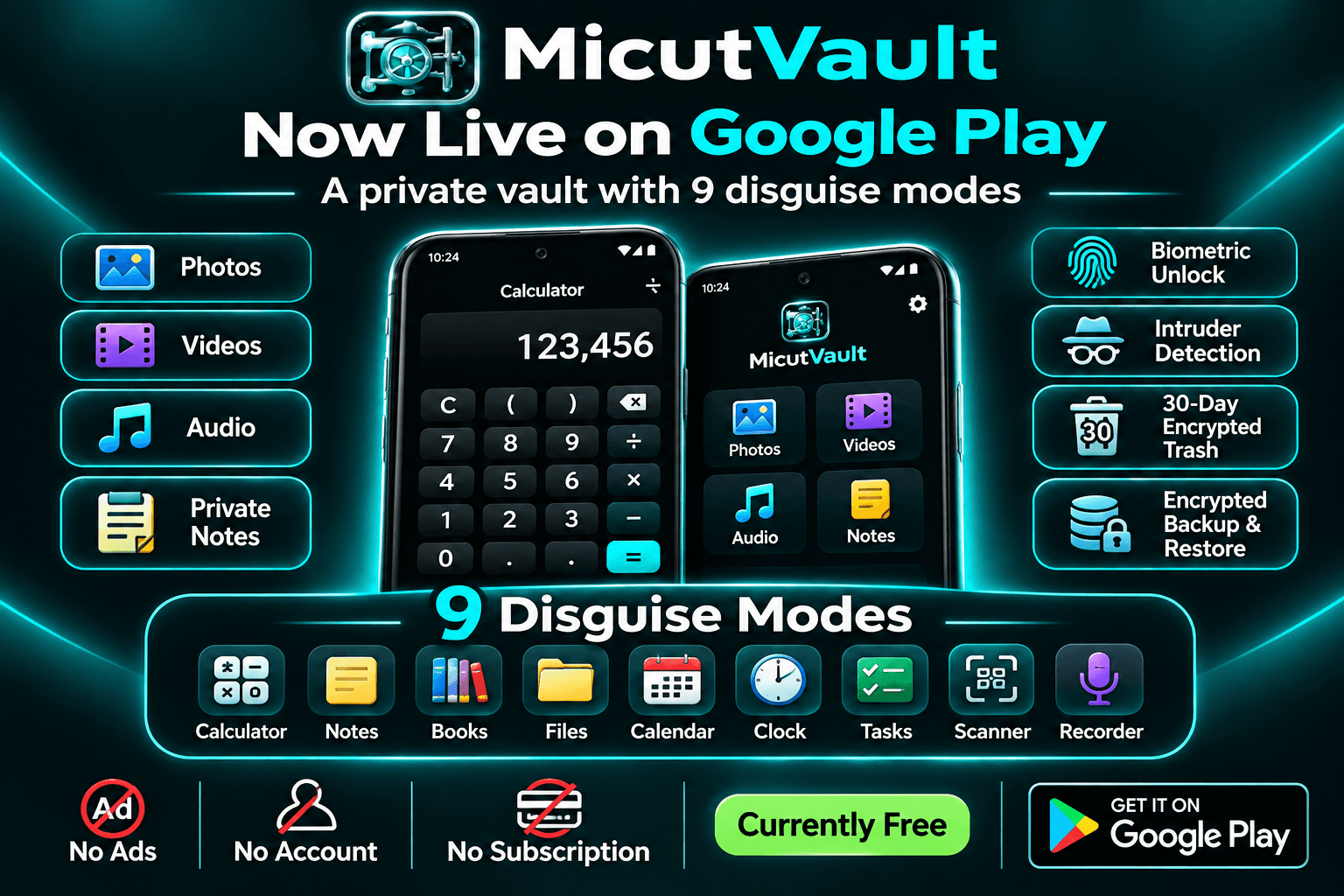
About this app
MicutVault is a completely free, privacy-focused Android app developed by TSI Dev Studio in Romania. It protects personal photos, videos, audio files and private notes inside a discreet, locally stored vault. Its standout feature is a collection of 9 disguise modes: Calculator, Notes, Books, Files, Calendar, Clock, Tasks, Scanner and Recorder. The Calculator disguise works as a real calculator while allowing discreet access to private content through a PIN. Security features include optional biometric unlocking, automatic locking, intruder detection, temporary lockouts, encrypted 30-day Trash and encrypted backups. MicutVault keeps private content on your device without requiring an online account or mandatory cloud storage. All features in the current public release are completely FREE, with no subscription or payment required. Your files. Your privacy. Your control.
Key features
- 1Nine disguise modes (Calculator, Notes, Books, Files, Calendar, Clock, Tasks, Scanner, Recorder) with a functional calculator.
- 2Fully local vault for photos, videos, audio and private notes — no account, no ads, no cloud dependency.
- 3PIN plus optional biometrics, auto-lock, intruder detection, encrypted 30-day Trash and encrypted backups.
- 4Completely free current release with no paywall or subscription.
Target customer profile
Drawn from the product itself, not from a survey.
Demographic
Privacy-conscious Android users
Pain points
Personal media is visible in regular gallery apps.
Primary needs
Private local storage with PIN and biometric protection.
Demographic
People who occasionally share their phones
Pain points
An obvious vault app can attract unwanted attention.
Primary needs
Discreet access through 9 disguise modes.
Demographic
Users with personal photos, audio and notes
Pain points
Sensitive content is scattered across different apps.
Primary needs
One private space for photos, videos, audio and notes.
Scout Review
Written by AI from measured evidence, scored out of 100.
MicutVault is a free, local-first Android vault from TSI Dev Studio built around nine disguise modes, with a functional Calculator among them. The marketing site is fast (94 mobile / 100 desktop Lighthouse), reasonably secure on headers (11/13), and accessible (97/100), but visually average — stretched cards, dense grey copy, and the nine disguises buried in a bullet list. The product's positioning is the strongest part: a disguise-first vault for people who share phones is a genuinely distinct angle against Xsilent and KeepSafe. What's missing is third-party proof — no audit, no bug bounty, no published security review — and the maker's own FAQ admits Android may still surface the real app name.
Measure by measure
Usability
60Store CTA is repeated and the setup flow is spelled out, but small grey-on-black paragraphs and a cookie banner parked over the final CTA make the page more tiring to read than it needs to be.
Design
58Judging the marketing site (app UI not captured): coherent mint-on-near-black branding and a clean hero, but stretched cards with dead space and the nine disguises — the whole point — reduced to a bullet list.
Speed
82Lighthouse mobile 94/100 (LCP 3.0s, CLS 0, TBT 0ms) and desktop 100/100. A genuinely light static page with no layout shift and no blocking time — near the top of the anchor band.
Security
7411/13 security headers with HSTS, DMARC and frame protection set; only CSP missing. The app claims no INTERNET permission and local-only processing, but no audit or bug bounty is published.
Accessibility
80Lighthouse a11y 97/100 with a single contrast failure — the same low-contrast grey body text the visual audit flagged. No WCAG statement or multi-language support is published.
Growth
62A real, specific wedge: nine disguises including a working calculator, aimed at phone-sharers who don't want an obvious vault. Differentiated against Xsilent and KeepSafe, but the disguise idea is copyable and the category is crowded.
Improvement areas
- No published security audit, pen-test or bug bounty to back the privacy claims.
- Nine disguise modes presented as a plain bullet list rather than a visual showcase.
- Low-contrast grey body text fails the one accessibility audit and hurts readability.
- Missing CSP header and stretched, half-empty card layouts on the marketing site.
Design & Usability
The site is a coherent, competently built marketing page: mint accent on near-black, a strong hero with one dominant CTA, and a genuinely useful Xsilent-vs-MicutVault comparison table. Where it falls down is in presenting the product's actual differentiator — nine disguise modes appear as a plain bullet list, and the card grid is stretched to equal heights, leaving half of 'Why MicutVault is different' empty. Usability is decent on the conversion path (the Play Store CTA repeats at top and bottom) but rough on reading: small grey-on-black paragraphs, dense text blocks, and a cookie banner pinned over the final CTA. The app UI itself wasn't captured in the evidence, so this verdict is on the marketing site.
Speed & Security
Speed is the standout: Lighthouse mobile 94/100 with LCP 3.0s, CLS 0 and TBT 0ms, and a perfect 100 on desktop. That's a lightweight static page doing exactly what it should. Security is solid on the web side — 11 of 13 probed headers present, including HSTS, frame protection and DMARC, with only CSP missing. The app's own claims are strong on paper: no INTERNET permission, no account, no analytics, PIN plus optional biometrics, auto-lock, encrypted 30-day Trash and encrypted backup. What's absent is third-party validation — no SOC 2, ISO, pen-test report or bug bounty is published, so the security posture rests on the maker's word and a header scan.
Accessibility & Growth
Accessibility scores 97/100 on Lighthouse, with a single failing audit for insufficient contrast — which lines up with the visual audit's note about small grey body copy on near-black. There's no WCAG conformance statement or multi-language evidence, so the automated score is the main signal. Growth is the interesting one: the idea has a real, specific wedge. Nine disguises including a functional calculator, aimed squarely at people who share phones and don't want a visibly-labelled vault, is a sharper position than KeepSafe's mainstream photo vault or Xsilent's broader toolkit. The honest limit is that the disguise concept is copyable, the category is crowded, and the maker's own FAQ concedes Android system surfaces may still reveal the real app name — which undercuts the core promise at the edges.
Conclusion
If you want a free, offline vault that doesn't announce itself as a vault, MicutVault's disguise approach is worth a look — especially since the current release has no paywall. Go in with calibrated expectations: the disguises change what the app looks like, not what Android's system surfaces report, and the security claims are the maker's own rather than independently audited. For irreplaceable files, follow the site's own advice and test a restore before trusting the backup. It's a promising, clearly-positioned indie tool that would benefit most from publishing a security audit and giving its core feature the presentation it deserves.
Suggestions for improvement
- Give the nine disguise modes a visual treatment — icons or a mockup grid — instead of a plain bullet list.
- Fix the stretched card grid so 'Why MicutVault is different' and 'Offline Vault' don't sit half-empty.
- Add a Content-Security-Policy header to close the last gap in an otherwise strong header set.
- Publish a security audit, pen-test summary or bug bounty to back the local-only privacy claims.
Alternatives comparison
Named competitors, point by point. Nobody paid to appear here or to be left out.
 MicutVault | Xsilent |  KeepSafe | |
|---|---|---|---|
| Primary privacy approach | Nine selectable disguise modes, including a functional Calculator | Master vault plus a separate Decoy PIN space | PIN-protected photo and video vault |
| Content types supported | Photos, videos, audio and private notes | Photos, videos, PDFs and supported files | Photos and videos |
| Cloud dependency | None — designed to run without INTERNET permission | Local-first with encrypted backup | Optional cloud backup |
| Pricing model | Completely free, no paywall or subscription | Free with optional Lifetime access | Free with premium/cloud options |
| Biometric unlock | Optional biometrics alongside PIN | PIN-based with decoy PIN | PIN protection |
Xsilent
Xsilent is another privacy-focused Android application developed by TSI Dev Studio. It offers an encrypted private vault for photos, videos, PDFs and other files, with features such as a Decoy PIN, Clean Share, encrypted backup and private PDF viewing. Unlike MicutVault, which emphasizes 9 disguise modes and a completely free launch, Xsilent provides a broader privacy toolkit with Free and optional Lifetime access.
KeepSafe
Popular Android photo vault that hides pictures and videos behind a PIN, with cloud backup options.
Comparing options? See MicutVault alternatives, scored side by side
More Security apps
View all Security
issued.live
89Free certificate transparency search and SSL lookup with ...

kosa8
88Sealed VMs for AI agents with instant rewind, audit trails & zero key exposureSealed VMs for AI agents with instant rewind and audit tr...

OBVELO
88Privacy gateway that masks personal data in LLM traffic

C2PA Lab
87Free C2PA Content Credentials Checker

Xsilent Vault: Hide Photos
87Private Android vault for photos, videos, PDFs and files, with no required account, no ads and no mandatory cloud.

Magery Forge
87Weekly security audits for vibe-coded sites, explained in...

Sidenty
87Sidenty is a professional digital identity protection ser...

ProcessSpy
87A native macOS process explorer and advanced monitor that...

Tokitool
87Free, private browser tools for images, chats, QR codes, ...

Basalt
86Eighteen PDF tools in one native Mac window: merge, split, compress, OCR, Bates numbering, forms, signing and redaction. Offline. $29 once.

PromptTrace
85Free hands-on AI security labs for prompt injection and L...

Sanctix
85Sanctions screening with verifiable SHA-256 audit trails.


A platform dedicated to providing unbiased reviews of newly launched applications, analyzing everything from their features to their full potential.
info@scoutforge.net© 2026 Scoutforge. All rights reserved.
