Cycling through all six. Tap any point to stop.
Measured on six things
Free AI motion transfer: animate any character image with...
Design
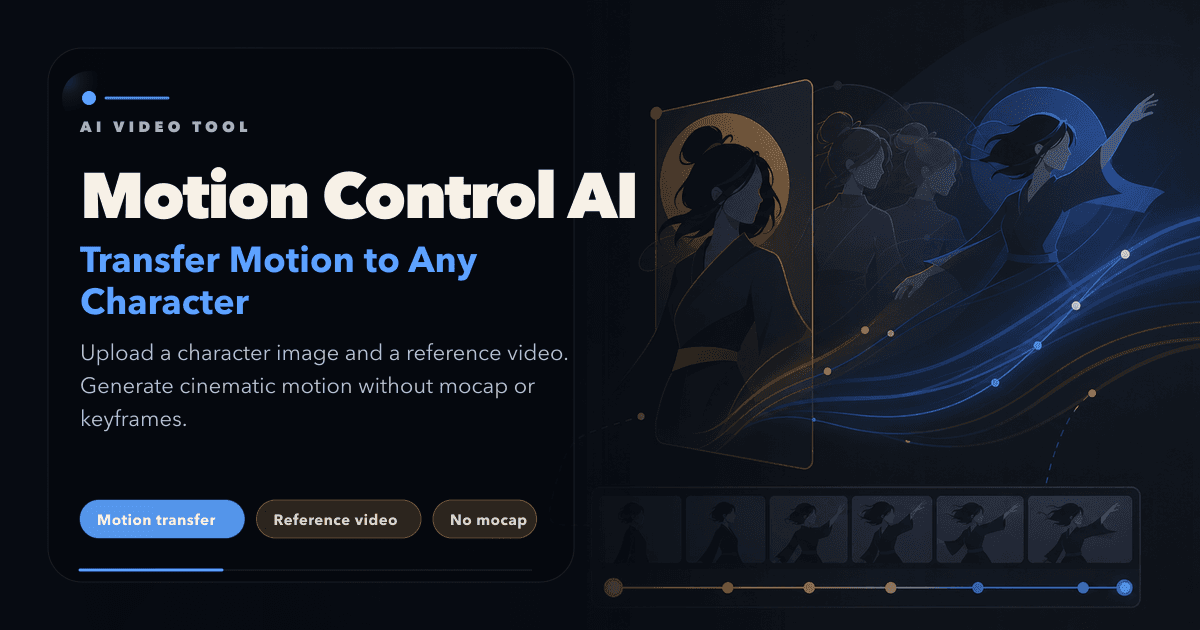
30The live homepage renders only a nav bar over an empty gradient — no hero, no product visuals, no value proposition in view. The promo card's type hierarchy and keyframe timeline show real craft, but the page as shipped reads unfinished.
Screenshots
1 / 2
About this app
Motion Control AI is a browser-based video generator that transfers full-body motion, hand gestures, and facial expressions from a reference video onto any character image — no mocap suit, rigging, or keyframes required. Upload a character image and up to 30 seconds of reference footage, and the engine extracts the skeleton, retargets every movement, and locks the character's identity (faces, outfits, proportions) across frames at 720p or 1080p. Core capabilities include full-body motion transfer, precise hand/gesture and facial/lip-sync capture, a dedicated Kling 2.6/3.0 motion control tool, face swap for stylized characters, and multiple aspect ratios (9:16, 16:9, 1:1). Beyond motion control, the studio bundles text-to-image, image-to-image, text-to-video, image-to-video, first/last-frame video, and an AI video editor, with access to models like Kling, Veo 3.1, Seedance 2, LTX 2.5, MiniMax, Gemini Omni, Nano Banana, and GPT Image 2. Outputs are watermark-free with commercial right...
Key features
- 1Full-body motion transfer from a reference video onto any character image, with identity lock up to 30 seconds.
- 2Hand, gesture, and facial/lip-sync capture in a single pass, plus face swap for stylized characters.
- 3Multi-model AI studio: Kling, Veo 3.1, Seedance 2, LTX 2.5, MiniMax, Nano Banana, GPT Image 2.
- 4Text-to-image, image-to-image, text-to-video, image-to-video, first/last-frame video, and an AI video editor.
- 5Free tier with no credit card, watermark-free commercial exports, 9:16 / 16:9 / 1:1 at 720p or 1080p.
Target customer profile
Drawn from the product itself, not from a survey.
Demographic
TikTok & YouTube Shorts creators
Pain points
Trend cycles move fast; real choreography shoots are costly and slow
Primary needs
Clone viral dances onto custom characters in minutes
Demographic
Brand, product & marketing teams
Pain points
Photos shoots and studio animation blow campaign budgets
Primary needs
Turn a mascot or product shot into a 30s animated ad
Demographic
Indie filmmakers & previs artists
Pain points
Crew bookings and blocking tests are expensive and time-consuming
Primary needs
Prototype character motion and camera blocking quickly
Demographic
Educators, course creators & virtual influencers
Pain points
Animated avatars require technical skills or pricey agencies
Primary needs
Drive a consistent avatar from reference footage for explainers
Scout Review
Written by AI from measured evidence, scored out of 100.
Motion Control AI is a browser-based motion transfer studio that retargets full-body, hand, and facial motion from a reference video onto a character image, with identity lock up to 30 seconds at 720p/1080p. It bundles that core with a broader AI studio — text-to-image, image-to-video, first/last-frame, and an editor — across models like Kling, Veo, Seedance, and Nano Banana. Pricing runs $15.90–$69.90/month with a $9.90 one-time credit pack and a free trial. The product concept is solid and the workflow is genuinely simple; the execution gaps are in presentation (a homepage that renders almost nothing) and performance (an 11.5s LCP).
Measure by measure
Usability
58The 3-step workflow (image + reference video → generate) is genuinely simple, and a no-credit-card free tier lowers the bar to try it. But the live homepage hides that story behind a blank gradient, so onboarding starts with a shrug.
Design
30The live homepage renders only a nav bar over an empty gradient — no hero, no product visuals, no value proposition in view. The promo card's type hierarchy and keyframe timeline show real craft, but the page as shipped reads unfinished.
Speed
55Lighthouse mobile 70/100 with a brutal 11.5s LCP, though CLS is a clean 0 and TBT a healthy 101ms. Desktop scores lower at 58/100. FCP at 1.5s means the shell appears fast and then the big element stalls.
Security
52HTTPS is enforced and SPF/DMARC are set, but HSTS, CSP, frame protection, and every other hardening header are missing — 4/12 on the checklist. No SOC 2, ISO, or bug-bounty claims surfaced. Standard early-stage posture, not a red flag.
Accessibility
58Lighthouse a11y 85/100, but four real failures: prohibited ARIA, unnamed buttons, low contrast, and undersized touch targets. Nav links are small grey-on-dark. No WCAG statement found. Better than many indie tools, still short of solid.
Growth
62A real, fast-moving problem (cheap motion for short-form video) with a specific wedge: reference-based transfer with identity lock, multi-model access, and a free tier. Category is crowded but growing.
Improvement areas
- Homepage renders only a nav bar and gradient — no hero, value proposition, or product preview visible.
- LCP of 11.5s on mobile and desktop performance below mobile (58/100) point at heavy, unoptimized assets.
- Security headers incomplete: no HSTS, CSP, frame protection, or X-Content-Type-Options (4/12 checklist).
- Four failing accessibility audits: unnamed buttons, prohibited ARIA, low contrast, undersized touch targets.
Design & Usability
Design and usability are the same story told twice: the product underneath looks competent, but the shipped homepage doesn't show it. The visual audit caught only a nav bar and a gradient where a hero should be, which means a first-time visitor gets zero explanation of what Motion Control AI does until they scroll or click into pricing. Where the promo card does render, the type hierarchy is disciplined and the keyframe timeline is a genuinely smart way to visualize motion transfer. The 3-step workflow is simple and the no-credit-card free tier is the right call for a try-before-you-buy tool. Fix the hero and this dimension jumps; leave it and every visitor starts confused.
Speed & Security
Speed is a mixed bag with one ugly number: mobile Lighthouse 70/100 but LCP at 11.5s, meaning the page paints fast (FCP 1.5s) and then stalls on the largest element. Desktop scoring lower (58) than mobile is unusual and points at heavy assets. CLS 0 and TBT 101ms are genuinely good, so the bones are fine — the payload isn't. Security is early-stage standard: HTTPS enforced, SPF and DMARC set, but HSTS, CSP, frame protection, and every other hardening header absent (4/12). No SOC 2, ISO, or bug bounty surfaced. For a tool handling uploaded images and video, adding a CSP and HSTS would be cheap and worth it.
Accessibility & Growth
Accessibility lands at 85/100 on Lighthouse but the failing audits are the ones that matter in practice: buttons without accessible names, prohibited ARIA, insufficient contrast, and touch targets too small to hit reliably. Nav links are small grey-on-dark. No WCAG statement or documented keyboard support was found. On growth, the idea holds up: motion transfer for short-form video is a real, growing need, and the wedge — reference-based transfer with identity lock up to 30 seconds, plus multi-model access (Kling, Veo, Seedance, LTX, Nano Banana) in one studio — is a legitimate reason to pick it over a single-model competitor. The limit is that Higgsfield, Kling, Runway, and Viggle all sit in the same lane, and bundling models is copyable. The free tier and the 30s identity-lock claim are the sharpest edges; lean on them.
Conclusion
If you're a short-form creator who needs a dance or gesture cloned onto a custom character without a mocap rig, this is a reasonable place to start — the free tier lets you test the engine before paying, and the 30-second identity lock is a real differentiator on paper. Go in expecting to judge the output yourself rather than trusting the landing page, because the landing page won't tell you much. The pricing is competitive for a multi-model studio, and the credit-pack option is a nice escape hatch for one-off projects. The work ahead is unglamorous: ship a hero that explains the product, cut the LCP, and add the security headers.
Suggestions for improvement
- Fix the homepage hero — the live page renders only a nav bar and gradient, so visitors get no value proposition or product preview.
- Cut the 11.5s LCP: identify the largest element and lazy-load or compress it; desktop scoring below mobile points at heavy assets.
- Add HSTS, CSP, frame protection, and X-Content-Type-Options — cheap hardening for a tool handling uploaded media.
- Fix the four failing a11y audits: name the buttons, correct the ARIA, raise contrast, and enlarge touch targets.
Alternatives comparison
Named competitors, point by point. Nobody paid to appear here or to be left out.
 Motion Control AI |  Higgsfield AI |  Kling AI |  Runway |  Viggle AI | |
|---|---|---|---|---|---|
| Reference-video motion transfer | Yes — full-body, hand, and facial motion from up to 30s reference video | Yes — motion control with cinematic FX presets | Yes — native motion control features | Partial — motion brush and image-to-video, not reference-based transfer | Yes — character animation and motion transfer |
| Character identity lock across frames | Claimed up to 30 seconds without drift | Branding/effects focus; identity lock not a headline claim | Character consistency features within Kling | Character reference tools, not a 30s lock claim | Character animation focus; identity lock not emphasized |
| Multi-model access in one studio | Kling, Veo 3.1, Seedance 2, LTX 2.5, MiniMax, Nano Banana, GPT Image 2 | Multiple models with effects/branding focus | Kling models only | Runway's own models | Viggle's own models |
| Free tier / trial | Free trial credits, no credit card | Free tier with limited credits | Free daily credits | Free tier with limited credits | Free tier available |
| Entry pricing | $15.90/mo Basic; $9.90 one-time 600-credit pack | Subscription tiers with credit system | Credit-based subscription tiers | Tiered subscription pricing | Tiered subscription pricing |
| Commercial rights / watermark-free | Watermark-free exports with full commercial rights on paid plans | Commercial use on paid tiers | Commercial use varies by plan | Commercial use on paid plans | Commercial use on paid tiers |
Higgsfield AI
Motion control and cinematic FX presets with a branding/effects focus; Motion Control AI leans toward raw motion fidelity and 30-second clips.
Kling AI
Popular AI video model with its own motion control features; Motion Control AI hosts Kling 2.6/3.0 engines alongside other models in one studio.
Runway
Professional AI video suite with motion brush and image-to-video tools; Motion Control AI offers reference-based motion transfer with a free tier.
Viggle AI
Character animation and motion transfer for meme/social content; Motion Control AI adds identity lock, multi-model access, and image tools.
Comparing options? See Motion Control AI alternatives, scored side by side
More AI Generations apps
View all AI Generations
Uni-1 by Luma AI
92Uni-1 is an advanced multimodal text-to-image AI model th...

Gerty
91Private, local AI assistant for Mac that runs offline

LTX 2.3 AI Video Generator
91Fast, open-source AI video generator with 4K support, mul...

DemoVexa
90Turn your code into professional product demo videos with AI-generated scripts, animated UI, and natural voiceovers.

All of Us
89Add deceased loved ones to photos with AI and see free pr...

Voqusa
89Transcribe social media video and audio links into text (free signup, 5 free credits, then pay-as-you-go)

Pixelimg
88A free online AI-powered tool that instantly converts ima...

IraVoice
88Private on-device dictation for Apple-silicon Macs.

OBVELO
88Privacy gateway that masks personal data in LLM traffic

tradutor de mangá com IA
88O tradutor de mangá com IA traduz capítulos em lote, personaliza textos e oferece edição visual para estúdios.

HeyVid AI
88HeyVid AI is a free all-in-one AI video and image generat...

RestorePhotosApp
88An AI-powered photo restoration app that brings old, blur...


A platform dedicated to providing unbiased reviews of newly launched applications, analyzing everything from their features to their full potential.
info@scoutforge.net© 2026 Scoutforge. All rights reserved.
