Cycling through all six. Tap any point to stop.
Measured on six things
Turn your photo into viral AI video trends in one click, no reference clip or prompt needed.
Security
41HTTPS not enforced, no HSTS, CSP, frame protection or Referrer-Policy — 2/12 on the header checklist. SPF and DMARC exist, but no security page or compliance claims.
Screenshots
1 / 1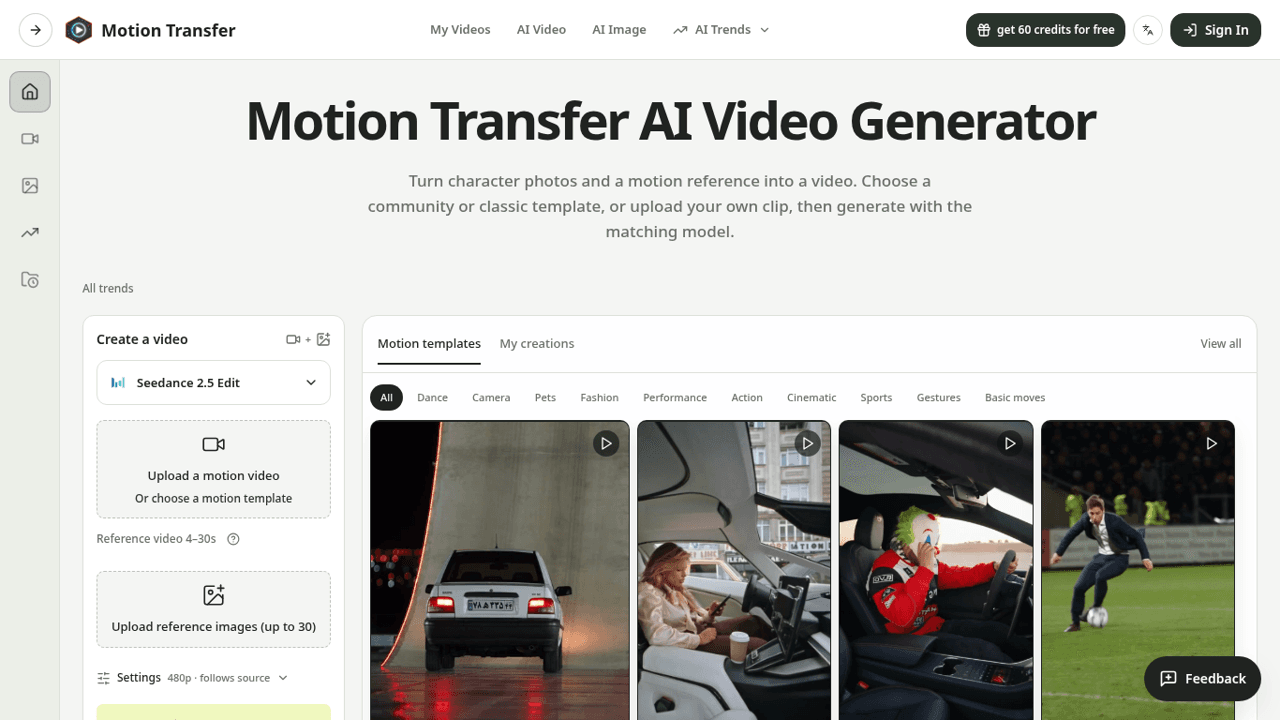
About this app
Motion Transfer AI is a specialized web app that brings still images to life by applying motion from a reference video. Unlike text-to-video tools that require you to describe movement, Motion Transfer AI lets you show the exact gesture, dance, or expression you want. You simply upload a character photo and a short motion clip, choose from models like Kling, Wan, or Seedance, and generate a new video where the photo adopts the movement. The workspace is straightforward: pick a community template or upload your own 3–30 second clip, adjust resolution and model settings, preview the credit cost, and generate. Results appear in My Creations for review and download. Standout features include multiple AI models for different needs, optional scene prompts, 'Match photo' or 'Match video' modes for Kling, and a credit-based pricing system with a free trial. It's ideal for content creators, marketers, and digital artists who want precise control over motion without complex animation software...
Key features
- 1Reference-video motion transfer: upload a photo plus a 3–30s clip and the photo adopts the movement.
- 2Multiple models under one credit balance — Kling 2.6/3.0, Wan 2.2, Seedance 2.0/2.5.
- 3Trend template library (Money Spread, Roadster, Ozil Goal) with category filters for quick starts.
- 4Credit estimate shown before generation; free tier includes 18 one-time signup credits.
Target customer profile
Drawn from the product itself, not from a survey.
Demographic
Social media content creators and influencers
Pain points
Creating engaging video content quickly; lack of animation skills; expensive software
Primary needs
Easy photo animation; trendy templates; fast rendering; cost-effective tools
Demographic
Digital marketers and small business owners
Pain points
Producing personalized video ads; high production costs; limited time
Primary needs
Reusable motion templates; character consistency; affordable pricing; quick turnaround
Demographic
Hobbyist animators and digital artists
Pain points
Complex animation workflows; steep learning curves; limited access to motion capture
Primary needs
Intuitive interface; reference-based animation; experimentation with styles; free trial
Scout Review
Written by AI from measured evidence, scored out of 100.
Motion Transfer AI does one thing clearly: take a photo, take a motion clip, produce a video where the photo performs the movement. The workspace is compact and honest about cost, the template library gives non-animators a starting point, and the multi-model credit pool is a real convenience. Accessibility scores a clean 100 on automated checks. Against that, the design has unfinished edges — a blank below-fold section, ragged template cards — mobile LCP is 12.4 seconds, and the security headers are close to absent. It's a useful tool with a specific pitch, sitting in a category where the incumbents are bigger and the models are rented.
Measure by measure
Usability
63Compact create panel with clear upload limits, model picker and a visible credit estimate. Template pills speed discovery, but the dense hero paragraph slows first-run comprehension.
Design
57Clean light UI with a strong lime CTA and a browsable template grid, but uneven card heights, cropped thumbnails and a blank below-the-fold section drag it to average.
Speed
55Desktop Lighthouse 82 but mobile 61 with a 12.4s LCP — the hero media is choking first paint on phones. CLS is excellent at 0.004 and TBT a modest 430ms.
Security
41HTTPS not enforced, no HSTS, CSP, frame protection or Referrer-Policy — 2/12 on the header checklist. SPF and DMARC exist, but no security page or compliance claims.
Accessibility
79Lighthouse a11y 100/100 with only one failing audit (mismatched accessible names on labeled elements). Language switcher present; no published WCAG statement.
Growth
62Real wedge — show the motion instead of describing it — plus a trend-template library aimed at creators. Crowded category, but the multi-model credit pool is a genuine hook.
Improvement areas
- Mobile performance: 12.4s LCP needs hero media compression or lazy-loading.
- Security headers: enforce HTTPS and add HSTS, CSP, Referrer-Policy and frame protection.
- Design polish: fix the blank below-fold section and inconsistent template card heights.
- Trust: publish a security/privacy page covering how uploaded photos and videos are handled.
Design & Usability
The homepage is competent and legible: a light gray nav, a bold hero, and a left-hand create panel with a lime Generate button that's impossible to miss. The template grid is the smartest part — you can browse Dance, Pets, Fashion and start from a real clip instead of a blank prompt. Where it slips is craft. Card heights don't line up, several thumbnails are cropped mid-subject, and the section below the fold renders as empty white space, which reads as unfinished rather than minimal. Usability is stronger than design: upload cards state their limits, help icons sit next to the ambiguous bits, and the credit estimate appears before you commit. The one real friction is the hero subhead, a dense paragraph that makes you read before you understand the photo-plus-video flow.
Speed & Security
Speed is split down the middle. Desktop Lighthouse lands at 82, which is fine, but mobile is 61 with a 12.4-second Largest Contentful Paint — the hero media is doing real damage to first paint on phones, and that's the device most of this audience is on. Layout stability is excellent (CLS 0.004) and main-thread blocking is modest at 430ms, so the problem is asset weight, not JavaScript. Security is the weakest dimension by a distance. The probe found HTTPS not enforced, no HSTS, no Content-Security-Policy, no frame protection, no Referrer-Policy and no Permissions-Policy — 2 of 12 checklist points, with only SPF and DMARC in place. There's no security page, no SOC 2 or ISO claim, and no bug bounty. For a tool that asks users to upload personal photos and video, that's a thin posture.
Accessibility & Growth
Accessibility is genuinely good: Lighthouse returns 100/100 with a single failing audit about visible text labels not matching accessible names — a narrow, fixable issue rather than a systemic one. A language switcher exists on pricing, though there's no published WCAG conformance statement. Growth is the most interesting question. The idea is specific and defensible in framing: instead of describing a gesture in text, you show a reference clip, and the app maps that motion onto your photo. Bundling Kling, Wan and Seedance behind one credit balance means users don't have to shop three vendors. The trend library — Money Spread, Roadster, Ozil Goal — is a smart acquisition surface for creators chasing formats. The limit is that the underlying models are rented, so the differentiation lives in UX and templates, not in proprietary capability. Runway, D-ID and HeyGen all sit in the same lane with more brand weight.
Conclusion
If you're a creator who already knows the exact dance or gesture you want and you're tired of writing prompts that produce something adjacent, this is a reasonable place to spend a few credits — the free tier gives you 18 to test the flow before paying. Go in expecting to trim your reference clip to one clean action and to check hands and faces in the output, because the site itself warns you those are where things break. Don't expect enterprise-grade compliance or a snappy mobile load. It's an early, focused tool that does its one job, priced sensibly, and honest about its limits.
Suggestions for improvement
- Fix the empty below-the-fold section and normalize template card heights so the grid reads as designed, not assembled.
- Compress or lazy-load the hero media — a 12.4s mobile LCP is costing you signups before the page even settles.
- Add HSTS, a Content-Security-Policy and Referrer-Policy; enforcing HTTPS is table stakes for a photo-upload product.
- Publish a short security/privacy page explaining how uploaded photos and reference videos are stored and deleted.
Alternatives comparison
Named competitors, point by point. Nobody paid to appear here or to be left out.
 Motion Transfer Motion Transfer |  Runway ML Runway ML |  D-ID D-ID |  HeyGen HeyGen | |
|---|---|---|---|---|
| Motion transfer from a reference video | Core feature — upload photo plus 3–30s clip | Yes, via Act-Two / motion brush tools | Limited — mostly text/audio driven | Yes, avatar motion from reference |
| Multiple third-party AI models selectable | Kling, Wan, Seedance under one credit pool | Proprietary Gen-series models only | Proprietary avatar models | Proprietary avatar models |
| Free tier / trial | 18 one-time credits, watermarked output | Free plan with limited credits | Free trial credits | Free plan, watermarked, limited minutes |
| Entry paid price | $8.30/mo billed yearly (2,400 credits/yr) | ~$12–15/mo standard tier | ~$5.90/mo lite tier | ~$24–29/mo creator tier |
| Trend / template library for quick starts | Yes — 24+ named trends with category filters | Presets and styles, not trend templates | Avatar templates, not motion trends | Avatar/template gallery, not motion trends |
Runway ML
AI video generation and editing suite with motion transfer features.
D-ID
Animates still portraits using text or audio, with some motion control.
HeyGen
AI video generator that animates avatars, including motion from reference videos.
Comparing options? See Motion Transfer alternatives, scored side by side
More Design & Creativity apps
View all Design & Creativity
RoomCreator
92An AI-powered interior and exterior design tool that tran...

What the GIF
89Frame-perfect video-to-GIF maker that runs entirely in yo...

TranscriptYou
88Free YouTube transcript generator with timestamps and AI ...

RestorePhotosApp
88An AI-powered photo restoration app that brings old, blur...

Portrait Gift
88AI-powered personalized face swap art platform creating c...

ButterKit
82macOS app for App Store screenshots: 3D mockups, auto-tra...

BeartIMAGE
88BeartIMAGE is a free, web-based image processing platform engineered for fast, bulk photo editing and conversion directly in your browser.

Pixelimg
88A free online AI-powered tool that instantly converts ima...

Coloring Pages Pro
87A massive collection of free printable coloring pages for...

QRocodile
87Design And Animate QR Codes People Want to Scan

FaceSwapAI
87AI face swap for photos, videos, GIFs with free trial.

Book Cover Generator
87AI book cover generator for indie authors—turn your story...


A platform dedicated to providing unbiased reviews of newly launched applications, analyzing everything from their features to their full potential.
info@scoutforge.net© 2026 Scoutforge. All rights reserved.
