Cycling through all six. Tap any point to stop.
Measured on six things
Free anonymous pastebin: browser-side encryption, burn-after-read, no account
Growth
58Real problem (private, no-account sharing) with concrete differentiators: no-key curl API, browser E2E encryption, burn-after-read. But 'free forever, no ads, no plans' means no stated path to revenue.
Screenshots
1 / 1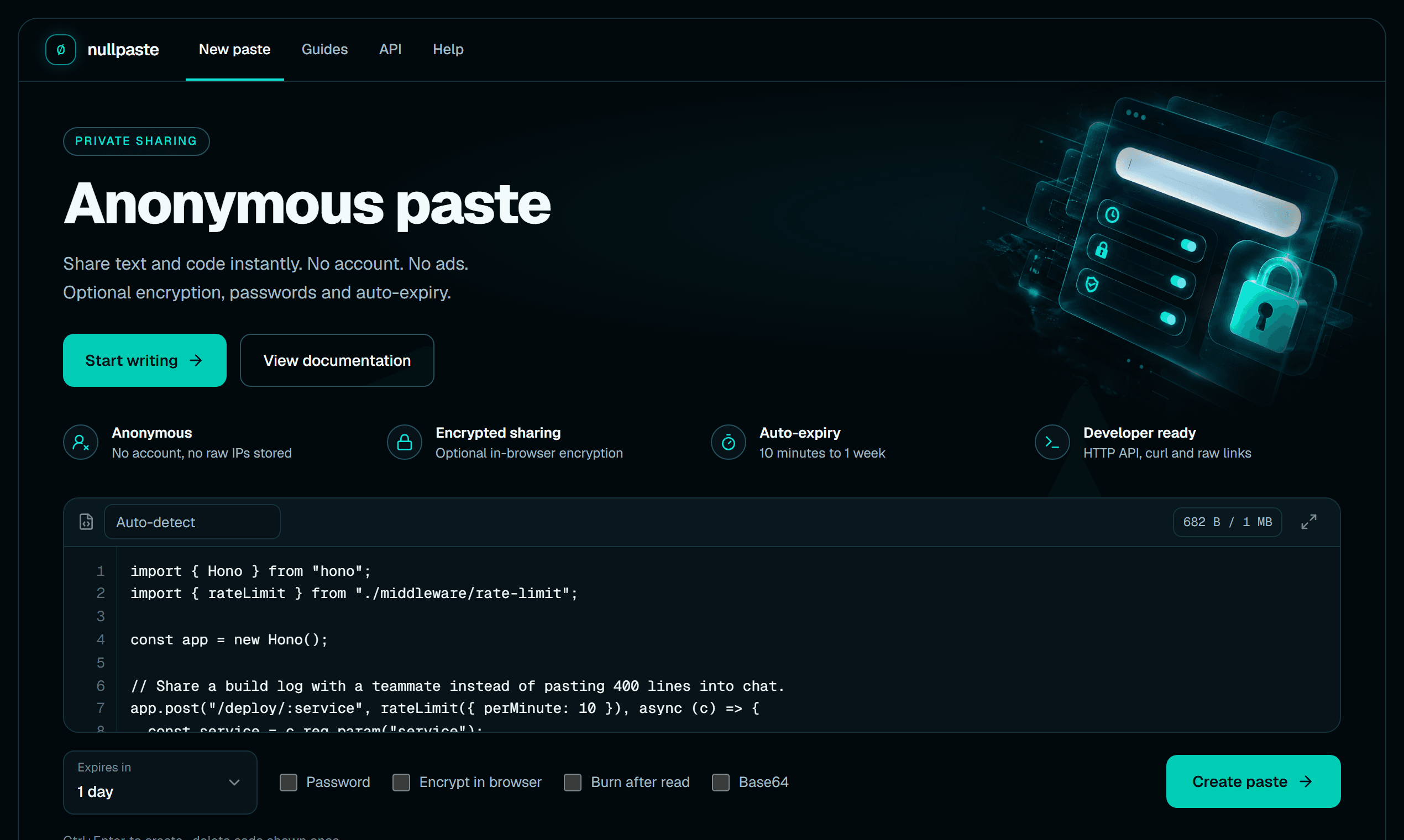
About this app
NullPaste is a free, anonymous pastebin for text, code and secrets. Paste something, get a link, share it anywhere. Turn on burn-after-read and the paste is deleted after one view; turn on browser encryption and the server only ever stores ciphertext. No account, no ads, and a curl API that needs no key.
Key features
- 1Anonymous pastebin with no account or sign-up; every feature available without registration.
- 2Optional browser-side end-to-end encryption with the key stored only in the share link's #key= fragment.
- 3Burn-after-read pastes with explicit-click confirmation so link-preview bots can't consume them.
- 4Auto-expiry from 10 minutes to 1 week or never; password protection with Argon2 hashing.
- 5Syntax highlighting for 100+ languages with auto-detection; curl API with no API key required.
Target customer profile
Drawn from the product itself, not from a survey.
Scout Review
Written by AI from measured evidence, scored out of 100.
NullPaste is a free, anonymous pastebin that does the core job well: paste text or code, get a link, optionally encrypt it in the browser or set it to burn after one read. The site is fast (Lighthouse 98/100 mobile), the security headers are complete, and the privacy claims are specific and technically credible (HMAC-hashed rate limiting, Argon2 passwords, E2E encryption with the key in the URL fragment). The docs are practical — 8 guides covering the workflows developers actually need. The rough edges are design details (tiny low-contrast option labels, a noisy 11-card feature grid) and a captcha that adds friction to a tool sold on speed. The bigger open question is sustainability: it's free forever with no ads and no plans, competing against established free pastebins. As a tool, it's competent and privacy-forward; as a business, the model is unstated.
Measure by measure
Usability
63No-account flow with visible expiry options and 8 practical guides keeps onboarding simple. Undercut by the Create paste button stranded far right of the options row and a captcha gate before every paste.
Design
71Coherent dark palette with disciplined teal accent and editor-first layout. Held back by tiny low-contrast option labels and an 11-card 'More ways to share' grid that repeats features already shown above.
Speed
88Lighthouse 98 mobile / 100 desktop with LCP 2.4s, CLS 0, TBT 40ms. No third-party tracking scripts loaded. Genuinely fast for a tool built around quick sharing.
Security
79Full security header suite (HSTS, CSP, frame protection, Permissions-Policy), SPF/DMARC, 12/12 checklist. HMAC-hashed rate limiting, Argon2 passwords, optional E2E encryption. No published audit or bug bounty found.
Accessibility
76Lighthouse accessibility 100/100. Automated checks pass cleanly, but the small low-contrast option labels and Ctrl+Enter hint on the dark background are a real readability concern, and no WCAG statement or multi-language support was found.
Growth
58Real problem (private, no-account sharing) with concrete differentiators: no-key curl API, browser E2E encryption, burn-after-read. But 'free forever, no ads, no plans' means no stated path to revenue.
Improvement areas
- Option labels and hint text are small and low-contrast on the dark background — a readability issue for the features that differentiate the product.
- The 'More ways to share privately' grid of 11 near-identical cards repeats features already shown above and adds visual noise.
- Captcha gate before every paste adds friction to a tool positioned around quick sharing; Create paste button is stranded far from the editor.
- No published security audit, bug bounty, or WCAG statement — third-party validation is missing for a privacy-focused tool.
Design & Usability
NullPaste's homepage is a well-executed dark-mode editor-first layout: the code area dominates, the teal accent is used with discipline, and the primary/secondary button hierarchy is clear. The step-by-step 'how to share' section and the four icon-led value props communicate the product quickly. Where it slips is the details — the option labels (Password, Encrypt in browser, Burn after read) are tiny low-contrast grey text, which is exactly backwards for the features that differentiate the product. The 'More ways to share privately' grid of 11 near-identical cards adds noise without adding information. Usability is solid for a no-account tool: expiry defaults to 1 day, options are visible without menus, and 8 guides cover the workflows. The friction points are the Create paste button stranded at the far right of the options row and a captcha gate before every paste, which is heavy for a tool sold on speed.
Speed & Security
Speed is the standout: Lighthouse 98 mobile / 100 desktop, LCP 2.4s, CLS 0, TBT 40ms, and no third-party tracking scripts. For a tool built around 'paste and share,' that snappiness matters and it delivers. Security is strong on the fundamentals — full header suite (HSTS, CSP, frame protection, X-Content-Type-Options, Referrer-Policy, Permissions-Policy), SPF and DMARC, 12/12 on the header checklist. The product-level choices back it up: raw IPs never stored, rate limiting via HMAC-SHA256 hashed identifier, Argon2 password hashing, and optional browser-side E2E encryption where the key lives only in the share link fragment. Burn-after-read requires an explicit click so link-preview bots can't consume it. What's missing is third-party validation — no published audit, pen-test, or bug bounty was found, which is normal for a free indie tool but keeps it out of the top band.
Accessibility & Growth
Accessibility scores 100/100 on Lighthouse's automated audit, and the site is responsive with a clear keyboard shortcut (Ctrl+Enter). But automated checks only cover part of WCAG, and the visual audit flags small, low-contrast option labels and hint text on the dark background — a real readability issue for low-vision users. No WCAG statement or multi-language support was found. On growth: the problem is real (people want to share text and secrets without an account or tracking), and the differentiators are concrete — a no-key curl API, browser E2E encryption, burn-after-read with bot protection, and a genuinely free tier. It positions directly against Pastebin, Hastebin, and the defunct Ghostbin. The limit is the model: 'free forever, no ads, no plans' means no stated revenue path, and the category is crowded with free alternatives. The wedge is privacy and developer ergonomics; whether that converts to a sustainable product is unproven.
Conclusion
If you need to share a snippet, a log, or a secret without creating an account, NullPaste is a solid choice — fast, private by design, and free. The E2E encryption and burn-after-read are genuinely useful and implemented thoughtfully (the explicit-click requirement for burn-after-read is a nice touch). Just don't expect a roadmap or a support SLA; this is an indie tool with a clear privacy stance and no monetization story. Use it, enjoy it, and keep a backup pastebin in mind in case the server bill wins.
Suggestions for improvement
- Increase the size and contrast of the option labels (Password, Encrypt in browser, Burn after read) — they're the differentiators and currently the hardest text to read.
- Consolidate the 11-card 'More ways to share privately' grid into 3-4 grouped links; it repeats the feature list above and adds noise.
- Move the Create paste button closer to the editor/options row, or make it sticky, so the typing-to-creating path isn't split across the layout.
- Publish a brief security page (even without a formal audit) documenting the encryption model, hashing choices, and data retention — it would strengthen trust for a privacy tool.
Alternatives comparison
Named competitors, point by point. Nobody paid to appear here or to be left out.
 NullPaste |  |  | ||
|---|---|---|---|---|
| Account required | No — no account or sign-up for any feature | Unknown | Unknown | Unknown |
| End-to-end encryption | Yes — optional browser-side encryption, key in URL fragment | Unknown | Unknown | Unknown |
| Burn-after-read | Yes — with explicit-click confirmation to block preview bots | Unknown | Unknown | Unknown |
| API access | Yes — curl API with no API key required | Unknown | Unknown | Unknown |
| Pricing | Free — no plans, no paywall, no ads | Unknown | Unknown | Unknown |
Comparing options? See NullPaste alternatives, scored side by side
More Security apps
View all Security
issued.live
89Free certificate transparency search and SSL lookup with ...

kosa8
88Sealed VMs for AI agents with instant rewind, audit trails & zero key exposureSealed VMs for AI agents with instant rewind and audit tr...

OBVELO
88Privacy gateway that masks personal data in LLM traffic

Xsilent Vault: Hide Photos
87Private Android vault for photos, videos, PDFs and files, with no required account, no ads and no mandatory cloud.

Tokitool
87Free, private browser tools for images, chats, QR codes, ...

Sidenty
87Sidenty is a professional digital identity protection ser...

ProcessSpy
87A native macOS process explorer and advanced monitor that...

Magery Forge
87Weekly security audits for vibe-coded sites, explained in...

C2PA Lab
87Free C2PA Content Credentials Checker

Basalt
86Eighteen PDF tools in one native Mac window: merge, split, compress, OCR, Bates numbering, forms, signing and redaction. Offline. $29 once.

Sanctix
85Sanctions screening with verifiable SHA-256 audit trails.

PromptTrace
85Free hands-on AI security labs for prompt injection and L...


A platform dedicated to providing unbiased reviews of newly launched applications, analyzing everything from their features to their full potential.
info@scoutforge.net© 2026 Scoutforge. All rights reserved.
