Cycling through all six. Tap any point to stop.
Measured on six things
Nutrition Facts Label Maker is a browser-based tool for building FDA-compliant Nutrition Facts labels for packaged food products. Choose from 13 official FDA label formats, fill in your product's nutrition data, and watch the label update live. Download a print-ready, high-resolution PDF sized to your packaging. Built for small food manufacturers and product developers who need accurate, compliant labels without hiring a designer.
Security
52HTTPS and CSP present, but missing HSTS, frame protection, and DMARC. No compliance certifications or detailed privacy policy found.
Screenshots
1 / 1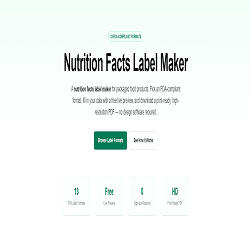
About this app
Nutrition Facts Label Maker helps food businesses create accurate, FDA-compliant Nutrition Facts labels without design software. The tool covers all 13 official FDA formats, including Standard Vertical, Simplified, Linear and Tabular (for small packages), Dual-Column, bilingual English/Spanish, and dedicated infant/children formats — all reflecting the FDA's 2016 label update. Enter your product's nutrition data and see the label redraw instantly in a live preview. Add an ingredient list, allergen statement, manufacturer info, or a transparent background, and resize the panel with a width slider to match your packaging. Export a high-resolution, print-ready PDF at 3x scale. No account is needed to build or preview a label — only for paid downloads. Pricing starts at $4 per one-time PDF; Pro ($20/mo, 20 downloads) and Business ($49/mo, unlimited) suit businesses labeling regularly. Built for small food manufacturers, home-based food businesses, and product developers.
Key features
- 1Covers all 13 FDA-compliant label formats, including niche ones like infant and bilingual.
- 2Real-time live preview that redraws the label as you type, with adjustable panel width.
- 3Pay-as-you-go pricing with no account required for previews; high-res PDF export at 3x scale.
Target customer profile
Drawn from the product itself, not from a survey.
Demographic
Small food business owners and entrepreneurs
Pain points
Need professional labels but lack design skills and budget for expensive software
Primary needs
Easy-to-use tool, compliance with FDA regulations, cost-effective
Demographic
Home-based food sellers and cottage food operators
Pain points
Struggling to meet labeling requirements for selling homemade goods legally
Primary needs
Guidance on FDA rules, simple workflow, ability to create attractive labels quickly
Demographic
Food manufacturers and packaging designers
Pain points
In need of multiple label formats for various products, time-consuming manual label design
Primary needs
Versatility, high-resolution outputs, efficiency, and consistent compliance
Demographic
Food consultants and labeling service providers
Pain points
Need reliable, up-to-date tools to serve clients efficiently
Primary needs
Accuracy, variety of formats, and professional results
Scout Review
Written by AI from measured evidence, scored out of 100.
Nutrition Facts Label Maker is a focused tool for food businesses needing FDA-compliant labels without design software. It excels in usability with a free live preview and covers all 13 official formats, a strong differentiator. Design is clean but repetitive, and performance is top-notch. Security is adequate but lacks advanced protections. Accessibility is good on automated checks but lacks manual verification. Growth potential is real, given the niche and pricing model, but the product is very early-stage with no proven traction. Overall, a solid, specialized tool that could carve out a niche if it builds trust and community.
Measure by measure
Usability
74Intuitive flow from format selection to live preview. No-account preview reduces friction. High info density on formats page may overwhelm new users.
Design
70Clean, consistent mint-green branding and clear layout. Repetitive feature cards and redundant format lists slightly dull the visual impact.
Speed
78Excellent performance: LCP 1.2s, CLS 0, TBT 167ms. Fast, responsive, and lightweight—no lag complaints found.
Security
52HTTPS and CSP present, but missing HSTS, frame protection, and DMARC. No compliance certifications or detailed privacy policy found.
Accessibility
78Lighthouse 100/100 on automated checks. No explicit WCAG statement, but keyboard navigation and contrast appear solid. Bilingual labels show some inclusivity.
Growth
62Clear niche with specific differentiator (all 13 FDA formats). Early stage with no traction yet, but category has recurring need.
Improvement areas
- Security headers incomplete (HSTS, DMARC missing) and no compliance certifications.
- No explicit accessibility statement or manual testing evidence.
- Repetitive design elements and lack of visual hierarchy on feature cards.
Design & Usability
The design is clean and consistent, with a mint-green accent that ties the brand together. Navigation is straightforward, and the three-step workflow is clearly communicated. However, the repetition of the 13 formats across two sections feels redundant, and the feature cards lack visual hierarchy. Usability is strong: no-account preview reduces friction, and the live preview is a key differentiator. The high information density on the formats page might overwhelm first-time visitors, but the clear CTAs help guide them.
Speed & Security
Performance is excellent—Lighthouse scores 92/100 on mobile with LCP at 1.2s and zero layout shift. The site feels snappy and lightweight. Security is adequate but not stellar: HTTPS and CSP are in place, but HSTS, frame protection, and DMARC are missing. No compliance certifications are mentioned, and the privacy policy isn't linked on the homepage. For a tool handling nutrition data, users might expect more transparency, but the basics are covered.
Accessibility & Growth
Accessibility is strong on automated checks (100/100), but there's no explicit WCAG statement or manual testing evidence. The bilingual label formats show some inclusivity, but the site UI itself is English-only. Growth potential is promising: the tool targets a specific niche (small food businesses) with a clear differentiator—all 13 FDA formats, including niche ones like infant and aggregate. The pay-as-you-go pricing lowers the barrier, but the domain is only 0.1 years old, so traction is unproven. The category has headroom, but competition from Canva and Adobe is stiff.
Conclusion
For small food businesses tired of wrestling with Canva templates or Adobe's learning curve, this tool offers a straightforward path to compliance. The pay-as-you-go model is friendly for occasional users. However, the lack of security certifications and detailed privacy policy might give enterprise clients pause. If the team can add more transparency and build a community, it could become the go-to for cottage food sellers. For now, it's a promising start with room to grow.
Suggestions for improvement
- Add a detailed privacy policy and security page to build trust, especially for business users.
- Include a comparison table against Canva and Adobe to highlight compliance advantages.
- Offer a free trial for Pro and Business tiers to let users test the full workflow.
- Add more visual differentiation between feature cards to reduce monotony.
Alternatives comparison
Named competitors, point by point. Nobody paid to appear here or to be left out.
 Nutrition Facts Label Maker Nutrition Facts Label Maker |  Canva Canva |  Adobe Illustrator Adobe Illustrator |  Online Labels Online Labels | |
|---|---|---|---|---|
| FDA compliance coverage | All 13 official FDA formats, including infant, bilingual, and aggregate. | Templates available but not guaranteed FDA-compliant; manual adjustments needed. | Full design control but no built-in FDA compliance features. | Free templates but lacks specific nutrition label compliance features. |
| Ease of use | No design skills needed; live preview and simple workflow. | User-friendly but requires manual compliance adjustments. | Steep learning curve; professional design software. | Simple template use but not tailored for nutrition labels. |
| Pricing model | Pay-as-you-go $4/PDF, Pro $20/mo, Business $49/mo. | Free tier with premium features via subscription. | Expensive subscription (~$20+/mo). | Free templates; pay for printing services. |
Canva
A popular graphic design platform with templates for nutrition labels, but may require manual adjustments for compliance.
Adobe Illustrator
Professional design software that offers complete control over label design, but has a steep learning curve and is expensive.
Online Labels
A service that provides free label templates and printing services, but may lack specific nutrition label compliance features.
Comparing options? See Nutrition Facts Label Maker alternatives, scored side by side
More Business Intelligence apps
View all Business Intelligence
AuditCloser
89White-label website audits that close deals for digital a...

CitableReport
89CitableReport is an AI visibility audit:

Spotwise
88AI-powered radio ad monitoring platform that tracks compe...

DataHabibi
88AI-powered Dubai real estate data platform with 12M+ DLD ...

Sonar
87Free website tracking checker. Paste a URL and Sonar crawls your site from the outside, then reports what's running and the problems it can prove.

Flowmaps
87Flowmaps turns your app idea into a visual map of every feature, checks it for gaps, and writes build steps for Lovable, Bolt, Cursor or Claude Code.

HISAB 360
87A Windows Excel add-in that pulls your ledger data into the workbook, reconciles it, and drafts the reports - all in plain English, inside Excel.

QVeris AI
86Connect AI agents to 10,000+ real-world tools and APIs

ValueScreener
86Screen stocks using 30+ value disciplines. Receive an email when your investment thesis breaks.

Reptor
85Reputation monitoring across Google, AI search engines, reviews, news and social media, with sentiment analysis per mention.

SnitchFeed
85AI-powered social listening for startups & SMBs to find h...

Claritrix
84Weighted decision scorecards for B...2B teams, no account ne


A platform dedicated to providing unbiased reviews of newly launched applications, analyzing everything from their features to their full potential.
info@scoutforge.net© 2026 Scoutforge. All rights reserved.
