Cycling through all six. Tap any point to stop.
Measured on six things
Free browser-based retro photo editor with Digicam, Film,...
Security
52HTTPS enforced with SPF and DMARC, but no HSTS, CSP, frame protection or Referrer-Policy — 4/12 on the header checklist. No SOC 2, ISO or bug bounty claims found.
Screenshots
1 / 1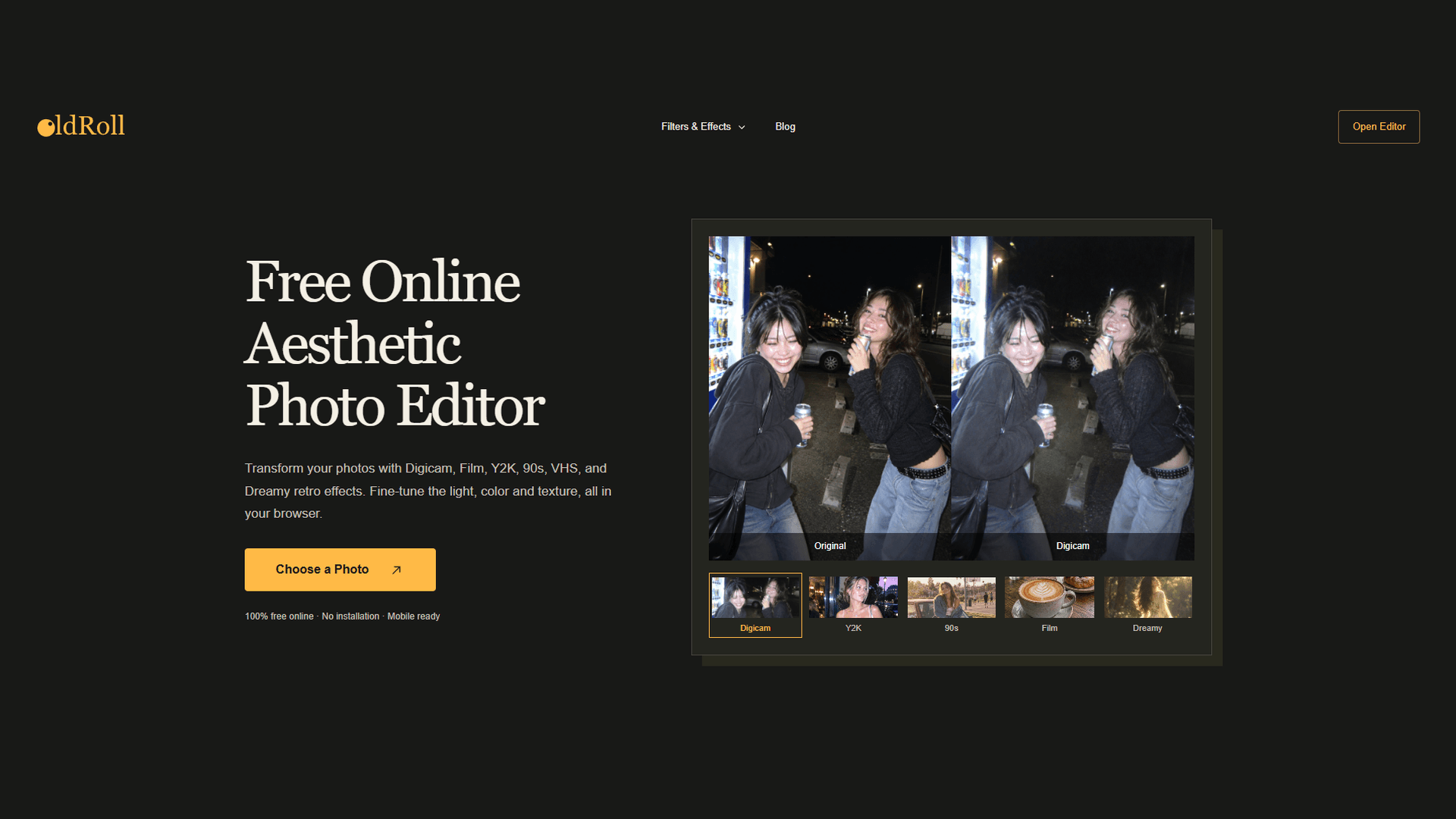
About this app
OldRoll is a browser-based photo editor that specializes in retro and aesthetic looks. It offers a wide range of filters and effects, including Digicam, Y2K, 90s, Film, Dreamy, and VHS, allowing users to give their photos a nostalgic camera feel. The editor provides fine-tuning controls for exposure, contrast, warmth, saturation, and lens blur, as well as options to add frames, stickers, and create collages. OldRoll is designed for content creators, photography enthusiasts, subculture creators, online sellers, music creators, and anime creators who want to add a consistent retro aesthetic to their visuals. The online version is currently 100% free, with no installation required, and is mobile-ready. The mobile app, available on iOS and Android, has over 50 million downloads and high ratings.
Key features
- 1Retro filter families: Digicam, Y2K, 90s, Film, Dreamy, VHS, Polaroid and Black & White with adjustable intensity.
- 2Fine-tuning sliders for exposure, contrast, warmth, saturation and lens blur, plus crop and before/after compare.
- 3Frames, stickers, grain, light leaks and collage layouts with solid, gradient or textured backgrounds.
- 4100% free browser editor with drag-and-drop upload, no installation, mobile-ready.
Target customer profile
Drawn from the product itself, not from a survey.
Demographic
Content creators and influencers
Pain points
Need to maintain a consistent visual style across posts and reels
Primary needs
Quick, free retro filters and effects to enhance photos for social media
Demographic
Photography enthusiasts and hobbyists
Pain points
Expensive film equipment and complex editing software
Primary needs
Authentic film and disposable-camera looks with adjustable intensity
Demographic
Online sellers and small business owners
Pain points
Product photos look too sterile or plain
Primary needs
Warm, nostalgic visuals to make products stand out without heavy editing
Demographic
Subculture creators (Y2K, street, lo-fi)
Pain points
Presets flatten images and lack customization
Primary needs
Editable retro effects like Y2K, VHS, and grain to create unique visuals
Scout Review
Written by AI from measured evidence, scored out of 100.
OldRoll is a browser-based retro photo editor that treats camera character as the product, not a preset pack. The app UI — judged from store screenshots, since that's where the product actually lives — is a tactile analog camera with physical controls and a live preview, and the website mirrors it with a warm cream palette and large labeled filter cards. Speed is excellent (Lighthouse 99 mobile, 100 desktop), accessibility audits clean at 100/100, and usability is frictionless: drag, drop, pick a filter, adjust intensity, save. The weak spots are security headers (4/12, no CSP or HSTS), a long repetitive homepage scroll with low-contrast link text, and no docs or help center. Growth is real but capped by a free web tier with no visible paid path.
Measure by measure
Usability
68Drag-and-drop upload, a bright 'Choose a Photo' CTA and per-filter 'Try This Filter' links get you editing in one click. Sliders for exposure, warmth and blur plus frames, stickers and collage are all in one flow.
Design
71Judging the app UI: store screenshots sell a tactile analog-camera interface with physical controls and live preview. The website backs it with a warm cream/charcoal palette and large labeled filter cards.
Speed
90Lighthouse mobile 99/100 with LCP 1.7s, CLS 0 and TBT 42ms; desktop 100/100. The site is genuinely snappy, and no lag complaints surfaced in the collected evidence.
Security
52HTTPS enforced with SPF and DMARC, but no HSTS, CSP, frame protection or Referrer-Policy — 4/12 on the header checklist. No SOC 2, ISO or bug bounty claims found.
Accessibility
79Lighthouse accessibility 100/100 and the app is localized in 8 languages. No published WCAG statement, so automated checks are the ceiling of what's verified here.
Growth
62Real problem, specific segments, and a camera-character wedge VSCO and Tezza don't fully own — but the free web editor has no obvious path from 'free' to 'paid'.
Improvement areas
- Security headers are 4/12 — no CSP, HSTS, frame protection or Referrer-Policy on an upload tool.
- No help center or docs explaining what intensity, grain and lens blur sliders actually do.
- Homepage filter cards use low-contrast link text and thin borders on a cream background.
- No visible paid web tier, so the free editor has no clear path to revenue.
Design & Usability
OldRoll ships through app stores, so the app UI is the product and the website is the shop window — and both hold up. Store screenshots render a full analog camera body with physical controls and a live preview screen, which sells the retro promise better than any copy could. The homepage continues the theme with a warm cream-and-charcoal palette, a large Digicam-vs-Original hero pair and six clearly labeled filter cards. Usability is where it earns its keep: drag-and-drop upload, a bright orange 'Choose a Photo' CTA and per-filter 'Try This Filter' links collapse browsing-to-editing into a single click, and the editor stacks exposure, contrast, warmth, saturation, lens blur, crop, frames, stickers and collage in one flow. The gaps are small but real — thin card borders and low-contrast link text on cream, a long repetitive scroll, and no help center or docs to explain what the intensity slider actually does.
Speed & Security
Speed is the standout: Lighthouse mobile 99/100 with LCP 1.7s, CLS 0 and TBT 42ms, and desktop a clean 100/100. For a browser photo editor that has to load image assets and render live previews, that's a genuinely well-built front end, and no lag complaints turned up in the collected evidence. Security is the weak flank. HTTPS is enforced and SPF and DMARC are in place, but the header probe found no HSTS, no CSP, no frame protection, no X-Content-Type-Options, no Referrer-Policy and no Permissions-Policy — 4/12 on the checklist. There's also no SOC 2, ISO certification, pen-test summary or bug bounty program visible. For a free tool that asks users to upload personal photos, the missing CSP and frame protection are the kind of thing worth fixing before someone embeds the editor somewhere it shouldn't be.
Accessibility & Growth
Accessibility scores well on what can be measured: Lighthouse's axe-core audit returns a perfect 100/100, and the app is localized in 8 languages per the App Store listing. What isn't verified is the human side — no published WCAG conformance statement, no documented keyboard or screen-reader support notes. Growth is a judgement on the idea, not the traction. The category is crowded — VSCO owns film presets, Tezza owns influencer templates, Lightroom owns pro color grading — but OldRoll's wedge is specific: camera hardware character (CCD color, direct flash, VHS texture, disposable warmth) with adjustable intensity, aimed at subculture, music and anime creators who want a look, not a preset. That's a real, defensible niche. The limit is monetization: the web editor is 100% free with no visible paid tier, so the browser product is a funnel to the app rather than a business on its own.
Conclusion
If you want a Digicam or Y2K look on a product shot in under a minute without installing anything, OldRoll does that better than most of its peers and faster than all of them. If you're uploading client photos or sensitive material, note that the security posture is thin — HTTPS and DMARC, but no CSP, no frame protection and no published audit. The free web editor is a genuinely good funnel for the 50M-download app; the question is whether it ever becomes a product in its own right. For now: use it, enjoy it, don't hand it anything you wouldn't post publicly.
Suggestions for improvement
- Add HSTS, a Content-Security-Policy and X-Frame-Options — the header checklist is 4/12 and CSP is the big one for an upload tool.
- Publish a short help page explaining intensity, grain and lens blur so users aren't guessing at slider behavior.
- Raise contrast on the 'Try This Filter' links and card borders — light gray on cream fails the eye test even if Lighthouse passed.
- Introduce a paid web tier (batch export, higher resolution, saved presets) so the free editor has a path to revenue.
Alternatives comparison
Named competitors, point by point. Nobody paid to appear here or to be left out.
 OldRoll OldRoll |  VSCO VSCO | Tezza |  Adobe Lightroom Adobe Lightroom | |
|---|---|---|---|---|
| Price for core editing | 100% free web editor, no installation | Free tier with limited presets; VSCO membership for full library | Free basics; Tezza subscription for full presets and templates | Free tier limited; paid Creative Cloud plan for full features |
| Retro / film aesthetic focus | Core product: Digicam, Y2K, 90s, VHS, Film, Polaroid, Dreamy | Strong film-inspired preset library, broader lifestyle aesthetic | Aesthetic filters and templates, influencer-oriented rather than camera-specific | Presets available but retro look is user-built, not the default |
| Fine-tuning controls (exposure, contrast, warmth, blur) | Exposure, contrast, warmth, saturation, lens blur, crop, intensity | Full manual adjustment suite plus preset intensity | Adjustment sliders plus preset strength control | Industry-leading color grading, curves, HSL, masking |
| Frames, stickers and collage | Film frames, stickers, grain, light leaks, grid and strip collages | Limited frames; collage not a core feature | Collage templates and stickers are a headline feature | No native collage or sticker tools |
| Browser-based, no install | Yes — full editor runs in browser, mobile-ready | Web studio available; app is primary experience | Mobile-first; web presence is mostly marketing | Yes — Lightroom Web with account required |
| Account required to edit | No — drop a photo and start editing | Yes — VSCO account needed | Yes — account and subscription for full access | Yes — Adobe ID required |
VSCO
Popular photo editing app with a wide range of presets and advanced editing tools, known for its film-inspired filters.
Tezza
Photo and video editing app with a focus on aesthetic filters, templates, and collages, popular among influencers.
Adobe Lightroom
Professional photo editing software with powerful color grading and preset capabilities, available on desktop and mobile.
Comparing options? See OldRoll alternatives, scored side by side
More Design & Creativity apps
View all Design & Creativity
RoomCreator
92An AI-powered interior and exterior design tool that tran...

What the GIF
89Frame-perfect video-to-GIF maker that runs entirely in yo...

TranscriptYou
88Free YouTube transcript generator with timestamps and AI ...

RestorePhotosApp
88An AI-powered photo restoration app that brings old, blur...

Portrait Gift
88AI-powered personalized face swap art platform creating c...

ButterKit
82macOS app for App Store screenshots: 3D mockups, auto-tra...

BeartIMAGE
88BeartIMAGE is a free, web-based image processing platform engineered for fast, bulk photo editing and conversion directly in your browser.

Pixelimg
88A free online AI-powered tool that instantly converts ima...

Coloring Pages Pro
87A massive collection of free printable coloring pages for...

QRocodile
87Design And Animate QR Codes People Want to Scan

FaceSwapAI
87AI face swap for photos, videos, GIFs with free trial.

TryInk
86Try on a tattoo on your own body photo before you book.


A platform dedicated to providing unbiased reviews of newly launched applications, analyzing everything from their features to their full potential.
info@scoutforge.net© 2026 Scoutforge. All rights reserved.
