Cycling through all six. Tap any point to stop.
Measured on six things
OnVid is a free AI video generator that turns text and images into high-quality videos for social media, marketing, and creative projects.
Speed
46Mobile performance is weak at 49/100 with 5.5s LCP — slow first paint on phones. Desktop is excellent at 94/100. CLS is perfect at 0. Mobile users will feel the lag.
Screenshots
1 / 1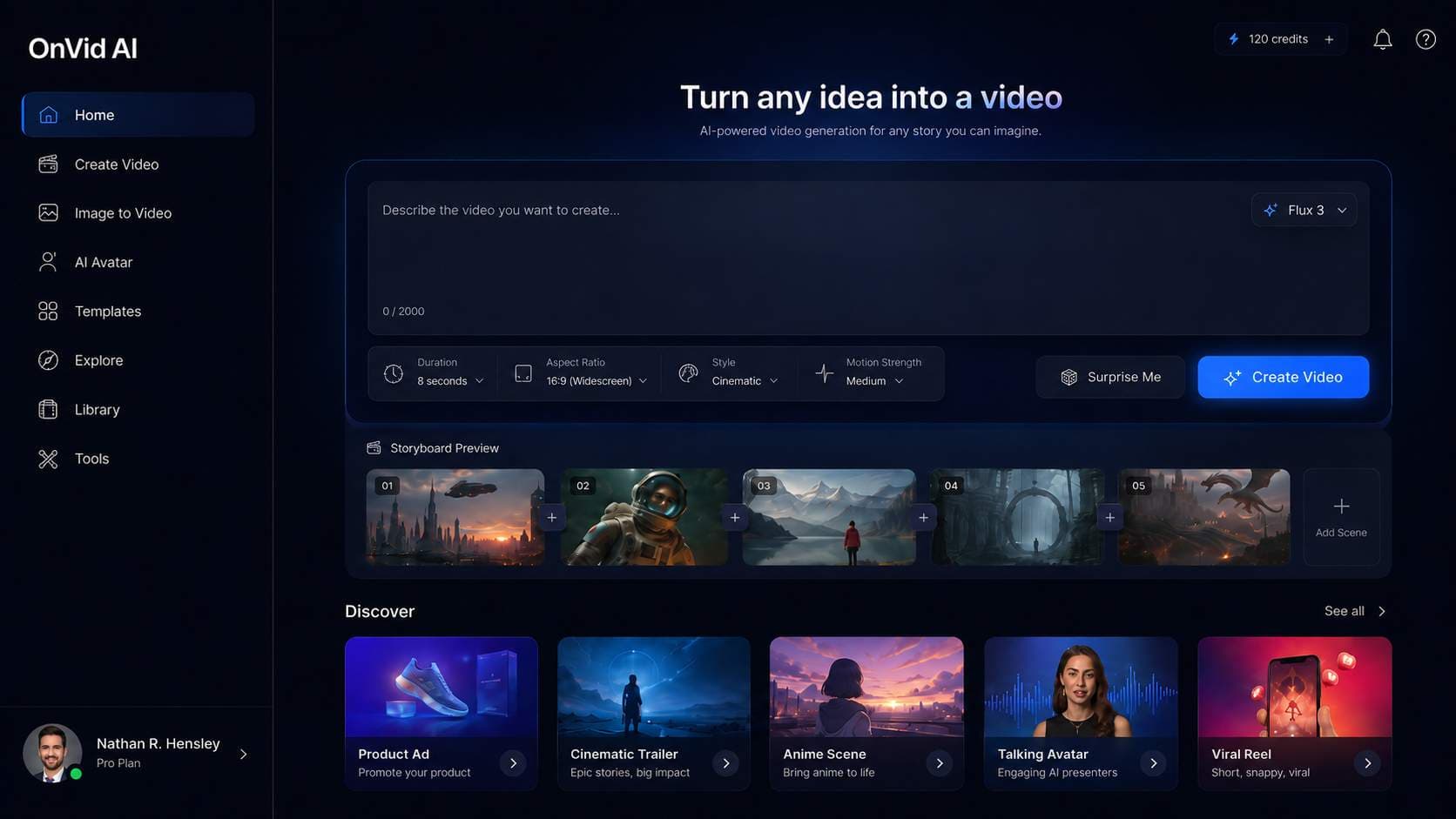
About this app
OnVid is a free AI video generator that helps you create videos from text prompts and images in seconds. With powerful text-to-video and image-to-video tools, anyone can turn ideas into engaging content without advanced editing skills or expensive software. Use OnVid AI to generate social media videos, YouTube content, marketing ads, product demos, short films, promotional clips, and creative visual stories. The platform is designed for creators, marketers, small businesses, educators, and anyone who wants to make professional AI videos faster. Simply describe your idea, upload an image if needed, and let the AI video maker transform it into a polished video. OnVid makes video creation simple, fast, and accessible for beginners and professionals. Whether you need an AI video generator for social media, advertising, storytelling, or business content, OnVid AI offers an easy way to create unique videos online. Start generating videos from text and images with OnVid today.
Key features
- 1Aggregates 6 leading AI video models (Kling, Veo, Seedance, Wan, Hailuo, Hunyuan) in one studio
- 2Text-to-video and image-to-video generation with length control and style presets
- 3Free tier with HD download and sharing, no advanced editing skills required
Target customer profile
Drawn from the product itself, not from a survey.
Demographic
Hobbyists & hobbyist creators
Pain points
Want to bring personal photos or ideas to life but find existing tools complicated or costly
Primary needs
Fun, intuitive, and affordable way to animate memories and share with friends and family
Demographic
Content creators & social media influencers
Pain points
Need to produce engaging video content frequently but lack time, skills, or equipment for traditional production
Primary needs
Fast creation, easy sharing, trendy styles, and cost-effective tools
Demographic
Small business owners & marketers
Pain points
Struggle to create promotional videos without hiring professionals or spending on expensive software
Primary needs
Quick ad creation for social media, product showcases, brand awareness, and a simple workflow
Demographic
Students & educators
Pain points
Have ideas for presentations, projects, or teaching materials but limited technical skills
Primary needs
Turn concepts into visual stories, make learning engaging, and produce multimedia assignments easily
Scout Review
Written by AI from measured evidence, scored out of 100.
OnVid is a promising free AI video generator that aggregates six leading models into a single, easy-to-use studio. The design is polished with a consistent dark theme and clear generator flow. Desktop performance is excellent, though mobile needs work. Security is basic but adequate for a new product. Accessibility is strong with minor contrast and heading issues. The growth potential is real — the free tier and multi-model aggregation are compelling against paid competitors. However, the brand-new domain and unverified traction claims warrant caution. If the team can improve mobile speed, add security headers, and publish an accessibility statement, OnVid could carve out a solid niche in the crowded AI video space.
Measure by measure
Usability
64Clear three-step flow and prompt-first generator layout. Controls are visible but cramped in a single row. Discover templates exist but 'See all' is easy to miss. Login/signup buttons are tiny and low-contrast.
Design
68Polished dark theme with consistent branding and clear hierarchy in the generator. Hero lacks visual proof of video quality — pure gradient with no demo clips. Trust bar avatars look low-res and generic.
Speed
46Mobile performance is weak at 49/100 with 5.5s LCP — slow first paint on phones. Desktop is excellent at 94/100. CLS is perfect at 0. Mobile users will feel the lag.
Security
52HTTPS with HSTS and X-Content-Type-Options is solid basics. Missing CSP, frame protection, Referrer-Policy, Permissions-Policy, and DMARC. No compliance certifications claimed. Checklist 6/12 — adequate for a new product but not impressive.
Accessibility
78Lighthouse scores 95/100 — strong baseline. Two failing audits: contrast ratio and heading order. No WCAG statement or accessibility page found. Dark theme with cyan accents may strain some users.
Growth
62Aggregates 6 top video models in one free studio — clear wedge against paid incumbents. Brand new domain, traction claims unverified. Category has headroom if execution holds.
Improvement areas
- Mobile performance is weak (LCP 5.5s) — needs optimization for on-the-go users
- Missing security headers (CSP, frame protection, DMARC) and no compliance certifications
- Homepage lacks real video examples — trust-building requires showing actual output
Design & Usability
OnVid presents a clean, dark-themed interface with consistent cyan CTAs that guide users through a straightforward three-step creation flow. The generator layout prioritizes the prompt, then controls, then preview — a sensible hierarchy. However, the homepage hero is a bare gradient with no video examples, undermining trust in the product's core output. The app sidebar is text-heavy without visual grouping, and login/signup buttons are low-contrast. Controls for duration, aspect, and style are visible but cramped in a single row. The Discover section offers templates but the 'See all' link is easy to miss. Overall, the design is polished but the usability has minor friction points that could be smoothed with better spacing and contrast.
Speed & Security
Performance is a tale of two devices: desktop scores an excellent 94/100 on Lighthouse, while mobile lags at 49/100 with a 5.5s LCP — a significant gap that will frustrate on-the-go users. CLS is perfect at 0, so no layout jumps. Security is basic but adequate: HTTPS with HSTS and X-Content-Type-Options are in place, but missing CSP, frame protection, and DMARC leave room for improvement. No compliance certifications are claimed, which is typical for a new product. The 6/12 checklist score reflects a foundation that works but isn't hardened. For a free tool, this is acceptable, but as the platform grows, investing in stronger security headers and a published security policy will be important.
Accessibility & Growth
Accessibility is a bright spot with a 95/100 Lighthouse score, though two audits fail: contrast ratio and heading order. No WCAG statement is published, which is a missed opportunity for transparency. The dark theme with cyan accents may pose contrast challenges for some users. Growth potential is promising: OnVid aggregates six leading video models into one free studio, a clear differentiator against paid incumbents like Runway, Pika, and Luma. The domain is brand new (registered 2026), and traction claims of 120,000+ creators are unverified. The free tier is a strong wedge, but sustainability depends on how the platform handles model API costs. The category has headroom, and the one-studio pitch is compelling if execution holds.
Conclusion
OnVid is worth a try if you're curious about AI video generation without committing to a paid plan. The free tier gives you access to top models like Kling and Veo, and the three-step flow is genuinely simple. Mobile users should expect some lag, and the homepage could use real video examples to build trust. But for a free tool, it delivers a lot of value. Keep an eye on how the platform evolves — if it maintains the free tier and improves performance, it could become a go-to for casual creators and small businesses. For now, it's a solid entry point into AI video, with room to grow.
Suggestions for improvement
- Add real video examples to the homepage hero to showcase output quality
- Improve mobile performance by optimizing images and reducing JavaScript
- Add CSP, frame protection, and DMARC headers to strengthen security
- Publish an accessibility statement and fix contrast/heading order issues
Alternatives comparison
Named competitors, point by point. Nobody paid to appear here or to be left out.
 OnVid |  Runway |  Pika Labs |  Luma Dream Machine | |
|---|---|---|---|---|
| Pricing model | Free tier with HD download, no credit card required | Freemium with paid plans starting around $12/month | Freemium with credits system, paid plans for more generations | Free tier with limited credits, paid plans for higher quality |
| Model variety | 6 models: Kling, Veo, Seedance, Wan, Hailuo, Hunyuan | Proprietary Gen-3 and Gen-4 models | Proprietary Pika 1.5 and 2.0 models | Proprietary Dream Machine model |
| Max video length | Up to 12s (Seedance), 10s (Kling), 8s (Veo) | Up to 10s per clip, extendable with additional generations | Up to 4s per clip, extendable with additional generations | Up to 5s per clip, extendable with additional generations |
| Target user | Hobbyists, creators, small businesses, educators — beginners welcome | Professionals and advanced creators needing fine control | Creative users focused on stylized, artistic outputs | Users seeking realistic, high-quality video from images |
Runway
Advanced AI video generation platform with more professional controls and pricing plans.
Pika Labs
User-friendly AI video generator known for creative styles and rapid generation, with a freemium model.
Luma Dream Machine
AI tool that creates high-quality videos from images and text, with a focus on realism.
Comparing options? See OnVid alternatives, scored side by side
More AI Generations apps
View all AI Generations
Uni-1 by Luma AI
92Uni-1 is an advanced multimodal text-to-image AI model th...

Gerty
91Private, local AI assistant for Mac that runs offline

LTX 2.3 AI Video Generator
91Fast, open-source AI video generator with 4K support, mul...

DemoVexa
90Turn your code into professional product demo videos with AI-generated scripts, animated UI, and natural voiceovers.

All of Us
89Add deceased loved ones to photos with AI and see free pr...

Voqusa
89Transcribe social media video and audio links into text (free signup, 5 free credits, then pay-as-you-go)

Pixelimg
88A free online AI-powered tool that instantly converts ima...

IraVoice
88Private on-device dictation for Apple-silicon Macs.

OBVELO
88Privacy gateway that masks personal data in LLM traffic

tradutor de mangá com IA
88O tradutor de mangá com IA traduz capítulos em lote, personaliza textos e oferece edição visual para estúdios.

HeyVid AI
88HeyVid AI is a free all-in-one AI video and image generat...

RestorePhotosApp
88An AI-powered photo restoration app that brings old, blur...


A platform dedicated to providing unbiased reviews of newly launched applications, analyzing everything from their features to their full potential.
info@scoutforge.net© 2026 Scoutforge. All rights reserved.
