Cycling through all six. Tap any point to stop.
Measured on six things
Remove or recover PST file passwords quickly and securely.
Security
40HTTPS is enforced and SPF is set, but HSTS, CSP, frame protection, X-Content-Type-Options, Referrer-Policy and DMARC are all missing (3/13 checklist points). No SOC 2, ISO or audit claim published.
Screenshots
1 / 2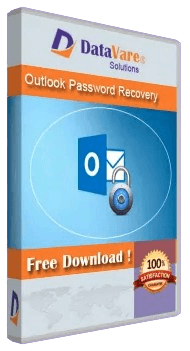
About this app
DataVare Outlook Password Recovery Expert is a powerful and easy-to-use tool that is capable of instantly recovering passwords from password-protected PST files of Microsoft Outlook. This software is extremely beneficial for users who have forgotten the password to their Outlook PST file and want to regain access to important email data. Main Features Quick Password Recovery Feature: With the help of cutting-edge technology, this tool can recover any type of password instantly. All Types of PST Supported: Supports both ANSI and UNICODE PST files. 100% Safe: No risk of data loss or any kind of damage. Simple and intuitive user interface: Even non-technical users can use it easily. Works without Outlook: You do not need to have MS Outlook installed on your system to run this software. Fully compatible with all versions of Windows.
Key features
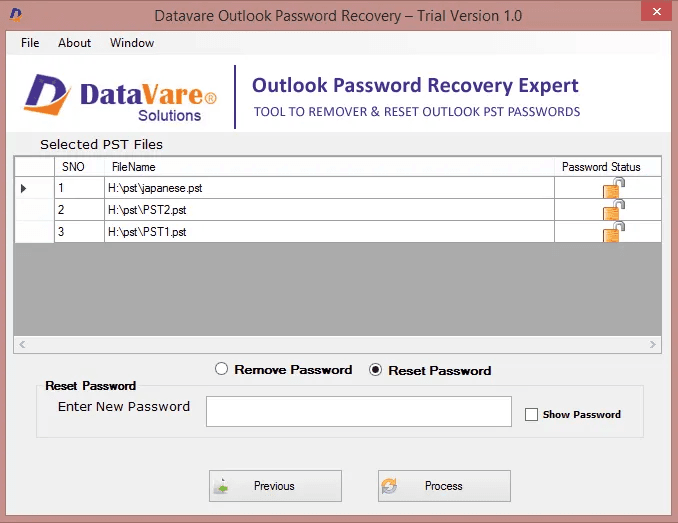
- 1Recovers passwords from password-protected ANSI and Unicode PST files, including bulk recovery of multiple files at once
- 2Resets a new password on unlocked PST files and saves the unlocked data to any local folder
- 3Works as a standalone Windows app without requiring Microsoft Outlook to be installed
Target customer profile
Drawn from the product itself, not from a survey.
Demographic
Individual Outlook users
Pain points
Forgotten PST password, locked out of email data
Primary needs
Quick recovery of PST password to access emails
Demographic
IT support professionals
Pain points
Multiple locked PST files from clients, tight deadlines
Primary needs
Bulk recovery and resetting passwords efficiently
Demographic
Small business owners
Pain points
Lost access to critical business emails stored in PST files
Primary needs
Affordable, reliable solution to recover PST passwords without data loss
Scout Review
Written by AI from measured evidence, scored out of 100.
Outlook Password Recovery Expert is a Windows utility that unlocks password-protected PST files, resets the password, and saves the unlocked data locally. It supports ANSI and Unicode PSTs, works without Outlook installed, and covers Outlook 2003 through 2021. The site claims 246 ratings at 4.6/5 and offers a free download alongside a paid license. The product does what it says, the FAQ is honest about limitations (it cannot read corrupted PST files), and the site loads fast. What holds it back is everything around the core function: a dated 2010s shareware aesthetic, a docs section that is one video and nothing else, a security-header profile that would embarrass a hobby blog, and a market that is quietly disappearing as Outlook moves to the cloud. It's a competent tool for a specific, shrinking job.
Measure by measure
Usability
58Download and Buy buttons are prominent and repeated, and the FAQ answers the real questions (no Outlook needed, 2003-2021 support, no corrupted PST). Docs are a single video with no written walkthrough.
Design
46A 2010s utility-software page: dark navy hero, 3D product box, dense purple text block, thin gradient feature cards. The app itself is a flat WinForms grid. Functional, but visually behind modern peers.
Speed
72Lighthouse mobile 89/100 (LCP 2.7s, CLS 0.011, TBT 0ms) and desktop 98/100. The site is light and snappy; no user complaints about lag surfaced in the collected evidence.
Security
40HTTPS is enforced and SPF is set, but HSTS, CSP, frame protection, X-Content-Type-Options, Referrer-Policy and DMARC are all missing (3/13 checklist points). No SOC 2, ISO or audit claim published.
Accessibility
68Lighthouse accessibility 93/100, but buttons lack accessible names and headings skip levels. English-only interface, no WCAG statement, no keyboard-navigation documentation found.
Growth
42A real but shrinking problem: forgotten PST passwords. The pitch is interchangeable with every other PST unlocker, and the segment — local Outlook files — is being eaten by cloud mail. Domain is 11 years old; traction signals are thin.
Improvement areas
- Security headers are missing (HSTS, CSP, frame protection, DMARC) — a password tool should lead on this, not lag
- Documentation is a single video page with no written step-by-step guides or troubleshooting content
- Dated WinForms UI and 2010s shareware homepage design undersell the tool's actual capability
Design & Usability
The homepage is a time capsule of 2010s shareware: dark navy hero, 3D product box, a dense purple paragraph block, and six thin-bordered feature cards with icons that look hand-me-down. The app screenshot confirms the vibe — a flat WinForms grid with radio buttons and no visual hierarchy. On usability it does better than the design suggests: Download and Buy buttons are large and repeated, the FAQ answers the questions that actually matter (works without Outlook, supports 2003-2021, cannot read corrupted PST), and the Screens/Video/Docs tabs give a clear path. The weak spot is documentation — the docs URL resolves to a single video page with no written steps, which is thin for a tool aimed at non-technical users. Navigation is minimal and the search icon is tiny and low-contrast. It works, it's just not pleasant to look at or to learn from.
Speed & Security
Speed is the standout. Lighthouse mobile performance lands at 89/100 with an LCP of 2.7s, CLS of 0.011 and TBT of 0ms; desktop hits 98/100. The page is light, static-feeling and snappy — no user complaints about lag surfaced anywhere in the collected evidence. Security is the opposite story. HTTPS is enforced and SPF is configured, but the probe found no HSTS, no CSP, no frame protection, no X-Content-Type-Options, no Referrer-Policy, no Permissions-Policy and no DMARC — three of thirteen checklist points. For a tool whose entire value proposition is 'trust us with your locked email data,' shipping a site with that header profile is a bad look. The site does publish Privacy, Cookie, Legal and Refund policies, which is table stakes, but there is no SOC 2, ISO, pen-test report or bug bounty anywhere. The gap between what it asks you to trust it with and what it demonstrates about its own security is the widest thing on this page.
Accessibility & Growth
Accessibility scores 93/100 on the automated Lighthouse audit, which is genuinely good, but the failing audits are telling: buttons have no accessible names and headings skip levels. Those are the two easiest fixes in the entire WCAG checklist and they're still open. The interface is English-only, there's no WCAG conformance statement, and no keyboard-navigation documentation. On growth, the honest read is that this is a real problem in a shrinking category. Forgotten PST passwords are a genuine pain, but the product is functionally interchangeable with every other PST unlocker on the market — nothing in the site's own material names a segment it serves better than the alternatives. The underlying format is legacy Microsoft tech that the company has been steering users away from for a decade, and the target customer (someone with a local PST file and no cloud migration) is a shrinking pool. The 11-year-old domain and 246 ratings show a business that has survived, not one with headroom. It can keep selling to IT pros with client archives, but there's no wedge here that gets stronger as it grows.
Conclusion
If you have a locked PST file and no other way in, this will probably do the job — it's cheap, it's fast, and it doesn't require Outlook installed. But go in with clear expectations. The interface looks like it was designed in 2012 and never revisited. The documentation is a video, not a manual. The site asks you to trust it with your email archive while shipping without HSTS, CSP or DMARC. And the category itself is on borrowed time: local PST files are a legacy format, and every year fewer people have one worth unlocking. For a one-off recovery, fine. As a long-term tool in your kit, look at what the broader Outlook recovery space offers before you commit.
Suggestions for improvement
- Add HSTS, CSP, X-Content-Type-Options and DMARC — a password tool's own site should be the hardest to spoof, not the easiest.
- Replace the single-video docs page with written step-by-step guides and screenshots for each recovery scenario.
- Fix the two failing Lighthouse audits: give buttons accessible names and put headings in sequential order.
- Modernize the app UI — the WinForms grid reads as unfinished next to the polish of competing recovery tools.
Alternatives comparison
Named competitors, point by point. Nobody paid to appear here or to be left out.
 Outlook Password Recovery Expert Outlook Password Recovery Expert | ||
|---|---|---|
| Password recovery from protected PST files | Yes — recovers passwords from ANSI and Unicode PST files | Not specified |
| Bulk recovery of multiple PST files | Yes — select multiple PST files and unlock them together | Not specified |
| Password reset after unlock | Yes — set a new password of your choice on the unlocked PST | Not specified |
| Works without Microsoft Outlook installed | Yes — standalone application, no Outlook required | Not specified |
| Supported Windows versions | Windows 11, 10, 8.1, 8, 7 and other versions | Not specified |
| Handles corrupted PST files | No — FAQ states the tool does not read corrupted PST files | Not specified |
Comparing options? See Outlook Password Recovery Expert alternatives, scored side by side
More Security apps
View all Security
OBVELO
88Privacy gateway that masks personal data in LLM traffic

Sidenty
87Sidenty is a professional digital identity protection ser...

ProcessSpy
87A native macOS process explorer and advanced monitor that...

PromptTrace
85Free hands-on AI security labs for prompt injection and L...

Sanctix
85Sanctions screening with verifiable SHA-256 audit trails.

eGuard
84Verifiable parental controls for families in the Philippines

VaultKeepR
84Password manager with no email, no account, no tracking. ...

Noden
84Native macOS SSH, SFTP & RDP client with a Keychain-backe...

Archonum
84Real-device browser automation for AI agents

Privacy Requests
84DSAR management software for small teams.

PCDOTS Email Recovery Software
83Recovers emails from corrupt mailboxes across 50+ platforms.

CertAssist.io
83Simple, affordable compliance certification for ISO 27001...


A platform dedicated to providing unbiased reviews of newly launched applications, analyzing everything from their features to their full potential.
info@scoutforge.net© 2026 Scoutforge. All rights reserved.
