Cycling through all six. Tap any point to stop.
Measured on six things
Email backup tool for Windows with 20+ formats and Email Clients
Growth
58Real problem (independent mailbox backup for compliance and offboarding) with a concrete $99 lifetime wedge against subscription rivals, but the category is crowded and the segment is narrow.
Screenshots
1 / 1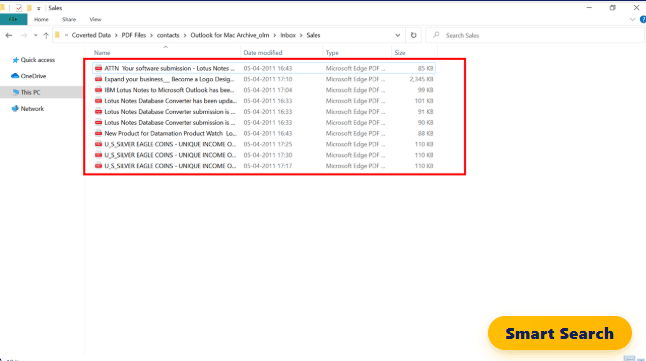
About this app
PCDOTS Email Backup Software is a Windows-only utility designed to create independent, locally controlled backups of email mailboxes. It reads from a wide range of sources: local mailbox files (PST, OST, MBOX, EML, OLM, MSG), live IMAP/POP3 servers, and OAuth-authenticated cloud accounts like Gmail, Office 365, Outlook.com, and Yahoo. The wizard exports to over 20 output formats including PST, MBOX, EML, PDF, HTML, CSV, and JSON, ensuring compatibility with various email clients and legal requirements. It preserves all headers, attachments, and folder structures, supports selective backup via date range and header filters, and offers multiple view modes for source inspection. Notable features include Unicode PST output for modern Outlook, PDF backup with embedded attachments, and IMAP LIST-EXTENDED for hidden folders. The tool runs on Windows 7 through 11 and Server editions, requires .NET Framework 4.5, and costs $99 one-time with a lifetime license. A free trial limits backups to ...
Key features
- 1Backs up from PST, OST, MBOX, EML, OLM, MSG, IMAP, POP3, Gmail, Office 365, Outlook.com and Yahoo.
- 2Exports to 20+ formats including PST, MBOX, EML, PDF, HTML, CSV and JSON with headers and attachments intact.
- 3Selective backup via date range and header filters, plus five view modes for source inspection.
Target customer profile
Drawn from the product itself, not from a survey.
Demographic
IT administrators in small to medium businesses
Pain points
Need to manage email backups for compliance and performance without relying on cloud storage.
Primary needs
A reliable, locally-run tool that can back up multiple mailboxes and formats with filtering options.
Demographic
Employees leaving a job or retiring
Pain points
Losing access to personal and professional emails stored in company accounts after offboarding.
Primary needs
A way to create a portable backup of work correspondence before account access is revoked.
Demographic
Legal and compliance professionals
Pain points
Requirement to preserve email evidence in immutable, court-acceptable formats for e-discovery.
Primary needs
A tool that can export emails to PDF with metadata intact and maintain chain of custody.
Demographic
Individuals with long-term personal email archives
Pain points
Emails scattered across providers that may shut down or delete old messages.
Primary needs
A unified, independent backup of all correspondence in a format that can be accessed offline.
Scout Review
Written by AI from measured evidence, scored out of 100.
PCDOTS Email Backup Software is a Windows-only utility that backs up mailboxes from local files, live IMAP/POP3 servers and OAuth cloud accounts into 20+ formats including PST, MBOX, PDF and EML. It targets IT admins, compliance professionals and departing employees who need a portable, locally controlled copy of their email. The site is fast (Lighthouse 99/100 mobile and desktop) and well-documented via a step-by-step guide, with a free trial and live chat. Security headers are mostly in place (10/12) but DMARC is missing and no compliance certifications were found. Accessibility scores 91/100 with several ARIA and heading-order failures. At $99 one-time with a lifetime license, it undercuts subscription rivals, but competes against free options like MailStore Home and Gmail Takeout.
Measure by measure
Usability
63Step-by-step guide covers loading, exporting and extracting data, plus live chat and a free trial. Onboarding is documented but the trial limit is vague on the homepage.
Design
62Long-form marketing page with clear hero, review badge and structured feature sections. Desktop utility UI is functional rather than modern; site craft is competent but not distinctive.
Speed
88Lighthouse mobile 99/100 (LCP 1.8s, CLS 0, TBT 0ms) and desktop 99/100. The site is genuinely fast, with no lag complaints in the collected evidence.
Security
72HTTPS enforced with HSTS, CSP, frame protection and Referrer-Policy; SPF present but DMARC missing and no published SOC 2/ISO or bug bounty found.
Accessibility
70Lighthouse a11y 91/100, but failing audits include aria-hidden focusable descendants, prohibited ARIA attributes and non-sequential headings. No WCAG statement or multi-language support found.
Growth
58Real problem (independent mailbox backup for compliance and offboarding) with a concrete $99 lifetime wedge against subscription rivals, but the category is crowded and the segment is narrow.
Improvement areas
- Missing DMARC and Permissions-Policy headers; no published SOC 2, ISO or bug bounty for a compliance-adjacent tool.
- Four failing Lighthouse accessibility audits (aria-hidden focusables, prohibited ARIA, heading order, label mismatch).
- Free-trial limit is not stated on the homepage, making pre-purchase evaluation harder than it needs to be.
Design & Usability
PCDOTS Email Backup Software presents a long-form marketing page with a clear hero, a 4.6/5 review badge and structured sections explaining sources, targets and what carries through a backup. The design is competent but dense — the homepage reads more like a whitepaper than a product page, and the Windows utility UI shown in screenshots is functional rather than modern. Usability is better served: a dedicated step-by-step guide at /guide.html walks through loading data from files, desktop clients, accounts and servers, then exporting and extracting attachments, addresses and contact numbers. A live chat widget and free trial lower the barrier, though the trial's exact backup limit is not stated on the homepage, which is a small friction point for evaluation.
Speed & Security
Speed is the standout. Lighthouse scores 99/100 on both mobile and desktop, with LCP 1.8s, CLS 0, TBT 0ms and FCP 1.1s — the site is genuinely snappy and there are no lag complaints in the collected evidence. Security is solid but not exceptional: HTTPS is enforced with HSTS, CSP, frame protection, X-Content-Type-Options and Referrer-Policy, and SPF is configured, giving 10/12 on the header checklist. However, DMARC is missing and Permissions-Policy is absent, and no SOC 2, ISO 27001, pen-test report or bug bounty program was found. For a tool that handles OAuth tokens for Gmail and Office 365, the lack of DMARC is a real gap worth closing.
Accessibility & Growth
Accessibility lands at 91/100 on Lighthouse, but the failing audits are meaningful: aria-hidden containers with focusable descendants, prohibited ARIA attributes, non-sequential heading order and visible labels that don't match accessible names. No WCAG conformance statement or multi-language support was found, so the site is English-only and unverified against WCAG. Growth is a judgement call: the problem — independent, locally controlled mailbox backup for compliance, offboarding and e-discovery — is real and specific, and the product differentiates on breadth (PST, OST, MBOX, EML, OLM, MSG, IMAP, POP3, Gmail, O365, Outlook, Yahoo) plus 20+ output formats including PDF for legal hold. The $99 one-time lifetime license is a concrete wedge against subscription rivals like Mail Backup X and Aid4Mail, but MailStore Home is free and Gmail Takeout is free, so the paid segment is narrow and the category is crowded.
Conclusion
If you need a Windows tool that pulls mail from Gmail, Office 365, IMAP or a pile of PST/OST/MBOX files and writes it back out as PST, MBOX, PDF or EML with headers and attachments intact, PCDOTS covers the matrix and does it for a one-time $99. The trial lets you verify the workflow before paying, and the guide is detailed enough to get a non-technical admin through it. The caveats are real: no DMARC, no published certifications, accessibility gaps, and a crowded field where free tools exist. For compliance-driven buyers who value a lifetime license and local control over a subscription, it's a reasonable pick — just don't expect enterprise-grade compliance paperwork to come with it.
Suggestions for improvement
- Publish the exact free-trial limit on the homepage and pricing page so buyers can evaluate fit before downloading.
- Add DMARC and Permissions-Policy headers; for a tool handling OAuth tokens this is a cheap, high-signal fix.
- Fix the four failing Lighthouse a11y audits: aria-hidden focusable descendants, prohibited ARIA, heading order, label/name mismatch.
- Add a short accessibility statement and consider a second language, since compliance buyers often span jurisdictions.
Alternatives comparison
Named competitors, point by point. Nobody paid to appear here or to be left out.
 PCDOTS Email Backup Software PCDOTS Email Backup Software |  MailStore Home MailStore Home | Mail Backup X |  Aid4Mail Aid4Mail |  Gmail Takeout Gmail Takeout | |
|---|---|---|---|---|---|
| Platform support | Windows 7-11 and Server editions; requires .NET Framework 4.5 | Windows only | Mac and Windows | Windows (and Mac via Aid4Mail for Mac) | Web-based, any browser |
| Pricing model | $99 one-time, lifetime license; free trial with limits | Free | Paid license (subscription/one-time tiers) | Paid license, tiered by edition | Free |
| Source coverage | PST, OST, MBOX, EML, OLM, MSG, IMAP, POP3, Gmail, Office 365, Outlook.com, Yahoo | POP3, IMAP, Exchange | Major email clients and cloud services | Wide range of email formats and servers | Gmail only |
| Output formats | 20+ including PST, MBOX, EML, PDF, HTML, CSV, JSON | Various archive formats | Multiple formats including PDF and PST | PST, MBOX, PDF and many others | MBOX |
| Legal/e-discovery PDF export | Yes — immutable, searchable PDF with embedded attachments | Limited; not a dedicated e-discovery tool | Yes, PDF export supported | Yes, PDF export supported | No |
MailStore Home
Free email archiving software for Windows that supports POP3, IMAP, and Exchange, and can back up to various formats.
Mail Backup X
A comprehensive email backup and archiving tool for Mac and Windows, supporting major email clients and cloud services.
Aid4Mail
A powerful email conversion and migration tool that also supports backup to multiple formats like PST, MBOX, and PDF.
Gmail Takeout
Google's built-in data export tool that allows users to download a copy of Gmail data in MBOX format.
Comparing options? See PCDOTS Email Backup Software alternatives, scored side by side
More Online Backup apps
View all Online Backup
PCDOTS PST Converter
85Convert Outlook PST files to 16 formats and clouds withou...

yourdrive
84YourDrive is a self-hosted file manager and media timeline that runs entirely on your own infrastructure. Organize files in nested folders, move them with drag-and-drop, search instantly, and browse photos and videos by month and year. Files stream straight to your own AWS S3, Azure Blob, MinIO, Cloudflare R2 or Wasabi storage. Install with one command. Free for personal use; teams pay per server, not per seat.
PCDOTS Email Recovery Software
83Recovers emails from corrupt mailboxes across 50+ platforms.

Alcazar Dead Man's Switch
82An encrypted digital legacy service that securely deliver...

App-Vault
81Encrypted photo and file vault for iPhone. AES-256 on device, pattern lock, decoy vault and calculator disguise. No account, no cloud.
PCDOTS Thunderbird Converter
81Recover and migrate Thunderbird profiles & MBOX files wit...

SysInfo Office 365 Export to PST Tool
80Export Exchange Online, on-premises, and hybrid mailboxes...

RemoteDrive by FileZilla Pro
80Integrates cloud storage into macOS Finder for seamless file management across services like Google Drive and Dropbox.

SysInfo Google Workspace Backup Tool
80Backup and migrate Google Workspace data locally or to ot...

S3FileHub
80A user-friendly web app for managing AWS S3 storage with AI summarization and analytics.

SysInfo Email Migration Tool
80Bulk email migration and backup tool for 5 sources with f...

Filifly
79A secure, web-based file sharing platform with end-to-end encryption and no login requirements for quick transfers.


A platform dedicated to providing unbiased reviews of newly launched applications, analyzing everything from their features to their full potential.
info@scoutforge.net© 2026 Scoutforge. All rights reserved.
