Cycling through all six. Tap any point to stop.
Measured on six things
Free photo collage maker for Android: about 1,000 layouts, no watermark, no ads, no account, works offline.
Speed
46Lighthouse mobile 49/100 with a brutal 7.5s LCP and 3.9s FCP; desktop is a healthy 90/100. In-app editing is offline so it dodges network lag, but the store page itself is slow to paint on mobile.
Screenshots
1 / 3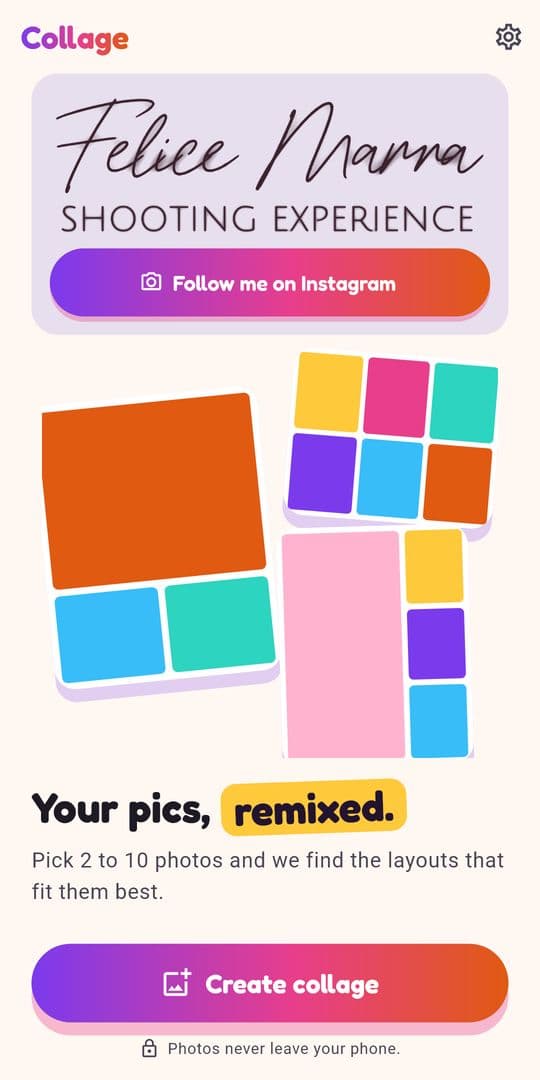
About this app
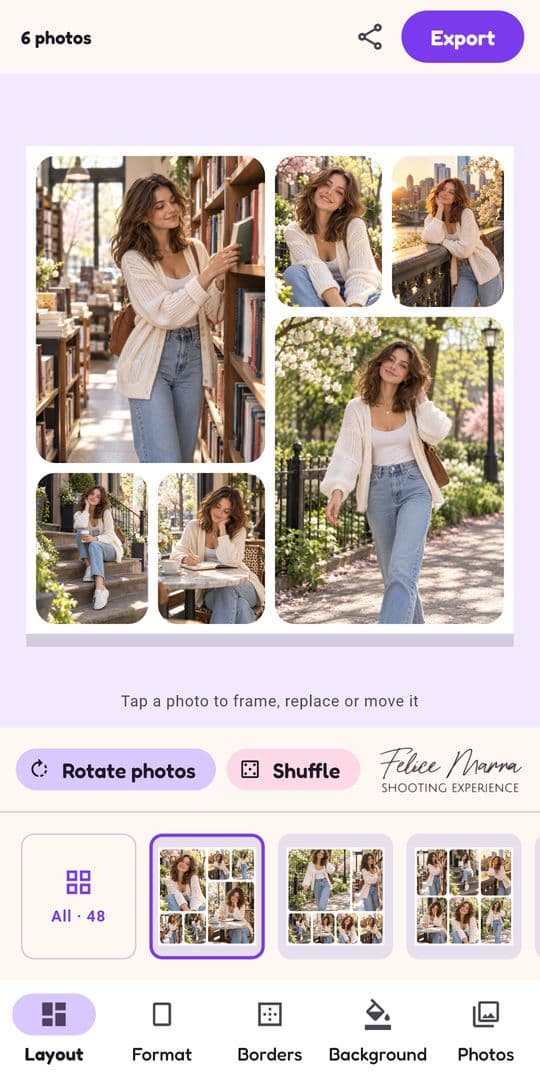
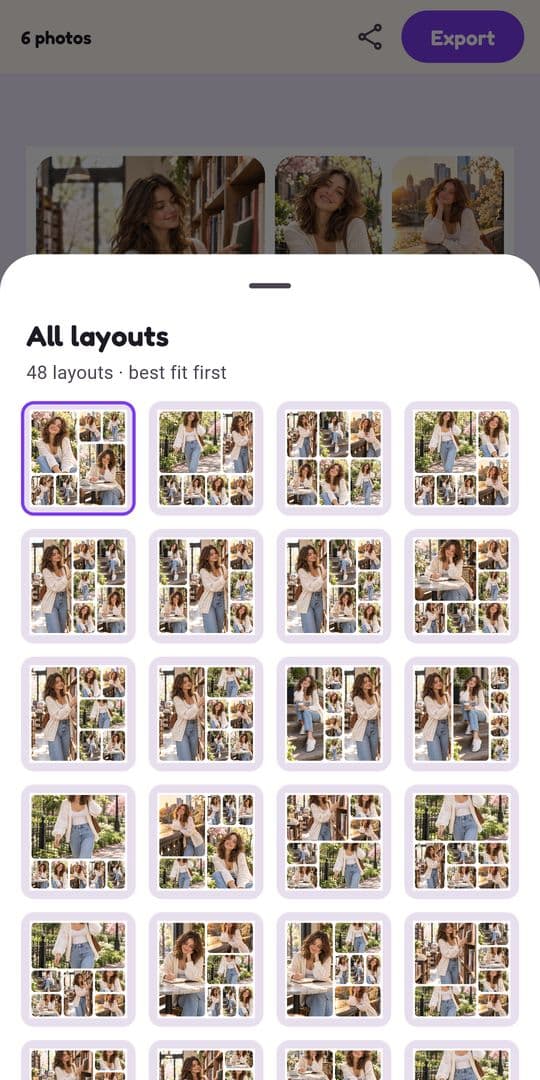
Make a photo collage in seconds, and keep it: no watermark, no ads, no account, no subscription. Pick 2 to 10 photos. The app looks at their shapes and shows first the layouts that crop them least, out of about 1,000 designs: clean photo grids, layouts with one hero photo, side by side and before & after. What you can make: Instagram stories (9:16), square posts, portrait 4:5 and landscape collages; photo dumps and monthly recaps with up to 10 pictures; moodboards, travel, birthday, wedding and family collages. Edit in a few taps: shuffle or rotate photos through the layout, drag and pinch to frame each one, long-press to swap two, adjust spacing, margins, rounded corners and background colors. Export up to 4096 px, then save or share. Every layout and every tool is free. Nothing is locked and nothing is stamped on your collage. The app works offline and never connects to the internet: no sign-up, no tracking. Available in 20 languages.
Key features
- 12-10 photo collages with ~1,000 layouts, least-cropping designs shown first.
- 2Offline operation, no account, no tracking, no watermark, no ads, no subscription.
- 3Tap-to-frame, long-press-to-swap, undo/redo, spacing/margins/corners/background controls, 4096px export.
Target customer profile
Drawn from the product itself, not from a survey.
Demographic
Social media influencers and content creators aged 18-35
Pain points
Watermarks and ads on free collage apps; subscription fees for basic features
Primary needs
Quick, watermark-free collages for Instagram stories and posts; offline editing
Demographic
Privacy-conscious individuals concerned about data tracking
Pain points
Apps that upload photos to servers; sign-up requirements; data collection
Primary needs
Offline operation; no account; no data sharing; local editing
Demographic
Casual users and families creating memory collages
Pain points
Complex interfaces; limited free layouts; intrusive ads
Primary needs
Easy-to-use tools; many free layouts; no hidden costs; ability to save high-resolution images
Scout Review
Written by AI from measured evidence, scored out of 100.
Photo Collage Maker & Grid is a focused, privacy-first collage app that does one thing well: turn 2-10 photos into a clean, watermark-free collage in seconds, offline, with no account. The editor is genuinely good — least-cropping layouts first, tap-to-frame, long-press-to-swap, undo/redo — and the 99/100 accessibility score is rare for an indie app. The weak spots are the slow mobile Play Store page (7.5s LCP), a five-icon tab bar that crowds small screens, and web-layer security gaps (HTTPS not enforced, no DMARC) that undercut the otherwise strong privacy story. Growth is the open question: the wedge is real, but the category is crowded and the app is early.
Measure by measure
Usability
72Pick 2-10 photos, get least-cropping layouts first, tap to frame, long-press to swap, undo/redo added recently. No sign-up and offline operation means near-zero time-to-value. On-screen hints guide the editor without a manual.
Design
70Judging the app UI from store screenshots: cohesive pastel palette, rounded corners, clear hierarchy with a prominent purple Export button and bordered selected layout. Screenshots are low-res and the five-icon tab bar crowds on small screens.
Speed
46Lighthouse mobile 49/100 with a brutal 7.5s LCP and 3.9s FCP; desktop is a healthy 90/100. In-app editing is offline so it dodges network lag, but the store page itself is slow to paint on mobile.
Security
62HTTPS not enforced and no DMARC or Referrer-Policy, but HSTS, CSP, frame protection and X-Content-Type-Options are present (8/13). The app itself is offline with no data collection per Play Data Safety — a strong privacy posture for a collage tool.
Accessibility
80Lighthouse accessibility 99/100 with only two minor failures (missing main landmark, label/name mismatch). Available in 20 languages. No public WCAG statement, but automated checks are near-perfect and the app is simple and touch-driven.
Growth
58Real problem (watermarks, ads, subscriptions on free collage apps), specific wedge (offline, no account, 1,000 layouts, no watermark), clear target. 100+ downloads is early context, not the score. Category is crowded but the privacy angle is defensible.
Improvement areas
- Mobile Play Store page performance (7.5s LCP) and web-layer security (HTTPS, DMARC, Referrer-Policy).
- Five-icon bottom tab bar crowds small screens; store screenshots are low-resolution.
- Differentiation needs to get louder against Canva/PicCollage — the privacy wedge is real but under-marketed.
Design & Usability
The app UI, judged from store screenshots, is cohesive and friendly: pastel palette, rounded corners, a big purple Export button, and a selected-layout border that makes state obvious. The editor flow is the real strength — pick 2-10 photos, get least-cropping layouts first, tap to frame, long-press to swap, with undo/redo added in a recent update. No sign-up and offline operation mean you're making a collage within seconds of install. The weak points are the five-icon bottom tab bar that crowds on small screens and store screenshots too low-res to judge typography. Usability is above-average for the category; design is solid but not distinctive enough to stand out in a screenshot-scrolling store.
Speed & Security
Speed is a split verdict: desktop Lighthouse is 90/100, but mobile is 49/100 with a 7.5s LCP and 3.9s FCP — the Play Store page itself is slow to paint on phones, which is exactly where it gets opened. In-app editing is offline, so once installed the app dodges network lag entirely. Security is a similar split: the app's privacy posture is genuinely strong (offline, no data collected, no third-party sharing per Play Data Safety), but the web layer has gaps — HTTPS not enforced, no DMARC, no Referrer-Policy, 8/13 on the header checklist. For a privacy-first product, the web hygiene should match the app's promise.
Accessibility & Growth
Accessibility is the standout: 99/100 on Lighthouse with only two minor failures (missing main landmark, label/name mismatch), and 20-language support. No public WCAG statement, but the automated checks are near-perfect and the app is simple and touch-driven. Growth is the harder call. The problem is real — free collage apps are ad-riddled and watermark-happy — and the wedge is specific: offline, no account, no watermark, ~1,000 layouts. The target (creators, privacy-conscious users, families) is clear. But the category is crowded by Canva and PicCollage, and 'no watermark, no ads' is a pitch every indie collage app has made. 100+ downloads is early context, not a verdict. The idea can grow; the differentiation needs to get louder.
Conclusion
If you want a collage app that doesn't watermark your work, doesn't nag you to subscribe, and doesn't upload your photos to a server, this is a genuinely good answer. The app delivers on its promise. What it needs next is polish on the store page (faster mobile load, higher-res screenshots), a tighter bottom bar, and web hygiene that matches the app's privacy claims. The idea is sound; the execution is above-average for an indie; the traction is early. Worth installing if the pitch resonates — just don't expect the store page to load as fast as the app runs.
Suggestions for improvement
- Enforce HTTPS and add DMARC + Referrer-Policy to close the web-layer security gaps.
- Improve mobile Play Store page performance — 7.5s LCP is losing installs before the app is even seen.
- Replace the five-icon bottom tab bar with a more compact navigation for small screens.
- Publish higher-resolution store screenshots so typography and control sizes are judgeable.
Alternatives comparison
Named competitors, point by point. Nobody paid to appear here or to be left out.
 Photo Collage Maker & Grid Photo Collage Maker & Grid |  Canva Canva |  PicCollage PicCollage | |
|---|---|---|---|
| Watermark-free export | Yes, always free | Yes on free tier, some assets require Pro | Free tier watermarked; removal requires subscription |
| Works offline / no account | Fully offline, no account | Online-first, account required | Account optional, cloud features online |
| Ads / subscription | No ads, no subscription | Free tier with Pro upsell | Ads + subscription for premium |
| Layout variety | ~1,000 layouts, least-cropping first | Huge template library, broader design scope | Large layout library with stickers/effects |
| Privacy / data collection | No data collected, no third-party sharing | Account data collected, cloud storage | Account and usage data collected |
Canva
Online graphic design platform that also offers collage templates.
PicCollage
Collage maker app with stickers and effects.
Comparing options? See Photo Collage Maker & Grid alternatives, scored side by side
More Design & Creativity apps
View all Design & Creativity
RoomCreator
92An AI-powered interior and exterior design tool that tran...

What the GIF
89Frame-perfect video-to-GIF maker that runs entirely in yo...

TranscriptYou
88Free YouTube transcript generator with timestamps and AI ...

RestorePhotosApp
88An AI-powered photo restoration app that brings old, blur...

Portrait Gift
88AI-powered personalized face swap art platform creating c...

ButterKit
82macOS app for App Store screenshots: 3D mockups, auto-tra...

BeartIMAGE
88BeartIMAGE is a free, web-based image processing platform engineered for fast, bulk photo editing and conversion directly in your browser.

Pixelimg
88A free online AI-powered tool that instantly converts ima...

Coloring Pages Pro
87A massive collection of free printable coloring pages for...

QRocodile
87Design And Animate QR Codes People Want to Scan

FaceSwapAI
87AI face swap for photos, videos, GIFs with free trial.

TryInk
86Try on a tattoo on your own body photo before you book.


A platform dedicated to providing unbiased reviews of newly launched applications, analyzing everything from their features to their full potential.
info@scoutforge.net© 2026 Scoutforge. All rights reserved.
