Cycling through all six. Tap any point to stop.
Measured on six things
All-in-one AI photo editor and generator for effortless, ...
Speed
57Lighthouse mobile 68/100 with LCP 4.7s, TBT 314ms, FCP 3.0s; desktop 76/100. CLS is fine at 0.061, but a 4.7s mobile LCP is nearly double the 'good' threshold — the editor loads, it just makes you wait for it.
Screenshots
1 / 1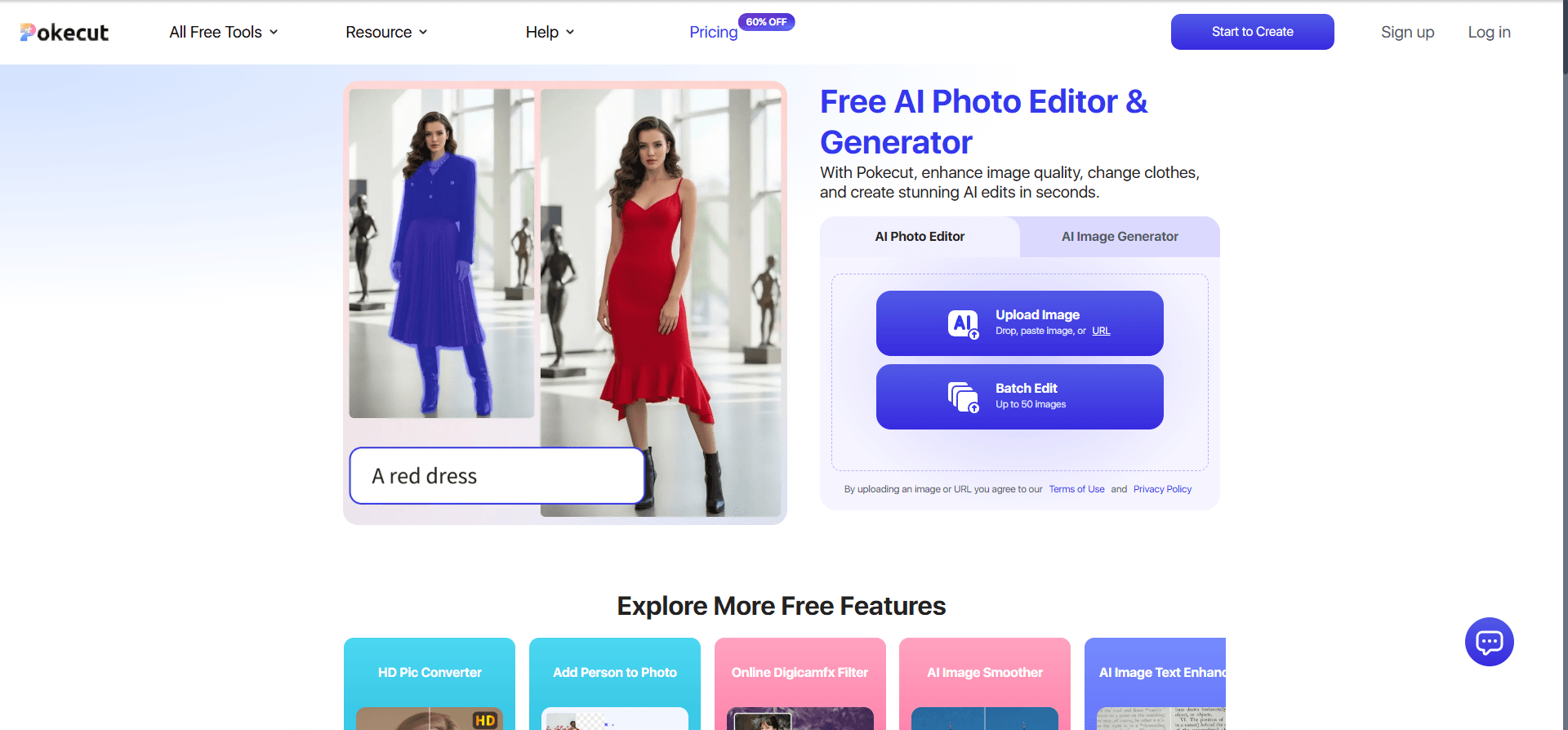
About this app
Pokecut is a comprehensive AI-powered photo editing and generation platform that runs entirely in your browser. It combines a powerful AI image generator with a suite of editing tools like background removal, object erasing, photo enhancement, and batch processing. With over 200 AI tools ranging from portrait retouching to body sculpting and creative filters, Pokecut caters to content creators, e-commerce sellers, and everyday users looking to produce professional-looking images quickly. The platform offers multiple AI models for different needs, from fast drafts to high-definition portraits, and supports batch editing for up to 50 images at once. Pokecut is free to use with limited credits, and a Pro subscription unlocks higher resolution and full feature access. It's trusted by over 3 million creators and has processed over 500 million edits. The tool is particularly praised for its natural-looking hair edits, background removal, and user-friendly interface, making it a strong alt...
Key features
- 1AI background removal, object erase, and photo enhancement in one browser tab — no download required.
- 2Batch editing for up to 50 images at once: resize, enhance, change or remove backgrounds.
- 3200+ AI tools including portrait retouching, body sculpting, hair editing, and creative filters.
- 4Multiple AI models (Lite, PRO, Ultra Enhance, Nano Banana Pro) for drafts through HD portraits.
- 5AI image generator with text-to-image and image-to-image, plus 10,000+ design templates.
Target customer profile
Drawn from the product itself, not from a survey.
Demographic
Content creators and influencers (Instagram, YouTube, TikTok)
Pain points
Need quick, high-quality edits for thumbnails and posts without learning complex software.
Primary needs
Easy background removal, filters, and templates to produce engaging visuals fast.
Demographic
E-commerce sellers and small business owners
Pain points
Struggle to edit product photos in bulk to meet marketplace standards and look professional.
Primary needs
Batch editing, background replacement, and enhancement to create consistent, polished product images.
Demographic
Casual users and hobbyists
Pain points
Want to improve personal photos (portraits, travel, family) without spending money on expensive software or subscriptions.
Primary needs
Free, easy-to-use tools for retouching, enhancing old photos, and creative effects like body editing and hair changes.
Scout Review
Written by AI from measured evidence, scored out of 100.
Pokecut is a genuinely broad browser-based AI photo editor — background removal, object erase, enhancement, body and hair retouching, batch processing up to 50 images, and an image generator with multiple models. The store listing is the best part of the pitch: clear, numbered, before/after-driven screenshots that make the core flow obvious. The homepage is where craft slips — an overlapping credits card on the hero, unreadable feature thumbnails, and a repetitive scroll. Speed is the measured weak spot (mobile LCP 4.7s), security is standard-for-stage (9/13 headers, no CSP or DMARC, no published audit), and accessibility is strong on automated checks (95/100) with a few real landmark and labeling gaps. Growth is credible: a real problem, named segments, and a batch-editing wedge the single-purpose competitors can't match.
Measure by measure
Usability
66Store screenshots make background removal instantly legible with labeled Before/After arrows, and pricing lays out Free/Pro/SE/Ultra plus credit packs with a 3-day trial. The 12-thumbnail 'Portrait Detail Studio' card and the crowded nav (three dropdowns + credits card) raise the first-run learning curve.
Design
71Judging the app UI and store material: 20 screenshots with numbered steps and before/after callouts communicate the core flow well, and the purple/blue system is cohesive. The homepage hero overlaps a credits card onto the headline and the feature grid insets are too small to read.
Speed
57Lighthouse mobile 68/100 with LCP 4.7s, TBT 314ms, FCP 3.0s; desktop 76/100. CLS is fine at 0.061, but a 4.7s mobile LCP is nearly double the 'good' threshold — the editor loads, it just makes you wait for it.
Security
63HTTPS enforced with HSTS, frame protection, X-Content-Type-Options, Referrer-Policy and Permissions-Policy all set — 9/13 on the header checklist. Missing CSP and DMARC, and no SOC 2/ISO/bug-bounty page surfaced; the pricing page's 'Security Guarantee' line is marketing, not an audit.
Accessibility
81Lighthouse accessibility 95/100 and the app ships localized in 8 languages. Three real failing audits remain — aria-hidden containers with focusable children, no main landmark, and visible labels without matching accessible names — so it's strong automated coverage, not a finished a11y story.
Growth
63Real problem (fast, cheap pro-looking edits), specific segments (creators, e-commerce sellers), and a genuine wedge: 200+ tools plus 50-image batch in one browser tab, where remove.bg does one thing and Canva/Fotor lean on templates. 3M+ creators and 4.7/5 from 1,526 App Store ratings are context, not the score.
Improvement areas
- Mobile performance: LCP 4.7s is nearly double the 'good' threshold — preload hero assets and defer JS.
- Homepage layout: overlapping credits card on the hero and unreadable feature-grid thumbnails.
- Security transparency: no CSP, no DMARC, no published SOC 2/ISO or bug-bounty page.
- Accessibility gaps: missing <main> landmark, aria-hidden focusable elements, mismatched accessible names.
Design & Usability
Pokecut's design story is told mostly through its store listing, and it's a good one: 20 screenshots with numbered steps and labeled before/after panels make background removal obvious in under three seconds, and the purple/blue system holds together across the homepage and app. The homepage itself is the weak link — a credits card overlapping the hero headline, feature-grid thumbnails too small to read, and alternating light-blue/white sections that blur into one long scroll. Usability splits the same way: the core flow is legible and pricing is transparent (Free, Pro, SE, Ultra, plus credit packs and a 3-day trial), but the nav stacks three dropdowns and a floating credits card, and the 12-thumbnail Portrait Detail Studio card front-loads density before a new user has done anything.
Speed & Security
Speed is the clearest measured weakness. Lighthouse mobile lands at 68/100 with a 4.7s LCP, 314ms TBT and 3.0s FCP; desktop is 76/100. CLS at 0.061 is fine, so the layout is stable — it's the initial paint that drags, which is a bad look for a tool selling 'quick edits.' Security is competent-but-unremarkable: HTTPS with HSTS, frame protection, X-Content-Type-Options, Referrer-Policy and Permissions-Policy are all set (9/13 on the header checklist), but there's no CSP, no DMARC record, and no SOC 2, ISO or bug-bounty page anywhere in the site content. The pricing page's 'Security Guarantee' line is a claim, not an audit. For an indie-scale browser editor handling user photos, that's a normal posture — not a red flag, not a selling point.
Accessibility & Growth
Accessibility is the strongest measured dimension: Lighthouse scores 95/100 and the app is localized in 8 languages. Three failing audits keep it from excellent — aria-hidden containers still hold focusable descendants, there's no main landmark, and some visible text labels don't match their accessible names. Those are fixable, but they're real keyboard and screen-reader friction. Growth is a judgement on the idea: the problem (fast, professional-looking edits without Photoshop) is real, the segments are named (creators, e-commerce sellers, casual users), and the wedge is concrete — 200+ tools and 50-image batch editing in one browser tab, where remove.bg does exactly one thing and Canva/Fotor lean on templates. That's a defensible position, though the 'all-in-one' framing invites comparison to every competitor at once. The 3M+ creator claim and 4.7/5 from 1,526 App Store ratings show the idea has legs; they don't prove it will keep them.
Conclusion
If you need one tab that does background removal, enhancement, portrait retouching and 50-image batch work without a Photoshop subscription, Pokecut is a reasonable pick — especially with a 3-day trial to test the Pro tier before committing. If you need a single-purpose background remover, remove.bg is faster to learn; if you need design templates, Canva is the better home base. The honest verdict: a capable, well-stocked tool whose marketing page undersells it and whose mobile load time oversells the wait. Fix the hero overlap, ship a CSP and DMARC record, add a <main> landmark, and trim the mobile LCP — those four moves would move this from 'solid' to 'recommend without caveats.'
Suggestions for improvement
- Fix the hero: move the 'Claim Your Free Credits' card out of the headline area and give the editor card breathing room.
- Enlarge the feature-grid inset images or replace them with short looping previews so the three cards read at a glance.
- Cut mobile LCP from 4.7s toward 2.5s — preload the hero image, defer non-critical JS, and audit third-party scripts.
- Add a Content-Security-Policy header and a DMARC record; publish a short security page to back the 'Security Guarantee' claim.
Alternatives comparison
Named competitors, point by point. Nobody paid to appear here or to be left out.
 Pokecut Pokecut |  Remove.bg Remove.bg |  Canva Canva |  Fotor Fotor | |
|---|---|---|---|---|
| Core focus | All-in-one AI photo editor + generator (200+ tools) | Single-purpose AI background removal | Graphic design platform with editing tools | Online photo editor with AI enhancement |
| Batch editing | Yes — up to 50 images at once | Limited / paid tier only | Bulk create via templates, not photo batch | Batch processing on paid plans |
| AI image generation | Yes — text-to-image + image-to-image, multiple models | No | Yes — Magic Media | Yes — AI image generator |
| Portrait / body retouching | Yes — face, hair, body sculpt, proportion edit | No | Basic retouch only | Yes — portrait retouch tools |
| Free tier | Yes — limited credits, watermark on free | Yes — low-res previews free | Yes — generous free plan | Yes — limited features |
| Mobile app | Yes — iOS (4.7/5, 1,526 ratings) + Android | Yes — iOS + Android | Yes — iOS + Android | Yes — iOS + Android |
Remove.bg
A dedicated background removal tool that quickly removes backgrounds from images with AI, but lacks advanced editing features like photo enhancement or body retouching.
Canva
A graphic design platform with built-in background removal and photo editing tools, but heavier on design templates and less focused on AI-powered photo enhancement and batch processing.
Fotor
An online photo editor with AI enhancement, background removal, and design tools, but its free version has limitations and it may not offer as many specialized AI models as Pokecut.
Comparing options? See Pokecut alternatives, scored side by side
More Design & Creativity apps
View all Design & Creativity
RoomCreator
92An AI-powered interior and exterior design tool that tran...

What the GIF
89Frame-perfect video-to-GIF maker that runs entirely in yo...

TranscriptYou
88Free YouTube transcript generator with timestamps and AI ...

RestorePhotosApp
88An AI-powered photo restoration app that brings old, blur...

Portrait Gift
88AI-powered personalized face swap art platform creating c...

ButterKit
82macOS app for App Store screenshots: 3D mockups, auto-tra...

BeartIMAGE
88BeartIMAGE is a free, web-based image processing platform engineered for fast, bulk photo editing and conversion directly in your browser.

Pixelimg
88A free online AI-powered tool that instantly converts ima...

Coloring Pages Pro
87A massive collection of free printable coloring pages for...

QRocodile
87Design And Animate QR Codes People Want to Scan

FaceSwapAI
87AI face swap for photos, videos, GIFs with free trial.

TryInk
86Try on a tattoo on your own body photo before you book.


A platform dedicated to providing unbiased reviews of newly launched applications, analyzing everything from their features to their full potential.
info@scoutforge.net© 2026 Scoutforge. All rights reserved.
