Cycling through all six. Tap any point to stop.
Measured on six things
AI SVG maker that turns text prompts or PNG/JPG uploads into clean SVGs for laser engraving, cutting, or everyday web and print use.
Design
34The illustration tiles that load share a tight, deliberate flat-vector palette, but the live homepage renders with an empty hero, flat color-block placeholders, and a blank below-fold — it reads as broken.
Screenshots
1 / 1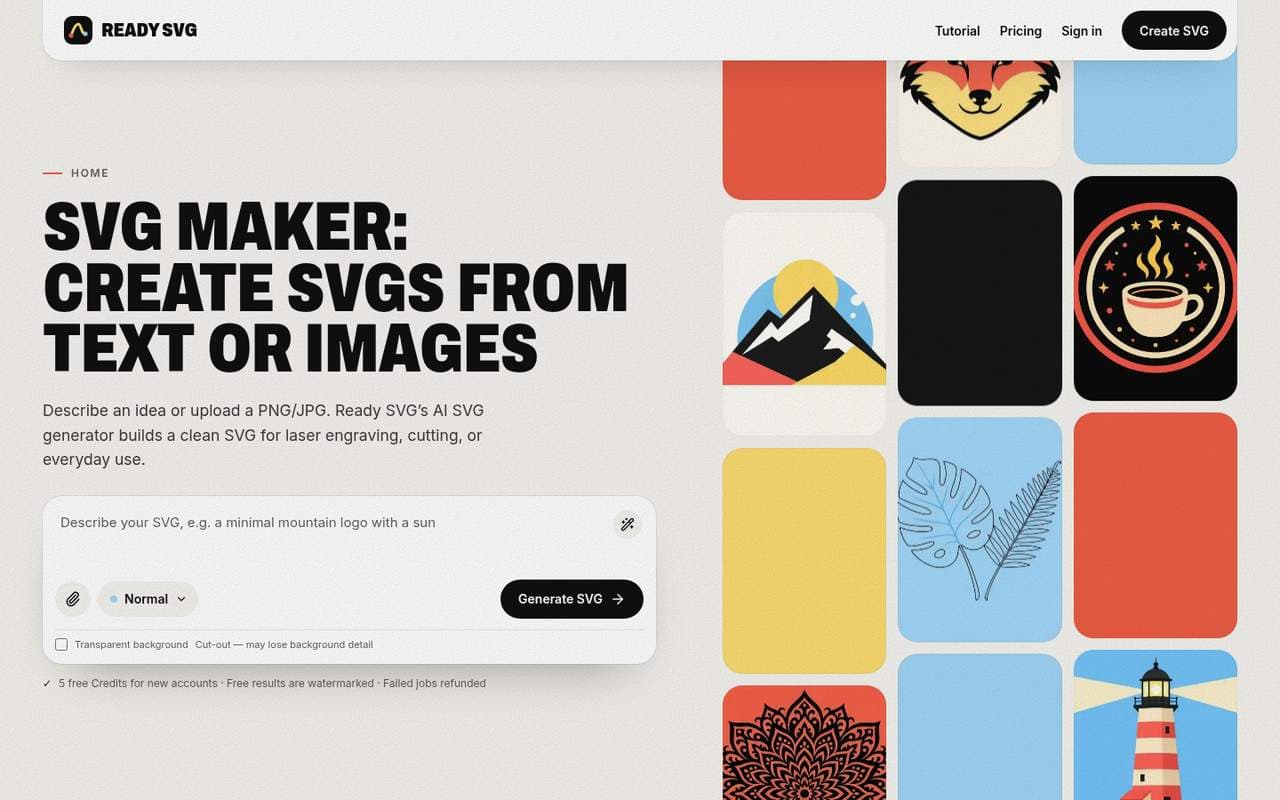
About this app
Ready SVG is an AI SVG maker for laser engraving, cutting, and everyday design. Describe an idea, upload a PNG or JPG (up to 10 MB), or use both. Choose Laser Engrave (black-filled artwork), Cut (red cut outlines with connection checks), or Normal (full-color SVG). AI redraws references by default before building vector paths; free Optimize prompt improves your text before you generate. Preview the real SVG, set export width in millimeters, and download. Successful results save to private History with free re-export. New accounts get 5 free Credits (plus 5 more on first Chrome extension sign-in). Each successful SVG uses 1 Credit; failed jobs are refunded. Free exports are watermarked; a confirmed subscription or Credit Pack unlocks watermark-free previews and exports. Also available as a Chrome extension that sends any web image into the same Laser Engrave, Cut, and Normal workflow.
Key features
- 1Three output modes: Laser Engrave (black-filled), Cut (red outlines with bridge checks), and Normal (full-color SVG).
- 2Text-to-SVG and image-to-SVG (PNG/JPG up to 10 MB) with AI redraw and free prompt optimization.
- 3Credit-based pricing: 5 free credits, 1 credit per successful SVG, failed jobs refunded, free re-export.
- 4Chrome extension that sends any web image into the same Laser Engrave, Cut, and Normal workflow.
Target customer profile
Drawn from the product itself, not from a survey.
Demographic
Laser engraving hobbyists and small business owners
Pain points
Manual tracing is slow and often produces broken or unconnected paths for cutting.
Primary needs
Fast, reliable SVG generation with cut-ready outlines and automatic bridge checks.
Demographic
Graphic designers and web developers
Pain points
Converting raster logos or icons into editable vectors requires expensive software and time.
Primary needs
Quick AI-assisted vectorization with full-color output and scalable results for web and print.
Demographic
Etsy and handmade product sellers
Pain points
Creating unique designs for ornaments, signs, and toppers without design skills is challenging.
Primary needs
Affordable, credit-based tool that turns ideas into sellable SVG files with commercial usage rights.
Scout Review
Written by AI from measured evidence, scored out of 100.
Ready SVG is a laser-focused AI SVG maker with a genuinely smart idea: pick your job first (Laser Engrave, Cut, or Normal), then generate, with cut-ready outlines, bridge checks, and mm-accurate export widths. The pricing is honest — 5 free credits, 1 credit per successful SVG, failed jobs refunded, free prompt optimization and re-export. Speed is excellent (99 mobile Lighthouse). But the live homepage is visibly broken — empty hero, placeholder tiles, blank below-fold — and security headers are almost entirely absent. The concept deserves better than the current front door.
Measure by measure
Usability
58The documented flow is genuinely clean — pick a mode, describe or upload, preview and set mm width, export — with free prompt optimization and refunded failed jobs. But the live page hides the prompt field, so onboarding starts blind.
Design
34The illustration tiles that load share a tight, deliberate flat-vector palette, but the live homepage renders with an empty hero, flat color-block placeholders, and a blank below-fold — it reads as broken.
Speed
88Lighthouse mobile 99/100 (LCP 1.2s, CLS 0.03, TBT 106ms) and desktop 98/100. Genuinely fast, snappy page with no lag complaints in the evidence.
Security
40HTTPS is enforced and Google sign-in is used, but the header probe found zero of HSTS, CSP, frame protection, Referrer-Policy, SPF, or DMARC — 2/13 checklist points and no published compliance or audit claims.
Accessibility
78Lighthouse accessibility audit scores a clean 100/100 on automated axe-core checks, and the responsive layout holds up on mobile. No published WCAG statement or multi-language support, so it sits mid-band.
Growth
62A real niche — laser hobbyists and Etsy sellers need cut-ready SVGs, not generic traces — with a genuine wedge (AI text-to-SVG plus bridge checks) the incumbents don't offer. Early stage, but the idea has room.
Improvement areas
- Homepage render is broken: empty hero, placeholder tiles, and blank below-fold sections.
- Security headers almost entirely absent (2/13): no HSTS, CSP, SPF, or DMARC.
- No published WCAG/accessibility statement or multi-language support.
- No visible prompt field or value proposition on the live landing page for first-time visitors.
Design & Usability
The design story is split: the illustration tiles that render show a confident, coherent flat-vector brand with a disciplined four-color palette, and the header is tidy with a single clear CTA. But the live homepage is visibly broken — an empty hero column, flat color-block placeholders standing in for artwork, and a completely blank below-fold with no footer. Usability is better on paper than in practice: the documented flow (choose mode, describe/upload, preview, set mm width, export) is genuinely well thought out, with free prompt optimization and automatic credit refunds on failure. The problem is the live page hides the prompt field and headline, so a first-time visitor lands on a grid of half-loaded tiles with no explanation of what the product does. Fix the render and the onboarding story is strong; ship it broken and no amount of good documentation saves the first impression.
Speed & Security
Speed is the standout: Lighthouse mobile 99/100 with LCP 1.2s, CLS 0.03, and TBT 106ms, and desktop 98/100 — genuinely snappy with no lag complaints in the evidence. Security is the weak flank. HTTPS is enforced and Google sign-in is used, but the header probe found none of HSTS, CSP, frame protection, X-Content-Type-Options, Referrer-Policy, Permissions-Policy, SPF, or DMARC — 2 of 13 checklist points. There are no published SOC 2, ISO, pen-test, or bug-bounty claims. For a tool that handles uploaded images and account credits, the missing transport and email hardening is a real gap worth closing: HSTS, a CSP, and SPF/DMARC are cheap wins that would move this from 'padlock and vibes' to a defensible baseline.
Accessibility & Growth
Accessibility scores a clean 100/100 on Lighthouse's automated axe-core checks and the layout holds up on mobile, but there's no published WCAG statement or multi-language support, so it sits mid-band — automated checks only cover part of WCAG. Growth is the most interesting dimension: Ready SVG targets a real, specific niche (laser engraving hobbyists, Etsy sellers, designers) with a genuine wedge the alternatives lack. Vector Magic, Illustrator Image Trace, and Inkscape all do raster-to-vector, but none offer AI text-to-SVG or laser-specific Cut/Engrave modes with automatic bridge checks. That's a defensible position in a category with visible headroom. The limit is execution: the domain is only ~0.4 years old and the live homepage is broken, so the idea is stronger than the current delivery. Fix the front door and this has room to grow.
Conclusion
If Ready SVG fixes its homepage render and hardens its security headers, it has a real shot at being the default SVG tool for the laser-engraving crowd. The niche is real, the workflow is thoughtful, and the pricing is fair. Right now it's a strong idea wearing a broken storefront — worth trying with the free credits, but don't judge it by the landing page until they fix it.
Suggestions for improvement
- Fix the homepage render: the hero column, prompt input, and below-fold sections are not rendering, leaving visitors with a blank page.
- Replace flat color-block placeholders in the masonry grid with real artwork or graceful loading states.
- Add HSTS, a Content-Security-Policy, and SPF/DMARC records — cheap hardening for an app handling uploads and credits.
- Publish a short WCAG/accessibility statement and consider multi-language support to back up the 100/100 audit score.
Alternatives comparison
Named competitors, point by point. Nobody paid to appear here or to be left out.
 Ready SVG | Vector Magic |  Adobe Illustrator Image Trace |  Inkscape | |
|---|---|---|---|---|
| AI text-to-SVG generation | Yes — describe an idea and AI generates SVG | No — image-to-vector only | No — manual trace, no text-to-SVG | No — bitmap trace only |
| Laser-specific Cut/Engrave modes with bridge checks | Yes — Cut mode flags broken outlines and auto-bridges | No laser-specific modes | Manual cleanup required for cut files | No automated laser/cut profiles |
| Pricing model | Credit-based: 5 free, 1 credit/SVG, $10–$120/mo or $5/10 credits | Subscription-based | Adobe subscription | Free and open-source |
| Image-to-vector conversion | Yes — PNG/JPG up to 10 MB, AI redraw by default | Yes — high-accuracy automatic trace | Yes — Image Trace feature | Yes — bitmap tracing |
Vector Magic
A popular automatic image-to-vector converter with high accuracy but no AI generation from text and no laser-specific modes.
Adobe Illustrator Image Trace
Professional vector editing software with a powerful trace feature, but requires a subscription and manual cleanup for cut files.
Inkscape
Free open-source vector editor with bitmap tracing, but no AI text-to-SVG or automated laser/cut profiles.
Comparing options? See Ready SVG alternatives, scored side by side
More AI Generations apps
View all AI Generations
Uni-1 by Luma AI
92Uni-1 is an advanced multimodal text-to-image AI model th...

LTX 2.3 AI Video Generator
91Fast, open-source AI video generator with 4K support, mul...

Gerty
91Private, local AI assistant for Mac that runs offline

DemoVexa
90Turn your code into professional product demo videos with AI-generated scripts, animated UI, and natural voiceovers.

All of Us
89Add deceased loved ones to photos with AI and see free pr...

Voqusa
89Transcribe social media video and audio links into text (free signup, 5 free credits, then pay-as-you-go)

HeyVid AI
88HeyVid AI is a free all-in-one AI video and image generat...

IraVoice
88Private on-device dictation for Apple-silicon Macs.

Pixelimg
88A free online AI-powered tool that instantly converts ima...

OBVELO
88Privacy gateway that masks personal data in LLM traffic

RestorePhotosApp
88An AI-powered photo restoration app that brings old, blur...

tradutor de mangá com IA
88O tradutor de mangá com IA traduz capítulos em lote, personaliza textos e oferece edição visual para estúdios.


A platform dedicated to providing unbiased reviews of newly launched applications, analyzing everything from their features to their full potential.
info@scoutforge.net© 2026 Scoutforge. All rights reserved.
