Cycling through all six. Tap any point to stop.
Measured on six things
AI teleprompter app that writes scripts and records video.
Security
52HTTPS enforced with HSTS, SPF and DMARC in place. But no CSP, no frame protection, no Referrer-Policy, and no published SOC 2, pen-test, or security page. Standard indie-app posture, nothing more.
Screenshots
1 / 1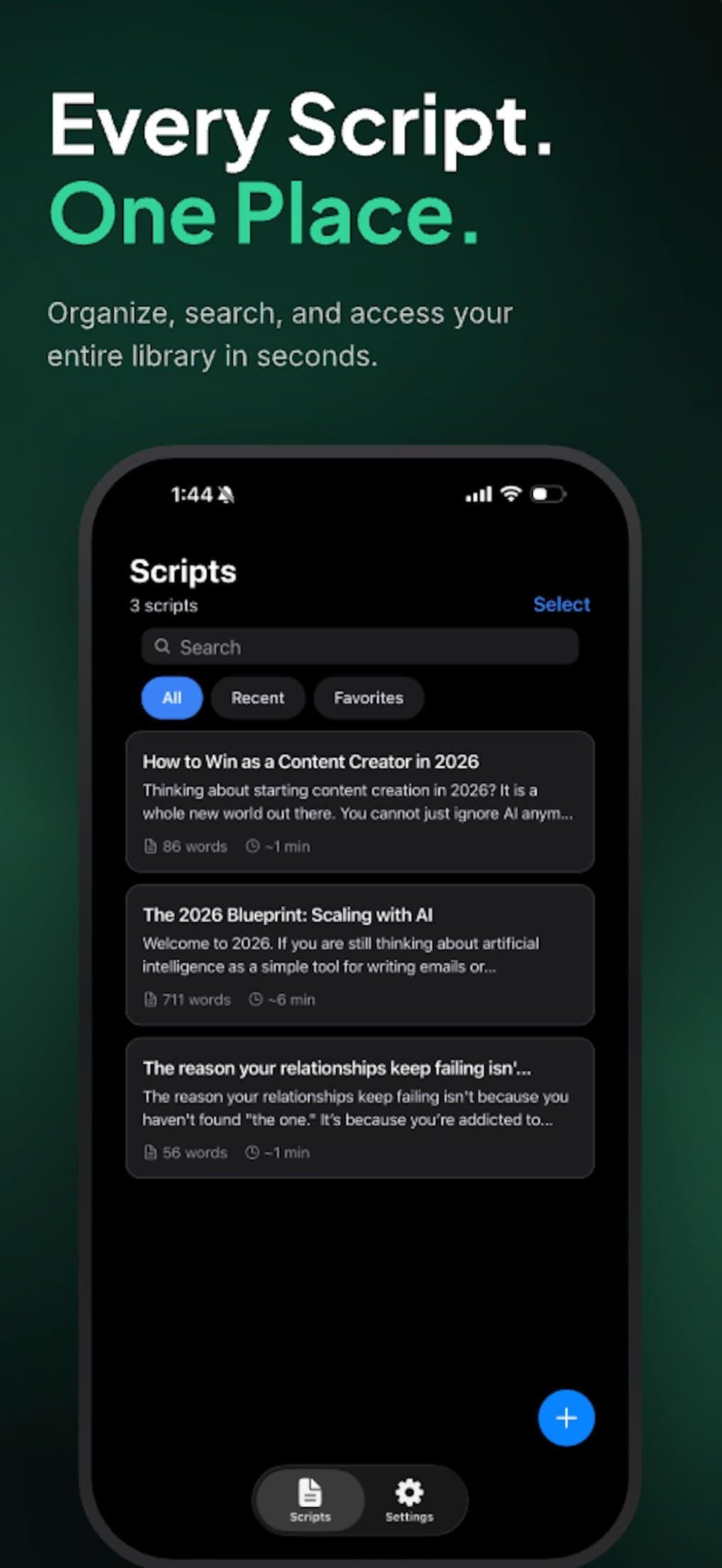
About this app
ScriptCam is a powerful iOS app that combines AI script generation, a smart teleprompter, and video recording into one seamless tool. Ideal for content creators, influencers, and professionals, it helps you produce polished videos without the hassle of switching apps. The AI writer generates full scripts from a simple topic description, which you can then read on the teleprompter while recording. The teleprompter features voice sync scrolling that adapts to your speaking pace, ensuring a natural delivery. Additional features include a script library, sync score analytics, and a Mac beta with cloud sync and external camera support. The app offers a free tier with Pro upgrades for unlimited scripts and AI. Whether you're a YouTuber, TikToker, or business presenter, ScriptCam streamlines your workflow and boosts your on-camera confidence.
Key features
- 1AI script generator that turns a topic description into a full, editable script
- 2Voice-sync teleprompter that scrolls to your speaking pace, not a timer
- 3Record-while-reading: camera and teleprompter run simultaneously in one app
- 4Script library with word counts, durations, and folders for reuse
- 5Sync score analytics tracking how closely you stayed on script take after take
- 6Mac beta with cloud sync, external camera/mic support, and keyboard shortcuts
Target customer profile
Drawn from the product itself, not from a survey.
Demographic
Content Creators (YouTubers, TikTokers, Vloggers)
Pain points
Memorizing scripts, awkward eye contact, switching between apps
Primary needs
Efficient script writing, natural teleprompting, seamless recording
Demographic
Business Professionals (Marketers, Salespeople, Executives)
Pain points
Polished video production, time-consuming retakes, lack of script guidance
Primary needs
Quick script generation, professional teleprompter, easy recording
Demographic
Educators and Course Creators
Pain points
Delivering engaging lectures, maintaining eye contact, script organization
Primary needs
AI-assisted scripting, smooth teleprompter, script library for reuse
Scout Review
Written by AI from measured evidence, scored out of 100.
ScriptCam is a genuinely useful bundle — AI script generation, voice-sync teleprompter, and in-app recording in one iOS app — and the app UI backs it up with clean script cards and a sensible New Script modal. The marketing site undersells it with a sparse, bottom-heavy homepage, and the Mac app is still a beta waitlist. Speed is excellent (99 mobile Lighthouse), accessibility is solid (94) with three fixable fails, and security is the weak spot: HTTPS and HSTS but no CSP, no frame protection, and no published compliance. Growth has a real wedge against the two listed alternatives, though the category is crowded.
Measure by measure
Usability
68Four clear entry points into a script (AI, voice, template, URL import), metadata on every card, and a free tier with no card. Mac app is still gated behind beta access, so the 'one seamless tool' promise is iOS-only today.
Design
71Judging the app UI from store screenshots: clean dark-mode script cards, a tidy six-option New Script modal, and clear hierarchy. The marketing homepage is the weak link — huge empty space and a hero shoved to the bottom.
Speed
88Lighthouse mobile 99/100 with LCP 2.0s, CLS 0, TBT 38ms. Desktop 90/100. The marketing site is genuinely fast — no heavy framework, no layout shift, no jank.
Security
52HTTPS enforced with HSTS, SPF and DMARC in place. But no CSP, no frame protection, no Referrer-Policy, and no published SOC 2, pen-test, or security page. Standard indie-app posture, nothing more.
Accessibility
70Lighthouse 94/100 with 33-language localization. Three real fails: contrast ratio, heading order, and labels without matching accessible names. No public WCAG statement, but the automated baseline is solid.
Growth
64Real wedge: AI script + voice-sync teleprompter + recording in one app, which neither listed alternative does. Specific segments named. Ceiling is the creator-tools category, but the Mac beta points at a pro tier.
Improvement areas
- Homepage layout: hero is below the fold with excessive white space and no primary CTA above it
- Security headers: missing CSP, frame protection, Referrer-Policy, Permissions-Policy (6/12 checklist)
- No published security or privacy page explaining how recordings and scripts are handled
- Three Lighthouse a11y fails: contrast ratio, heading order, and accessible names on labeled controls
- Mac app still gated behind 'request beta access' — the cross-platform promise is iOS-only today
Design & Usability
The app itself is the product here, and the app looks good: dark-mode script cards with word counts and durations, a New Script modal that offers AI, voice, template, and URL import without turning into a menu maze, and a bottom tab bar that doesn't make you think. The marketing homepage is the opposite — a hero pushed to the bottom of the viewport under a wall of white space, with the Download button hiding in the nav. Usability is competent on iOS: four clear paths to a script, free tier with no card, metadata on every card. The gap is the Mac app, which is still a 'request beta access' gate, so the 'one seamless tool' pitch is iOS-only for now.
Speed & Security
Speed is the standout. Lighthouse mobile 99/100 with LCP 2.0s, CLS 0, TBT 38ms; desktop 90/100. The site is light, static-feeling, and doesn't punish you for clicking. Security is the opposite story: HTTPS and HSTS are enforced, SPF and DMARC are configured, and then the checklist runs out. No CSP, no frame protection, no X-Content-Type-Options, no Referrer-Policy, no Permissions-Policy — 6 of 12 points. No SOC 2, no pen-test summary, no security page. For an app that records your face and voice, that's a thin public posture, even by indie standards.
Accessibility & Growth
Accessibility lands at 94/100 on Lighthouse with 33-language localization, which is above average for the category. The three failing audits are real though: insufficient contrast, non-sequential headings, and visible labels without matching accessible names — the kind of thing that's cheap to fix and annoying to hit. Growth is the interesting one. The idea has a genuine wedge: PromptSmart does voice recognition but no AI and no recording; Teleprompter.com is web-only with no AI. ScriptCam bundles all three, names its segments (YouTubers, business presenters, educators), and has a Mac beta with cloud sync and external cameras as a pro-tier expansion. The ceiling is the creator-tools category — big, crowded, but not saturated at the 'AI + teleprompter + record' intersection. Early traction (4.2/5 from 5 ratings, domain under a year old) is context, not the score.
Conclusion
If you're a creator who's been juggling a notes app, a teleprompter, and the camera, ScriptCam is the first iOS app in this list that actually closes the loop. Download it, run one take, and see if the voice-sync scrolling holds your pace. Just don't expect the Mac version to be ready — and don't expect a security page to tell you how your recordings are handled, because there isn't one yet.
Suggestions for improvement
- Fix the homepage: pull the hero above the fold, add a primary Download CTA in the hero, and cut the empty white space.
- Add CSP, frame protection, Referrer-Policy, and Permissions-Policy headers — the checklist is half-done.
- Publish a short security/privacy page explaining how recordings and scripts are stored and synced.
- Fix the three Lighthouse a11y fails: contrast ratios, heading order, and accessible names on labeled controls.
Alternatives comparison
Named competitors, point by point. Nobody paid to appear here or to be left out.
 ScriptCam ScriptCam | Teleprompter.com | PromptSmart | |
|---|---|---|---|
| AI script generation from a topic | Yes — built-in AI writer generates full scripts from a topic description | No — basic web teleprompter, no AI writing | No — voice-recognition teleprompter, no AI script generation |
| Voice-sync teleprompter scrolling | Yes — scrolls to your speaking pace automatically | Manual speed control, no voice sync | Yes — core feature, voice recognition scrolling |
| In-app video recording while reading | Yes — camera and teleprompter run simultaneously | No — teleprompter only, record separately | No — teleprompter only, no integrated recording |
| Script library with metadata | Yes — folders, word counts, durations, favorites | Basic script storage, no rich library | Script storage on mobile, limited organization |
| Desktop / Mac support | Mac app in beta — request access, cloud sync, external cameras | Web-based, works in any browser | Mobile-first, limited desktop presence |
| Free tier available | Yes — free download, Pro unlocks unlimited scripts and AI | Yes — free web tier with paid upgrades | Yes — free tier with in-app purchases |
Teleprompter.com
A web-based teleprompter tool with basic features, lacking integrated AI and recording.
PromptSmart
A mobile teleprompter app with voice recognition but no AI script generation or recording.
Comparing options? See ScriptCam alternatives, scored side by side
More Design & Creativity apps
View all Design & Creativity
RoomCreator
92An AI-powered interior and exterior design tool that tran...

What the GIF
89Frame-perfect video-to-GIF maker that runs entirely in yo...

TranscriptYou
88Free YouTube transcript generator with timestamps and AI ...

RestorePhotosApp
88An AI-powered photo restoration app that brings old, blur...

Portrait Gift
88AI-powered personalized face swap art platform creating c...

ButterKit
82macOS app for App Store screenshots: 3D mockups, auto-tra...

BeartIMAGE
88BeartIMAGE is a free, web-based image processing platform engineered for fast, bulk photo editing and conversion directly in your browser.

Pixelimg
88A free online AI-powered tool that instantly converts ima...

Coloring Pages Pro
87A massive collection of free printable coloring pages for...

QRocodile
87Design And Animate QR Codes People Want to Scan

FaceSwapAI
87AI face swap for photos, videos, GIFs with free trial.

Book Cover Generator
87AI book cover generator for indie authors—turn your story...


A platform dedicated to providing unbiased reviews of newly launched applications, analyzing everything from their features to their full potential.
info@scoutforge.net© 2026 Scoutforge. All rights reserved.
