Cycling through all six. Tap any point to stop.
Measured on six things
Turn two still images and a text prompt into a free five-second, 480p video clip.
Security
40HTTPS is enforced and SPF is set, but the probe found 3/13 header checklist points: no HSTS, CSP, frame protection, Referrer-Policy or DMARC. No SOC 2, ISO or pen-test claims anywhere.
Screenshots
1 / 1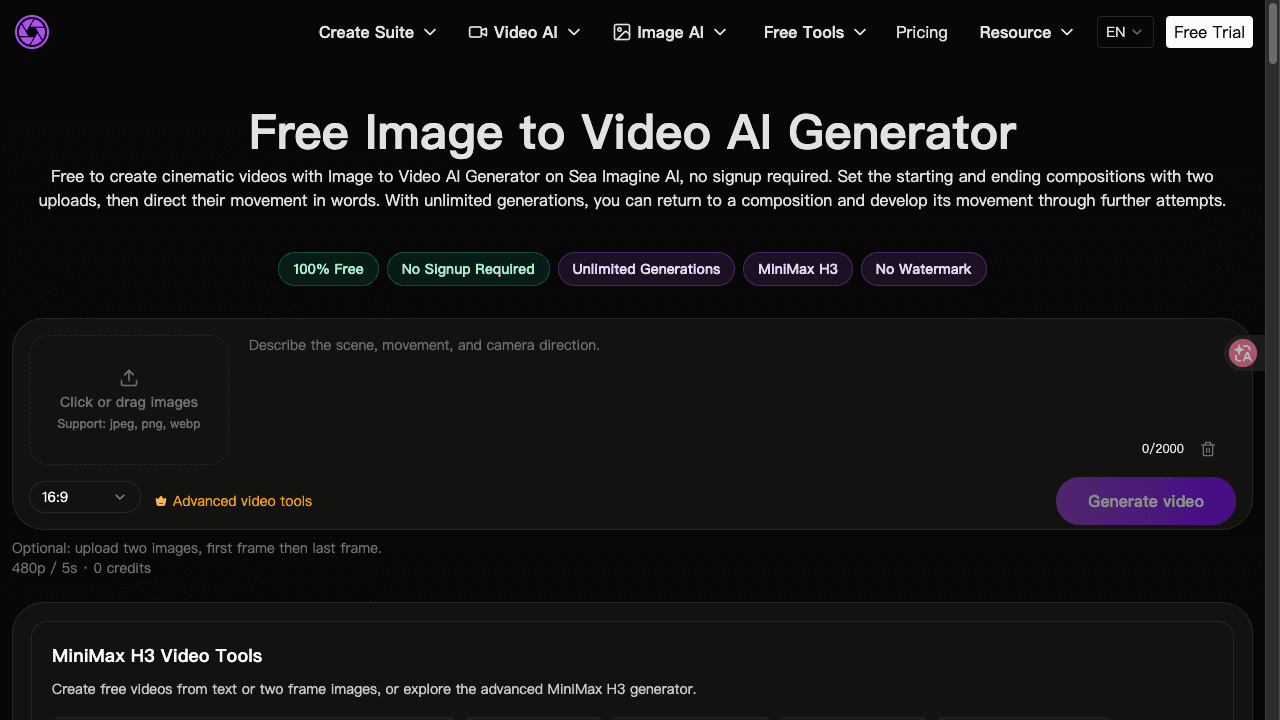
About this app
Sea Imagine AI’s free Image to Video page turns a starting image and an ending image into a five-second, 480p clip guided by a text prompt. Choose 16:9, 9:16, or 1:1, then complete the page verification to generate. The page says this workflow needs no sign-up or credits; free queue times may vary. It is intended for creators exploring motion between still images.
Key features
- 1Two-frame image-to-video: upload a starting and ending image, describe the motion in a prompt, get a 5-second 480p clip.
- 2No signup, no credits, unlimited generations on the free page — with a variable free queue and browser-local history.
- 3Aspect ratio choice of 16:9, 9:16 or 1:1, with paid credit packs ($19.99–$199.99) unlocking premium models and watermark removal.
Target customer profile
Drawn from the product itself, not from a survey.
Demographic
Artists and digital creators
Pain points
Want to preview motion between two still images without building a video timeline.
Primary needs
Create a five-second, 480p clip from start and end images plus a prompt on a free page that requires no sign-up or credits.
Scout Review
Written by AI from measured evidence, scored out of 100.
Sea Imagine AI's free image-to-video page is a genuinely useful wedge tool: two frames in, a five-second 480p clip out, no signup, no credits, unlimited attempts. The start-and-end-frame workflow is a real differentiator in a category dominated by single-image animation, and the free tier is honest about its tradeoffs — variable queue, browser-local history, fixed 480p/5s output. The problems are structural rather than conceptual. Measured performance is poor (mobile 55/100, 15.2s LCP), security headers are largely absent (3/13), and the surrounding site is cluttered with duplicated nav blocks and an upgrade banner that fights the free pitch. Accessibility is the standout at 96/100 with one contrast failure. It's a good idea wearing a mediocre shell.
Measure by measure
Usability
62Genuinely low-friction: no signup, no credits, two uploads and a prompt. Held back by a mandatory page-verification step, a variable free queue, browser-local-only history, and zero docs for this tool.
Design
58Competent tool-first layout: two upload dropzones, prompt box, aspect selector, output panel. Undone by a bloated mega-nav, repeated 'FREE TOOLS' blocks, and a 20% OFF banner parked above a page that promises free.
Speed
44Lighthouse mobile 55/100 with a 15.2s LCP and 501ms TBT; desktop scores worse at 45/100. Layout is stable (CLS 0.002), but the page takes a geological age to become usable.
Security
40HTTPS is enforced and SPF is set, but the probe found 3/13 header checklist points: no HSTS, CSP, frame protection, Referrer-Policy or DMARC. No SOC 2, ISO or pen-test claims anywhere.
Accessibility
80Lighthouse accessibility 96/100 with a single failing audit for color contrast. No WCAG statement or a11y page, and only an EN locale, but the automated baseline is genuinely strong.
Growth
58A real wedge: free, no-signup, unlimited two-frame image-to-video with a clear upsell to credit packs. Differentiated on the start+end-frame workflow, but the category is crowded and the domain is barely a year old.
Improvement areas
- Performance: 15.2s LCP and 501ms TBT on mobile; desktop scores 45/100. The tool shell needs to load before the marketing chrome.
- Security headers: 3/13 checklist points, no CSP/HSTS/frame protection/DMARC on a site that processes payments.
- Site clarity: duplicated 'FREE TOOLS' nav entries and a 20% OFF banner competing with a page that advertises '100% Free'.
- Documentation: no help docs for the free image-to-video tool; the only docs cover the separate Infinite Canvas beta.
Design & Usability
The free image-to-video page does the one thing that matters: it gets you from two stills to a clip without an account, a credit balance, or a timeline editor. Two dropzones, a 2000-character prompt box, a 16:9/9:16/1:1 selector, generate. That's the whole product and it's the right shape. What drags it down is everything wrapped around it — a mega-nav that lists 'FREE TOOLS' twice, a persistent 20% OFF upgrade banner sitting above a page whose entire pitch is '100% Free', and all-caps display headings that read like a billboard. The mandatory page-verification step is a small tax on an otherwise frictionless flow, and the free queue is honestly disclosed as variable. History being browser-local is the real usability ceiling: unlimited generations, but only in this tab, on this device.
Speed & Security
Speed is the weak spot and it's measured, not vibes. Lighthouse mobile lands at 55/100 with an LCP of 15.2 seconds and 501ms of total blocking time; desktop is worse at 45/100. CLS is a clean 0.002, so the page doesn't jump around — it just takes an eternity to arrive. For a tool where the value is 'quick motion study', a fifteen-second wait before you can even drop a file is a bad first impression. Security is similarly thin: HTTPS is enforced and SPF is published, but the header probe returned 3/13 checklist points. No HSTS, no CSP, no frame protection, no Referrer-Policy, no DMARC. There's no SOC 2, ISO 27001, pen-test summary or bug bounty page to be found. The pricing page asserts 'card details are never stored and all transactions are highly secure' — a sentence, not a control. For a site that takes payments, the browser hardening baseline is missing.
Accessibility & Growth
Accessibility is the strongest measured dimension: 96/100 on the axe-core audit, with exactly one failing check — insufficient color contrast between background and foreground. That's a real, fixable flaw, not a systemic one. There's no WCAG conformance statement and the site only ships an EN locale, so the automated score is doing most of the work here, but the baseline is solid. Growth is a judgement on the idea, not the traction. The wedge is legitimate: free, no-signup, unlimited, and specifically a two-frame start-and-end composition workflow rather than the single-image animation everyone else ships. That's a real differentiator for storyboard and transition work. The monetization path is visible — four one-time credit packs from $19.99 to $199.99, with the free 480p/5s tool as the top of the funnel. The limit is that image-to-video is a brutally crowded category with well-funded incumbents, and the domain was registered in October 2025 with a single Twitter profile as its social footprint. The idea can grow; the distribution hasn't started yet.
Conclusion
If you need a quick motion study between two stills and you don't want an account, this does the job and asks for nothing. Go in expecting a wait, keep your browser tab open because that's where your history lives, and don't read the pricing page's security sentence as a promise. The product's real asset is the two-frame workflow — that's worth building on. The real liabilities are a fifteen-second load and a payment-handling site with no CSP. Fix the shell and this becomes a tool people bookmark instead of a tool people try once.
Suggestions for improvement
- Cut LCP from 15.2s: defer non-critical scripts, compress hero media, and serve the tool shell before the marketing chrome.
- Ship baseline security headers — HSTS, CSP, X-Frame-Options, Referrer-Policy, Permissions-Policy — and publish a DMARC record.
- Fix the single failing contrast audit; it's one palette change away from a clean 100 on axe-core.
- Remove the duplicate 'FREE TOOLS' nav block and move the 20% OFF banner off the page that advertises '100% Free'.
Alternatives comparison
Named competitors, point by point. Nobody paid to appear here or to be left out.
 Sea Imagine AI Free Image to Video AI Generator |  | |
|---|---|---|
| Free tier without signup | Yes — no signup, no credits, unlimited generations | Not specified in provided details |
| Input model | Two images (start + end frame) plus a text prompt | Not specified in provided details |
| Output resolution and length | 480p, 5 seconds (free tier) | Not specified in provided details |
| Aspect ratios | 16:9, 9:16, 1:1 | Not specified in provided details |
| Paid upgrade path | One-time credit packs $19.99–$199.99; watermark removal, premium models, fast queue | Not specified in provided details |
Comparing options? See Sea Imagine AI Free Image to Video AI Generator alternatives, scored side by side
More AI Generations apps
View all AI Generations
Uni-1 by Luma AI
92Uni-1 is an advanced multimodal text-to-image AI model th...

Gerty
91Private, local AI assistant for Mac that runs offline

LTX 2.3 AI Video Generator
91Fast, open-source AI video generator with 4K support, mul...

DemoVexa
90Turn your code into professional product demo videos with AI-generated scripts, animated UI, and natural voiceovers.

All of Us
89Add deceased loved ones to photos with AI and see free pr...

Voqusa
89Transcribe social media video and audio links into text (free signup, 5 free credits, then pay-as-you-go)

Pixelimg
88A free online AI-powered tool that instantly converts ima...

IraVoice
88Private on-device dictation for Apple-silicon Macs.

OBVELO
88Privacy gateway that masks personal data in LLM traffic

tradutor de mangá com IA
88O tradutor de mangá com IA traduz capítulos em lote, personaliza textos e oferece edição visual para estúdios.

HeyVid AI
88HeyVid AI is a free all-in-one AI video and image generat...

RestorePhotosApp
88An AI-powered photo restoration app that brings old, blur...


A platform dedicated to providing unbiased reviews of newly launched applications, analyzing everything from their features to their full potential.
info@scoutforge.net© 2026 Scoutforge. All rights reserved.
