Cycling through all six. Tap any point to stop.
Measured on six things
Seedance 3.0 turns text prompts and up to 50 image, video and audio references into cinematic 1080p videos with synced dialogue and sound. It makes single takes up to 30 seconds, edits existing footage by prompt, and starts with free credits.
Growth
58Real problem (cheap cinematic video with synced audio) and a specific wedge (30s takes, 50 refs, native sound), but it's a front-end to someone else's model — easy to copy, hard to defend.
Screenshots
1 / 1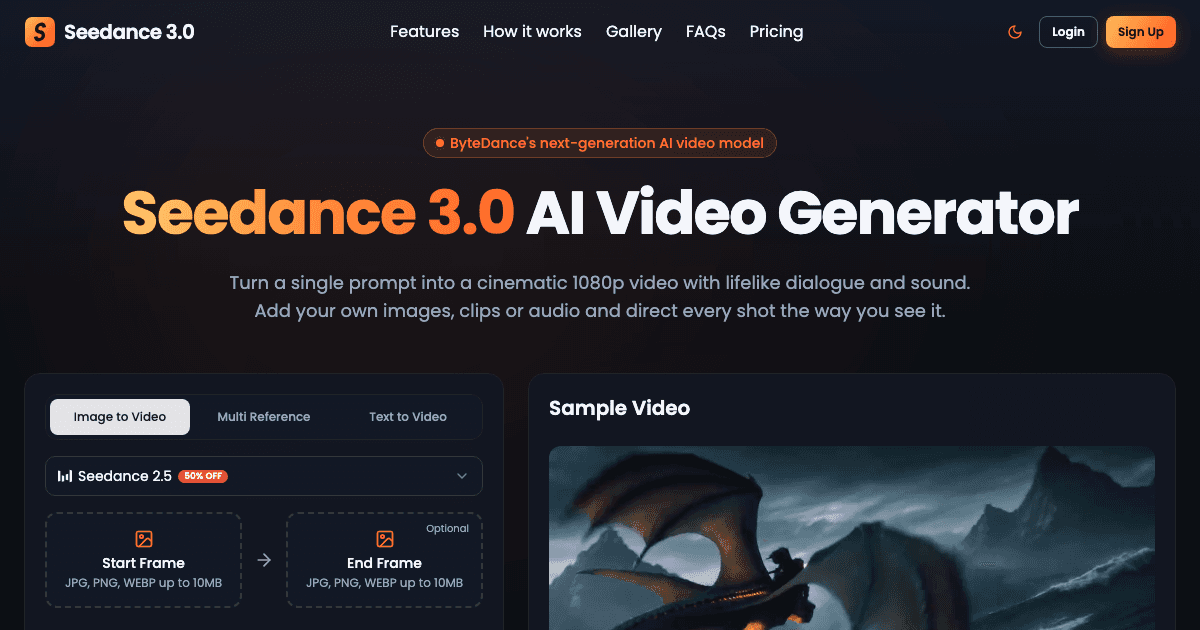
About this app
Seedance 3.0 turns text prompts and up to 50 image, video and audio references into cinematic 1080p videos with synced dialogue and sound. It makes single takes up to 30 seconds, edits existing footage by prompt, and starts with free credits.
Key features
- 1Up to 50 multimodal references (images, video, audio) tagged per role in a single generation
- 230-second single-take generation with timestamped script beats
- 3Native synced dialogue, room tone and sound effects rendered with the frames
- 4Prompt-based editing of existing footage (restyle weather, swap products, extend takes)
- 51080p output with vertical/wide export for Reels, Shorts and TikTok
Target customer profile
Drawn from the product itself, not from a survey.
Demographic
Social creators & influencers (Reels, Shorts, TikTok)
Pain points
No film crew or separate audio editor; slow multi-tool workflows
Primary needs
Vertical videos with voices and sound already baked in
Demographic
Marketing & advertising teams
Pain points
Costly reshoots; hard to make multiple ad variants fast
Primary needs
Quick ad openers, backdrop/model swaps, multi-format exports
Demographic
Filmmakers, studios & YouTubers
Pain points
Pitching sequences that don't move; risks before booking shoots
Primary needs
Moving previs with pinned cast/set and consistent 30s takes
Demographic
E-commerce brands & educators
Pain points
Static packshots; no stock clips for niche processes
Primary needs
Lit product videos and narrated explainers generated in one pass
Scout Review
Written by AI from measured evidence, scored out of 100.
Seedance 3.0 is a polished, fast front-end to ByteDance's video model, with a genuinely differentiated feature set — 30-second single takes, up to 50 multimodal references, native synced audio, and prompt-based editing of existing footage. The landing page is well-crafted and the generator is testable in one click. The weaknesses are structural: no documentation, thin security posture, accessibility gaps, and a business model that depends entirely on a vendor whose own product could replace it. Worth trying for creators who want long takes with baked-in sound; worth watching before you build a workflow on it.
Measure by measure
Usability
66Generator sits right at the top with prompt, frame uploads and duration controls; three-step flow is scannable. FAQ and support email help, but no visible docs or onboarding tour.
Design
71Coherent dark theme with disciplined orange accents and strong feature-section hierarchy. Undercut by a loud '25% OFF' badge and a homepage that just stops — no footer.
Speed
88Lighthouse mobile 99/100 with 1.1s LCP and 0.006 CLS; desktop 97/100. Genuinely snappy landing page with no measurable layout shift.
Security
62HTTPS, HSTS, CSP and frame protection in place, but missing X-Content-Type-Options, Referrer-Policy, Permissions-Policy, plus no SPF/DMARC. No SOC 2 or security page.
Accessibility
70Lighthouse a11y 88/100 with solid structure, but three real failures: invalid aria values, unnamed buttons, and insufficient color contrast. No WCAG statement published.
Growth
58Real problem (cheap cinematic video with synced audio) and a specific wedge (30s takes, 50 refs, native sound), but it's a front-end to someone else's model — easy to copy, hard to defend.
Improvement areas
- No documentation or help center — only a FAQ and a support email
- Missing security headers (X-Content-Type-Options, Referrer-Policy, Permissions-Policy) and no SPF/DMARC
- Accessibility failures: invalid aria values, unnamed buttons, insufficient contrast
- No footer, legal pages, or status page visible on the homepage
Design & Usability
The landing page is genuinely well-built: dark navy canvas, disciplined orange accents, feature sections that pair big claims with matching video examples, and a live generator sitting right at the top so you can test the pitch without scrolling. The three-step Upload/Direct/Render flow is scannable and the FAQ covers the obvious questions. What's missing is depth — no docs, no onboarding tour, no footer, and a promo badge that undercuts the polish. It reads like a strong marketing page for a product whose actual help center hasn't been written yet.
Speed & Security
Speed is the standout: Lighthouse mobile 99/100, LCP 1.1s, CLS 0.006, desktop 97/100 — this is a fast, well-optimized site with no measurable layout shift. Security is competent but shallow: HTTPS enforced with HSTS, CSP and frame protection, yet missing X-Content-Type-Options, Referrer-Policy and Permissions-Policy headers, and no SPF or DMARC on the domain. No SOC 2, no security page, no bug bounty. For a tool handling user-uploaded media, that's table stakes met and nothing more.
Accessibility & Growth
Accessibility lands at 88/100 on Lighthouse with three concrete failures — invalid aria attributes, buttons without accessible names, and insufficient color contrast — and no published WCAG statement to show intent. Growth is the interesting question: the problem (cheap cinematic video with synced dialogue) is real and the wedge (30-second single takes, 50 multimodal references, native audio) is specific against Runway, Kling and Pika. But the site openly brands itself as ByteDance's model, which means the moat is a UI and a price markup — copyable the moment the model vendor ships its own front-end.
Conclusion
If you're a social creator or marketer who needs a 30-second vertical with dialogue already synced, this is one of the few tools that actually claims that in one pass — and the free credits make it cheap to find out. If you're a studio or brand planning to standardize on it, wait: no docs, no SOC 2, no DMARC, and a domain registered weeks ago. Test it, ship a few clips, but keep your Runway and Kling accounts warm until the product grows a help center and a security page.
Suggestions for improvement
- Publish real documentation — a help center with prompt guides, reference-tagging examples, and API docs if any exist.
- Add the missing security headers (X-Content-Type-Options, Referrer-Policy, Permissions-Policy) and set up SPF/DMARC on the domain.
- Fix the three Lighthouse a11y failures: valid aria values, accessible names on icon buttons, and contrast on orange-on-dark text.
- Add a proper footer with legal, privacy, terms and status links — the page currently just stops.
Alternatives comparison
Named competitors, point by point. Nobody paid to appear here or to be left out.
 Seedance 3.0 |  Runway |  Kling AI |  Pika | |
|---|---|---|---|---|
| Max single-take duration | Up to 30 seconds | ~10s per generation (extendable) | Up to 10s per clip | ~3-5s per clip |
| Multimodal reference input | Up to 50 images/video/audio, tagged per role | Image + video references, motion controls | Image-to-video, limited multi-ref | Image reference, effects-focused |
| Native synced audio / dialogue | Yes — voices, room tone, SFX rendered with frames | Separate audio tools; limited native sync | Limited native audio | Sound effects add-on, not synced dialogue |
| Prompt-based editing of existing footage | Yes — restyle, swap, extend by prompt | Yes — inpainting, motion brush, video-to-video | Limited editing tools | Effects and modifications, not full edits |
| Free tier / trial | Free starting credits | Free tier with limited credits | Free daily credits | Free tier available |
| Published security/compliance | None published; partial headers | SOC 2 Type II, enterprise security page | Limited public compliance docs | Limited public compliance docs |
Runway
Established AI video generation suite with text/image-to-video, motion controls, and editing tools.
Kling AI
AI video generator known for longer clips, motion realism, and image-to-video workflows.
Pika
Accessible AI video tool focused on quick generative clips and creative effects.
Comparing options? See Seedance 3.0 alternatives, scored side by side
More AI Generations apps
View all AI Generations
Uni-1 by Luma AI
92Uni-1 is an advanced multimodal text-to-image AI model th...

Gerty
91Private, local AI assistant for Mac that runs offline

LTX 2.3 AI Video Generator
91Fast, open-source AI video generator with 4K support, mul...

DemoVexa
90Turn your code into professional product demo videos with AI-generated scripts, animated UI, and natural voiceovers.

All of Us
89Add deceased loved ones to photos with AI and see free pr...

Voqusa
89Transcribe social media video and audio links into text (free signup, 5 free credits, then pay-as-you-go)

Pixelimg
88A free online AI-powered tool that instantly converts ima...

IraVoice
88Private on-device dictation for Apple-silicon Macs.

OBVELO
88Privacy gateway that masks personal data in LLM traffic

tradutor de mangá com IA
88O tradutor de mangá com IA traduz capítulos em lote, personaliza textos e oferece edição visual para estúdios.

HeyVid AI
88HeyVid AI is a free all-in-one AI video and image generat...

RestorePhotosApp
88An AI-powered photo restoration app that brings old, blur...


A platform dedicated to providing unbiased reviews of newly launched applications, analyzing everything from their features to their full potential.
info@scoutforge.net© 2026 Scoutforge. All rights reserved.
