Cycling through all six. Tap any point to stop.
Measured on six things
AI best take photo merger for group photos, fixing closed...
Security
52HTTPS with HSTS, but missing CSP, frame protection, and email auth headers; privacy policy is solid on data deletion, no compliance certs.
Screenshots
1 / 1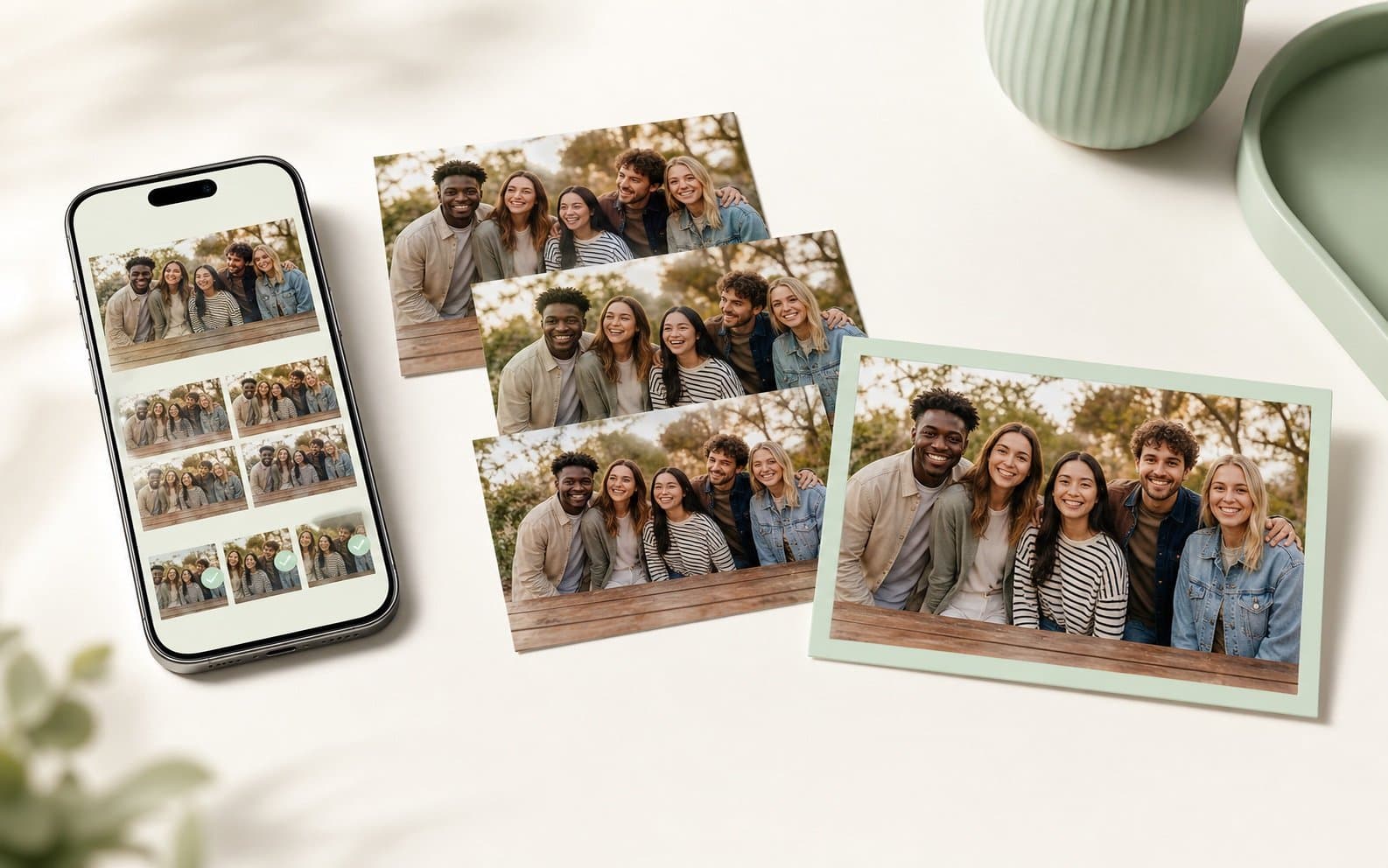
About this app
SnapMerge is a focused AI tool that lets you upload 2-3 similar group photos and intelligently merges them into one perfect shot. It selects the best real expressions from each person across the frames, ensuring open eyes and natural smiles without generating fake features. Ideal for family portraits, travel groups, and event photos, SnapMerge preserves identities and scene consistency, giving you a keeper image that feels authentic. The process is simple: upload near-identical shots, let the AI align and blend the best faces, and download the result. It’s not a general photo editor but a specialized solution for the common problem of someone blinking or looking away in an otherwise great photo. Plus, your source photos aren’t stored permanently, and the output is accessible via a temporary signed URL, keeping privacy in mind.
Key features
- 1Merge 2-3 similar group photos into one keeper with best expressions
- 2Uses real source pixels — no generated faces or invented smiles
- 3Temporary storage with signed URLs and automatic deletion after processing
Target customer profile
Drawn from the product itself, not from a survey.
Demographic
Event and party photographers
Pain points
Group shots at events often have mixed expressions and closed eyes
Primary needs
Quickly create a flawless group photo without manual editing
Demographic
Families with children
Pain points
Kids blink or make funny faces in every group shot
Primary needs
A single photo with everyone looking good and eyes open
Demographic
Travelers and tour groups
Pain points
At landmarks, at least one person looks away or squints
Primary needs
One perfect group photo to remember the trip
Scout Review
Written by AI from measured evidence, scored out of 100.
SnapMerge is a focused AI tool that solves a real, common problem: fixing closed eyes or awkward expressions in group photos by merging the best real faces from 2-3 similar shots. The site is clean and the workflow is simple, but the hero lacks a clear value proposition, and there's no pricing or demo to reduce friction. Security is basic but privacy-conscious, with a solid data-deletion policy. Accessibility is minimal, and growth signals are absent, though the niche is well-defined and differentiated from Photoshop, Google Photos, and Remini. It's a competent early-stage product with a clear wedge, but it needs more polish in messaging, transparency, and trust signals to stand out.
Measure by measure
Usability
62Simple 3-step flow and helpful FAQ, but no pricing, docs, or live demo visible; upload UI is intuitive but dense on mobile.
Design
58Clean, consistent palette and clear visual hierarchy between input and output, but hero lacks headline/CTA and mockup styling feels generic.
Speed
60Lightweight static site with minimal JS; no published benchmarks or user complaints about lag, but server-side merge speed unverified.
Security
52HTTPS with HSTS, but missing CSP, frame protection, and email auth headers; privacy policy is solid on data deletion, no compliance certs.
Accessibility
55No WCAG statement or multi-language support; standard HTML with alt text likely present, but keyboard/screen reader compatibility unverified.
Growth
62Real niche problem with clear differentiators vs. Photoshop, Best Take, and Remini; segmented customers, but no traction signals yet.
Improvement areas
- Add pricing page and live demo to reduce signup friction
- Improve hero messaging with clear headline and CTA
- Publish accessibility statement and multi-language support
Design & Usability
SnapMerge presents a focused, single-purpose tool with a clean visual identity. The sage-and-neutral palette is consistent, and the phone-to-print visual metaphor clearly communicates the input/output flow. However, the hero section lacks any headline or CTA, leaving the value proposition to be inferred entirely from imagery — a risky choice for first-time visitors. Usability is straightforward: upload 2-3 near-identical photos, merge, download. The FAQ covers key concerns like closed eyes and identity preservation, but there's no pricing page, documentation, or interactive demo to reduce friction before signup. The upload grid is intuitive but dense on smaller screens. Overall, the design is competent but unremarkable, and usability is solid for a narrow workflow, though missing discovery aids like a 'how it works' video or step-by-step guide.
Speed & Security
The site itself is lightweight — a static landing page with minimal JavaScript — so it loads quickly. However, no performance benchmarks are published, and the merge processing time (the actual product) is unverified. Security is a mixed bag: HTTPS with HSTS is enforced, but the absence of CSP, frame protection, and email authentication headers (SPF/DMARC) leaves room for hardening. The privacy policy is a genuine strength: source photos are deleted after processing, and outputs are served via temporary signed URLs. That said, there are no SOC 2, ISO, or bug bounty claims, which is typical for an early-stage tool but limits trust for enterprise or professional photographers. The 4/12 security checklist score reflects a basic setup that meets minimum standards but doesn't go beyond them.
Accessibility & Growth
Accessibility is an afterthought — no WCAG statement, no multi-language support, and no explicit keyboard or screen reader testing mentioned. The site likely works for basic navigation, but it's not a differentiator. Growth potential is more promising: the problem (someone blinking or looking away in group photos) is universal and painful, and SnapMerge's positioning as a specialized, no-skill alternative to Photoshop is clear. It also differentiates from Google Photos Best Take (ecosystem-limited) and Remini (enhancement, not merging). Target segments — families, travelers, event photographers — are well-defined. However, there's no visible traction (reviews, funding, or user counts), and the narrow workflow (2-3 similar photos, max 6MB) may limit appeal. The idea has room, but execution and marketing need to prove it can capture a niche before incumbents add this as a feature.
Conclusion
SnapMerge has the bones of a useful tool — a narrow, well-executed workflow for a universal pain point. The lack of pricing, docs, and traction makes it hard to judge long-term viability, but the privacy-first approach and clear differentiation are promising. If the team adds a transparent pricing page, a live demo, and some social proof, it could carve out a solid niche. For now, it's a promising MVP that needs to prove it can merge photos as well as it merges ideas.
Suggestions for improvement
- Add a headline and CTA to the hero — tell visitors what SnapMerge does in one sentence.
- Publish a pricing page or a 'free trial' option to reduce signup friction.
- Add a short demo video showing a real before/after merge to build trust.
- Include a security page with SOC 2 or at least a clear data-handling timeline.
Alternatives comparison
Named competitors, point by point. Nobody paid to appear here or to be left out.
 SnapMerge SnapMerge |  Adobe Photoshop Adobe Photoshop |  Google Photos Best Take Google Photos Best Take |  Remini Remini | |
|---|---|---|---|---|
| Ease of use for non-experts | Simple 3-step upload-merge-download; no skill required | Requires manual face swapping and layer merging; steep learning curve | One-click Best Take on Pixel, but limited to Google ecosystem | Focuses on upscaling/enhancement, not expression merging |
| Privacy and data handling | Source photos deleted after processing; temporary signed URLs | Local processing; user controls files, but no explicit deletion guarantee | Cloud storage; photos retained unless manually deleted | Cloud processing; unclear retention policy |
| Output quality and authenticity | Uses real source pixels; no generated faces, preserves identities | Manual editing can produce realistic results but depends on skill | AI blends expressions; may produce artifacts on complex scenes | Enhances resolution, not expressions; may over-process faces |
Adobe Photoshop
Manual face swapping and layer merging, but requires skill and time.
Google Photos Best Take
Similar AI-powered feature for Pixel phones, but limited to Google ecosystem.
Remini
AI photo enhancer, but focuses on upscaling and restoration, not expression merging.
Comparing options? See SnapMerge alternatives, scored side by side
More AI Generations apps
View all AI Generations
Uni-1 by Luma AI
92Uni-1 is an advanced multimodal text-to-image AI model th...

Gerty
91Private, local AI assistant for Mac that runs offline

LTX 2.3 AI Video Generator
91Fast, open-source AI video generator with 4K support, mul...

DemoVexa
90Turn your code into professional product demo videos with AI-generated scripts, animated UI, and natural voiceovers.

All of Us
89Add deceased loved ones to photos with AI and see free pr...

Pixelimg
88A free online AI-powered tool that instantly converts ima...

OBVELO
88Privacy gateway that masks personal data in LLM traffic

HeyVid AI
88HeyVid AI is a free all-in-one AI video and image generat...

IraVoice
88Private on-device dictation for Apple-silicon Macs.

tradutor de mangá com IA
88O tradutor de mangá com IA traduz capítulos em lote, personaliza textos e oferece edição visual para estúdios.

RestorePhotosApp
88An AI-powered photo restoration app that brings old, blur...

Mygom SEO
87MygomSEO is an AI marketing agent that audits your site, writes SEO content, publishes to 12+ CMS platforms, posts to social, and monitors rankings 24/7.


A platform dedicated to providing unbiased reviews of newly launched applications, analyzing everything from their features to their full potential.
info@scoutforge.net© 2026 Scoutforge. All rights reserved.
