Cycling through all six. Tap any point to stop.
Measured on six things
Free contact form backend for any website
Growth
62Real wedge: 500 free submissions total vs Formspree's 50/month, Pro at $5/mo vs $15/mo, plus an MCP server for AI agents. Category has incumbents but room for a price-led challenger.
Screenshots
1 / 1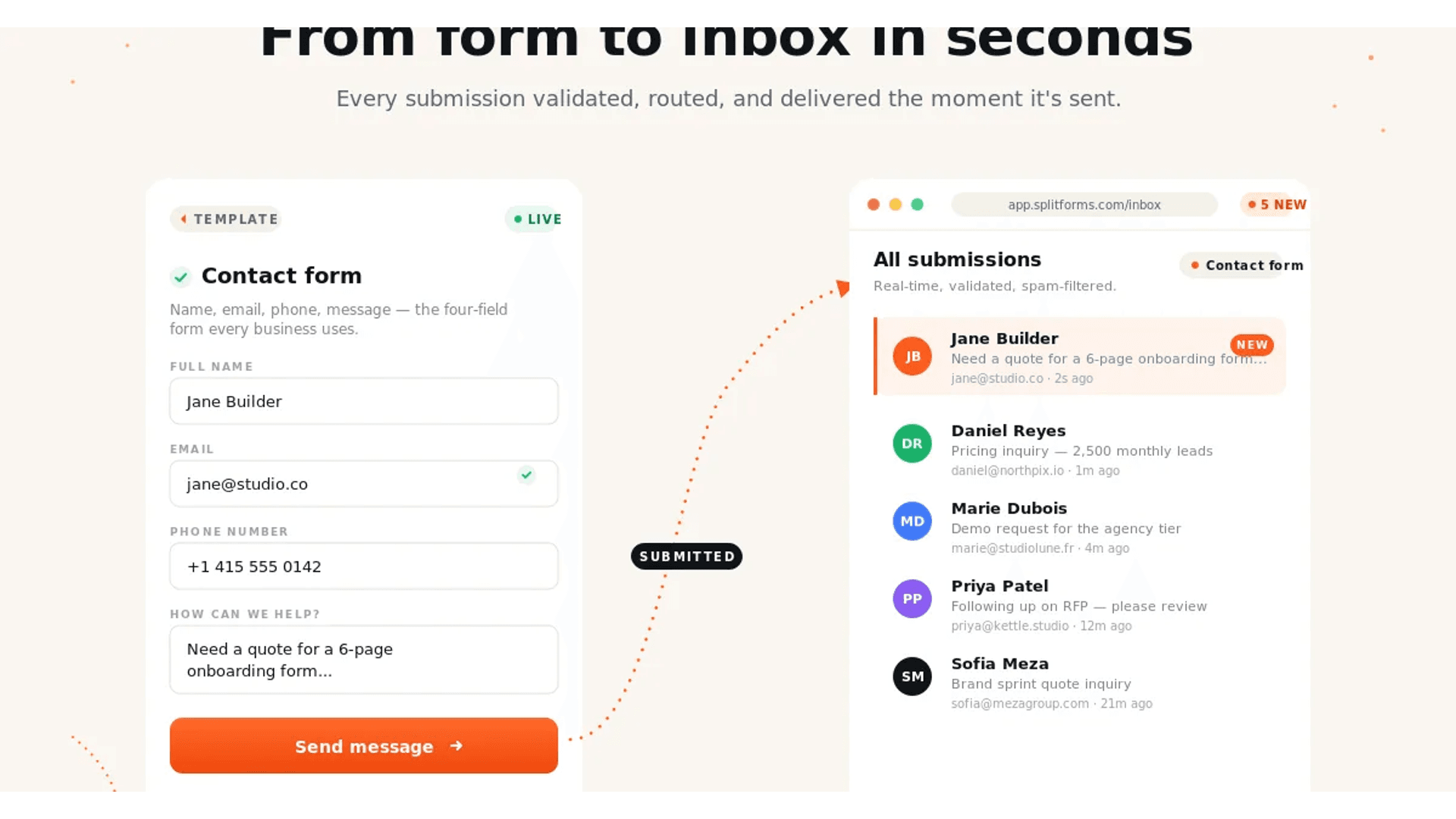
About this app
Split Forms is a hosted form backend. Point any HTML, React, Next.js, WordPress or AI-built form at its endpoint, and every submission is spam-filtered, saved to a dashboard and emailed to you, with no server, PHP or SMTP to run. The free plan includes 500 submissions with no card. It works with forms on sites built by AI tools and has an MCP server (https://splitforms.com/api/mcp) for AI agents.
Key features
- 1Hosted form backend: point any HTML, React, Next.js, WordPress or AI-built form at one endpoint — no server, PHP or SMTP.
- 2Free plan: 500 submissions total (not monthly), unlimited forms, no credit card, email notifications included.
- 3MCP server with 12 tools for AI agents at /api/mcp, plus OpenAPI 3.1 spec and llms.txt for AI-assisted integration.
Target customer profile
Drawn from the product itself, not from a survey.
Demographic
Indie developers and hobbyists
Pain points
Limited budgets, need simple form handling without backend infrastructure.
Primary needs
Free tier with no credit card, easy setup, reliable email notifications.
Demographic
Small agencies and freelancers
Pain points
Managing multiple client forms, needing integrations and higher submission limits.
Primary needs
Affordable paid plans, webhooks, file uploads, and team seats.
Demographic
Startups and product teams
Pain points
Scaling form submissions, integrating with CRMs and other tools.
Primary needs
High-volume plans, Stripe payments, advanced spam protection.
Scout Review
Written by AI from measured evidence, scored out of 100.
SplitForms is a hosted form backend that does the unglamorous work well: point any HTML, React, Next.js, or AI-built form at one endpoint, and submissions get spam-filtered, stored, and emailed to you. The free plan gives 500 submissions total with no card, Pro is $5/month for 5,000, and Annual is $49/year for 15,000. The docs are genuinely excellent — quickstart, OpenAPI spec, llms.txt, code samples — and the security headers are a clean 12/12. Speed is strong on desktop and good on mobile. Design is polished but has rough edges in the comparison table and a future-dated stamp. Accessibility is mostly there with specific contrast and ARIA gaps. The real story is the pricing wedge: 500 free submissions total versus Formspree's 50/month, and Pro at a third of Formspree's price. For indie developers, freelancers, and AI-assisted builders who just want their form to work, that's a compelling pitch.
Measure by measure
Usability
74Docs are a genuine integration reference — quickstart, endpoint, OpenAPI spec, llms.txt. Google or email-code signup, no card, first form auto-created. Pricing table is dense to scan.
Design
71Clean, modern landing page with strong orange CTAs and clear hierarchy. Cramped comparison table, generic maker-media graphic, and a future-dated 'Updated October 2026' stamp hold it back.
Speed
72Lighthouse desktop 98/100, mobile 85/100 with LCP 2.9s and CLS 0. TBT 412ms is the mobile drag. Marketing pages feel static and light; no lag complaints found.
Security
7612/12 security headers: HSTS, CSP, frame protection, Referrer-Policy, Permissions-Policy, SPF, DMARC. HMAC-SHA256 signed webhooks. No SOC 2, ISO, or pen-test claim found.
Accessibility
70Lighthouse a11y 93/100. Failing: ARIA role children, color contrast, visible text labels without matching accessible names. No WCAG statement or multi-language support found.
Growth
62Real wedge: 500 free submissions total vs Formspree's 50/month, Pro at $5/mo vs $15/mo, plus an MCP server for AI agents. Category has incumbents but room for a price-led challenger.
Improvement areas
- Fix the future-dated 'Updated October 2026' text in the hero — it undermines credibility on first read.
- Resolve the three Lighthouse a11y failures: ARIA role children, color contrast, and accessible names for visible text labels.
- Publish an accessibility statement and a SOC 2 roadmap page to reassure larger buyers and enterprise prospects.
Design & Usability
SplitForms' homepage is a competent, modern SaaS landing page: orange CTAs, a centered signup card, and product screenshots that actually show the inbox and dashboard rather than abstract shapes. The visual hierarchy works — you know what it does and where to click within seconds. The cracks show below the fold: the '30-second answer' comparison table is cramped enough to require squinting, the maker-media card uses a generic dotted-line graphic that feels templated, and a future-dated 'Updated October 2026' stamp in the hero is the kind of detail that makes a careful reader pause. Usability is where SplitForms genuinely shines. The docs page is a real integration reference — quickstart, endpoint spec, request/response shapes, code samples, an OpenAPI 3.1 spec, and an llms.txt for AI assistants. Signup is Google or a 6-digit email code, no card, and your first form and access key are created automatically. The friction is on the marketing side: the pricing table and key-facts box pack too much into too little space, forcing more scanning than the hero ever asks for.
Speed & Security
Speed is a clear strength. Lighthouse desktop scores 98/100 and mobile 85/100, with LCP 2.9s, CLS 0, and FCP 1.2s. The only mobile drag is a 412ms total blocking time, which is noticeable but not painful. The marketing pages feel static and light — no heavy SPA shell, no obvious third-party bloat, and the optional embed.js tracker is explicitly lightweight. No user complaints about lag surfaced in the collected evidence. Security is similarly solid at the infrastructure layer. The HTTP probe returned a perfect 12/12: HTTPS enforced, HSTS, CSP, frame protection, X-Content-Type-Options, Referrer-Policy, Permissions-Policy, plus SPF and DMARC for email. Webhooks are signed with HMAC-SHA256 and have a defined timeout and retry policy. Spam filtering is rule-based with a honeypot, time-trap, per-IP rate limits, and content scoring — no CAPTCHA required. What's missing is the compliance paper trail: no SOC 2, ISO 27001, or pen-test claim appears on the site, which is normal for a product this young but will matter to larger buyers.
Accessibility & Growth
Accessibility lands at a respectable 93/100 on Lighthouse, but the failing audits are the ones that matter: ARIA roles missing required children, insufficient color contrast, and visible text labels without matching accessible names. Those are real, fixable issues, not audit noise. There's no accessibility statement or WCAG conformance claim on the site, and multi-language support isn't mentioned. Keyboard navigation wasn't independently tested, so the picture is incomplete — but the automated signals suggest a site that's mostly accessible with a few specific gaps. Growth is the most interesting dimension. The category — hosted form backends — is mature, with Formspree, Web3Forms, and Basin all established. SplitForms' wedge is pricing and volume: 500 free submissions total (not monthly) versus Formspree's 50/month, and Pro at $5/month for 5,000 submissions versus Formspree's $15/month for 200. That's not a rounding-error difference; it's a structural price advantage. The MCP server with 12 tools for AI agents, plus llms.txt and openapi.json, targets a niche — AI-built and vibe-coded forms — that competitors aren't visibly serving. The domain is only 0.4 years old, so traction is early, but the idea has a clear reason to exist and a specific customer to serve.
Conclusion
SplitForms isn't trying to out-feature Formspree or Basin — it's trying to undercut them while being genuinely pleasant to integrate. The MCP server for AI agents is the most forward-looking piece; as more sites get built by ChatGPT and Claude, a form backend that speaks that language has a real advantage. The gaps are the usual early-stage ones: no SOC 2, no accessibility statement, a design that's 90% there. None of those are dealbreakers for the target customer — indie devs and freelancers who want a form that works without a backend. If you're paying Formspree $15/month for 200 submissions, SplitForms is worth a serious look. If you need enterprise compliance paperwork, come back in a year.
Suggestions for improvement
- Fix the future-dated 'Updated October 2026' text in the hero — it undermines credibility on first read.
- Resolve the three Lighthouse a11y failures: ARIA role children, color contrast, and accessible names for visible text labels.
- Publish an accessibility statement and consider a SOC 2 roadmap page to reassure larger buyers.
- Loosen the '30-second answer' comparison table — increase column width and font size for scannability.
Alternatives comparison
Named competitors, point by point. Nobody paid to appear here or to be left out.
 Split Forms |  Formspree |  Web3Forms |  Basin | |
|---|---|---|---|---|
| Free tier allowance | 500 submissions total, no card, no time limit | 50 submissions per month | 250 submissions per month | 50 submissions per month, one form |
| Entry paid plan price | $5/month for 5,000 submissions | $15/month for 200 submissions | $149/year for 10,000 submissions | Paid plans start around $8/month |
| AI agent integration (MCP server) | Yes — 12 tools at /api/mcp, plus llms.txt and OpenAPI spec | Not advertised | Not advertised | Not advertised |
| Spam protection | Rule-based: honeypot, time-trap, per-IP rate limits, content scoring — no CAPTCHA | Built-in spam filtering on all plans | Spam protection included | Spam filtering included |
| Webhooks and integrations | HMAC-SHA256 signed webhooks, Google Sheets, Notion, Airtable, Slack, Zapier, Make, n8n (paid) | Webhooks and integrations on paid plans | Webhooks on paid plans | Webhooks and integrations on paid plans |
| File uploads | Up to 5 files of 5 MB each per submission (paid, 500 MB–5 GB storage) | File uploads on paid plans | File uploads on paid plans | File uploads on paid plans |
| Stripe payments on forms | Yes — submitters check out via Stripe, money goes to your account (paid) | Not advertised | Not advertised | Not advertised |
| Team seats | 3 seats on Pro and Annual; 10 on custom plans | Team features on higher tiers | Not advertised | Team features on higher tiers |
Formspree
Form backend with a free tier of 50 submissions per month and paid plans starting at $15/month.
Web3Forms
Free form backend with 250 submissions per month; paid plans start at $149/year for 10,000 submissions.
Basin
Form backend with a free tier limited to 50 submissions per month and one form.
Comparing options? See Split Forms alternatives, scored side by side
More Development & Engineering apps
View all Development & Engineering
Vibe Coding Agent Skills
92A free, open-source platform offering 110 AI agent skills...

CreateMyCoin
92A no-code Solana token creator that deploys SPL tokens in...

CC Switch
91Open-source desktop app for switching AI coding providers...

TaxID
90Fast EU VAT validation API for developers, covering 27 EU...

DemoVexa
90Turn your code into professional product demo videos with AI-generated scripts, animated UI, and natural voiceovers.

Denpex
89AI-powered GPU failure diagnosis for distributed ML training

FontPlop
89Browser-based font viewer & tester for TTF, OTF, WOFF, WO...

deed.page
89Permanent web hosting for AI agents, no human step

Webfetch
89Web scraping API that turns any URL into HTML, text, Mark...

BeartIMAGE
88BeartIMAGE is a free, web-based image processing platform engineered for fast, bulk photo editing and conversion directly in your browser.

ButterKit
82macOS app for App Store screenshots: 3D mockups, auto-tra...

DataHabibi
88AI-powered Dubai real estate data platform with 12M+ DLD ...


A platform dedicated to providing unbiased reviews of newly launched applications, analyzing everything from their features to their full potential.
info@scoutforge.net© 2026 Scoutforge. All rights reserved.
