Cycling through all six. Tap any point to stop.
Measured on six things
Free tool to reset forgotten MS SQL Server user & SA pass...
Design
44Dated download-page template: competing green/blue hero CTAs, a chat bubble covering the product render, and a 'FREE FOR LIFETIME' panel that still mentions an EML to NSF Converter. Tidy spec table is the one bright spot.
Screenshots
1 / 1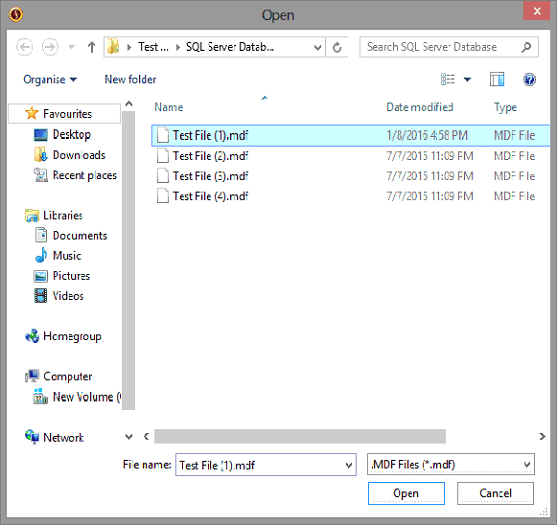
About this app
SysInfo MS SQL Server Password Recovery Tool is a Windows-based utility that helps database administrators and developers regain access to SQL Server instances when credentials are lost. It works directly with MDF files—no need for a live SQL Server installation—and lets you reset passwords for individual user accounts as well as the system administrator (SA) account. The tool auto-detects the SQL Server version, previews user lists, and handles both encrypted and multilingual passwords. It supports SQL Server 2014 down to 2000 and is compatible with Windows 11 through older versions. The interface is straightforward: load the MDF file, pick a user, set a new password, and apply. A free version lets you view users but not change passwords; the full version unlocks resetting. As of 2025, SysInfo offers a lifetime free license in exchange for a verified review on platforms like G2 or Trustpilot. It's a practical pick for anyone locked out of their SQL database and looking for a no-fus...
Key features
- 1Resets SQL Server user and SA passwords directly from an offline MDF file — no live SQL Server instance required.
- 2Auto-detects SQL Server version and supports 2014, 2012, 2008 R2, 2008, 2005 and 2000.
- 3Handles encrypted, unencrypted and multilingual passwords; previews the user list before applying a reset.
Target customer profile
Drawn from the product itself, not from a survey.
Demographic
Database administrators (DBAs) managing SQL Server instances
Pain points
Locked out of SA account, no access to critical databases
Primary needs
Quickly reset SA/user passwords without downtime
Demographic
IT support technicians handling multiple client servers
Pain points
Forgotten passwords across various SQL Server versions
Primary needs
A reliable tool that supports legacy and modern SQL versions
Demographic
Software developers working with offline MDF files
Pain points
Need to access password-protected MDF files without a live SQL environment
Primary needs
Offline password reset capability with version auto-detection
Scout Review
Written by AI from measured evidence, scored out of 100.
SysInfo MS SQL Server Password Recovery Tool does one narrow job — resetting SQL Server user and SA passwords from an offline MDF file without a live instance — and by the site's own account it does it across SQL Server 2000 through 2014, with version auto-detection and multilingual password handling. The marketing page is fast (Lighthouse 99 mobile / 100 desktop) and the security headers are mostly in place, but the design is a dated template with a copy-paste error naming a different product, and the licence model asks you to publish a review and email a screenshot before you get a key. The two-character demo cap means you cannot verify the core feature before that commitment. It is a competent utility wrapped in a page that undersells and occasionally misrepresents it.
Measure by measure
Usability
55Clear four-step workflow (load MDF, pick user, set password, apply) and a familiar Windows file dialog. But the two-character demo cap and the review-then-email-a-screenshot licence flow add real friction before you can test anything.
Design
44Dated download-page template: competing green/blue hero CTAs, a chat bubble covering the product render, and a 'FREE FOR LIFETIME' panel that still mentions an EML to NSF Converter. Tidy spec table is the one bright spot.
Speed
88Lighthouse mobile 99/100 (LCP 1.3s, TBT 119ms, CLS 0.025) and desktop 100/100. The marketing page is genuinely fast and light — no complaints about lag in the collected evidence.
Security
72HTTPS enforced with HSTS, CSP, Referrer-Policy and Permissions-Policy; SPF and DMARC set. Missing X-Frame-Options and X-Content-Type-Options, and no SOC 2/ISO/pen-test claims found. Solid basics, thin on assurance.
Accessibility
80Lighthouse accessibility 98/100 with only minor failures: no main landmark, role=presentation conflicts, and a few visible labels without matching accessible names. No WCAG statement published, but the automated baseline is strong.
Growth
56Real, specific pain — locked-out SA accounts with no live instance — and offline MDF reset is a genuine wedge over SSMS. But Stellar and Elcomsoft sell the same premise, and nothing here explains why you'd pick this one.
Improvement areas
- The 'FREE FOR LIFETIME' panel references a different product (EML to NSF Converter) — a visible copy-paste error.
- Demo caps password changes at two characters, so the core feature cannot be meaningfully tested before purchase.
- No published security audit, SOC 2 or pen-test despite handling database credential files.
- Free licence requires posting a public review and emailing a screenshot — friction that undermines trust.
Design & Usability
The page is a conventional software-download template that has aged: a pale cyan hero with two equally weighted buttons (green 'Free Download', blue 'Lifetime Free'), a floating chat bubble parked over the product render, and a features grid of small grey paragraphs that runs six or seven lines deep. The worst tell is the 'FREE FOR LIFETIME' panel, which thanks readers for their interest in the 'SysInfo EML to NSF Converter Tool' — copy lifted from a different product. Usability is more defensible: the workflow is genuinely simple (load the MDF, pick a user, set a new password, apply), the file picker uses a standard Windows dialog, and the anchor bar jumps to Features, Specification, Guide and Video. But the demo caps password changes at two characters, and the full licence is gated behind posting a review on G2 or Trustpilot and emailing a screenshot. You cannot properly evaluate the tool before committing to public praise for it.
Speed & Security
Speed is the standout. Lighthouse measured 99/100 on mobile with a 1.3s LCP, 119ms total blocking time and a 0.025 CLS, and a perfect 100 on desktop. The marketing site is lean and snappy, and no lag complaints surfaced in the collected evidence. Security is competent but unambitious: HTTPS is enforced with HSTS, a Content-Security-Policy, Referrer-Policy and Permissions-Policy all present, plus SPF and DMARC on the domain — 10 of 12 header checks passed. The gaps are X-Frame-Options and X-Content-Type-Options. More importantly, no SOC 2, ISO 27001, penetration test or bug bounty is published anywhere we could find. For a utility that reads and rewrites database credential files, that absence is the thing a cautious DBA will notice first.
Accessibility & Growth
Accessibility scores 98/100 on the automated Lighthouse audit, with only minor failures: no main landmark element, some role=presentation conflicts, and a handful of visible labels without matching accessible names. No WCAG conformance statement is published, so the strong automated result is unverified by the vendor's own claims. Growth is the harder call. The problem is real and specific — a DBA locked out of the SA account with no live instance to authenticate against — and the offline MDF approach is a legitimate wedge over SSMS, which is useless without admin access. But the alternatives list tells the story: Stellar sells the same offline MDF recovery, and Elcomsoft sells a more advanced forensic version. SysInfo's differentiator is a lifetime free licence in exchange for a review, which is a pricing tactic, not a defensible position. The domain dates to 2010, so the vendor has staying power, but nothing in the material explains why a buyer picks this over Stellar.
Conclusion
If you are genuinely locked out of a SQL Server instance and have the MDF file in hand, this is a plausible tool for the job — the workflow is simple and the version coverage is broad. Go in with clear eyes: test the two-character demo first, read the licence terms carefully before posting any review, and treat the 'FREE FOR LIFETIME' panel as marketing rather than a guarantee. Compare against Stellar's offering before you commit, since both take the same offline approach and only one of them will have a page that names its own product correctly.
Suggestions for improvement
- Fix the 'FREE FOR LIFETIME' panel — it currently thanks readers for their interest in the EML to NSF Converter, a different product entirely.
- Raise the demo cap above two characters so buyers can actually verify the reset works before committing to a review.
- Publish a security page: SOC 2 or a pen-test summary would matter enormously for a tool that rewrites database credentials.
- Collapse the two hero CTAs into one primary action and move the chat bubble off the product render.
Alternatives comparison
Named competitors, point by point. Nobody paid to appear here or to be left out.
 SysInfo MS SQL Server Password Recovery Tool |  SQL Server Management Studio (SSMS) |  SQL Password Recovery by Stellar |  SQL Server Password Changer by Elcomsoft | |
|---|---|---|---|---|
| Works without a live SQL Server instance (offline MDF) | Yes — core design, reads MDF directly | No — requires admin access to a running instance | Yes — offline MDF approach | Yes — forensic offline approach |
| Resets the SA (system administrator) account password | Yes — explicitly supported | Only with existing admin access | Yes | Yes |
| Free tier / trial available | Demo limited to 2-character password change; lifetime free licence via review | Free (Microsoft official) | Trial available (limited) | Commercial only |
| Target audience / complexity | DBAs and IT support; simple 4-step GUI | DBAs and developers; full management suite | DBAs; guided recovery wizard | Forensic experts; advanced tooling |
| SQL Server version coverage | 2014 down to 2000 | Current versions (matches installed instance) | Broad legacy support | Broad, forensic-grade coverage |
SQL Server Management Studio (SSMS)
Microsoft's official tool; can reset passwords if you have admin access, but useless when locked out.
SQL Password Recovery by Stellar
Commercial tool to recover SQL Server passwords; similar offline MDF approach.
SQL Server Password Changer by Elcomsoft
Forensic tool to reset SQL passwords; more advanced, geared toward experts.
Comparing options? See SysInfo MS SQL Server Password Recovery Tool alternatives, scored side by side
More Security apps
View all Security
issued.live
89Free certificate transparency search and SSL lookup with ...

kosa8
88Sealed VMs for AI agents with instant rewind, audit trails & zero key exposureSealed VMs for AI agents with instant rewind and audit tr...

OBVELO
88Privacy gateway that masks personal data in LLM traffic

Magery Forge
87Weekly security audits for vibe-coded sites, explained in...

Tokitool
87Free, private browser tools for images, chats, QR codes, ...

Xsilent Vault: Hide Photos
87Private Android vault for photos, videos, PDFs and files, with no required account, no ads and no mandatory cloud.

Sidenty
87Sidenty is a professional digital identity protection ser...

ProcessSpy
87A native macOS process explorer and advanced monitor that...

C2PA Lab
87Free C2PA Content Credentials Checker

Basalt
86Eighteen PDF tools in one native Mac window: merge, split, compress, OCR, Bates numbering, forms, signing and redaction. Offline. $29 once.

PromptTrace
85Free hands-on AI security labs for prompt injection and L...

Sanctix
85Sanctions screening with verifiable SHA-256 audit trails.


A platform dedicated to providing unbiased reviews of newly launched applications, analyzing everything from their features to their full potential.
info@scoutforge.net© 2026 Scoutforge. All rights reserved.
