Cycling through all six. Tap any point to stop.
Measured on six things
Recover and restore corrupted Outlook PST files with ease.
Design
46Dated Windows-era UI and a dense, wall-of-text homepage with clashing red/green highlights. Functional but visually behind modern peers like Stellar.
Screenshots
1 / 3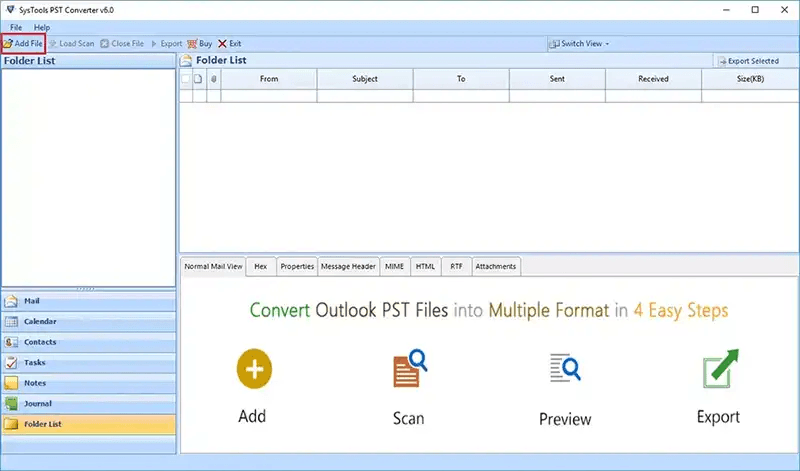
About this app
SysTools Outlook PST Recovery is a professional solution designed to recover and restore inaccessible, corrupted, damaged, or severely affected Outlook PST files. When a PST file becomes corrupted due to improper shutdown, oversized mailbox data, virus attacks, hardware issues, software crashes, or other unexpected errors, users may face problems opening Outlook or accessing important emails and mailbox items. The software helps recover mailbox data from damaged PST files and makes it accessible again. The tool is designed to recover different types of Outlook mailbox data, including emails, contacts, calendars, tasks, notes, journals, and other supported mailbox items. It is useful for users who are unable to open their PST files normally or receive Outlook errors while trying to access stored mailbox data. Instead of relying only on Outlook's built-in repair utility, users can use the recovery software to extract accessible data from severely corrupted PST files.
Key features
- 1Recovers emails, contacts, calendars, tasks, journals, and notes from corrupted PST files.
- 2Exports to PST, EML, MSG, PDF, HTML, and Office 365 with selective filtering.
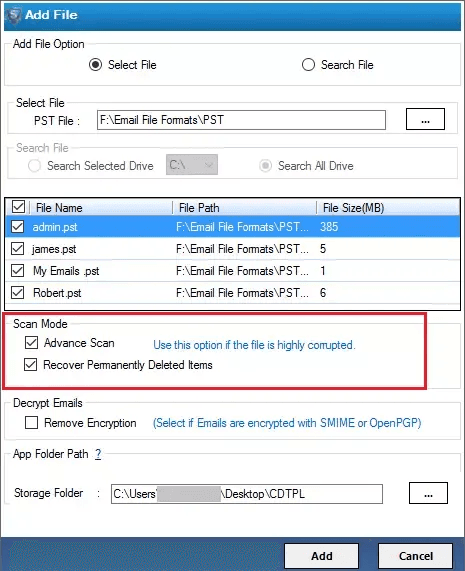
- 3Decrypts and removes SMIME & OpenPGP encryption; supports batch recovery and save/load scan.
Target customer profile
Drawn from the product itself, not from a survey.
Demographic
IT Administrators and Professionals
Pain points
Corrupted PST files causing data loss and email downtime.
Primary needs
Reliable recovery of large PST files and batch processing.
Demographic
Small Business Owners
Pain points
Loss of critical business emails and contacts due to PST corruption.
Primary needs
Affordable, easy-to-use recovery tool with export to multiple formats.
Demographic
Legal and Financial Professionals
Pain points
Need to recover encrypted emails and maintain data integrity for compliance.
Primary needs
Secure recovery with encryption removal and preservation of metadata.
Scout Review
Written by AI from measured evidence, scored out of 100.
SysTools Outlook Recovery is a competent, established PST recovery tool with a dated face. Its security posture is genuinely strong (12/12 headers), accessibility audits well (94/100), and it offers a clear 4-step workflow with a free demo. But the design is stuck in the Windows 7 era, the homepage is a wall of text, and mobile performance is sluggish (64/100, 3.5s LCP). Against Stellar and Kernel it competes on features like SMIME decryption and batch recovery rather than polish. It'll get the job done for an IT admin who needs a corrupted PST back — it just won't be a pleasant ride getting there.
Measure by measure
Usability
62Clear 4-step workflow, free demo, and Guide/Docs links make it approachable. But dense copy and competing CTAs slow the path to proof.
Design
46Dated Windows-era UI and a dense, wall-of-text homepage with clashing red/green highlights. Functional but visually behind modern peers like Stellar.
Speed
55Lighthouse mobile 64/100 with LCP 3.5s and TBT 768ms — usable but sluggish on mobile. Low CLS (0.026) keeps layout stable.
Security
76Full security header suite (HSTS, CSP, frame protection, DMARC/SPF) at 12/12 checklist points. No published SOC 2 or bug bounty found.
Accessibility
72Lighthouse a11y 94/100 with multi-language support claimed. Failing contrast, missing main landmark, and unlabeled SVGs keep it from the top of the band.
Growth
58Real, painful problem with a specific pro audience and genuine differentiators (SMIME decryption, batch, O365 export). But it's a crowded, mature category.
Improvement areas
- Dated UI and dense, wall-of-text homepage need a modern redesign.
- Mobile performance (64/100, 3.5s LCP) needs optimization.
- No published SOC 2/ISO certification or bug bounty for enterprise trust.
Design & Usability
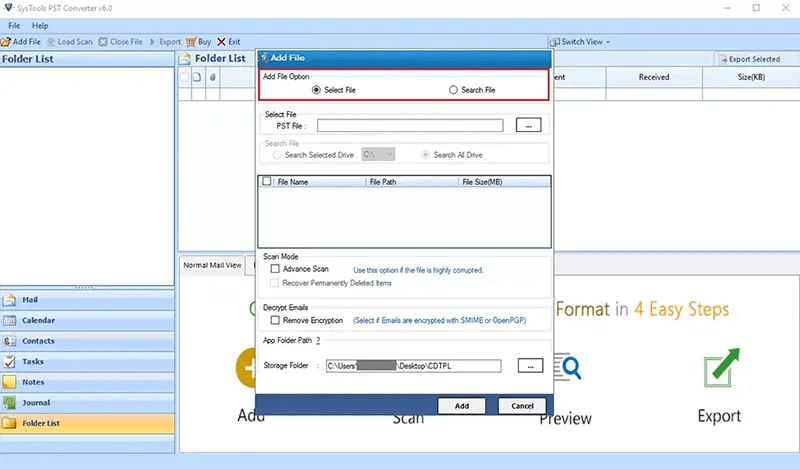
SysTools Outlook Recovery looks like it was designed in 2012 and never revisited. The homepage is a dense wall of 12+ bullet points with no cards, dividers, or whitespace, and the red inline highlights clash with the green checkmark system in a way that reads as unfinished. The maker's own screenshots show thick-bordered Windows dialogs and empty panes that undercut confidence. Usability is better than design: a clear 4-step workflow, a free demo, and Guide/Docs links give users a real path to value. But the two competing CTAs and heavy scrolling before any proof hurt the onboarding flow. It works; it just doesn't feel cared for.
Speed & Security
Speed is middling. Lighthouse mobile scores 64/100 with a 3.5s LCP and 768ms of total blocking time — the page is usable but noticeably sluggish on phones, though layout stability (CLS 0.026) is good. Security is the strongest dimension: the site enforces HTTPS with HSTS, ships a full CSP, frame protection, X-Content-Type-Options, Referrer-Policy, and Permissions-Policy, and has SPF and DMARC configured — 12/12 on our header checklist. What's missing is published compliance evidence: no SOC 2, ISO 27001, or bug bounty program is visible, which matters for the IT-admin and legal buyers this tool targets.
Accessibility & Growth
Accessibility scores well at 94/100 on Lighthouse, and the site claims multi-language support. But the audit flags real gaps: insufficient color contrast, a missing main landmark, SVGs without accessible text alternatives, and visible labels that don't match accessible names — fixable issues that suggest a11y wasn't a priority. Growth is a judgment call: PST corruption is a genuine, painful problem with a specific professional audience, and SysTools brings real differentiators (SMIME/OpenPGP decryption, save/load scan, batch recovery, Office 365 export). But the category is mature and crowded with Stellar and Kernel, and the 2008 domain and 1022 reviews show an established player rather than a fast-growing one.
Conclusion
If you're an IT admin staring down a corrupted PST and you need SMIME decryption or batch recovery, SysTools has the feature set and the security hygiene to be a reasonable pick. If you care about a modern interface, fast mobile pages, or published compliance certifications, look at Stellar or Kernel first. The tool is functional and the 30-day money-back guarantee lowers the risk of trying it. Just don't expect the experience to match the price tag's implied polish.
Suggestions for improvement
- Redesign the homepage with cards, whitespace, and section dividers instead of a 12-bullet wall of text.
- Fix the red/green highlight clash and remove debug-looking inline styling from feature lists.
- Improve mobile performance — target LCP under 2.5s and cut the 768ms total blocking time.
- Publish a SOC 2 or ISO 27001 report and add a security/compliance page for enterprise buyers.
Alternatives comparison
Named competitors, point by point. Nobody paid to appear here or to be left out.
 SysTools Outlook PST Recovery Software SysTools Outlook PST Recovery Software |  Stellar Repair for Outlook Stellar Repair for Outlook |  Kernel for Outlook PST Recovery Kernel for Outlook PST Recovery | |
|---|---|---|---|
| Recovers emails, contacts, calendars, tasks, and notes from corrupted PST files | Yes | Yes | Yes |
| Supports large PST files and batch processing | Yes (no file size limit, batch via Search PST) | Yes (supports large PST files) | Yes |
| Preview recovered data before saving | Yes (8 view modes, category-wise preview) | Yes (preview before saving) | Yes |
| Export to multiple formats (PST, EML, MSG, PDF, HTML, Office 365) | Yes (PST, EML, MSG, PDF, HTML, Office 365) | Yes (multiple formats) | Yes (multiple export options) |
| Handles password-protected / encrypted PST files | Yes (SMIME & OpenPGP decryption) | Yes | Yes (supports password-protected files) |
| Free trial / demo available | Yes (free live demo download) | Yes (free trial) | Yes (free trial) |
| Money-back guarantee | Yes (30 days) | Yes (30 days) | Yes |
Stellar Repair for Outlook
A popular PST recovery tool that repairs corrupted PST files and recovers emails, contacts, calendars, and more. It supports large PST files and offers preview before saving.
Kernel for Outlook PST Recovery
A comprehensive PST recovery software that recovers deleted emails and other items from corrupt PST files. It supports password-protected files and offers multiple export options.
Comparing options? See SysTools Outlook PST Recovery Software alternatives, scored side by side
More Online Backup apps
View all Online Backup
PCDOTS PST Converter
85Convert Outlook PST files to 16 formats and clouds withou...

yourdrive
84YourDrive is a self-hosted file manager and media timeline that runs entirely on your own infrastructure. Organize files in nested folders, move them with drag-and-drop, search instantly, and browse photos and videos by month and year. Files stream straight to your own AWS S3, Azure Blob, MinIO, Cloudflare R2 or Wasabi storage. Install with one command. Free for personal use; teams pay per server, not per seat.
PCDOTS Email Recovery Software
83Recovers emails from corrupt mailboxes across 50+ platforms.

Alcazar Dead Man's Switch
82An encrypted digital legacy service that securely deliver...

App-Vault
81Encrypted photo and file vault for iPhone. AES-256 on device, pattern lock, decoy vault and calculator disguise. No account, no cloud.
PCDOTS Thunderbird Converter
81Recover and migrate Thunderbird profiles & MBOX files wit...

SysInfo Office 365 Export to PST Tool
80Export Exchange Online, on-premises, and hybrid mailboxes...

RemoteDrive by FileZilla Pro
80Integrates cloud storage into macOS Finder for seamless file management across services like Google Drive and Dropbox.

SysInfo Google Workspace Backup Tool
80Backup and migrate Google Workspace data locally or to ot...

S3FileHub
80A user-friendly web app for managing AWS S3 storage with AI summarization and analytics.

SysInfo Email Migration Tool
80Bulk email migration and backup tool for 5 sources with f...

Filifly
79A secure, web-based file sharing platform with end-to-end encryption and no login requirements for quick transfers.


A platform dedicated to providing unbiased reviews of newly launched applications, analyzing everything from their features to their full potential.
info@scoutforge.net© 2026 Scoutforge. All rights reserved.
