Cycling through all six. Tap any point to stop.
Measured on six things
Design and preview custom wrap ideas for Tesla vehicles with Tesla Wrap Studio.
Security
42HTTPS is enforced and SPF is set, but HSTS, CSP, frame protection, Referrer-Policy, Permissions-Policy and DMARC are all missing — 3/13 on the header checklist. No compliance or audit signals found.
Screenshots
1 / 1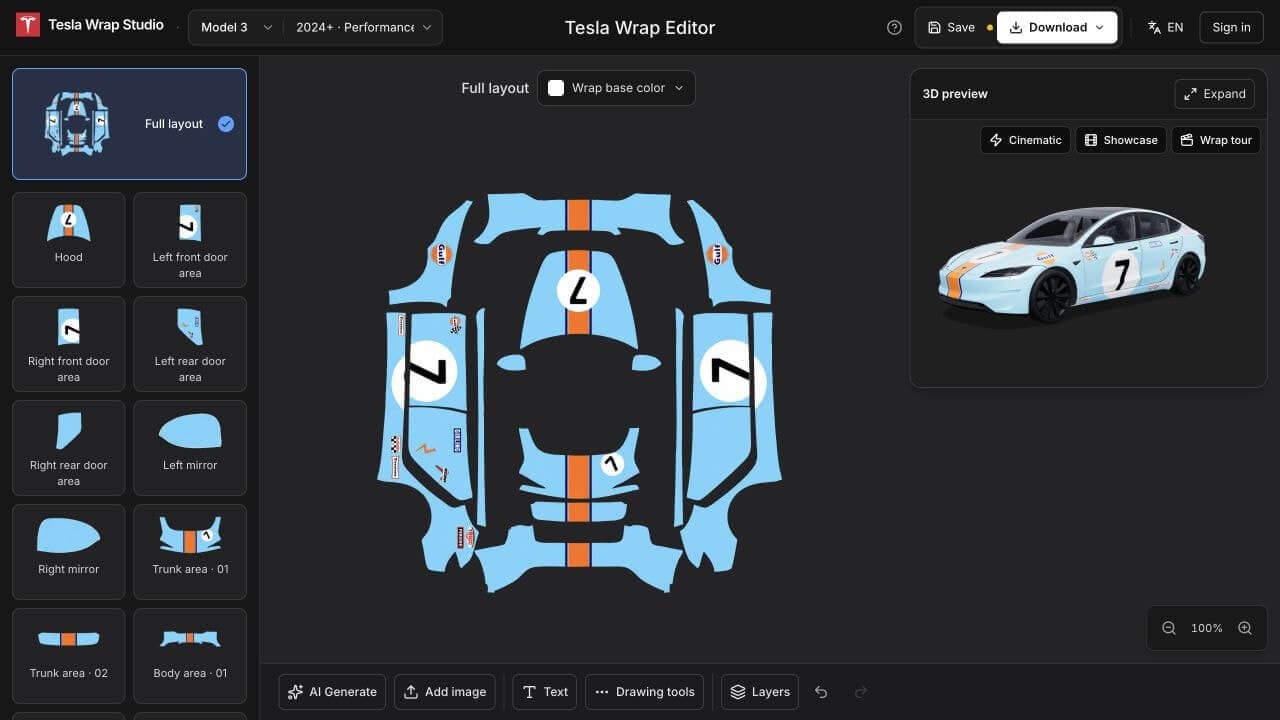
About this app
Tesla Wrap Studio is an online wrap design tool for Tesla owners. Explore colors and patterns, create your own design, and see how it looks on your vehicle in 3D. Create your design in 2D using vehicle templates. Preview your design on a 3D vehicle model. Download a PNG for Tesla Paint Shop and images of your 3D preview. Tesla Wrap Studio is an independent project, not affiliated with or endorsed by Tesla, Inc.
Key features
- 1Browser-based Tesla wrap designer with 2D templates and live 3D preview across Model Y, 3, Cybertruck, X and S.
- 2Free no-account editing with colors, text, brushes and shapes; free PNG export for Tesla Paint Shop.
- 3AI wrap generation from text or reference image, sold as one-time credit packs ($4.99–$19.99).
Target customer profile
Drawn from the product itself, not from a survey.
Demographic
Tesla owners
Primary needs
Create custom Tesla Wraps or download free designs. Explore colors and patterns, preview your look in 3D, and export a PNG for Tesla Paint Shop.
Scout Review
Written by AI from measured evidence, scored out of 100.
Tesla Wrap Studio is a focused, well-built niche tool: a browser-based wrap designer for Tesla owners with a live 3D preview and a clean PNG export for Tesla Paint Shop. The design is genuinely good, the site is fast, and the free no-account tier plus illustrated guide make it easy to try. The gaps are security hardening (3/13 headers, no DMARC) and the AI feature being gated behind membership and credits despite leading the homepage. Growth is real but bounded by the niche.
Measure by measure
Usability
68Free no-account editing plus an illustrated 3-step guide is a genuinely low-friction onboarding. The catch: the headline AI feature sits behind sign-in, membership and credits.
Design
72Strong dark theme, high-quality 3D renders and a live-preview editor give it real visual cohesion. Inspiration grid lacks filters and the editor's 12-thumbnail rail is cramped.
Speed
82Lighthouse desktop 91/100 with LCP 681ms, CLS 0.001 and TBT 34ms — genuinely snappy for a 3D-heavy editor. No lag complaints surfaced in the collected evidence.
Security
42HTTPS is enforced and SPF is set, but HSTS, CSP, frame protection, Referrer-Policy, Permissions-Policy and DMARC are all missing — 3/13 on the header checklist. No compliance or audit signals found.
Accessibility
80Lighthouse accessibility 100/100 with only one failing audit on accessible-name matching. No a11y statement or multi-language support beyond an EN dropdown, so it sits mid-band.
Growth
62Sharp niche (Tesla owners), a real wedge (browser 2D+3D design to Paint Shop PNG, no Photoshop) and a clear monetization path. Physical wrap printing is still 'coming soon'.
Improvement areas
- Security headers are 3/13 — no HSTS, CSP, frame protection or DMARC on a site that takes payments.
- AI feature is gated behind sign-in, membership and credits despite leading the homepage.
- Inspiration grid lacks filters/sorting; editor panel rail is cramped with low-contrast borders.
Design & Usability
Design is the strongest card here. The dark theme, the 3D renders and the live-preview editor all read as a product someone actually cared about, and the two-path 'AI vs design your own' split is clear. The weak spots are curation and density: the inspiration grid has no filters and the editor's 12-thumbnail rail is cramped. Usability is close behind — free no-account editing, a genuinely illustrated 3-step guide, and a repeated primary CTA make onboarding easy. The friction is that the AI feature the homepage leads with is gated behind sign-in, membership and credits, which turns the headline promise into a paywall tease.
Speed & Security
Speed is a clear win: Lighthouse desktop 91/100, LCP 681ms, CLS 0.001, TBT 34ms — impressive for a 3D-heavy editor, and no lag complaints surfaced. Security is the opposite story. HTTPS is enforced and SPF is set, but HSTS, CSP, frame protection, X-Content-Type-Options, Referrer-Policy, Permissions-Policy and DMARC are all absent — 3/13 on the header checklist. For a site that takes payments and stores cloud design projects, that's a meaningful gap, and no SOC 2, ISO or pen-test signals were found to offset it.
Accessibility & Growth
Accessibility scores 100/100 on Lighthouse with a single failing audit on accessible-name matching — strong automated results, but no a11y statement and no multi-language support beyond an EN dropdown, so it lands mid-band rather than top. Growth is the interesting one: the idea is specific (Tesla owners), the wedge is real (browser-based 2D design plus 3D preview plus Paint Shop PNG export, no Photoshop), and the AI-credit pricing is a sensible monetization path. The honest limit is category size — Tesla owners who care about wraps is a niche of a niche — and physical wrap printing is still 'coming soon'. Domain registered 2026-09-03, so this is very early.
Conclusion
If you own a Tesla and have ever wanted to see a wrap before committing, this is the most frictionless way to do it — free, browser-based, and the 3D preview is the real deal. Just don't expect the AI magic to be free, and don't expect enterprise-grade security headers on a site this young. Worth a bookmark; worth a credit pack if the AI output lands.
Suggestions for improvement
- Add HSTS, CSP, frame protection and DMARC — the header checklist is 3/13 and this site takes payments.
- Add filters and sorting to the inspiration grid so users can browse by model, style or color.
- Offer a free AI generation or two so the headline feature isn't a paywall tease.
- Publish an accessibility statement and confirm keyboard/screen-reader support in the editor.
Alternatives comparison
Named competitors, point by point. Nobody paid to appear here or to be left out.
 Tesla Wrap Studio Tesla Wrap Studio |  | |
|---|---|---|
| 3D vehicle preview | Yes — live 3D preview of every panel while designing | Not specified in provided details |
| Free tier without account | Yes — colors, text, brushes, shapes and 3D preview free without signup | Not specified in provided details |
| AI wrap generation | Yes — text or reference image, credit-based ($4.99–$19.99 packs) | Not specified in provided details |
| Export for Tesla Paint Shop | Yes — PNG export plus 3D preview images, free | Not specified in provided details |
| Supported Tesla models | Model Y, 3, Cybertruck, X, S; Cybercab/Roadster/Semi on roadmap | Not specified in provided details |
Comparing options? See Tesla Wrap Studio alternatives, scored side by side
More Design & Creativity apps
View all Design & Creativity
RoomCreator
92An AI-powered interior and exterior design tool that tran...

What the GIF
89Frame-perfect video-to-GIF maker that runs entirely in yo...

TranscriptYou
88Free YouTube transcript generator with timestamps and AI ...

RestorePhotosApp
88An AI-powered photo restoration app that brings old, blur...

Portrait Gift
88AI-powered personalized face swap art platform creating c...

ButterKit
82macOS app for App Store screenshots: 3D mockups, auto-tra...

BeartIMAGE
88BeartIMAGE is a free, web-based image processing platform engineered for fast, bulk photo editing and conversion directly in your browser.

Pixelimg
88A free online AI-powered tool that instantly converts ima...

Coloring Pages Pro
87A massive collection of free printable coloring pages for...

QRocodile
87Design And Animate QR Codes People Want to Scan

FaceSwapAI
87AI face swap for photos, videos, GIFs with free trial.

Book Cover Generator
87AI book cover generator for indie authors—turn your story...


A platform dedicated to providing unbiased reviews of newly launched applications, analyzing everything from their features to their full potential.
info@scoutforge.net© 2026 Scoutforge. All rights reserved.
