Cycling through all six. Tap any point to stop.
Measured on six things
Connect Unsora AI to ChatGPT or Claude over MCP and your assistant can make video, images, AI influencers, clips, thumbnails, and scheduled posts.
Security
52HTTPS and HSTS are in place, but missing common security headers. No SOC 2 or audit claims found.
Screenshots
1 / 1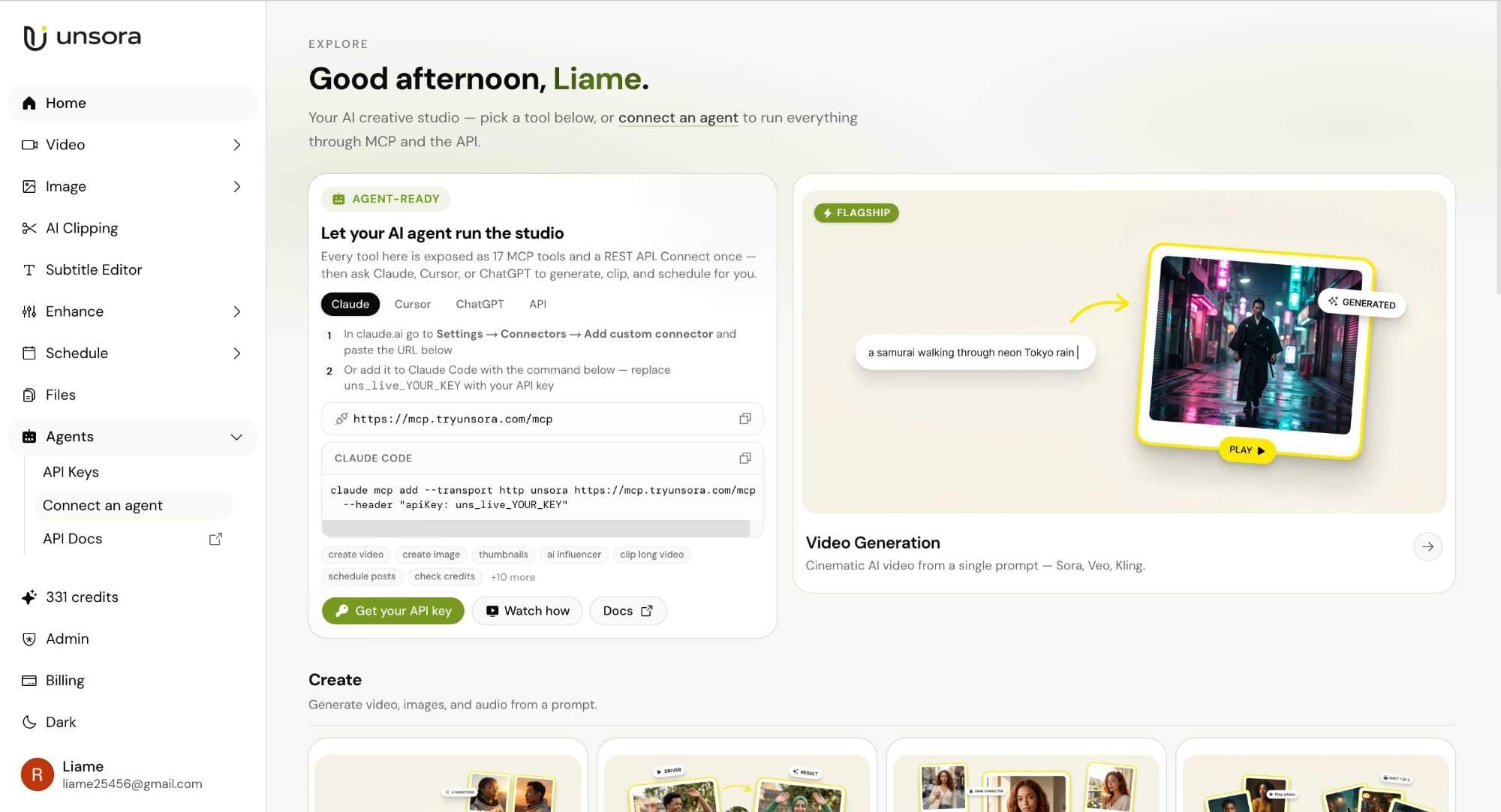
About this app
Unsora AI gives your AI assistant creative hands. Connect it once over MCP to ChatGPT, Claude, OpenClaw, or Hermes, and a full creative toolkit becomes something your assistant can call mid-conversation. Ask in plain language and get a finished file back. Cinematic video from a prompt and reference images. Ultra-realistic images. A recurring AI influencer who fronts your spots. Long streams cut into short captioned clips. Thumbnails from a prompt or a frame. Subtitles added, styled, or removed. Motion control that drives a still with camera moves from a reference clip. Upscaling to 4K for video and 8K for images. It runs leading models from Google, ByteDance, Kuaishou, and OpenAI, including Seedance 2.0, with new tools added often. When the file is ready, publish it without leaving the thread. Unsora pushes to TikTok, YouTube, X, Instagram, and more, or queues it for later. No editing experience needed, nothing to install. Every plan starts with a 3-day free trial.
Key features
- 1MCP integration with ChatGPT, Claude, OpenClaw, and Hermes
- 211 tools: video/image generation, AI influencers, clipping, thumbnails, subtitles, upscaling, motion control
- 3Direct publishing to TikTok, YouTube, X, Instagram, and more
Target customer profile
Drawn from the product itself, not from a survey.
Demographic
Content creators and YouTubers
Pain points
Spending too much time on manual editing, clipping, and thumbnails; need to produce multiple pieces of content daily.
Primary needs
Automated video clipping, thumbnail generation, and social media scheduling directly from chat.
Demographic
Digital marketers and social media managers
Pain points
Managing multiple platforms and tools for content creation and publishing; high volume of content demands.
Primary needs
Efficient bulk creation, publishing to multiple platforms, and AI-driven content generation.
Demographic
AI enthusiasts and early adopters
Pain points
Want to push AI assistants beyond text; frustrated with switching between tools for creative tasks.
Primary needs
Seamless MCP integration, cutting-edge media generation, and ability to experiment with new models.
Scout Review
Written by AI from measured evidence, scored out of 100.
Unsora AI offers a compelling vision: giving AI assistants creative hands via MCP. The design is clean, usability is solid, and the toolset is comprehensive. Security and accessibility need work, but for a beta product, it's promising. The key is whether it can win over creators in a crowded market.
Measure by measure
Usability
68Clear onboarding with API key steps and tool categories. Changelog is a placeholder, but core docs are solid.
Design
70Clean, modern interface with good visual hierarchy and consistent styling. Minor density issues in sidebar and thumbnail row.
Speed
60No performance issues observed; site appears lightweight. No benchmarks or user complaints to contradict.
Security
52HTTPS and HSTS are in place, but missing common security headers. No SOC 2 or audit claims found.
Accessibility
55No explicit accessibility statement or WCAG compliance mentioned. Visual contrast is good, but keyboard/screen reader support unverified.
Growth
62Real problem, clear differentiators via MCP, but crowded market. Needs to prove it can win creators over incumbents.
Improvement areas
- Security hardening: add CSP, frame protection, and other headers
- Accessibility: publish WCAG statement and ensure keyboard navigation
- Changelog: provide regular updates and release notes
Design & Usability
Unsora's design is polished and modern, with a clear visual hierarchy that makes the MCP integration path scannable. The sidebar is a bit dense, but the overall layout is intuitive. Usability is strong with well-organized tool categories and a straightforward API key setup. The changelog being a placeholder is a minor letdown, but the docs are solid.
Speed & Security
No performance issues observed; the site feels lightweight. Security is basic: HTTPS and HSTS are present, but missing CSP and other headers. No SOC 2 or audit claims, which is typical for a beta product. Docs advise on API key safety, which is good.
Accessibility & Growth
Accessibility is unverified — no WCAG statement, but visual contrast is good. Growth potential is real: the problem of manual content editing is painful, and MCP integration is a differentiator. However, competition from RunwayML and Canva is fierce, so Unsora needs to execute well to carve out a niche.
Conclusion
If you're a creator tired of switching between tools, Unsora is worth a try. The 3-day free trial lets you test the MCP integration with your favorite AI. Just keep an eye on security hardening and accessibility improvements as it matures.
Suggestions for improvement
- Add a real changelog with release notes and feature updates.
- Implement security headers like CSP and X-Content-Type-Options.
- Publish an accessibility statement and ensure keyboard navigation.
- Add a 'view all' control for the thumbnail gallery.
Alternatives comparison
Named competitors, point by point. Nobody paid to appear here or to be left out.
 Unsora AI |  RunwayML |  Canva | |
|---|---|---|---|
| AI video generation | Yes, via chat with MCP; supports Seedance 2.0, Kling, Google, OpenAI | Yes, standalone platform with Gen-3 and other models | Limited, basic video editing, not AI-native |
| MCP integration with AI assistants | Yes, one-link MCP setup for ChatGPT, Claude, OpenClaw, Hermes | No, standalone platform | No, manual workflow |
| Social media scheduling | Yes, direct publishing to TikTok, YouTube, X, Instagram | No, not included | Yes, via Canva's scheduling features |
RunwayML
A standalone AI video generation platform, but lacks direct chat integration and social media scheduling.
Canva
Design and video editing tool, but not AI assistant native and requires manual workflow.
Comparing options? See Unsora AI alternatives, scored side by side
More AI Generations apps
View all AI Generations
Uni-1 by Luma AI
92Uni-1 is an advanced multimodal text-to-image AI model th...

LTX 2.3 AI Video Generator
91Fast, open-source AI video generator with 4K support, mul...

Gerty
91Private, local AI assistant for Mac that runs offline

DemoVexa
90Turn your code into professional product demo videos with AI-generated scripts, animated UI, and natural voiceovers.

All of Us
89Add deceased loved ones to photos with AI and see free pr...

Voqusa
89Transcribe social media video and audio links into text (free signup, 5 free credits, then pay-as-you-go)

IraVoice
88Private on-device dictation for Apple-silicon Macs.

Pixelimg
88A free online AI-powered tool that instantly converts ima...

HeyVid AI
88HeyVid AI is a free all-in-one AI video and image generat...

RestorePhotosApp
88An AI-powered photo restoration app that brings old, blur...

tradutor de mangá com IA
88O tradutor de mangá com IA traduz capítulos em lote, personaliza textos e oferece edição visual para estúdios.

OBVELO
88Privacy gateway that masks personal data in LLM traffic


A platform dedicated to providing unbiased reviews of newly launched applications, analyzing everything from their features to their full potential.
info@scoutforge.net© 2026 Scoutforge. All rights reserved.
