Cycling through all six. Tap any point to stop.
Measured on six things
AI photo effects you can shape through conversation
Security
50HTTPS enforced with SPF and DMARC, but no HSTS, CSP, frame protection or Referrer-Policy — 4/12 on the header checklist. No published audits or security page found.
Screenshots
1 / 1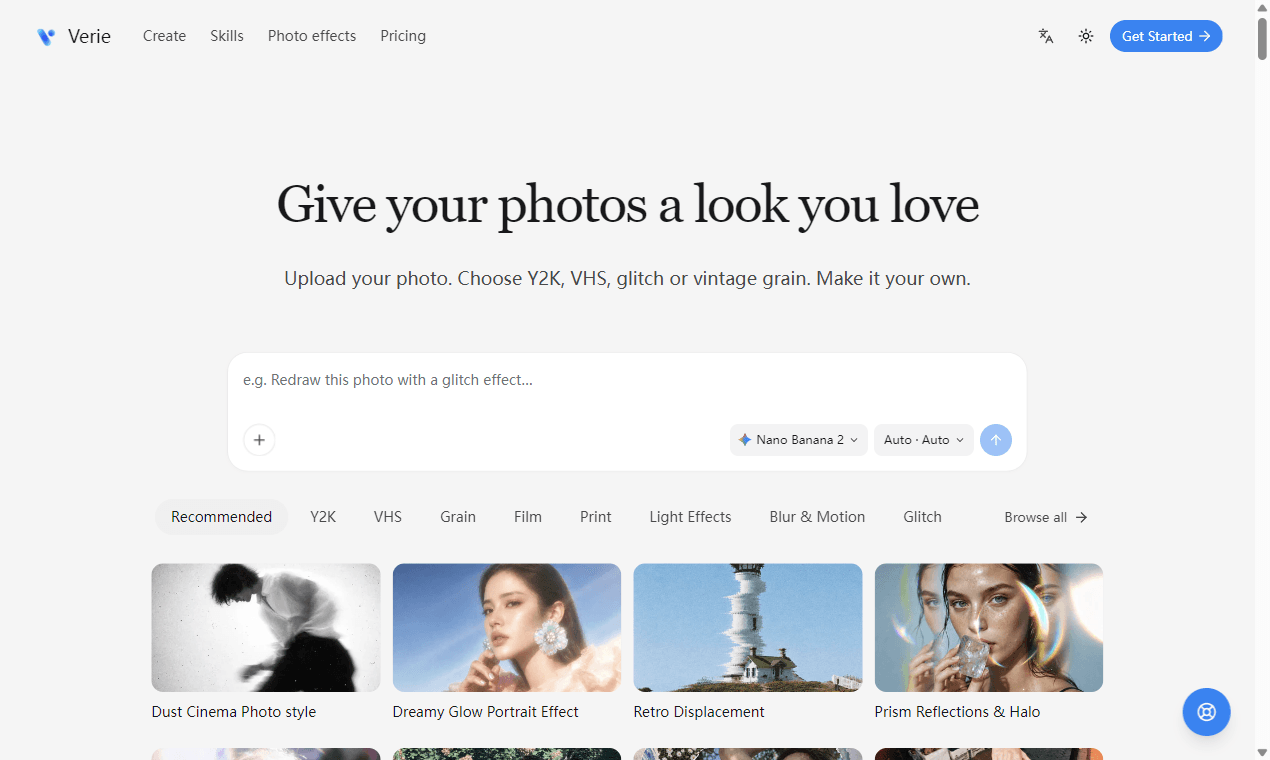
About this app
Verie brings AI photo effects and editing to your browser. Explore Y2K, VHS, glitch and vintage grain, upload your photo, then use conversation to refine the next version.
Key features
- 1Conversational refinement: after the first result, describe changes like 'softer glow' or 'different mood' to generate new versions.
- 2Saved 'Skill' recipes per effect (Y2K Digicam, VHS, Glitch, Grain) with defined inputs and settings, so no prompt writing is required.
- 3Browser-based workflow: sign in, upload, check the credit estimate, generate, review and download without installing Photoshop or a plugin.
Target customer profile
Drawn from the product itself, not from a survey.
Demographic
Social media creators and influencers
Pain points
Need eye-catching visuals quickly; limited budget for pro editing software
Primary needs
Fast, trendy filters like Y2K and VHS to boost engagement
Demographic
Hobbyist photographers and digital artists
Pain points
Want unique textures but lack advanced editing skills
Primary needs
Easy, one-click effects with room for customization
Demographic
Small business owners (Etsy, Instagram shops)
Pain points
Struggle to create cohesive, stylized product photos
Primary needs
Consistent, branded looks without hiring a designer
Scout Review
Written by AI from measured evidence, scored out of 100.
Verie is a browser-based AI photo filter tool that turns a photo into Y2K, VHS, glitch or vintage-grain looks, then lets you refine the result by chatting with it. The pitch is clear and the homepage sells it: bold hero, captioned example grid, three-step flow, and a prompt box that shows you what to type. The measured profile is genuinely uneven. Accessibility is excellent at 100/100 with language and theme toggles. Desktop speed is strong at 94, though mobile drops to 76 with a 3.2s LCP. Design is good above the fold and unfinished below it, with placeholder rectangles standing in for previews. Security is the weak spot — 4/12 on the header checklist with no published audits. Usability is competent but gated: no free tier, no trial, and a small low-contrast upload box. Growth is a real idea in a crowded, easily copied category.
Measure by measure
Usability
58Three-step flow and example prompt make the path to a result obvious, but there's no free trial and the upload box is small and low-contrast next to the CTA.
Design
70Clean, high-contrast hero and a well-captioned filter grid sell the look immediately. Below-fold placeholder rectangles and a black video block undercut an otherwise polished page.
Speed
68Lighthouse mobile 76/100 (LCP 3.2s, TBT 281ms) and desktop 94/100. CLS 0 keeps the layout stable; mobile LCP is the main drag.
Security
50HTTPS enforced with SPF and DMARC, but no HSTS, CSP, frame protection or Referrer-Policy — 4/12 on the header checklist. No published audits or security page found.
Accessibility
78Lighthouse accessibility 100/100, plus a language switcher and theme toggle in the header. No WCAG statement or keyboard/screen-reader verification found.
Growth
58Real, specific problem (trendy looks without pro software) with a conversational follow-up loop as the wedge. Early-stage domain; category is crowded and copyable.
Improvement areas
- No free tier or trial — the first thing a curious creator meets is a subscription or a credit pack.
- Below-fold placeholder rectangles and a black video block replace real effect previews on the homepage.
- Security headers are incomplete (4/12) with no published audit, security page or bug bounty.
- Upload area is small and low-contrast despite being the product's primary action.
Design & Usability
The homepage does the hard part well: a bold hero, a scannable grid of Y2K/VHS/glitch/grain examples with captions, and a numbered three-step flow that tells you exactly what happens next. The upload prompt even seeds you with 'e.g. Redraw this photo with a glitch effect...' so you're never staring at a blank box. Where it slips is below the fold — a 3x3 grid of solid dark gray rectangles stands in for effect previews, and the video section ends in a black slab with a tiny play button. On usability, the biggest friction is commercial, not visual: there is no free tier and no trial anywhere on the homepage or pricing page, so the first thing a curious creator meets is a paywall. The upload area is also small and low-contrast next to the top-right CTA, which is the opposite of what you want on a tool whose entire job is getting a photo in.
Speed & Security
Speed is split down the middle: Lighthouse desktop performance is 94/100, but mobile lands at 76/100 with an LCP of 3.2s and TBT of 281ms. CLS is a clean 0, so nothing jumps around while it loads — the mobile LCP is the number to watch, since social creators are overwhelmingly on phones. Security is the weakest measured area. HTTPS is enforced and SPF and DMARC are in place, but the header probe found no HSTS, no Content-Security-Policy, no frame protection, no X-Content-Type-Options and no Referrer-Policy — 4 out of 12 checklist points. For a product that asks users to upload personal photos and enter payment details, that's a thin baseline. No SOC 2, ISO, pen-test report, bug bounty or dedicated security page turned up in the collected content, so there's nothing published to offset the missing headers.
Accessibility & Growth
Accessibility is the standout measured result: a 100/100 Lighthouse audit, plus a language switcher and theme toggle in the header, which suggests multi-language and dark-mode support are real rather than decorative. The caveat is that automated axe-core checks cover only part of WCAG — there's no accessibility statement, no WCAG conformance claim, and no independent keyboard or screen-reader verification in the collected evidence, so 78 reflects strong automated signals without a published commitment. On growth, the idea is legitimate: creators and small shops genuinely want trendy looks without opening Photoshop, and Verie's conversational follow-up loop plus saved 'Skill' recipes per effect is a more specific wedge than a static filter pack. The problem is the category. Prisma and Picsart already own this space, Picsart bundles filters into a full editor, and Y2K/VHS/glitch are copyable in a weekend. The domain was registered in August 2026, so this is very early — but traction isn't the question here; the question is whether the wedge holds, and right now it's a feature, not a moat.
Conclusion
Verie's core loop — pick a look, upload, generate, then refine by conversation — is the right shape for this audience, and the conversational follow-up is the most interesting thing on the site. Whether it earns a place in a creator's workflow comes down to two things the current build doesn't answer: can I try it before I pay, and can I trust you with my photos? A free generation or two and a real security page would do more for conversion than another filter tab. The bones are here. The trust layer isn't yet.
Suggestions for improvement
- Add a free trial or a small free credit grant so creators can see a result before hitting a paywall.
- Replace the below-fold placeholder rectangles with real before/after previews — they're the strongest sales asset you have.
- Ship the missing security headers (HSTS, CSP, frame protection, Referrer-Policy) and publish a short security page.
- Enlarge and raise the contrast of the upload area; it's the primary action and currently the quietest element on the page.
Alternatives comparison
Named competitors, point by point. Nobody paid to appear here or to be left out.
 Verie Verie |  Prisma Prisma |  Picsart Picsart | |
|---|---|---|---|
| Pricing model | Subscription from $8.90/mo (yearly) or one-time credit packs from $19; no free tier | Free with ads plus a paid subscription tier for unlimited styles | Free tier with ads plus paid Gold subscription; heavy discounting |
| Core approach to effects | AI generation with saved 'Skill' recipes (Y2K, VHS, glitch, grain) plus conversational follow-up edits | Neural style transfer turning photos into paintings, sketches and art styles | Full editor with AI filters, effects, templates, background removal and video |
| Platform availability | Browser-based web app; no native iOS/Android app mentioned | Mobile apps (iOS/Android) with a long-standing install base | Web, iOS, Android and desktop; one of the largest creator app install bases |
| Free trial / try-before-pay | None found on homepage or pricing page; credits require purchase | Free tier available with ads | Generous free tier with ads and limited AI credits |
| Commercial usage rights | Free download with commercial license included on all paid plans | Personal use on free tier; commercial terms vary by plan | Commercial use permitted under paid Gold subscription terms |
Prisma
AI art filter app that transforms photos into paintings and sketches.
Picsart
All-in-one photo and video editor with AI filters, effects, and templates.
Comparing options? See Verie alternatives, scored side by side
More Design & Creativity apps
View all Design & Creativity
RoomCreator
92An AI-powered interior and exterior design tool that tran...

What the GIF
89Frame-perfect video-to-GIF maker that runs entirely in yo...

TranscriptYou
88Free YouTube transcript generator with timestamps and AI ...

RestorePhotosApp
88An AI-powered photo restoration app that brings old, blur...

Portrait Gift
88AI-powered personalized face swap art platform creating c...

ButterKit
82macOS app for App Store screenshots: 3D mockups, auto-tra...

BeartIMAGE
88BeartIMAGE is a free, web-based image processing platform engineered for fast, bulk photo editing and conversion directly in your browser.

Pixelimg
88A free online AI-powered tool that instantly converts ima...

Coloring Pages Pro
87A massive collection of free printable coloring pages for...

QRocodile
87Design And Animate QR Codes People Want to Scan

FaceSwapAI
87AI face swap for photos, videos, GIFs with free trial.

TryInk
86Try on a tattoo on your own body photo before you book.


A platform dedicated to providing unbiased reviews of newly launched applications, analyzing everything from their features to their full potential.
info@scoutforge.net© 2026 Scoutforge. All rights reserved.
