Cycling through all six. Tap any point to stop.
Measured on six things
AI tool that removes text, captions, and watermarks from video without blur or crop. Freemium: 30 free seconds every month.
Security
52HTTPS and HSTS enforced with SPF, and Google OAuth removes password risk. But no CSP, frame protection, Referrer-Policy, or DMARC, and no published SOC 2/ISO or security page — 5/12 on header checklist.
Screenshots
1 / 1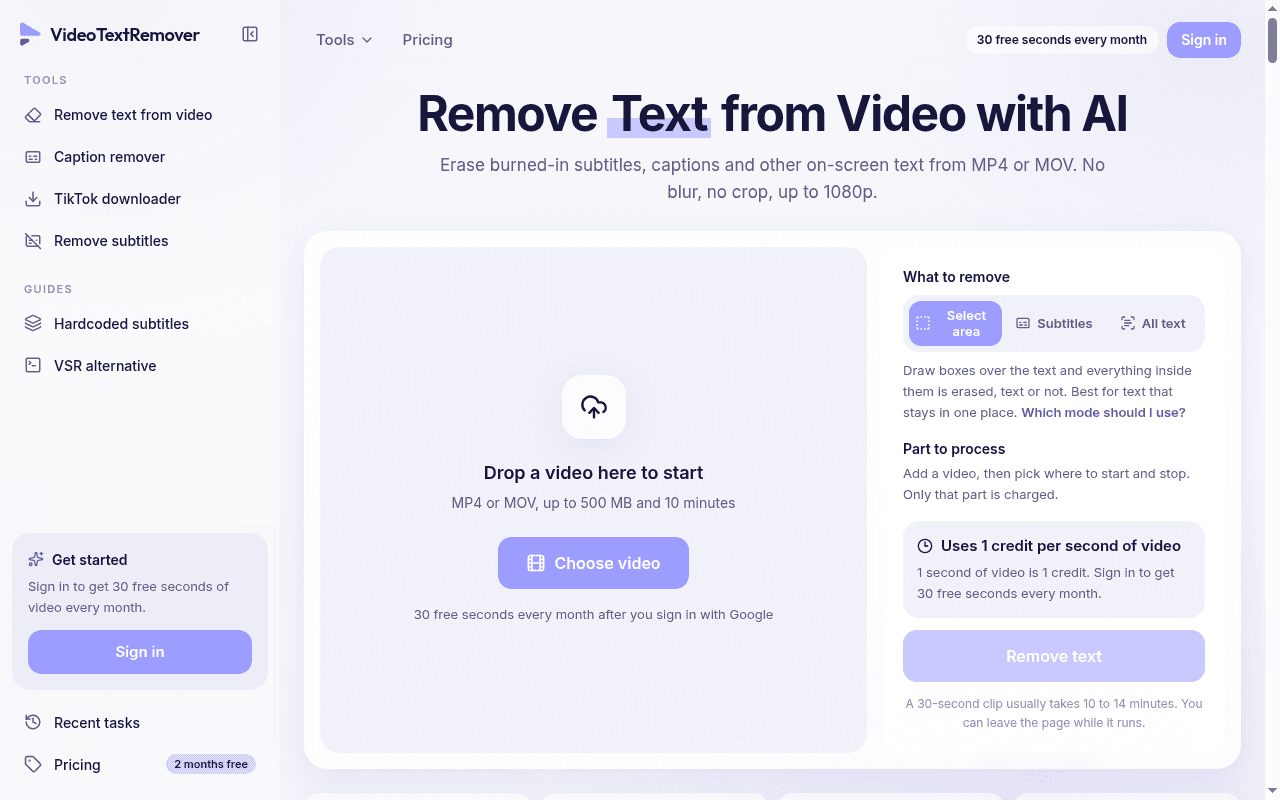
About this app
Remove Text from Video with AI — no blur or crop. VideoTextRemover removes text, captions, and watermarks from video without blur or crop. Freemium: 30 free seconds every month. Upload an MP4 or MOV, pick a removal mode, and the AI repaints the area behind the text frame by frame.
Key features
- 1AI repaints the area behind burned-in text frame by frame — no blur, no crop, up to 1080p MP4/MOV
- 2Three modes: Select area (draw boxes), Subtitles (fixed-band captions), All text (captions plus titles/labels)
- 3Per-second pricing: 1 credit = 1 second, 30 free seconds monthly, credit packs that never expire
Target customer profile
Drawn from the product itself, not from a survey.
Demographic
Content creators repurposing social media videos
Pain points
Burned-in captions from TikTok, Reels, or Shorts ruin reposts and re-captioning
Primary needs
Quickly remove old captions to repost with new ones
Demographic
Video editors and post-production freelancers
Pain points
Hardcoded subtitles that can't be switched off in any player
Primary needs
Clean up clips without blur boxes or cropping
Demographic
Localization teams and translation services
Pain points
Original subtitles are burned into the video and block new language overlays
Primary needs
Erase existing subtitles to add translated ones
Demographic
Marketers and product advertisers
Pain points
Old captions or promo text embedded in ad footage need removal
Primary needs
Repaint text areas cleanly for reuse in new campaigns
Scout Review
Written by AI from measured evidence, scored out of 100.
VideoTextRemover is a focused, honest AI tool that does one thing — erase burned-in text from video by repainting the background, no blur or crop — and explains its own limits better than most funded startups. The before/after gallery is real, credited footage, and the 'not a good fit' section naming large text and busy backgrounds builds more trust than any testimonial would. Pricing is transparent and per-second, with 30 free seconds monthly and credit packs that never expire. The weaknesses are concrete: mobile load time is slow at 5.5s LCP, security headers are half-configured with no published compliance, accessibility lacks a statement and multi-language support, and the free tier is geo-locked. For creators repurposing talking-head and product clips, it's a credible, fairly priced option. For anyone with busy backgrounds or animated text, read the honesty section first.
Measure by measure
Usability
68Google sign-in to 30 free seconds, three clearly explained modes, and a pricing FAQ that answers rollover, currency, and tax. Held back by 10-minute-plus processing with no live preview and English-only UI.
Design
74Dark, focused landing page with a real before/after gallery across six credited demo clips and an honest 'not a good fit' section. Polished and credible, though the UI is utilitarian rather than distinctive.
Speed
66Desktop Lighthouse 99/100 and TBT of 4ms are excellent, but mobile LCP of 5.5s drags the score — more than double the 2.5s 'good' threshold, likely from heavy demo media on the hero.
Security
52HTTPS and HSTS enforced with SPF, and Google OAuth removes password risk. But no CSP, frame protection, Referrer-Policy, or DMARC, and no published SOC 2/ISO or security page — 5/12 on header checklist.
Accessibility
80Lighthouse accessibility 96/100 with only a color-contrast failure. Strong automated baseline, but no WCAG statement, no a11y page, and English-only UI keep it short of the top of the band.
Growth
62A real, specific pain (burned-in captions blocking reposts and localization) with per-second pricing as a genuine wedge over manual masking. Geo-locked free tier and a brand-new domain cap near-term reach.
Improvement areas
- Mobile performance: 5.5s LCP is more than double the 'good' threshold — optimize hero media
- Security: only 5/12 headers present, no DMARC, no CSP, no published compliance or security page
- Accessibility: color-contrast failure, no WCAG statement, English-only UI despite multi-currency pricing
Design & Usability
VideoTextRemover's design is more credible than most AI-tool landing pages: a dark, focused layout, six before/after demos using properly credited Blender Foundation and Mixkit footage, and a refreshingly honest 'where it works best, and where it doesn't' section that names large text, busy backgrounds, and moving text as failure cases. Usability is solid but not frictionless — Google sign-in gets you 30 free seconds with no card, and three modes (Select area, Subtitles, All text) are explained with a decision guide. The catch is throughput: processing takes '10 minutes or more' and runs in the background, so there's no live preview and you're trusting a Recent tasks tab to deliver. The pricing FAQ is genuinely good, answering credits, rollover, currency, and tax without a support ticket.
Speed & Security
Speed is a tale of two devices. Desktop Lighthouse scores 99/100 with a 4ms total blocking time, but mobile lands at 78/100 with a 5.5-second LCP — more than double Google's 2.5s 'good' threshold, almost certainly from heavy hero demo media. CLS of zero and a 943ms FCP show the page is well-built once it arrives; it just arrives slowly on a phone. Security is the weakest dimension: HTTPS and HSTS are enforced and SPF is configured, and Google-only OAuth removes password-storage risk entirely. But the header probe found no CSP, no frame protection, no X-Content-Type-Options, no Referrer-Policy, no Permissions-Policy, and no DMARC — 5/12 on the checklist. No SOC 2, ISO, or security page is published, which is normal for a new indie tool but leaves buyers with nothing to point at.
Accessibility & Growth
Accessibility scores 96/100 on Lighthouse with a single failing audit — insufficient color contrast — which is a strong automated baseline for a small product. What's missing is the human layer: no WCAG conformance statement, no accessibility page, and an English-only interface despite pricing in euros, pounds, and Canadian dollars. Growth is the most interesting question. The problem is real and specific: burned-in captions from TikTok, Reels, and Shorts block reposts, re-captioning, and localization, and the alternatives are a Python/GPU open-source tool (VSR), CapCut's partial masking, or Premiere's content-aware fill. Per-second pricing at roughly $0.030/s with a free monthly allowance is a genuine wedge. The limits are structural: the free tier is geo-restricted to about fifteen countries, the domain is brand new, and the category has real incumbents. It can grow, but the funnel is narrower than it needs to be.
Conclusion
If your problem is burned-in subtitles on a talking-head clip or a product ad and you want it gone without a blur box, this is a reasonable, transparently priced tool worth the 30 free seconds to test. If your footage is busy, fast-moving, or the text animates, the site itself tells you it will struggle — believe it. The product's biggest asset is that it doesn't oversell; its biggest gap is that a brand-new domain with geo-locked free seconds and thin security documentation has a lot of trust-building left to do.
Suggestions for improvement
- Cut mobile LCP from 5.5s — lazy-load or compress the hero demo videos; desktop already hits 99/100.
- Add the missing security headers (CSP, X-Content-Type-Options, Referrer-Policy, Permissions-Policy) and publish DMARC.
- Fix the color-contrast failure and add a short WCAG/accessibility statement to match the 96 audit score.
- Expand the free tier beyond the ~15 listed countries, or the top of the funnel stays artificially narrow.
Alternatives comparison
Named competitors, point by point. Nobody paid to appear here or to be left out.
 VideoTextRemover VideoTextRemover |  Video Subtitle Remover (VSR) Video Subtitle Remover (VSR) |  CapCut CapCut |  Adobe Premiere Pro Adobe Premiere Pro | |
|---|---|---|---|---|
| Pricing model | Per-second: ~$0.030/s on plans, $0.033–0.049/s on packs, 30 free seconds/month | Free and open-source; you pay in GPU hardware and setup time | Freemium subscription; text removal is a paid-tier feature | Subscription (~$22–$60/mo); content-aware fill included |
| Setup effort | Google sign-in, upload, pick mode — browser only, no install | Requires Python environment and a capable GPU | App install, manual masking and keyframing | Pro NLE install; content-aware fill needs manual masking |
| Background repaint quality | AI repaints frame by frame; best on clean, static backgrounds, traces on busy ones | Inpainting model; quality depends on model and hardware | Partial removal; may not fully repaint, often manual masking | Content-aware fill is strong but requires manual masking per clip |
| Free tier | 30 seconds/month, geo-restricted to ~15 countries | Fully free, unlimited (hardware permitting) | Free tier with watermarks and limited features | 7-day trial only, no ongoing free tier |
Video Subtitle Remover (VSR)
Open-source offline tool for removing hardcoded subtitles, requires Python and GPU setup.
CapCut
Video editor with some text removal features, but may not fully repaint backgrounds and often requires manual masking.
Adobe Premiere Pro
Professional video editing software with content-aware fill, but complex and expensive for simple text removal.
Comparing options? See VideoTextRemover alternatives, scored side by side
More Design & Creativity apps
View all Design & Creativity
RoomCreator
92An AI-powered interior and exterior design tool that tran...

What the GIF
89Frame-perfect video-to-GIF maker that runs entirely in yo...

TranscriptYou
88Free YouTube transcript generator with timestamps and AI ...

RestorePhotosApp
88An AI-powered photo restoration app that brings old, blur...

Portrait Gift
88AI-powered personalized face swap art platform creating c...

ButterKit
82macOS app for App Store screenshots: 3D mockups, auto-tra...

BeartIMAGE
88BeartIMAGE is a free, web-based image processing platform engineered for fast, bulk photo editing and conversion directly in your browser.

Pixelimg
88A free online AI-powered tool that instantly converts ima...

Coloring Pages Pro
87A massive collection of free printable coloring pages for...

QRocodile
87Design And Animate QR Codes People Want to Scan

FaceSwapAI
87AI face swap for photos, videos, GIFs with free trial.

Book Cover Generator
87AI book cover generator for indie authors—turn your story...


A platform dedicated to providing unbiased reviews of newly launched applications, analyzing everything from their features to their full potential.
info@scoutforge.net© 2026 Scoutforge. All rights reserved.
