Cycling through all six. Tap any point to stop.
Measured on six things
Securely migrate Exchange mailboxes, archives, and public...
Design
57Conventional but scannable landing page with a disciplined blue/white palette. Undone by a chat popup covering the hero headline, a duplicated '03' step label, mismatched icon styles, and a product screenshot showing an 'Activate Windows' watermark.
Screenshots
1 / 1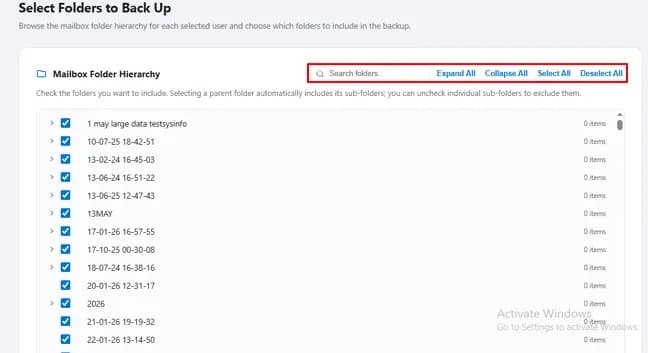
About this app
Aryson Exchange Online to Office 365 Migration is a Windows-based tool built for admins who need to move mailbox data between Microsoft 365 tenants, from on-premises Exchange to Exchange Online, or from hybrid setups to the cloud. It handles primary mailboxes, online archives, public folders, and shared mailboxes, with the option to export directly to Outlook PST as well. The tool supports OAuth 2.0 for single-mailbox authentication and Client ID/Secret for enterprise-wide jobs, so you can bulk-migrate via CSV without storing credentials. Standout features include cross-type mailbox mapping (e.g., public folders to shared mailboxes), incremental migration to skip already-moved items, concurrent folder processing (up to 3 at once), and a solid set of filters like date range, item type selection, and exclude empty folders. Folder hierarchy and metadata are preserved, and real-time activity reports let you track progress. The interface is straightforward, and the demo version lets you ...
Key features
- 1Cross-type mailbox mapping: route Primary Mailbox, Online Archive, Public Folder, and Shared Mailbox sources to any target category.
- 2Dual authentication: OAuth 2.0 for single mailboxes, Microsoft Entra ID Client ID/Secret for enterprise-wide bulk jobs.
- 3Incremental migration plus concurrent folder processing (up to 3 at once) to skip moved items and cut transfer time.
Target customer profile
Drawn from the product itself, not from a survey.
Demographic
IT administrators at mid-sized enterprises (50-500 employees) managing Microsoft 365 tenants
Pain points
Native tools lack direct tenant-to-tenant migration; scripts are error-prone and time-consuming
Primary needs
Secure, bulk migration with minimal downtime and no data loss
Demographic
Exchange administrators in organizations transitioning from on-premises or hybrid Exchange to Exchange Online
Pain points
Complex hybrid setups and public folder restructuring require manual mapping and scripting
Primary needs
Automated mapping, folder hierarchy preservation, and incremental migration
Demographic
Managed Service Providers (MSPs) handling multiple client migrations
Pain points
Need a repeatable, cost-effective tool that supports CSV bulk imports and detailed reporting
Primary needs
Multi-tenant support, client ID/secret authentication, and activity logs for client verification
Scout Review
Written by AI from measured evidence, scored out of 100.
Aryson Exchange Online to Office 365 Migration is a Windows admin tool for moving mailboxes between Microsoft 365 tenants, from on-prem or hybrid Exchange to Exchange Online, or out to PST. The feature set is aimed squarely at real admin pain: cross-type mapping (public folders to shared mailboxes), incremental migration, concurrent folder processing, date and item-type filters, CSV bulk import, and OAuth 2.0 or Client ID/Secret auth. The marketing site is fast and clean on security headers but sloppy on detail — a chat popup over the hero, a duplicated step number, and a watermarked product screenshot. No third-party audits or independent reviews were verifiable in the collected evidence, so treat the on-site 4.9/2456 rating as a claim, not a fact.
Measure by measure
Usability
63Download CTA is front and center, FAQ toggles are clear, and the folder picker has search plus bulk select. The homepage is a long wall of small-type cards, and pricing/trial detail is thin in the fetched content.
Design
57Conventional but scannable landing page with a disciplined blue/white palette. Undone by a chat popup covering the hero headline, a duplicated '03' step label, mismatched icon styles, and a product screenshot showing an 'Activate Windows' watermark.
Speed
88Lighthouse mobile 97/100 (LCP 1.8s, CLS 0.001, TBT 47ms) and desktop 89/100. Genuinely fast, lightweight marketing site with no lag complaints in the collected evidence.
Security
74Full security-header sweep (HSTS, CSP, frame protection, Referrer-Policy, Permissions-Policy) plus SPF/DMARC, 12/12 checklist. Site claims no credential or mailbox storage. No SOC 2, ISO, or pen-test evidence found.
Accessibility
68Lighthouse a11y 93/100, but real failures remain: insufficient color contrast, non-sequential headings, no main landmark, and visible labels without matching accessible names. No WCAG statement found.
Growth
58Real, specific pain — tenant-to-tenant and public-folder moves native tools botch — with concrete wedges (cross-type mapping, CSV bulk, Client ID/Secret). But it's a crowded category and the pitch is feature-parity, not a moat.
Improvement areas
- No published compliance evidence (SOC 2, ISO, pen-test) despite handling full mailbox contents.
- Landing page detail errors: duplicated step number, chat popup over hero copy, watermarked product screenshot.
- Accessibility gaps: contrast failures, non-sequential headings, missing main landmark, mismatched accessible labels.
Design & Usability
The site is competent and easy to scan: a clear hero, a specification table, an FAQ accordion, and a folder picker with search and bulk select that shows someone thought about the actual job. But the polish leaks — a chat popup parks itself on top of the hero headline, the How It Works sequence reads 01, 02, 03, 03, and the flagship product screenshot carries an 'Activate Windows' watermark with placeholder folder names. For a tool sold to IT admins who notice exactly this kind of thing, that's a self-inflicted wound. Usability is the stronger half: the download path is short and the in-app folder controls are sensible, though the homepage is a long wall of small-type cards that buries the pricing and trial details.
Speed & Security
Speed is the standout. Lighthouse mobile lands at 97/100 with a 1.8s LCP and near-zero layout shift, desktop at 89/100 — a genuinely lightweight marketing site, and no lag complaints surfaced in the collected evidence. Security is solid on the plumbing: HTTPS enforced with HSTS, CSP, frame protection, Referrer-Policy and Permissions-Policy all present, SPF and DMARC published, a clean 12/12 on the header checklist. The site also states it stores no credentials, mailbox content, or organisational data. What's missing is the paper trail — no SOC 2, ISO 27001, pen-test summary, or bug bounty found — which for a tool that touches entire mailboxes is the gap an enterprise buyer will ask about first.
Accessibility & Growth
Accessibility scores 93/100 on Lighthouse but the failing audits are the honest part: insufficient color contrast, headings out of sequence, no main landmark, and visible labels that don't match their accessible names. No WCAG conformance statement was found. Growth is a judgement on the idea: the problem is real and specific — tenant-to-tenant moves and public-folder-to-shared-mailbox restructuring that native Microsoft tooling handles poorly — and Aryson names concrete wedges like cross-type mapping, incremental migration, CSV bulk import, and Client ID/Secret enterprise auth. But the category is crowded with MigrationWiz, Stellar, and Microsoft's own Migration Manager, and the pitch reads as feature parity rather than a structural advantage. It can win deals on price and workflow, not on a moat.
Conclusion
If you're an Exchange admin staring down a tenant-to-tenant move or a public-folder retirement, the workflow features here map to the job better than scripting it by hand, and the demo lets you test that before paying. Go in with a checklist: confirm the demo actually handles your mailbox types and sizes, ask directly for their data-handling and compliance documentation since none is published, and validate the incremental migration on a pilot batch before committing a bulk CSV run. The site's speed and header hygiene suggest a maintained product; the watermark and the miscounted steps suggest a marketing team moving faster than its QA. Neither tells you whether the migration engine holds up under load — only your pilot will.
Suggestions for improvement
- Fix the How It Works sequence (01, 02, 03, 03) and re-shoot the product screenshot without the 'Activate Windows' watermark or placeholder folder names.
- Reposition the chat launcher so it stops covering the hero headline and description on first load.
- Publish a security/compliance page: data-handling detail, any SOC 2 or ISO status, and a pen-test or bug-bounty contact.
- Add an accessibility statement and fix the failing audits — contrast, heading order, main landmark, and accessible label names.
Alternatives comparison
Named competitors, point by point. Nobody paid to appear here or to be left out.
 Aryson Exchange Online to Office 365 Migration |  Microsoft 365 Migration Manager |  MigrationWiz by BitTitan |  Stellar Converter for EDB | |
|---|---|---|---|---|
| Tenant-to-tenant mailbox migration | Yes — direct M365 tenant-to-tenant moves preserving folder hierarchy and metadata | Limited — native tool focused on content migration, weak on tenant-to-tenant mailboxes | Yes — cloud-based tenant-to-tenant mailbox and archive migration | Partial — EDB conversion and O365 migration, recovery-oriented |
| Public folder to shared mailbox mapping | Yes — cross-type mapping routes Public Folder source to Shared Mailbox target | No — not a supported native scenario | Yes — supports public folder and shared mailbox migration | Limited — primarily EDB-to-PST/O365 conversion |
| Bulk CSV mailbox import | Yes — CSV import for bulk mailbox migration without storing credentials | Yes — CSV-driven task creation in Migration Manager | Yes — bulk project and mailbox configuration | No — single-file conversion workflow |
| Deployment model | Windows desktop application, on-prem install | Native Microsoft 365 cloud service | Cloud-based SaaS platform, pay-as-you-go | Windows desktop application |
| Pricing model | Perpetual license with free demo version | Included with Microsoft 365 subscription | Pay-as-you-go per mailbox/user | Perpetual license with free trial |
Microsoft 365 Migration Manager
Native Microsoft tool for migrating content to Microsoft 365, but limited in tenant-to-tenant and public folder scenarios.
MigrationWiz by BitTitan
Cloud-based migration platform supporting mailbox, archive, and document migrations with a pay-as-you-go model.
Stellar Converter for EDB
Tool for converting Exchange EDB files to PST and migrating to Office 365, often used for recovery scenarios.
Comparing options? See Aryson Exchange Online to Office 365 Migration alternatives, scored side by side
More Online Backup apps
View all Online Backup
SendVeil
88Send large original files through private, expiring links, with EU storage.

PCDOTS PST Converter
85Convert Outlook PST files to 16 formats and clouds withou...

SysInfo OST to PST Converter
84Convert, migrate, and recover OST files to PST and 13+ fo...

yourdrive
84YourDrive is a self-hosted file manager and media timeline that runs entirely on your own infrastructure. Organize files in nested folders, move them with drag-and-drop, search instantly, and browse photos and videos by month and year. Files stream straight to your own AWS S3, Azure Blob, MinIO, Cloudflare R2 or Wasabi storage. Install with one command. Free for personal use; teams pay per server, not per seat.
PCDOTS Email Recovery Software
83Recovers emails from corrupt mailboxes across 50+ platforms.

KeepTik
83Download TikTok videos without a watermark, save photo posts as images, and bulk download selected TikTok profile posts with KeepTik for Chrome and Edge.

ServerOS
83One daemon, total control of your Linux servers

Alcazar Dead Man's Switch
82An encrypted digital legacy service that securely deliver...

Softaken Cloud Backup
82Professional Email Backup for Cloud-Based Accounts
PCDOTS Email Converter
82Convert emails between 250+ formats and clients on Window...

App-Vault
81Encrypted photo and file vault for iPhone. AES-256 on device, pattern lock, decoy vault and calculator disguise. No account, no cloud.

SysInfo Microsoft Teams Migration Tool
81Migrate Teams, channels, and chats between Microsoft 365 ...


A platform dedicated to providing unbiased reviews of newly launched applications, analyzing everything from their features to their full potential.
info@scoutforge.net© 2026 Scoutforge. All rights reserved.
