Cycling through all six. Tap any point to stop.
Measured on six things
Migrate IBM Lotus Notes NSF files to Office 365 mailboxes...
Design
46Dated homepage with clashing orange accent, a chat bubble that truncates the hero subtitle, and an unfinished single-card review carousel. Feature grid and spec table are tidy, but keyword-stuffed copy undercuts polish.
Screenshots
1 / 1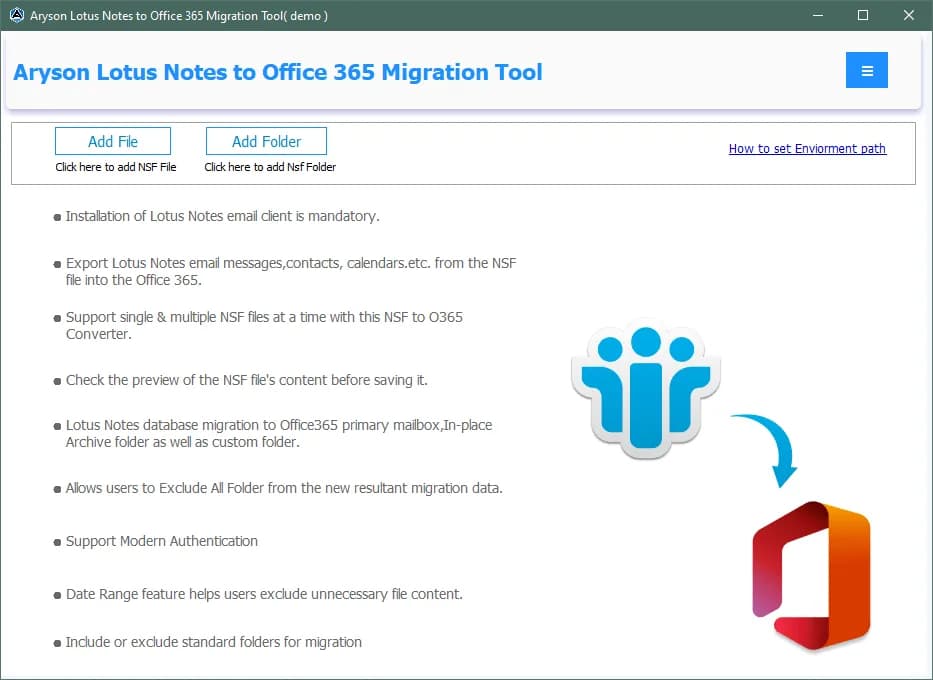
About this app
Aryson Lotus Notes to Office 365 Migration Tool is a specialized utility designed to simplify the complex process of migrating IBM Lotus Notes (NSF) data to Microsoft Office 365. This award-winning software enables both individual users and IT teams to transfer emails, contacts, and calendars from one or multiple NSF files directly into Office 365 mailboxes, public folders, or online archives. Standout features include an advanced date range filter for selective data backup, the ability to skip attachments to reduce migration size, duplicate detection, and custom folder naming. The tool supports all versions of Lotus Notes and runs on all Windows OS versions, including Windows 11. With a user-friendly interface and a free trial version that migrates up to 50 files per folder, Aryson provides a reliable and efficient solution for organizations transitioning from on-premises Lotus Notes to the cloud-based Office 365.
Key features
- 1Bulk migration of multiple Lotus Notes NSF files to Office 365 mailboxes, public folders, or online archives.
- 2Advanced date-range filter plus attachment exclusion and duplicate detection for selective, lean migrations.
- 3Free trial migrates up to 50 files per folder; supports Lotus Notes 6.0 through 10.0 on all Windows versions.
Target customer profile
Drawn from the product itself, not from a survey.
Demographic
IT administrators and system engineers
Pain points
Manual NSF migration is complex, error-prone, and time-consuming
Primary needs
Reliable tool for bulk migration with minimal downtime and data integrity
Demographic
Small to mid-sized businesses
Pain points
Lack of built-in Microsoft tools for NSF to Office 365 migration
Primary needs
Cost-effective solution to migrate all mailboxes efficiently
Demographic
Enterprise IT teams
Pain points
Migrating large volumes of data with specific requirements like date ranges
Primary needs
Advanced filters for selective migration and duplicate handling
Scout Review
Written by AI from measured evidence, scored out of 100.
Aryson's Lotus Notes to Office 365 Migration Tool is a workmanlike utility wrapped in a dated marketing site. The product itself does what it says: bulk NSF migration with date filters, attachment exclusion, duplicate skipping, and selectable Office 365 targets, backed by a free trial that moves 50 files per folder. The six-step guide makes the workflow legible before you buy. The website is where it stumbles — a chat bubble obscuring the hero, clashing accent colors, an unfinished review carousel, and four sections of duplicated copy. Technically it is sounder than it looks: 12/12 security headers and a 95 accessibility score are genuinely above average, undermined only by a 0.756 layout shift and no published compliance audits. Against Kernel and Stellar it competes on price and simplicity, not on anything they cannot copy.
Measure by measure
Usability
58Clear six-step migration guide and above-the-fold CTAs help, and the 50-files-per-folder free trial lowers the barrier. But the page repeats the same benefits across four sections, and the chat bubble fights the buttons.
Design
46Dated homepage with clashing orange accent, a chat bubble that truncates the hero subtitle, and an unfinished single-card review carousel. Feature grid and spec table are tidy, but keyword-stuffed copy undercuts polish.
Speed
57Lighthouse mobile 73, desktop 68. LCP and FCP at 2.0s and TBT a healthy 75ms, but CLS 0.756 means the page visibly jumps as it loads — the layout, not the scripts, is the problem.
Security
76Strong header hygiene: HTTPS enforced, HSTS, CSP, frame protection, Referrer and Permissions policies, plus SPF and DMARC — 12/12 on the probe. No published SOC 2, ISO, or pen-test claims found, so it sits below the audited tier.
Accessibility
79Lighthouse accessibility 95/100 with only contrast and a missing main landmark failing. Solid automated results, but no WCAG statement or accessibility page was found, and the low-contrast text is a real, visible defect.
Growth
58Real, specific problem — Microsoft ships no NSF-to-Office 365 path — aimed at IT admins leaving Lotus Notes. But the wedge is feature-level filters that Kernel and Stellar also sell, so it competes on price and polish, not on anything structural.
Improvement areas
- Homepage design is dated: chat bubble truncates the hero, clashing orange accent, unfinished review carousel.
- Severe 0.756 cumulative layout shift causes visible page reflow despite otherwise decent load times.
- No published SOC 2, ISO, or pen-test documentation despite handling full corporate mailbox migrations.
Design & Usability
The homepage reads like a 2016 vendor page that got a fresh coat of paint on the feature grid and nothing else. The spec table and six-step migration guide are genuinely useful — a first-time admin can see exactly what happens after install. But the hero is compromised by a floating chat bubble that cuts off the product subtitle, the orange Services pill sits in a navy header like a misplaced ad, and the review carousel is one card with four dead pagination dots. Below the fold, four sections restate the same three benefits in slightly different words, so the page is long without being informative. The free trial (50 files per folder) is a real, low-friction way to evaluate, and the CTAs are where they should be. It works; it just makes you scroll past the same sentence four times to find out it works.
Speed & Security
Speed is a mixed bag with a clear culprit. Lighthouse mobile lands at 73 and desktop at 68 — LCP and FCP both around 2.0s and TBT a healthy 75ms, so the server and scripts are not the issue. The 0.756 cumulative layout shift is: the page visibly reflows as it loads, which is exactly the kind of jank that makes a vendor site feel less trustworthy than it is. Security is the strongest dimension here. The probe returned 12/12 — HTTPS enforced, HSTS, CSP, frame protection, X-Content-Type-Options, Referrer-Policy, Permissions-Policy, plus SPF and DMARC. That is better header hygiene than plenty of larger SaaS products manage. What is missing is the paperwork tier: no SOC 2, ISO 27001, pen-test summary, or bug bounty surfaced. For a utility that ingests entire corporate mailboxes and authenticates into Office 365 tenants, an audited trust page would be the natural next step.
Accessibility & Growth
Accessibility scores well on automation — 95/100 — with only two failures: insufficient color contrast and a missing main landmark. Both are real and fixable, and the absence of any WCAG statement or accessibility page means there is no public commitment behind the number. Growth is the more interesting question. The problem is legitimate and specific: Microsoft genuinely does not ship a built-in NSF-to-Office 365 migration path, and organizations leaving Lotus Notes need one. Aryson targets that with date-range filters, attachment skipping, duplicate detection, and mailbox/public-folder/archive targets. The catch is that Kernel Migrator for Lotus Notes and Stellar Converter for NSF sell substantially the same feature set, so Aryson's differentiation is price and interface rather than capability. It is a competent entrant in a real but shrinking niche — Lotus Notes migrations are a finite, declining market — with no structural advantage over the two peers listed beside it.
Conclusion
If you are an IT admin with a pile of NSF files and an Office 365 tenant, this is a reasonable tool to trial — the free tier is generous enough to prove it works before you pay, and the filters cover the cases that actually matter in a real migration. Go in expecting a functional Windows utility rather than a polished cloud service, and budget time for the layout jank on the site. The bigger question is timing: Lotus Notes migrations are a declining niche, and the two named competitors sell the same filters. Aryson's edge is price and a simpler interface, which is enough to win a procurement decision but not enough to build a moat. Try it, verify the migration on a test mailbox first, and keep the competitors' quotes on the desk.
Suggestions for improvement
- Fix the floating chat bubble so it stops overlapping and truncating the hero subtitle — it is the single most visible defect on the page.
- Resolve the 0.756 cumulative layout shift by reserving space for images and embeds; the load speed is already fine.
- Consolidate 'How It Works', 'Advantages', 'What It Does', and 'When to Use' into one section — they repeat the same three benefits.
- Publish a trust page with SOC 2 or a pen-test summary; the header security is strong but undocumented for enterprise buyers.
Alternatives comparison
Named competitors, point by point. Nobody paid to appear here or to be left out.
 Aryson Lotus Notes to Office 365 Migration Tool |  Kernel Migrator for Lotus Notes |  Stellar Converter for NSF | |
|---|---|---|---|
| Direct migration to Office 365 | Yes — mailbox, public folder, online archive | Yes — Office 365, Exchange, and other platforms | Yes — direct migration to Office 365 |
| Date range filter for selective migration | Yes — advanced date range filter | Yes — advanced filters | Not stated in provided description |
| Skip attachments to reduce migration size | Yes — exclude attachments during backup | Not stated in provided description | Not stated in provided description |
| Free trial / evaluation version | Yes — 50 files per folder | Trial available (per vendor) | Trial available (per vendor) |
| Duplicate detection | Yes — skip duplicate NSF files | Not stated in provided description | Not stated in provided description |
Kernel Migrator for Lotus Notes
A powerful tool for migrating Lotus Notes to Office 365, Exchange, and other platforms with advanced filters.
Stellar Converter for NSF
Converts NSF files to PST and other formats, and supports direct migration to Office 365.
Comparing options? See Aryson Lotus Notes to Office 365 Migration Tool alternatives, scored side by side
More Online Backup apps
View all Online Backup
SendVeil
88Send large original files through private, expiring links, with EU storage.

PCDOTS PST Converter
85Convert Outlook PST files to 16 formats and clouds withou...

SysInfo OST to PST Converter
84Convert, migrate, and recover OST files to PST and 13+ fo...

yourdrive
84YourDrive is a self-hosted file manager and media timeline that runs entirely on your own infrastructure. Organize files in nested folders, move them with drag-and-drop, search instantly, and browse photos and videos by month and year. Files stream straight to your own AWS S3, Azure Blob, MinIO, Cloudflare R2 or Wasabi storage. Install with one command. Free for personal use; teams pay per server, not per seat.
PCDOTS Email Recovery Software
83Recovers emails from corrupt mailboxes across 50+ platforms.

KeepTik
83Download TikTok videos without a watermark, save photo posts as images, and bulk download selected TikTok profile posts with KeepTik for Chrome and Edge.

ServerOS
83One daemon, total control of your Linux servers

Alcazar Dead Man's Switch
82An encrypted digital legacy service that securely deliver...

Softaken Cloud Backup
82Professional Email Backup for Cloud-Based Accounts
PCDOTS Email Converter
82Convert emails between 250+ formats and clients on Window...

App-Vault
81Encrypted photo and file vault for iPhone. AES-256 on device, pattern lock, decoy vault and calculator disguise. No account, no cloud.

SysInfo Microsoft Teams Migration Tool
81Migrate Teams, channels, and chats between Microsoft 365 ...


A platform dedicated to providing unbiased reviews of newly launched applications, analyzing everything from their features to their full potential.
info@scoutforge.net© 2026 Scoutforge. All rights reserved.
