Cycling through all six. Tap any point to stop.
Measured on six things
Free tool to open, view, and recover MDB/ACCDB files with...
Design
44Dated Windows-Forms aesthetic carried straight to the web: heavy blues and oranges, dense bullet walls, inconsistent feature icons, and a screenshot showing empty panes. Functional but visually behind free peers.
Screenshots
1 / 1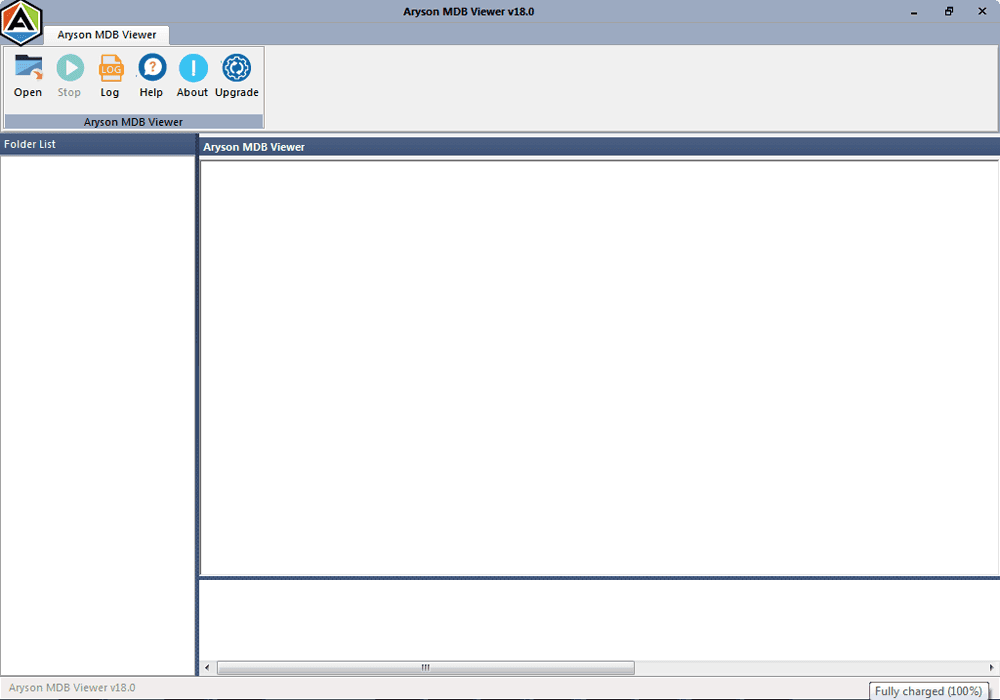
About this app
Aryson MDB Viewer is a lightweight, free utility designed to help users open, view, and explore Microsoft Access database files (.mdb and .accdb) without requiring MS Access installed. It supports both healthy and corrupted files, offers dual recovery modes (Standard and Advanced), and can handle databases of any size. The tool provides previews of tables, queries, forms, system tables, and even deleted records, making it useful for database administrators, forensic analysts, and IT professionals. With an intuitive interface, auto-detection of Access file versions, and compatibility across all Windows editions, Aryson MDB Viewer is a reliable solution for quick database access and recovery. The free version allows full previewing, while the paid version ($69) adds saving and export capabilities.
Key features
- 1Open and preview MDB/ACCDB files without MS Access installed, including corrupt databases via Standard and Advanced recovery modes
- 2Preview tables, queries, forms, system tables and deleted records — useful for forensic and audit work
- 3Free version for full previewing; $69 paid tier adds saving and export capabilities
Target customer profile
Drawn from the product itself, not from a survey.
Demographic
Database administrators and IT professionals
Pain points
Need to access Access databases without MS Access; dealing with corrupted files; large file sizes
Primary needs
Quick viewing of MDB/ACCDB files; recovery of corrupt databases; ability to preview system tables and deleted records
Demographic
Forensic analysts and auditors
Pain points
Require access to deleted records and system tables; need to investigate database contents without altering original files
Primary needs
Preview of hidden/deleted data; non-destructive viewing; support for various Access versions
Demographic
Small business owners and non-technical users
Pain points
Lack of technical expertise; cannot afford MS Access licenses; need to view database files occasionally
Primary needs
Simple, user-friendly interface; free tool; ability to open files without additional software
Scout Review
Written by AI from measured evidence, scored out of 100.
Aryson MDB Viewer is a competent, fast-loading utility site for a genuinely useful tool: open and preview Access databases without MS Access, including corrupt files and deleted records. The technical execution is strong — 99/100 Lighthouse performance and a full 12/12 security-header sweep — and the freemium model (free preview, $69 to save/export) is clear. Where it stumbles is presentation: a dated Windows-Forms UI, a text-dense homepage with inconsistent icons, dropdown-heavy navigation, and accessibility gaps in contrast and heading structure. Against free peers like MDB Viewer Plus and MDB Admin Tool, the corrupt-file and forensic preview features are the differentiator, but the visual and a11y polish lag behind.
Measure by measure
Usability
58Clear freemium split (free preview, $69 to save/export), with Screens, Video, Guide and FAQ links plus a live demo. Navigation is dropdown-heavy and the page buries specs and how-to steps under heavy scroll.
Design
44Dated Windows-Forms aesthetic carried straight to the web: heavy blues and oranges, dense bullet walls, inconsistent feature icons, and a screenshot showing empty panes. Functional but visually behind free peers.
Speed
88Lighthouse 99/100 on both mobile and desktop: LCP 1.7s, CLS 0, TBT 32ms, FCP 1.4s. Genuinely fast, lightweight marketing page with no bloat or lag complaints found.
Security
76Full security-header sweep: HTTPS enforced, HSTS, CSP, frame protection, Referrer-Policy, Permissions-Policy, plus SPF and DMARC — 12/12 checklist points. No published audits or SOC 2 found.
Accessibility
68Lighthouse a11y 90/100, but failing audits include insufficient color contrast, non-sequential headings, small touch targets and a missing main landmark. No WCAG statement, English-only.
Growth
58Real, recurring problem — reading MDB/ACCDB without an Access license — with a genuine wedge in corrupt-file and deleted-record preview for forensic/audit users. Niche ceiling, crowded free field.
Improvement areas
- Dated UI and text-dense homepage with inconsistent icons and heavy blue/orange palette
- Accessibility gaps: color contrast, heading order, touch targets, missing main landmark, no WCAG statement
- No published security compliance (SOC 2/ISO/pen-test) or bug bounty despite strong headers
- Dropdown-heavy navigation and a 'Live Demo' that is really just a download link
Design & Usability
Design is the weak link: the visual audit calls the homepage dated, and the app screenshot shows a classic Windows Forms layout with a small toolbar and large empty panes. Heavy blues and oranges, inconsistent feature icons, and long unbroken bullet lists give it a 2000s utility-software feel. Usability is better than the looks suggest — there's a clear freemium split (free preview, $69 to save/export), plus Screens, Video, Guide, EULA and FAQ links and a downloadable free version. The friction is navigation: multiple dropdowns, specs and how-to steps buried under heavy scroll, and a 'Live Demo' that's really just a download. Competent, not polished.
Speed & Security
Speed is the standout: Lighthouse 99/100 on both mobile and desktop, LCP 1.7s, CLS 0, TBT 32ms, FCP 1.4s. The marketing page is lean and snappy with no bloat, and no lag complaints surfaced in the collected evidence. Security is solid on the technical side — the header probe returned 12/12 checklist points including HTTPS enforcement, HSTS, CSP, frame protection, Referrer-Policy, Permissions-Policy, plus SPF and DMARC. What's missing is the compliance layer: no SOC 2, ISO, pen-test report or bug bounty is advertised, which is normal for a small vendor but keeps it out of the top tier. Strong fundamentals, thin transparency.
Accessibility & Growth
Accessibility lands at a decent 90/100 on Lighthouse but the failing audits are real: insufficient color contrast, non-sequential heading order, small touch targets, no main landmark, and role=presentation conflicts. There's no WCAG statement and the site is English-only, so keyboard and screen-reader users get a working-but-rough experience. Growth is a judgement on the idea: opening MDB/ACCDB files without an MS Access license is a genuine recurring need, and the corrupt-file preview plus deleted-record and system-table viewing gives it a real forensic/audit wedge. But the alternatives list is full of free viewers, so the ceiling is a niche professional tool rather than a category leader. The 2013-registered domain shows an established vendor, not runaway momentum.
Conclusion
If you need to peek inside an MDB or ACCDB file without an Access license — especially a damaged one — Aryson does the job and does it quickly. Just don't expect a modern interface or a compliance badge. The free version covers viewing; only pay the $69 if you actually need to save or export. For casual users, the free alternatives are worth a look first; for forensic or audit work where deleted records and system tables matter, this earns its place.
Suggestions for improvement
- Modernize the app UI and homepage: replace the Windows-Forms look and heavy blue/orange palette with a cleaner, current design.
- Fix the accessibility failures: color contrast, sequential headings, touch-target sizing, and add a main landmark.
- Publish a real interactive live demo or sample file instead of linking 'Live Demo' to a download.
- Add a security/compliance page and a WCAG accessibility statement to build trust with enterprise and forensic buyers.
Alternatives comparison
Named competitors, point by point. Nobody paid to appear here or to be left out.
 Aryson MDB Viewer Aryson MDB Viewer | MDB Viewer Plus | MDB Admin Tool | Access Viewer | |
|---|---|---|---|---|
| Price | Free to view; $69 to save/export | Free | Free | Free (online) |
| Editing support | View only; export in paid tier | View and edit | View and edit | View only |
| Corrupt file recovery | Yes — Standard and Advanced recovery modes | Not advertised | Basic recovery features | No |
| Deleted records / system tables preview | Yes — deleted records and system tables | Not advertised | Not advertised | No |
| Installation / privacy | Windows desktop app; files stay local | Windows desktop app; files stay local | Windows desktop app; files stay local | Online — requires uploading files to a server |
| Large file support | No size limit claimed | Standard desktop limits | Supports large files | Upload-size dependent |
MDB Viewer Plus
A free, lightweight viewer for MDB and ACCDB files that allows viewing and editing of Access databases without MS Access.
MDB Admin Tool
A free tool for viewing and editing MDB files, with support for large files and basic recovery features.
Access Viewer
A free online tool to view MDB files, but requires uploading files to a server, which may raise privacy concerns.
Comparing options? See Aryson MDB Viewer alternatives, scored side by side
More Online Backup apps
View all Online Backup
yourdrive
84YourDrive is a self-hosted file manager and media timeline that runs entirely on your own infrastructure. Organize files in nested folders, move them with drag-and-drop, search instantly, and browse photos and videos by month and year. Files stream straight to your own AWS S3, Azure Blob, MinIO, Cloudflare R2 or Wasabi storage. Install with one command. Free for personal use; teams pay per server, not per seat.

PCDOTS Email Recovery Software
83Recovers emails from corrupt mailboxes across 50+ platforms.

Alcazar Dead Man's Switch
82An encrypted digital legacy service that securely deliver...
PCDOTS Thunderbird Converter
81Recover and migrate Thunderbird profiles & MBOX files wit...

App-Vault
81Encrypted photo and file vault for iPhone. AES-256 on device, pattern lock, decoy vault and calculator disguise. No account, no cloud.

RemoteDrive by FileZilla Pro
80Integrates cloud storage into macOS Finder for seamless file management across services like Google Drive and Dropbox.

SysInfo Google Workspace Backup Tool
80Backup and migrate Google Workspace data locally or to ot...

S3FileHub
80A user-friendly web app for managing AWS S3 storage with AI summarization and analytics.

Filifly
79A secure, web-based file sharing platform with end-to-end encryption and no login requirements for quick transfers.

Softaken Data Recovery Software
79Recover deleted files from Windows with ease.

SysInfo Office 365 Backup Tool
79Backup and export Office 365 mailboxes to PST, MBOX, PDF,...

Very Good Calendar Sync
78Privacy-first on-device Mac calendar sync tool.


A platform dedicated to providing unbiased reviews of newly launched applications, analyzing everything from their features to their full potential.
info@scoutforge.net© 2026 Scoutforge. All rights reserved.
