Cycling through all six. Tap any point to stop.
Measured on six things
Backup and export Office 365 mailboxes to PST, MBOX, PDF,...
Design
57Functional, consistent blue-accented layout with prominent CTAs, but the hero is text-dense and the three 'Why Use' cards carry identical weight with no imagery. Reads as competent utility marketing, not polished.
Screenshots
1 / 1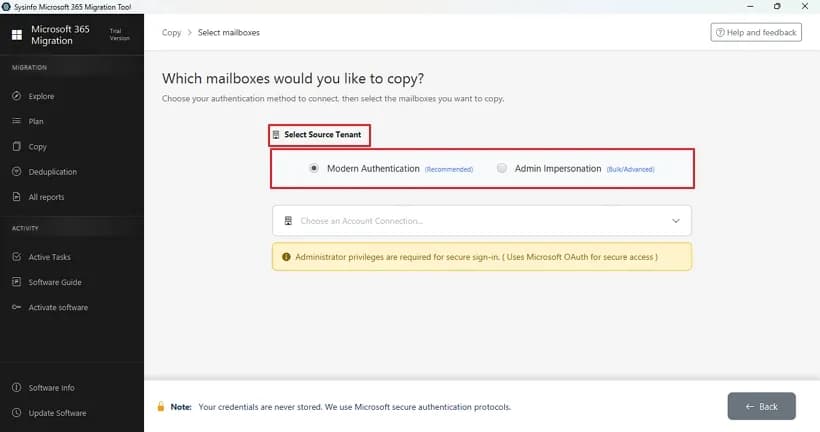
About this app
SysInfo Office 365 Backup Tool is a dedicated utility that lets you back up and export Microsoft 365 mailbox data locally. It handles emails, contacts, calendars, tasks, and notes, exporting them to PST, MBOX, PDF, EML, MSG, and CSV. Beyond simple backup, it can restore PST and OST files back into Office 365 mailboxes, migrate data between tenants or to Google Workspace and IMAP accounts, and scan primary, shared, archive, and public folder mailboxes. Nice touches include bulk multi-account processing, modern OAuth 2.0 authentication, duplicate removal, date filters, skipping previously migrated items, saving emails with or without attachments, and optional server cleanup after backup. A free demo converts 50 emails per folder so you can test before buying. It runs on Windows (with a Mac edition available) and works across all major Outlook versions. If you need long-term email archiving or a safe exit path out of the cloud, this is a solid, enterprise-ready option.
Key features
- 1Export M365 mailboxes to PST, MBOX, PDF, EML, MSG, and CSV with date filters and duplicate removal.
- 2Restore PST/OST into Office 365 and migrate tenant-to-tenant or to Google Workspace/IMAP.
- 3Bulk multi-account processing with Modern Authentication (OAuth 2.0) and a 50-email free demo.
Target customer profile
Drawn from the product itself, not from a survey.
Demographic
IT administrators and sysadmins managing Microsoft 365 tenants
Pain points
Manual mailbox exports are slow, error-prone, and hard to scale across users
Primary needs
Bulk multi-account backup, secure modern authentication, and reliable data integrity
Demographic
Small and mid-sized businesses needing email archiving/compliance
Pain points
No built-in granular export and retention control for Office 365 data
Primary needs
Local backups in multiple formats, date filters, and duplicate removal
Demographic
Individual professionals migrating away from Office 365
Pain points
Moving mailboxes to Google Workspace or IMAP feels complex and risky
Primary needs
Simple migration to other platforms and PST/OST restore with preserved folder structure
Scout Review
Written by AI from measured evidence, scored out of 100.
SysInfo Office 365 Backup Tool is a mature, feature-dense Windows utility for backing up, exporting, restoring, and migrating Microsoft 365 mailbox data. The marketing site is fast and functional but text-heavy, with competing CTAs and repetitive sections. Security headers are solid (10/12) with OAuth 2.0 claimed but no published audit; accessibility scores well automatically yet fails contrast and landmark basics. The product's real strength is breadth — PST/MBOX/PDF/EML/MSG/CSV export, PST/OST restore, tenant-to-tenant and Google Workspace/IMAP migration, bulk multi-account processing, and a 50-email free demo. It's a credible, enterprise-leaning option in a crowded migration category.
Measure by measure
Usability
61Free demo (50 emails/folder) and a wizard UI with clear auth options lower the barrier, but two competing CTAs and a repetitive long page add friction. Solid, unremarkable onboarding for a desktop utility.
Design
57Functional, consistent blue-accented layout with prominent CTAs, but the hero is text-dense and the three 'Why Use' cards carry identical weight with no imagery. Reads as competent utility marketing, not polished.
Speed
88Lighthouse mobile 97/100 (LCP 2.1s, CLS 0, TBT 150ms) and desktop 100/100. Genuinely fast, well-optimized marketing page with no layout shift.
Security
74HTTPS, HSTS, CSP, Referrer-Policy, Permissions-Policy, SPF and DMARC all present (10/12 checklist); missing frame protection and X-Content-Type-Options. OAuth 2.0 claimed, but no published audit or compliance page found.
Accessibility
69Lighthouse a11y 92/100, but real failures remain: low-contrast text, color-only links, no main landmark, and mismatched accessible names. No WCAG statement published. Above-average automated score, gaps in practice.
Growth
62Real, specific problem (M365 archiving, migration, PST/OST restore) with concrete differentiators — multi-format export and cross-platform migration — that Microsoft's native backup doesn't cover. Clear wedge, but a crowded migration-tool category.
Improvement areas
- No published SOC 2/ISO/pen-test page to verify the security posture behind the OAuth claim.
- Accessibility failures: low contrast, color-only links, missing main landmark, mismatched names.
- Text-dense hero, competing CTAs, and repetitive feature sections hurt scannability.
Design & Usability
The site is a competent, blue-accented utility page: prominent download buttons, a wizard screenshot showing Modern Authentication options, and a free demo that converts 50 emails per folder so buyers can test before paying. Where it stumbles is density — the hero stacks a product name, a 4.9-star badge, a paragraph, and a tall box graphic into one block, and the three 'Why Use' cards carry identical weight with no icons or imagery to guide the eye. Two competing primary CTAs (Free Download vs Purchase Now) split attention, and the page repeats its feature list enough times to feel padded. Nothing is broken; it just reads like marketing built by engineers who trust bullet points more than layout.
Speed & Security
Speed is the standout: Lighthouse scores 97/100 on mobile (LCP 2.1s, CLS 0, TBT 150ms) and a perfect 100 on desktop, with no layout shift and a fast first paint. Security is respectable for the category — HTTPS enforced, HSTS, CSP, Referrer-Policy, Permissions-Policy, SPF and DMARC all present, hitting 10 of 12 header checklist points. The gaps are frame protection and X-Content-Type-Options, both cheap to add. The tool claims OAuth 2.0 Modern Authentication for mailbox access, which matters for M365, but there's no published SOC 2, ISO, or penetration-test page to verify the vendor's own security posture beyond headers.
Accessibility & Growth
Accessibility lands at 92/100 on Lighthouse but the failing audits are the ones users feel: insufficient color contrast, links distinguishable only by color, no main landmark, and visible text labels without matching accessible names. There's no WCAG statement or accessibility page, so the automated score flatters a site with real gaps. Growth is the more interesting question: the problem is genuine — Microsoft's native 365 Backup restores Exchange/OneDrive/SharePoint but won't export to MBOX/PDF or migrate you to Google Workspace or IMAP. That cross-platform migration and multi-format export is a real wedge for IT admins and SMBs. The limit is the category: migration and archiving tools are crowded, and the differentiators are features competitors can copy rather than a structural moat.
Conclusion
If you're an IT admin who needs a safe exit path out of Office 365 or a compliance-friendly archive in multiple formats, this tool covers the checklist and lets you test with a 50-email demo before buying. The site won't wow you and the compliance paperwork isn't public, so verify security requirements directly with the vendor. For straightforward mailbox backup and cross-platform migration, it's a solid, unremarkable-but-capable choice.
Suggestions for improvement
- Publish a security/compliance page (SOC 2, ISO, or pen-test summary) to back the OAuth 2.0 claim.
- Add frame protection and X-Content-Type-Options headers to close the two remaining checklist gaps.
- Fix accessibility failures: contrast ratios, color-only links, a main landmark, and accessible names.
- Simplify the hero and pick one primary CTA; add icons or imagery to the 'Why Use' cards.
Alternatives comparison
Named competitors, point by point. Nobody paid to appear here or to be left out.
 SysInfo Office 365 Backup Tool SysInfo Office 365 Backup Tool |  Microsoft 365 Backup Microsoft 365 Backup | |
|---|---|---|
| Export mailbox to multiple local formats (PST, MBOX, PDF, EML, MSG, CSV) | Yes — PST, MBOX, PDF, EML, MSG, CSV | No — restore-focused, no multi-format export |
| Cross-platform migration (tenant-to-tenant, Google Workspace, IMAP) | Yes — Office 365, Google Workspace, IMAP | No — Microsoft 365 only |
| Restore PST/OST into Office 365 mailboxes | Yes — direct PST/OST restore | Yes — restores Exchange/OneDrive/SharePoint |
| Bulk multi-account processing | Yes — batch multiple accounts | Yes — tenant-wide via admin center |
| Free trial / demo | Yes — 50 emails per folder | Included with eligible M365 licenses |
Comparing options? See SysInfo Office 365 Backup Tool alternatives, scored side by side
More Online Backup apps
View all Online Backup
PCDOTS Email Recovery Software
83Recovers emails from corrupt mailboxes across 50+ platforms.

Alcazar Dead Man's Switch
82An encrypted digital legacy service that securely deliver...

App-Vault
81Encrypted photo and file vault for iPhone. AES-256 on device, pattern lock, decoy vault and calculator disguise. No account, no cloud.
PCDOTS Thunderbird Converter
81Recover and migrate Thunderbird profiles & MBOX files wit...

RemoteDrive by FileZilla Pro
80Integrates cloud storage into macOS Finder for seamless file management across services like Google Drive and Dropbox.

SysInfo Google Workspace Backup Tool
80Backup and migrate Google Workspace data locally or to ot...

S3FileHub
80A user-friendly web app for managing AWS S3 storage with AI summarization and analytics.

Filifly
79A secure, web-based file sharing platform with end-to-end encryption and no login requirements for quick transfers.

Softaken Data Recovery Software
79Recover deleted files from Windows with ease.

Very Good Calendar Sync
78Privacy-first on-device Mac calendar sync tool.

ArchiveMind
78Private, local-first catalogue and search for large file ...
PCDOTS Evernote File Converter
77Convert Evernote ENEX, HTML, MHT exports to PDF, DOCX, Ma...


A platform dedicated to providing unbiased reviews of newly launched applications, analyzing everything from their features to their full potential.
info@scoutforge.net© 2026 Scoutforge. All rights reserved.
