Cycling through all six. Tap any point to stop.
Measured on six things
Free tool to view and convert OST files without Outlook, ...
Design
46Dated marketing page: three competing hero CTAs, a chat popup covering the copy, 17 flat feature bullets with no hierarchy, and a stock-silhouette testimonial. The app's three-pane mail layout is the one genuinely sound piece.
Screenshots
1 / 1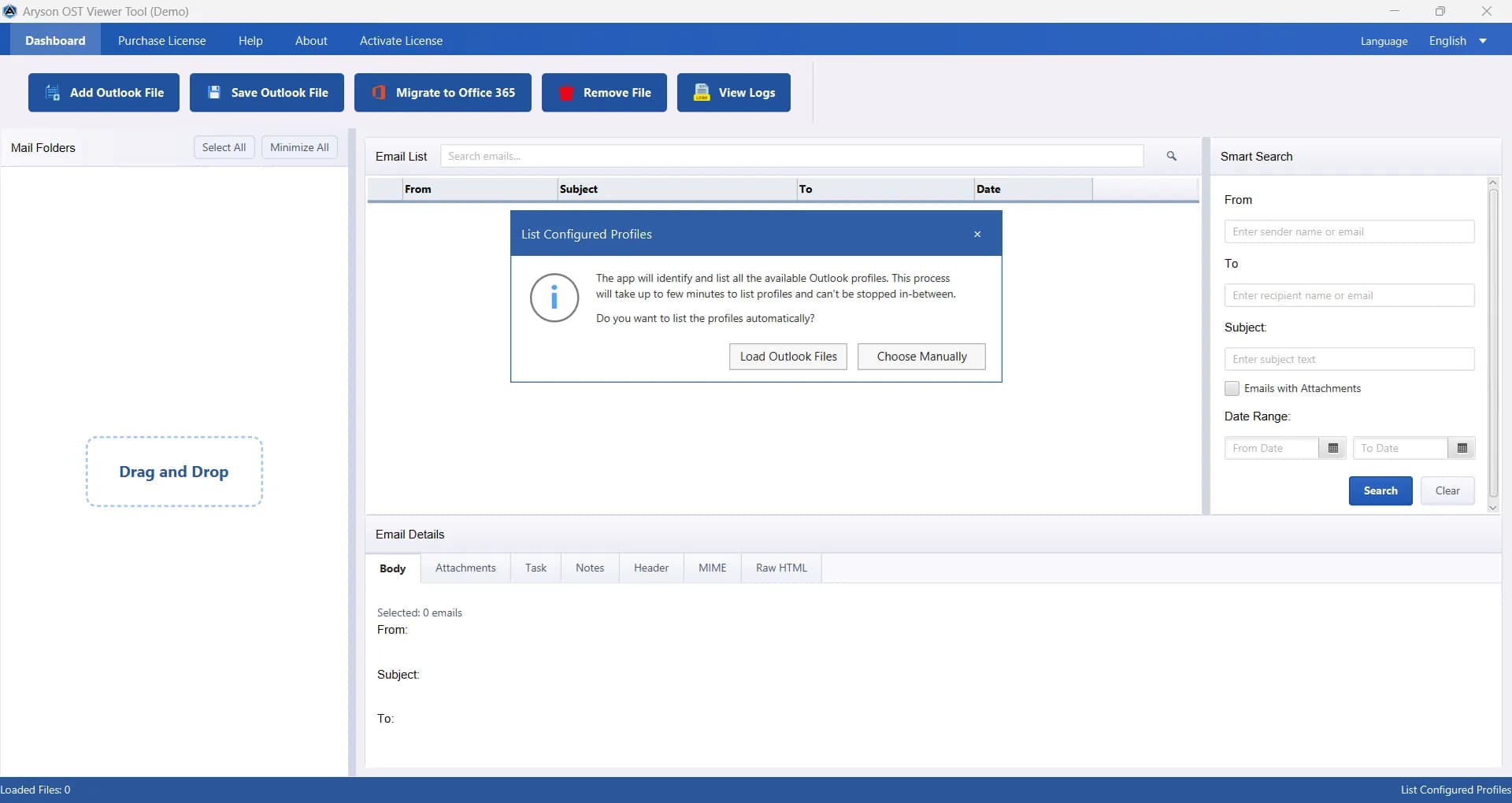
About this app
Aryson OST Viewer is a specialized utility designed for IT professionals, administrators, and forensic experts who need to access Outlook OST files without relying on Microsoft Outlook. It offers a read-only preview of emails, attachments, contacts, calendars, tasks, and notes, and supports exporting to multiple formats like PST, PDF, MBOX, EML, MSG, CSV, and direct migration to Office 365. The tool handles both healthy and slightly corrupted OST files, provides advanced filters and search options, and ensures data integrity. With its user-friendly interface and robust feature set, Aryson OST Viewer simplifies OST file analysis and recovery, making it an indispensable tool for email data management.
Key features
- 1Read-only preview of OST/PST emails, attachments, contacts, calendars, tasks, notes, headers and MIME without Outlook installed.
- 2Export to PST, PDF, MBOX, EML, MSG and CSV with folder hierarchy preserved, duplicate removal and PST splitting by size.
- 3Direct Office 365 migration with modern authentication and per-file mailbox mapping, plus progress logs.
Target customer profile
Drawn from the product itself, not from a survey.
Demographic
IT Administrators and System Managers
Pain points
Difficulty accessing orphaned OST files after employee departure or Exchange account removal; need to recover data without Outlook.
Primary needs
Reliable OST file viewing and conversion, batch processing, and secure migration to Office 365.
Demographic
Digital Forensics Experts and Legal Investigators
Pain points
Maintaining evidence integrity while analyzing email data; dealing with corrupted or inaccessible OST files.
Primary needs
Read-only access to OST files, support for corrupted files, and detailed preview of all mailbox items.
Demographic
Small Business Owners and Home Users
Pain points
Inability to open OST files due to Outlook issues or lack of Outlook installation; need to extract attachments or emails.
Primary needs
Free and easy-to-use OST viewer, conversion to common formats like PST and PDF, and basic export capabilities.
Scout Review
Written by AI from measured evidence, scored out of 100.
Aryson OST Viewer is a competent, long-lived Windows utility wrapped in a marketing page that undersells it. The app does the job: read-only preview of emails, attachments, contacts, calendars, tasks and notes from OST files without Outlook, with filters, duplicate removal, PST splitting and direct Office 365 migration. The site is fast (98 mobile Lighthouse) and the security headers are immaculate (12/12). Where it falls down is presentation and proof: a dated hero with three competing CTAs, a popup covering the copy, a stock-silhouette testimonial, buried demo limits, and no published compliance attestations for an audience that handles legal evidence. Against free competitors, the differentiator has to be corruption handling and migration — and the site doesn't argue that case loudly enough.
Measure by measure
Usability
58Real nav with Features, Specifications, Video and FAQs, and a documented free demo. But the demo's 100-email/20,000-item caps are buried in a feature card, and the in-app profiles modal fires on launch before you can do anything.
Design
46Dated marketing page: three competing hero CTAs, a chat popup covering the copy, 17 flat feature bullets with no hierarchy, and a stock-silhouette testimonial. The app's three-pane mail layout is the one genuinely sound piece.
Speed
88Lighthouse mobile 98/100 with LCP 1.8s, CLS 0.003 and TBT 43ms; desktop 91/100. The marketing site is genuinely fast and light. Desktop app performance itself was not measured.
Security
76Full header hygiene: HTTPS enforced, HSTS, CSP, frame protection, Referrer-Policy, Permissions-Policy, SPF and DMARC — 12/12 on the probe. Claims GDPR-compliant processing and zero stored credentials; no SOC 2 or pen-test report published.
Accessibility
58Lighthouse a11y 83/100, but the failures are the basics: low-contrast text, out-of-order headings, images with no alt, unnamed links, undersized touch targets, no main landmark. No WCAG statement and English-only.
Growth
54A real, specific pain — orphaned or corrupted OST files with no Outlook — but Kernel and SysTools both give away free OST viewers, so the paid wedge has to be corruption handling and O365 migration, not viewing.
Improvement areas
- Dated landing page: three competing hero CTAs, a chat popup covering the copy, and 17 flat feature bullets with no hierarchy.
- Accessibility basics failing: missing alt text, unnamed links, out-of-order headings, low contrast, no main landmark.
- No published SOC 2, ISO 27001 or penetration test despite handling forensic and legal email evidence.
- Free demo limits (100 emails/folder, 20,000 items) buried in a feature card instead of shown at the download button.
Design & Usability
The marketing page is stuck in 2015: a dense six-line hero paragraph in small grey type, three competing download buttons in blue, orange and red, a Microsoft Store badge, and a chat popup that lands on top of the copy before you've read it. The 17-bullet feature wall gives every claim equal weight, so nothing reads as the reason to buy. The one place design thinking shows up is the app itself — a folders/list/detail three-pane layout that any Outlook user will navigate without a manual. Usability is carried by the nav (Features, Specifications, Video, FAQs) and a documented free demo, but the demo's real limits — 100 emails per folder, 20,000 items — are buried in a feature card instead of sitting next to the download button where they'd actually inform a decision. And the app opens with a 'List Configured Profiles' modal that interrupts the first interaction before the user has asked for anything.
Speed & Security
Speed is the standout: Lighthouse mobile 98/100 with a 1.8s LCP, 0.003 CLS and 43ms TBT, desktop 91/100. The page is light and it shows. Security is solid on the transport layer — HTTPS enforced, HSTS, CSP, frame protection, X-Content-Type-Options, Referrer-Policy and Permissions-Policy all present, plus SPF and DMARC, for a clean 12/12 on the header probe. The site claims GDPR-compliant processing and that no credentials are stored on external servers, which matters for a tool that ingests mailbox data. What's missing is the paper trail: no SOC 2, no ISO 27001, no published penetration test, no security page beyond a marketing bullet. For an IT-admin and forensics audience that handles legal evidence, that's the gap worth closing — the headers are excellent, the attestations are absent.
Accessibility & Growth
Accessibility scores 83/100 on Lighthouse, but the failures are the cheap ones: insufficient color contrast, headings out of sequence, images without alt attributes, links with no discernible name, touch targets too small, no main landmark, and role=presentation conflicts. Those are fixable in an afternoon and they're on a page whose body copy is already small and light grey. No WCAG conformance statement and no localization. Growth is the interesting question. The problem is real and sharply defined — an employee leaves, the Exchange account goes, the OST file is orphaned, and nobody has Outlook to open it. The claimed wedge is corruption tolerance, batch export across six formats, and direct Office 365 migration with per-file mailbox mapping. But the two listed competitors, Kernel and SysTools, both offer free OST viewers, so 'view your OST' is not a business. The paid case has to rest on migration and forensic-grade handling, which is a narrower but more defensible market. Domain age (2013) and 1.5M claimed downloads suggest staying power, not momentum.
Conclusion
If you're an IT admin with an orphaned OST file and no Outlook, this will get you your mail back, and the Office 365 migration path is the part worth paying for. If you just need to peek inside a healthy OST file, the free viewers from Kernel and SysTools will do it for nothing. The tool is more capable than its landing page makes it look — which is a strange problem to have, but a fixable one.
Suggestions for improvement
- Collapse the hero to one primary CTA and move the Mac/Store/demo options into a secondary row.
- Surface the free demo limits (100 emails/folder, 20,000 items) directly beside the download button.
- Publish a security page with SOC 2 or ISO status, data-handling detail, and a pen-test summary for the forensics audience.
- Fix the a11y failures: alt text, link names, heading order, contrast, and a main landmark — all cheap wins.
Alternatives comparison
Named competitors, point by point. Nobody paid to appear here or to be left out.
 Aryson OST Viewer |  Kernel OST Viewer |  SysTools OST Viewer | |
|---|---|---|---|
| Price to view OST files | Paid; free demo capped at 100 emails/folder and 20,000 items | Free viewer; paid tiers for saving/export | Free viewer; paid tiers for export |
| View OST without Microsoft Outlook | Yes — read-only preview of all mailbox items | Yes | Yes |
| Export formats | PST, PDF, MBOX, EML, MSG, CSV | Multiple formats including PST, MSG, EML, PDF | Multiple formats including PST, MSG, EML, PDF |
| Direct Office 365 migration | Yes — modern auth with per-file mailbox mapping | Offered in paid product line | Offered in paid product line |
| Corrupted OST handling | Healthy and slightly corrupted files; skips heavily corrupted | Supports corrupted OST files | Supports corrupted OST files |
| Platform coverage | Windows, Mac, Linux | Windows | Windows |
Kernel OST Viewer
A free tool to view OST files without Outlook, with options to save in various formats.
SysTools OST Viewer
Free OST viewer that allows previewing OST file contents and exporting to multiple formats.
Comparing options? See Aryson OST Viewer alternatives, scored side by side
More Online Backup apps
View all Online Backup
SendVeil
88Send large original files through private, expiring links, with EU storage.

PCDOTS PST Converter
85Convert Outlook PST files to 16 formats and clouds withou...

SysInfo OST to PST Converter
84Convert, migrate, and recover OST files to PST and 13+ fo...

yourdrive
84YourDrive is a self-hosted file manager and media timeline that runs entirely on your own infrastructure. Organize files in nested folders, move them with drag-and-drop, search instantly, and browse photos and videos by month and year. Files stream straight to your own AWS S3, Azure Blob, MinIO, Cloudflare R2 or Wasabi storage. Install with one command. Free for personal use; teams pay per server, not per seat.
PCDOTS Email Recovery Software
83Recovers emails from corrupt mailboxes across 50+ platforms.

KeepTik
83Download TikTok videos without a watermark, save photo posts as images, and bulk download selected TikTok profile posts with KeepTik for Chrome and Edge.

ServerOS
83One daemon, total control of your Linux servers

Alcazar Dead Man's Switch
82An encrypted digital legacy service that securely deliver...

Softaken Cloud Backup
82Professional Email Backup for Cloud-Based Accounts
PCDOTS Email Converter
82Convert emails between 250+ formats and clients on Window...

App-Vault
81Encrypted photo and file vault for iPhone. AES-256 on device, pattern lock, decoy vault and calculator disguise. No account, no cloud.

SysInfo Microsoft Teams Migration Tool
81Migrate Teams, channels, and chats between Microsoft 365 ...


A platform dedicated to providing unbiased reviews of newly launched applications, analyzing everything from their features to their full potential.
info@scoutforge.net© 2026 Scoutforge. All rights reserved.
