Cycling through all six. Tap any point to stop.
Measured on six things
Migrate SharePoint sites, libraries & lists between tenan...
Design
44Dated download-portal aesthetic: hero crams 13 bullets, a 1.5M counter and two CTAs above the fold, a chat popup covers the headline, and the maker screenshot still shows an 'Activate Windows' watermark. The four-card section shows they can do clean layout.
Screenshots
1 / 1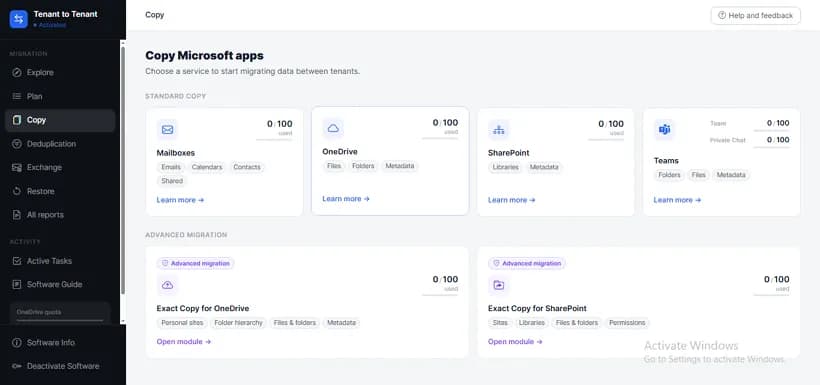
About this app
Aryson SharePoint Migration Tool is a Windows-based utility for moving SharePoint Online sites, subsites, document libraries, folders, files, and lists between Microsoft 365 tenants, or from SharePoint to OneDrive. It leverages Graph API, Migration API, and SharePoint REST API to preserve folder hierarchy, metadata, version history, and supported content types. The tool offers OAuth 2.0 and Client ID & Secret authentication, bulk mapping via CSV, incremental migration, and granular filters for file size, extension, date, and content type. An Exact Copy mode migrates web parts, sensitivity labels, and permissions. It also supports mailbox, OneDrive, and Teams migrations. The trial version limits migrations to 5 list items and skips files over 20 MB, while the full license costs $499. With a 4.9-star average from over 3,000 reviews and 1M+ sites migrated, Aryson is a reliable choice for IT admins handling tenant consolidations, restructuring, or project-based content moves.
Key features
- 1Tenant-to-tenant SharePoint Online migration plus SharePoint-to-OneDrive, with Graph, Migration and SharePoint REST APIs
- 2Exact Copy mode preserving version history, web parts, sensitivity labels and permissions
- 3CSV bulk mapping, incremental migration, and filters for file size, extension, date and content type
Target customer profile
Drawn from the product itself, not from a survey.
Demographic
IT administrators and cloud solutions managers in mid-to-large enterprises
Pain points
Complex tenant-to-tenant migrations, risk of data loss, downtime during restructuring
Primary needs
Secure, automated migration with detailed reporting and minimal manual effort
Demographic
Systems engineers and SharePoint consultants managing multiple Microsoft 365 tenants
Pain points
Mapping source to destination users, preserving metadata and permissions, avoiding duplicate files
Primary needs
Bulk mapping via CSV, advanced filters, incremental migration, and exact copy features
Demographic
Small business owners and project managers with limited IT resources
Pain points
Budget constraints, lack of technical expertise, need to move specific project files quickly
Primary needs
User-friendly interface, affordable one-time license, selective migration with preview
Scout Review
Written by AI from measured evidence, scored out of 100.
Aryson SharePoint Migration Tool is a Windows utility for moving SharePoint Online sites, libraries and lists between Microsoft 365 tenants, or to OneDrive, using Graph, Migration and SharePoint REST APIs. It's aimed squarely at IT admins doing tenant consolidations and restructuring, and the feature set is credible: OAuth 2.0 and client-credential auth, CSV bulk mapping, incremental migration, file size/extension/date/content-type filters, and an Exact Copy mode that carries version history, web parts, sensitivity labels and permissions. The $499 one-time license is a real alternative to ShareGate and Metalogix subscriptions. The problems are presentation and proof. The site looks dated, the hero is overloaded, a chat popup covers the headline, and the product screenshot has an 'Activate Windows' watermark. The trial is too small to evaluate a real migration, and there's no SOC 2 or third-party audit for enterprise procurement.
Measure by measure
Usability
52Modes are discoverable via tabs and the purchase path is findable, but the trial caps at 5 list items and skips files over 20 MB — you can't actually test a real migration. Specs list Windows 95 and Outlook 97 at equal weight to current versions, muddying compatibility.
Design
44Dated download-portal aesthetic: hero crams 13 bullets, a 1.5M counter and two CTAs above the fold, a chat popup covers the headline, and the maker screenshot still shows an 'Activate Windows' watermark. The four-card section shows they can do clean layout.
Speed
70Lighthouse mobile 83/100 and desktop 79/100 with LCP 1.8s and zero layout shift. TBT of 580ms shows some main-thread cost, likely the chat popup and legacy scripts, but the page is genuinely quick to first paint.
Security
76Full security-header sweep: HTTPS enforced, HSTS, CSP, frame protection, Referrer-Policy, Permissions-Policy, plus SPF and DMARC — 12/12 on the probe. OAuth 2.0 and client-credential auth are claimed. No SOC 2, ISO or third-party audit is published.
Accessibility
68Lighthouse a11y 94/100, but three real failures: insufficient color contrast, non-sequential heading order, and no main landmark. No accessibility statement or WCAG claim anywhere, and it's a Windows-only desktop tool with no stated multi-language support.
Growth
62Real, recurring enterprise need — tenant-to-tenant M365 consolidation — with concrete wedges over SPMT (tenant-to-tenant, CSV mapping, Exact Copy) and a $499 one-time price undercutting ShareGate. Capped by a trial too small to prove itself.
Improvement areas
- Dated, overloaded hero with an overlapping chat popup and an 'Activate Windows' watermark in the product screenshot
- Trial capped at 5 list items and 20 MB files, too small to evaluate a real migration
- No published SOC 2 / ISO audit or accessibility statement for enterprise procurement
Design & Usability
The homepage reads like a 2013 software directory listing that got a fresh coat of blue paint. The hero throws an H1, a bold subtitle, a paragraph, a download button, a 1,556,899 download counter, a 4.9-star line and thirteen alternating-bold bullets at you before you've decided you care, and a floating 'Queries' popup lands on top of the headline for good measure. The maker screenshot still carries an 'Activate Windows' watermark. The four-card 'When Do You Need' block proves the team can lay out a clean section — they just don't apply it to the part that matters. Usability is workable: migration modes are discoverable through tabs, and the buy path is findable. But the trial caps at five list items and skips files over 20 MB, which means an IT admin evaluating a tenant migration can't actually test one. Specs listing Windows 95 and Outlook 97 alongside current versions make compatibility a guessing game.
Speed & Security
Speed is a genuine bright spot. Lighthouse mobile scores 83/100 with LCP 1.8s, CLS 0 and FCP 1.8s; desktop lands 79/100. The 580ms total blocking time points at the chat popup and legacy scripts, but first paint is fast and the page doesn't jump around. Security is the strongest dimension on paper: the header probe returns 12/12 — HTTPS enforced, HSTS, CSP, frame protection, X-Content-Type-Options, Referrer-Policy, Permissions-Policy, plus SPF and DMARC. The tool claims OAuth 2.0 and client-credential authentication, which is the right posture for a Graph/Migration API tool. What's missing is third-party proof: no SOC 2, ISO 27001 or published audit, and the '100% Secure Authentication' stat card is an unsourced absolute. For an enterprise buyer moving sensitive tenant data, that gap matters more than the headers.
Accessibility & Growth
Accessibility scores 94/100 on Lighthouse but fails three real checks: insufficient color contrast, non-sequential heading order, and no main landmark. There's no accessibility statement, no WCAG conformance claim, and it's a Windows-only desktop tool with no stated multi-language support — thin for an enterprise-facing product. Growth is the most defensible story here. Tenant-to-tenant SharePoint migration is a real, recurring problem that Microsoft's free SPMT structurally doesn't solve, and Aryson's CSV bulk mapping, granular filters and Exact Copy mode (version history, permissions, sensitivity labels) are concrete wedges. At $499 one-time it undercuts ShareGate and Metalogix, which is a clear price lane for mid-market IT teams. The limit is proof: a five-item, 20 MB-capped trial doesn't let a buyer validate a complex migration, and the site leans on 1.5M downloads and 3,056 reviews rather than case studies or benchmarks.
Conclusion
If you're an IT admin who needs tenant-to-tenant SharePoint migration and can't justify ShareGate's pricing, Aryson is worth a serious look — the feature list maps to the actual job, and the $499 one-time cost is hard to argue with. But go in with eyes open: the trial won't let you prove it on real data, so ask for a guided demo or a scoped pilot before committing. And if your procurement team needs SOC 2 or ISO documentation, ask Aryson directly — it isn't published on the site. The product underneath the dated marketing looks competent; the marketing is doing it no favors.
Suggestions for improvement
- Rebuild the hero: one headline, one value line, one CTA. Move the 13 bullets and download counter below the fold.
- Remove the floating 'Queries' popup from the hero, or make it dismissible and non-overlapping.
- Replace the maker screenshot — the 'Activate Windows' watermark is an instant credibility loss for enterprise buyers.
- Raise the trial to at least a full site or library with a size cap that lets admins test a realistic migration.
Alternatives comparison
Named competitors, point by point. Nobody paid to appear here or to be left out.
 Aryson SharePoint Migration Tool |  Microsoft SharePoint Migration Tool (SPMT) |  ShareGate |  Metalogix Essentials for Office 365 | |
|---|---|---|---|---|
| Tenant-to-tenant SharePoint migration | Yes — core use case | No — SharePoint-to-SharePoint Online only | Yes — robust tenant-to-tenant | Yes — enterprise-grade |
| Pricing model | $499 one-time license | Free (official Microsoft tool) | Subscription, higher price point | Enterprise licensing, costlier |
| Version history & permissions preservation | Yes — Exact Copy mode | Partial — limited metadata/version support | Yes — full fidelity | Yes — full fidelity |
| Bulk CSV mapping & granular filters | Yes — CSV mapping, size/extension/date/content-type filters | No — lacks advanced filtering and mapping | Yes — reporting and automation | Yes — advanced features |
| Learning curve / setup complexity | Moderate — Windows utility, guided UI | Low — simple but limited | Steeper learning curve | Complex setup required |
Microsoft SharePoint Migration Tool (SPMT)
Free official tool from Microsoft for migrating content to SharePoint Online and OneDrive, but limited to SharePoint-to-SharePoint Online scenarios and lacks advanced filtering and tenant-to-tenant mapping.
ShareGate
Comprehensive migration and management tool for Microsoft 365, offering robust tenant-to-tenant migration, reporting, and automation, but at a higher price point and steeper learning curve.
Metalogix Essentials for Office 365
Enterprise-grade migration suite with advanced features for SharePoint, OneDrive, and Teams, but requires more complex setup and is costlier for small teams.
Comparing options? See Aryson SharePoint Migration Tool alternatives, scored side by side
More Online Backup apps
View all Online Backup
SendVeil
88Send large original files through private, expiring links, with EU storage.

PCDOTS PST Converter
85Convert Outlook PST files to 16 formats and clouds withou...

SysInfo OST to PST Converter
84Convert, migrate, and recover OST files to PST and 13+ fo...

yourdrive
84YourDrive is a self-hosted file manager and media timeline that runs entirely on your own infrastructure. Organize files in nested folders, move them with drag-and-drop, search instantly, and browse photos and videos by month and year. Files stream straight to your own AWS S3, Azure Blob, MinIO, Cloudflare R2 or Wasabi storage. Install with one command. Free for personal use; teams pay per server, not per seat.
PCDOTS Email Recovery Software
83Recovers emails from corrupt mailboxes across 50+ platforms.

KeepTik
83Download TikTok videos without a watermark, save photo posts as images, and bulk download selected TikTok profile posts with KeepTik for Chrome and Edge.

ServerOS
83One daemon, total control of your Linux servers

Alcazar Dead Man's Switch
82An encrypted digital legacy service that securely deliver...

Softaken Cloud Backup
82Professional Email Backup for Cloud-Based Accounts
PCDOTS Email Converter
82Convert emails between 250+ formats and clients on Window...

App-Vault
81Encrypted photo and file vault for iPhone. AES-256 on device, pattern lock, decoy vault and calculator disguise. No account, no cloud.

SysInfo Microsoft Teams Migration Tool
81Migrate Teams, channels, and chats between Microsoft 365 ...


A platform dedicated to providing unbiased reviews of newly launched applications, analyzing everything from their features to their full potential.
info@scoutforge.net© 2026 Scoutforge. All rights reserved.
