Cycling through all six. Tap any point to stop.
Measured on six things
AI clipper for viral short-form video from long content.
Security
52HTTPS enforced with HSTS, secure cookies, and X-Content-Type-Options. Missing CSP, frame protection, SPF, and DMARC. No SOC 2 or security page. Basics present, hardening incomplete.
Screenshots
1 / 5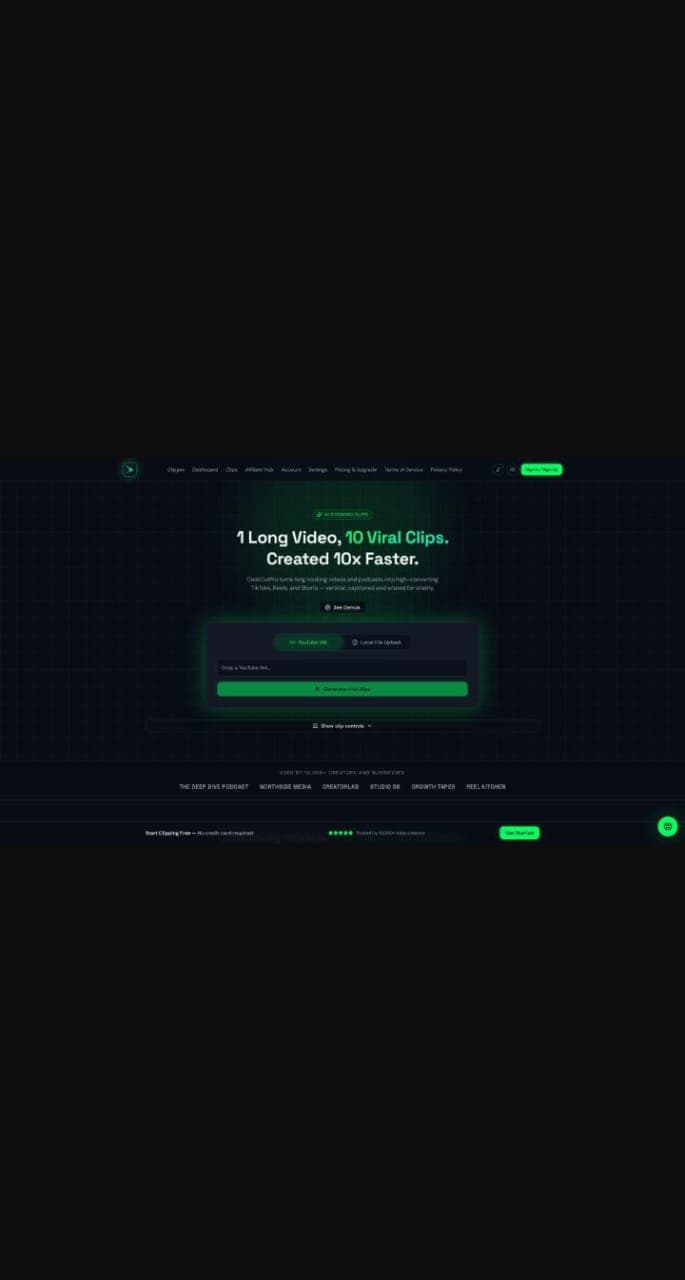
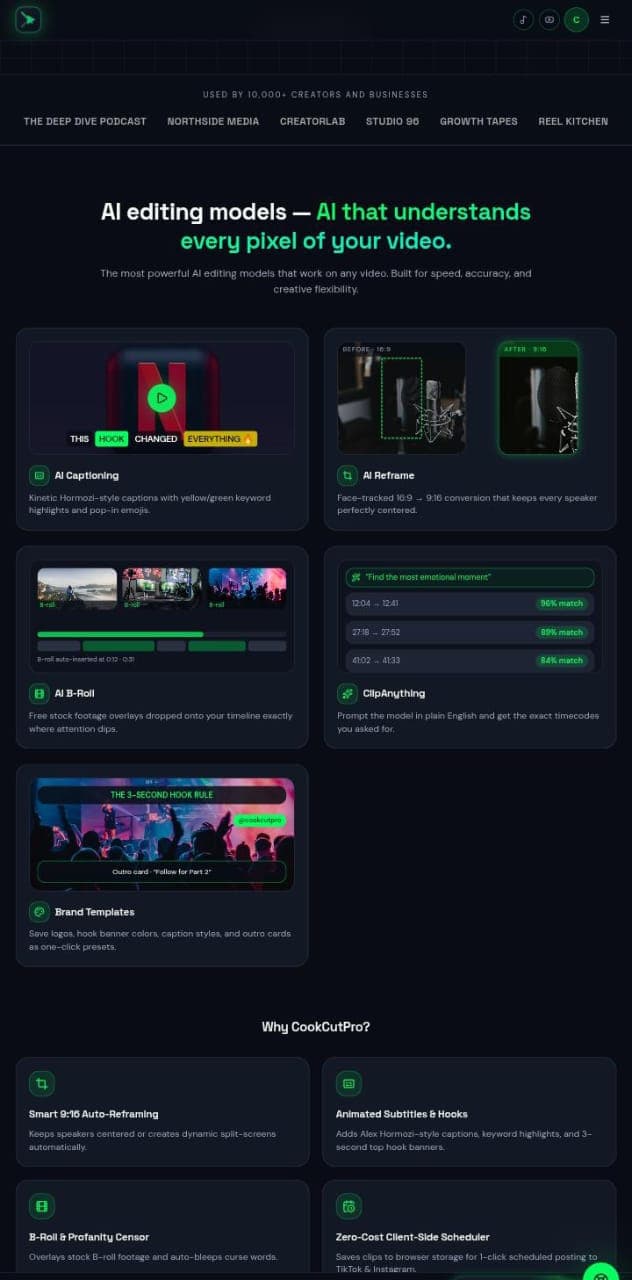
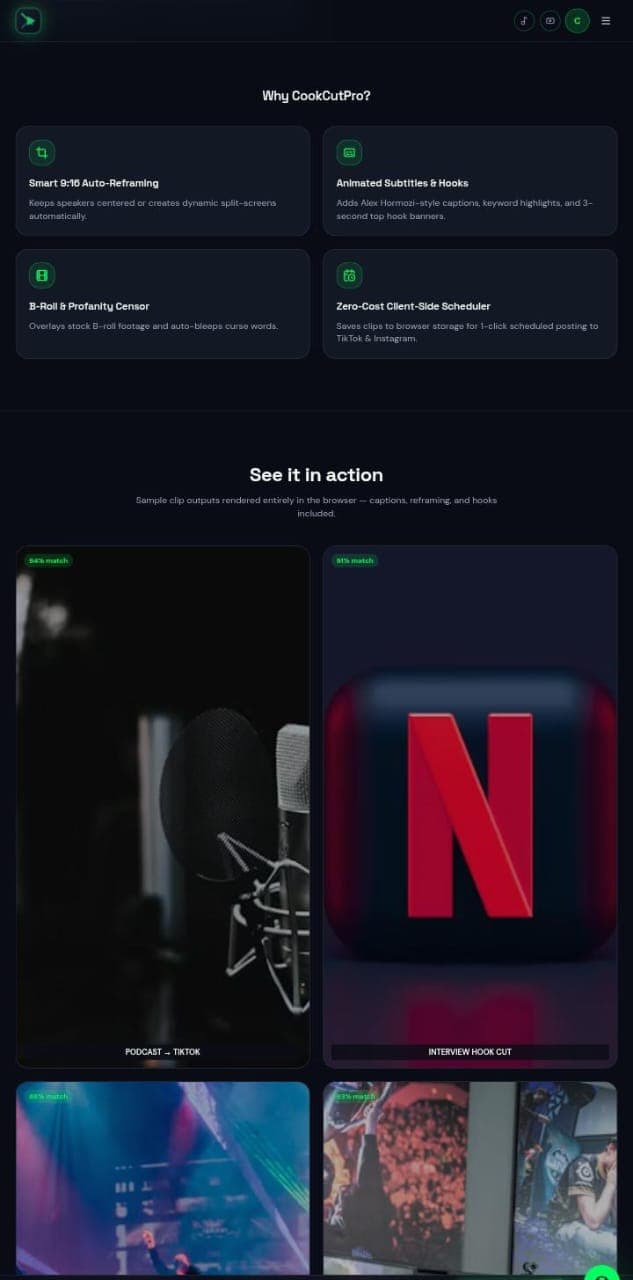
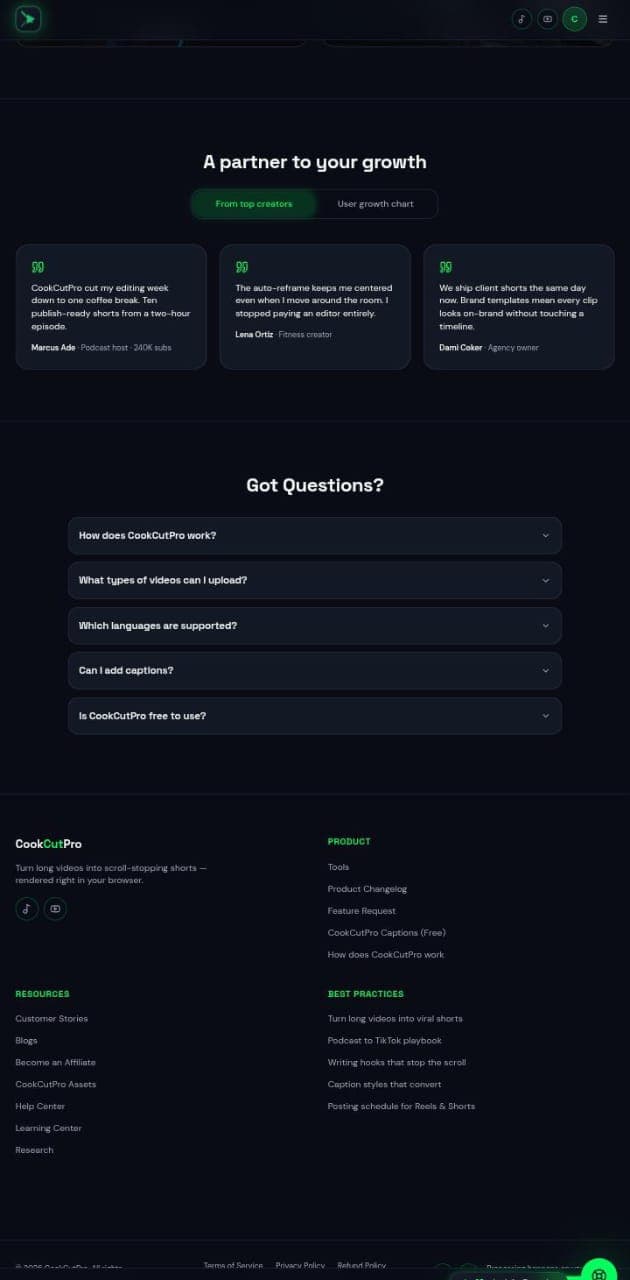
About this app
CookCutPro is a web-based AI video editor that transforms long-form videos into viral short clips for TikTok, Instagram Reels, and YouTube Shorts. Paste a YouTube link or upload a file, and the AI automatically reframes to 9:16, adds kinetic captions, inserts B-roll, and even censors profanity. It is designed for speed and ease, allowing creators to produce multiple clips in minutes without manual editing. Key features include AI captioning with keyword highlights, face-tracked reframing, prompt-based clip selection, and brand templates. Trusted by over 10,000 creators, CookCutPro is ideal for podcasters, social media managers, and content creators looking to maximize reach with minimal effort.
Key features
- 1AI captioning with kinetic Hormozi-style captions and keyword highlights.
- 2Face-tracked 16:9 to 9:16 reframing that keeps speakers centered.
- 3Prompt-based clip selection with plain English timecode matching.
- 4Brand templates for logos, hook banners, caption styles, and outro cards.
- 5B-roll auto-insertion and profanity censoring.
- 6Client-side scheduler for 1-click posting to TikTok and Instagram.
Target customer profile
Drawn from the product itself, not from a survey.
Demographic
Podcast hosts and interviewers
Pain points
Long episodes take hours to edit into clips; maintaining speaker focus in vertical format is tedious.
Primary needs
Quickly generate multiple short clips with accurate captions and automatic reframing.
Demographic
Social media managers and agencies
Pain points
High volume of client content requires fast turnaround; maintaining brand consistency across clips is challenging.
Primary needs
Efficient batch processing, brand templates, and scheduled posting features.
Demographic
Content creators and influencers
Pain points
Limited time and editing skills; need to produce engaging shorts to grow audience.
Primary needs
Easy-to-use AI tool that creates viral-ready clips with hooks and captions.
Scout Review
Written by AI from measured evidence, scored out of 100.
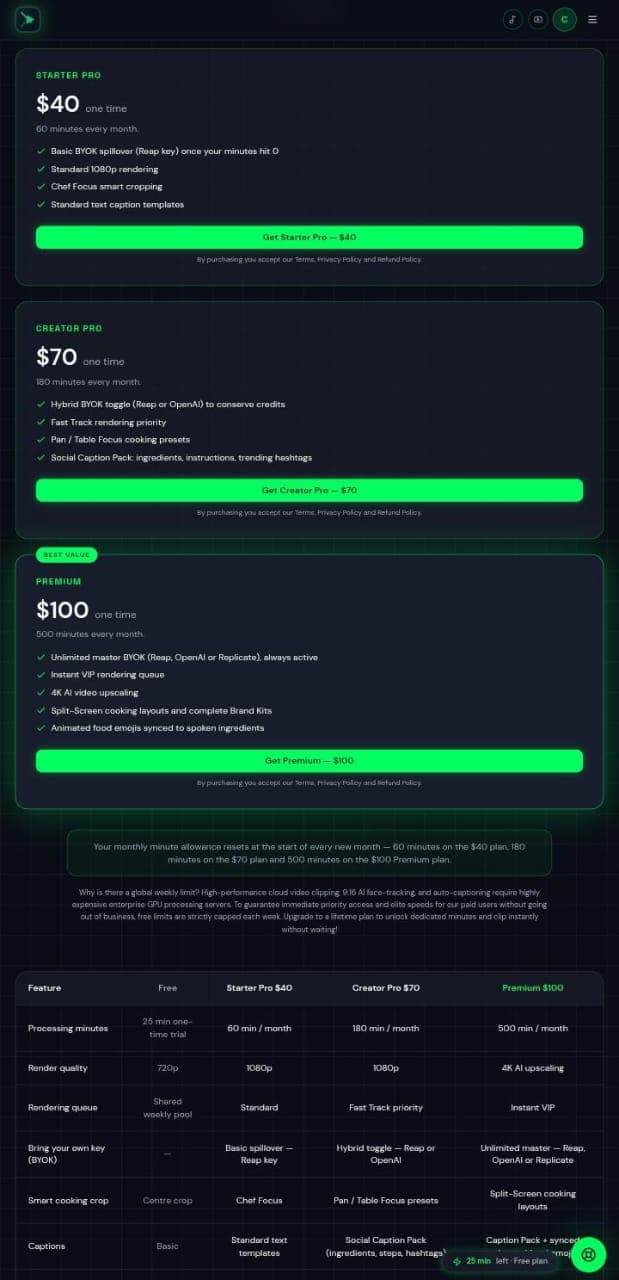
CookCutPro is a web-based AI video editor that turns long videos into vertical clips for TikTok, Reels, and Shorts. It offers face-tracked reframing, kinetic captions, B-roll insertion, and profanity censoring. The site is polished with a dark theme and green CTAs, and the pricing page lists four tiers from free to $100 one-time. Speed is strong (Lighthouse mobile 83, desktop 93), accessibility scores 98/100 on automated checks, but security is incomplete (no CSP, SPF, or DMARC) and usability lacks visible documentation. Growth potential is moderate: the problem is real but the cooking-specific wedge is narrow against established competitors like Opus.pro and Descript. The product works and looks the part, but it doesn't yet stand out in a crowded category.
Measure by measure
Usability
58Free 25-minute trial with no credit card, demo clips with match percentages, and a feature comparison table. FAQ answers not visible and no onboarding flow shown. Solid but unremarkable.
Design
71Dark navy theme with high-contrast green CTAs and clear hero hierarchy. Feature cards use concrete before/after visuals and match percentages. Cramped hero input and missing section anchors hold it back.
Speed
68Lighthouse mobile 83/100 with LCP 3.6s and TBT 0ms; desktop 93/100. Client-side rendering claims suggest some processing happens locally. Solid performance for a media-heavy landing page.
Security
52HTTPS enforced with HSTS, secure cookies, and X-Content-Type-Options. Missing CSP, frame protection, SPF, and DMARC. No SOC 2 or security page. Basics present, hardening incomplete.
Accessibility
80Lighthouse accessibility 98/100 with only two failing audits: heading order and mismatched accessible names. No WCAG statement or a11y page found. Strong automated score, thin manual signals.
Growth
54Real problem (long-to-short video editing) with a cooking-specific wedge: Chef Focus, Pan/Table presets, food emoji sync. But the category is crowded and the differentiator is narrow.
Improvement areas
- Security headers: add CSP, frame protection, SPF, and DMARC.
- Documentation: expand FAQ answers and add a help center.
- Accessibility: fix heading order and accessible name mismatches.
- Growth: verify the '10,000 creators' claim with case studies.
Design & Usability
CookCutPro's design is competent and conversion-focused: dark navy with green CTAs, feature cards showing real before/after reframing and match percentages, and a testimonial row with follower counts. The hero input is cramped and the long page lacks section anchors, but the visual hierarchy works. Usability is mid-tier: a free 25-minute trial with no credit card and demo clips with match percentages are good signals, but the FAQ answers aren't visible in the screenshot and there's no onboarding flow shown. The pricing page has a clear feature comparison table across four tiers, which helps. For a product targeting podcasters and social media managers, the lack of visible documentation or help center is a gap. It works, but it doesn't stand out from Opus.pro or Kapwing on either design or usability.
Speed & Security
Speed is a genuine strength: Lighthouse mobile 83/100 with LCP 3.6s and TBT 0ms, desktop 93/100. The site claims client-side rendering for some features, which aligns with the low TBT. No user complaints about lag found. Security is weaker: HTTPS enforced with HSTS, secure cookies, and X-Content-Type-Options, but missing CSP, frame protection, SPF, and DMARC. The checklist score is 7/13. No SOC 2, ISO, or security page found. For a tool handling user video uploads and YouTube links, the lack of CSP and email authentication is a real gap. The privacy and refund policies are linked, which is the minimum. Compared to Descript (which has enterprise security pages) and Kapwing, CookCutPro is behind on security transparency. Speed is above average; security is below average for the category.
Accessibility & Growth
Accessibility scores well on automated checks: Lighthouse 98/100 with only two failing audits (heading order and mismatched accessible names). No WCAG statement or a11y page found, and no multi-language support mentioned beyond an FAQ question. The site is responsive and keyboard-navigable per the audit. Growth potential is moderate: the problem (long-form to short-form video) is real and growing, but the category is crowded with Opus.pro, Descript, and Kapwing. CookCutPro's wedge is cooking-specific presets (Chef Focus, Pan/Table Focus) and animated food emojis synced to spoken ingredients. That's a narrow differentiator. The domain is 0.1 years old, only a YouTube profile is listed, and the '10,000 creators' claim is unverified. The idea can grow, but the moat is thin and the incumbents are well-funded. Score reflects a real problem with a specific but narrow wedge.
Conclusion
CookCutPro is a competent entry in the AI clipping space. It does the basics well: fast rendering, decent design, and a free tier that lets you test before paying. But the security headers are incomplete, the FAQ answers aren't visible, and the cooking-specific features are a thin moat against Opus.pro and Descript. If you're a cooking creator who wants food emojis synced to spoken ingredients, this might be for you. For everyone else, the alternatives are more established and better documented. It's worth a free trial, but don't expect it to replace your editor yet.
Suggestions for improvement
- Expand the FAQ with visible answers and add a help center or documentation page.
- Add CSP, frame protection, SPF, and DMARC headers to harden security.
- Publish an accessibility statement and fix the heading order and accessible name issues.
- Clarify the '10,000 creators' claim with verifiable testimonials or case studies.
Alternatives comparison
Named competitors, point by point. Nobody paid to appear here or to be left out.
 CookCutPro CookCutPro | CookCutPro |  Descript Descript |  Kapwing Kapwing | |
|---|---|---|---|---|
| Core function | AI video editor for long-to-short clipping with cooking-specific presets | AI-powered video editing tool for long-to-short clips with captions and reframing | All-in-one audio and video editor with AI transcription, overdub, and clip creation | Online video editor with AI tools for repurposing content into social media clips |
| Pricing model | Free 25-min trial; $40/$70/$100 one-time with monthly minute refills | Subscription-based with free tier and paid plans | Subscription-based with free tier and paid plans | Freemium with paid subscription tiers |
| Auto-reframing | Face-tracked 16:9 to 9:16 with Chef Focus and Pan/Table Focus cooking presets | AI-powered auto-reframing for vertical formats | Auto-reframing available in paid tiers | Smart reframing for social media aspect ratios |
| Captioning | Kinetic captions with keyword highlights and animated food emojis synced to spoken ingredients | AI-generated captions with keyword highlighting | AI transcription with editable captions and speaker labels | Auto-generated subtitles and captions |
| B-roll insertion | Auto-inserted stock B-roll at attention dips | Not a core feature | Manual B-roll insertion via timeline | Stock media library with manual insertion |
| Brand templates | Save logos, hook banner colors, caption styles, and outro cards as presets | Brand kit available on higher tiers | Brand templates and custom styles | Brand kit with logos, colors, and fonts |
| Profanity censoring | Auto-bleeps curse words | Not a core feature | Manual editing required | Manual editing required |
| Scheduling | Client-side scheduler for 1-click posting to TikTok and Instagram | Direct publishing to social platforms | Publishing to YouTube and social platforms | Scheduling and publishing to social platforms |
CookCutPro
AI-powered video editing tool that turns long videos into short clips with captions and reframing.
Descript
All-in-one audio and video editor with AI features like transcription, overdub, and clip creation.
Kapwing
Online video editor with AI tools for repurposing content into social media clips.
Comparing options? See CookCutPro alternatives, scored side by side
More Design & Creativity apps
View all Design & Creativity
RoomCreator
92An AI-powered interior and exterior design tool that tran...

Tracé slides
89Interactive math & physics slides with live graphs and an...

English Test Coach
89English Test Coach checks your IELTS essays and letters, gives an estimated band score across all four criteria, and tells you exactly what to revise next.

What the GIF
89Frame-perfect video-to-GIF maker that runs entirely in yo...

Portrait Gift
88AI-powered personalized face swap art platform creating c...

TranscriptYou
88Free YouTube transcript generator with timestamps and AI ...

Pixelimg
88A free online AI-powered tool that instantly converts ima...

ButterKit
82macOS app for App Store screenshots: 3D mockups, auto-tra...

BeartIMAGE
88BeartIMAGE is a free, web-based image processing platform engineered for fast, bulk photo editing and conversion directly in your browser.

RestorePhotosApp
88An AI-powered photo restoration app that brings old, blur...

Coloring Pages Pro
87A massive collection of free printable coloring pages for...

QRocodile
87Design And Animate QR Codes People Want to Scan


A platform dedicated to providing unbiased reviews of newly launched applications, analyzing everything from their features to their full potential.
info@scoutforge.net© 2026 Scoutforge. All rights reserved.
