Cycling through all six. Tap any point to stop.
Measured on six things
Securely recover data from internal/external storage drives
Speed
44Lighthouse mobile 59/100 with a 26.5s LCP — roughly ten times the 'good' threshold. Desktop fares better at 71/100, but the mobile experience is genuinely slow.
Screenshots
1 / 1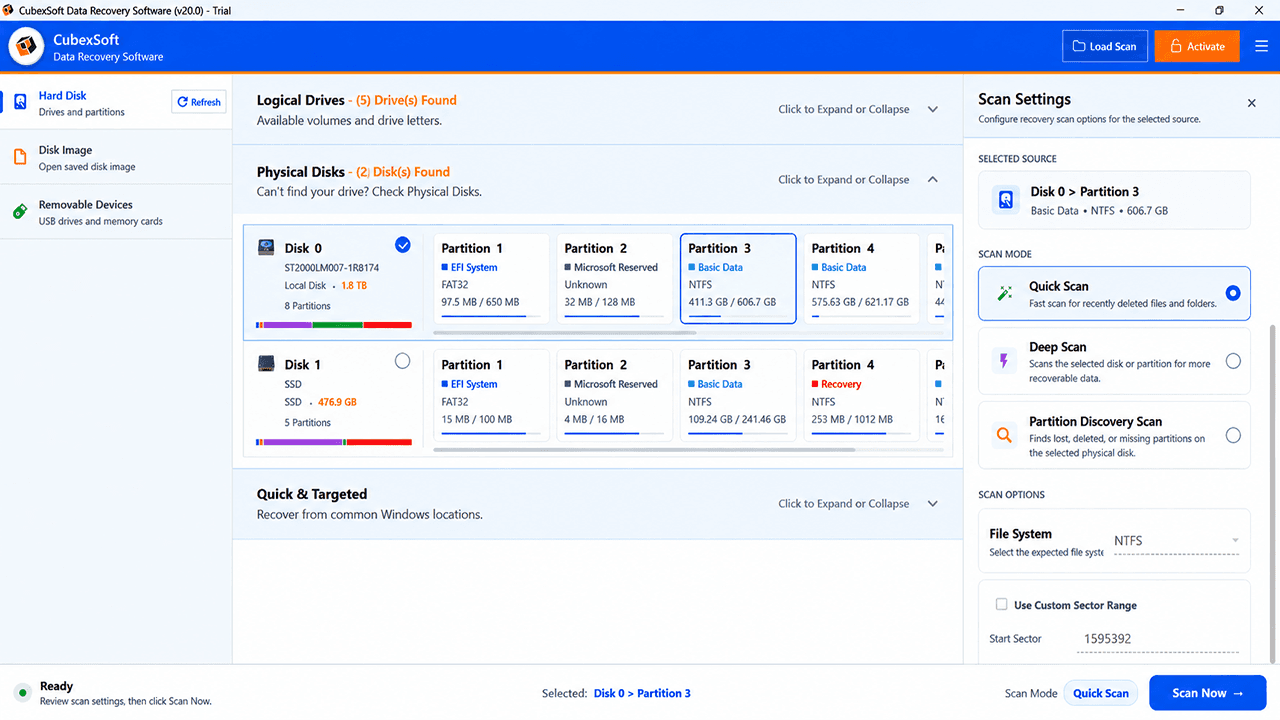
About this app
CubexSoft Data Recovery Wizard is a robust data recovery software designed for Windows users to recover lost, deleted, formatted, or corrupted files from internal and external storage devices. It supports a wide range of file types including photos, videos, documents, audio, archive files and more. The software offers multiple scanning modes—Quick Scan, Deep Scan, and Partition Discovery Scan—to cater to different data loss scenarios. It also features a preview option, file filtering, and search capabilities to streamline the recovery process. With an intuitive interface and step-by-step guidance, even non-technical users can efficiently recover their data.
Key features
- 1Three scan modes — Quick Scan, Deep Scan, and Partition Discovery Scan — covering deleted, formatted, and lost-partition scenarios
- 2Free preview of recoverable files before purchase, with filters by name, type, and size to narrow large scan results
- 3Disk image loading lets you scan a virtual copy of a damaged drive instead of the failing hardware itself
Target customer profile
Drawn from the product itself, not from a survey.
Demographic
Home users who accidentally deleted or formatted files
Pain points
Accidental deletion, formatting errors, fear of permanent data loss
Primary needs
Easy recovery of important personal files like photos, videos, and documents
Demographic
IT professionals and technicians
Pain points
Data loss from client devices, need for reliable recovery tools
Primary needs
Advanced scanning modes, support for various file systems, and efficient recovery
Demographic
Small business owners and freelancers
Pain points
Loss of critical business data due to hardware failure or human error
Primary needs
Secure recovery of business documents, emails, and databases without data leakage
Scout Review
Written by AI from measured evidence, scored out of 100.
CubexSoft Data Recovery Software is a competent, long-running Windows recovery utility from a company that's been at it for over a decade. The recovery workflow is genuinely well-designed for non-technical users: pick a drive, choose a scan depth, preview what's recoverable, then pay to save. The free preview is the right call and the disk image loading feature is a real differentiator for damaged drives. The marketing site is polished and, refreshingly, uses actual app screenshots rather than mockups. Where it stumbles is speed — a 26.5-second mobile LCP is a serious problem for a product people reach for in a panic — and accessibility, where seven Lighthouse audits fail. Security headers are strong at 10/12, though DMARC is missing and no audit is published. Against EaseUS, Recuva and Stellar, CubexSoft is a credible middle option: more capable than free Recuva, less established than EaseUS, and without Stellar's professional-tier positioning. It works. It's just not obviously the one you should pick.
Measure by measure
Usability
62Linear recovery flow (pick source → scan mode → preview → recover) is genuinely beginner-friendly, and free preview plus filters reduce guesswork. No login, no search, no visible help center in the nav.
Design
68Clean blue-gradient hero, consistent iconography and real product screenshots that match the actual app UI. Dated Windows chrome in the app shot and repeated CTA blocks hold it back from the top of the band.
Speed
44Lighthouse mobile 59/100 with a 26.5s LCP — roughly ten times the 'good' threshold. Desktop fares better at 71/100, but the mobile experience is genuinely slow.
Security
74Strong header hygiene: HTTPS enforced, HSTS, CSP, frame protection, X-Content-Type-Options, Referrer-Policy, SPF — 10/12 on the probe. Missing Permissions-Policy and DMARC, and no published audit or security page.
Accessibility
58Lighthouse 83/100 with seven failing audits: unnamed buttons, low contrast, broken heading order, small touch targets, no main landmark. No accessibility statement or WCAG claim on the site.
Growth
58Real, recurring problem with a specific Windows-first pitch and a disk-image-loading feature the free alternatives lack. But the category is crowded and the wedge is thin.
Improvement areas
- Mobile page speed: 26.5s LCP is roughly ten times the 'good' threshold and needs lazy-loading and image compression
- Accessibility: seven failing Lighthouse audits including unnamed buttons, low contrast, and missing main landmark
- Security completeness: DMARC and Permissions-Policy headers missing; no published audit or security page
Design & Usability
The marketing site is competent and, unusually, honest — the screenshots on the homepage are the actual app, not mockups, so what you see is what you download. The visual language is consistent: blue gradient hero, eight feature cards with colored top borders, a trust bar with 500K+ users and 15+ years. It reads as a real product from a real company, not a weekend side project. The app UI itself is a different story — the visual audit flagged a dated Windows title bar and dense, small-text tables that clash with the polished marketing shell. Usability is where CubexSoft actually earns its keep: the flow is linear and forgiving (choose a source, pick Quick/Deep/Partition Discovery scan, preview, recover), the free preview lets you verify before you pay, and filters plus search keep large scan results manageable. What's missing is the boring stuff — no account, no search on the site, no visible help center or documentation link in the nav. For a tool aimed at non-technical home users, that's a gap worth closing.
Speed & Security
Speed is the weak spot, and it's measurable. Lighthouse mobile scores 59/100 with a Largest Contentful Paint of 26.5 seconds — roughly ten times Google's 'good' threshold and slow enough that a user on a phone may assume the page is broken. Desktop is better at 71/100, but the mobile number is the one that matters for a product whose audience is 'I just deleted my photos and I'm panicking on my phone.' The page is heavy with feature lists, embedded screenshots and a long file-type dump, and none of it is lazy-loaded. Security is the opposite story: the HTTP probe returned 10 of 12 checklist points, with HTTPS enforced, HSTS, a Content Security Policy, frame protection, X-Content-Type-Options, Referrer-Policy and SPF all present. The two gaps are Permissions-Policy and DMARC — the latter matters for a company that emails download links and license keys, since without it anyone can spoof cubexsoft.com in a phishing campaign. The site advertises 'Process Data Locally' and a 'Secure Recovery Process,' which is the right claim for a recovery tool, but there's no published SOC 2, ISO certification, or security page to back it up. For a consumer utility that's normal, but it caps how high this dimension can go.
Accessibility & Growth
Accessibility lands at 83/100 on Lighthouse, which sounds fine until you read the failing audits: buttons with no accessible name, insufficient color contrast, headings that skip levels, touch targets too small to hit reliably, and no main landmark on the page. Seven distinct failures across the core WCAG categories. There's no accessibility statement and no WCAG conformance claim anywhere on the site, so there's no evidence anyone is tracking this. On growth, the honest read is that the problem is real and recurring — people delete files, drives fail, and they will pay to get data back — but the category is brutally crowded. EaseUS owns the mindshare, Recuva is free, and Stellar covers the professional tier. CubexSoft's wedge is Windows-only focus, a disk image loading feature that lets you scan a damaged drive safely, and a partition discovery scan for lost volumes. Those are real differentiators, but they're features, not a moat — any competitor can ship them in a release cycle. The 10.4-year-old domain and 500K+ user claim suggest a durable business, but nothing in the product's own material explains why a new buyer picks this over EaseUS. That's a positioning problem, not a product problem, and it's the ceiling on this score.
Conclusion
If you've lost data on a Windows machine and you want a tool that won't make you read a manual, CubexSoft is a reasonable stop. The free preview means you can verify it finds your files before spending anything, which is the single most important thing a recovery tool can offer. The disk image loading feature is worth knowing about if the drive itself is failing — scanning an image is safer than hammering a dying disk. But go in with realistic expectations: the mobile site is slow enough to be frustrating, the app UI looks its age, and the company publishes no security certifications. If you're a home user with a deleted folder, this will likely do the job. If you're an IT professional recovering client data at scale, EaseUS and Stellar have deeper professional tooling and better-documented support. Try the free preview first — it costs nothing and tells you in ten minutes whether this tool can actually see your files.
Suggestions for improvement
- Fix the 26.5s mobile LCP — lazy-load the file-type lists and embedded screenshots, and compress the hero imagery.
- Add accessible names to icon-only buttons and a main landmark; the seven failing Lighthouse audits are all fixable in an afternoon.
- Publish a DMARC record and a Permissions-Policy header to close the last two gaps in an otherwise strong security posture.
- Add a visible help center or documentation link in the nav — non-technical users recovering data need guidance before they scan.
Alternatives comparison
Named competitors, point by point. Nobody paid to appear here or to be left out.
 CubexSoft Data Recovery Software |  EaseUS Data Recovery Wizard |  Recuva |  Stellar Data Recovery | |
|---|---|---|---|---|
| Platform support | Windows only | Windows and Mac | Windows only | Windows and Mac |
| Price model | Free download with paid license; free preview of recoverable files | Free trial with 2GB recovery limit; paid annual/perpetual license | Free tier; paid Pro upgrade | Free trial with preview; paid Standard/Professional/Premium tiers |
| Scan modes | Quick Scan, Deep Scan, Partition Discovery Scan | Quick Scan and Deep Scan | Quick Scan and Deep Scan | Quick Scan, Deep Scan, and advanced recovery options |
| Disk image loading | Yes — load and scan a disk image as a virtual drive | Yes — create and load disk images | Not a headline feature | Yes — image creation and recovery |
| Free preview before purchase | Yes — preview file names, types, sizes before recovery | Yes — preview before recovery | Yes — free tool, preview and recover | Yes — preview in free trial |
| File system support | NTFS, FAT16, FAT32, exFAT and others (5+) | NTFS, FAT, exFAT, HFS+, APFS and more | NTFS, FAT, exFAT | NTFS, FAT, exFAT, HFS+, APFS and more |
EaseUS Data Recovery Wizard
A popular data recovery tool for Windows and Mac, offering similar features like deep scanning and preview.
Recuva
A free data recovery tool by CCleaner, suitable for basic file recovery on Windows.
Stellar Data Recovery
Professional data recovery software for Windows and Mac, with advanced features for complex recovery scenarios.
Comparing options? See CubexSoft Data Recovery Software alternatives, scored side by side
More Security apps
View all Security
issued.live
89Free certificate transparency search and SSL lookup with ...

kosa8
88Sealed VMs for AI agents with instant rewind, audit trails & zero key exposureSealed VMs for AI agents with instant rewind and audit tr...

SendVeil
88Send large original files through private, expiring links, with EU storage.

Postdate
88Share one link now that opens at the time you choose.

OBVELO
88Privacy gateway that masks personal data in LLM traffic

Sidenty
87Sidenty is a professional digital identity protection ser...

tmps.fyi
87Share text, images, screenshots and files across devices using a free online clipboard.

Magery Forge
87Weekly security audits for vibe-coded sites, explained in...

ProcessSpy
87A native macOS process explorer and advanced monitor that...

Xsilent Vault: Hide Photos
87Private Android vault for photos, videos, PDFs and files, with no required account, no ads and no mandatory cloud.

Tokitool
87Free, private browser tools for images, chats, QR codes, ...

C2PA Lab
87Free C2PA Content Credentials Checker


A platform dedicated to providing unbiased reviews of newly launched applications, analyzing everything from their features to their full potential.
info@scoutforge.net© 2026 Scoutforge. All rights reserved.
