Cycling through all six. Tap any point to stop.
Measured on six things
Generates logos from prompts and lets you instantly edit and customize them manually or with AI
Design
57Coherent dark theme with the prompt field as a clear primary action, but the homepage renders a large empty void below the nav, conflicting 'AI Logo Generator' vs 'AI Design' headlines, and zero sample logos to show the product's value.
Screenshots
1 / 1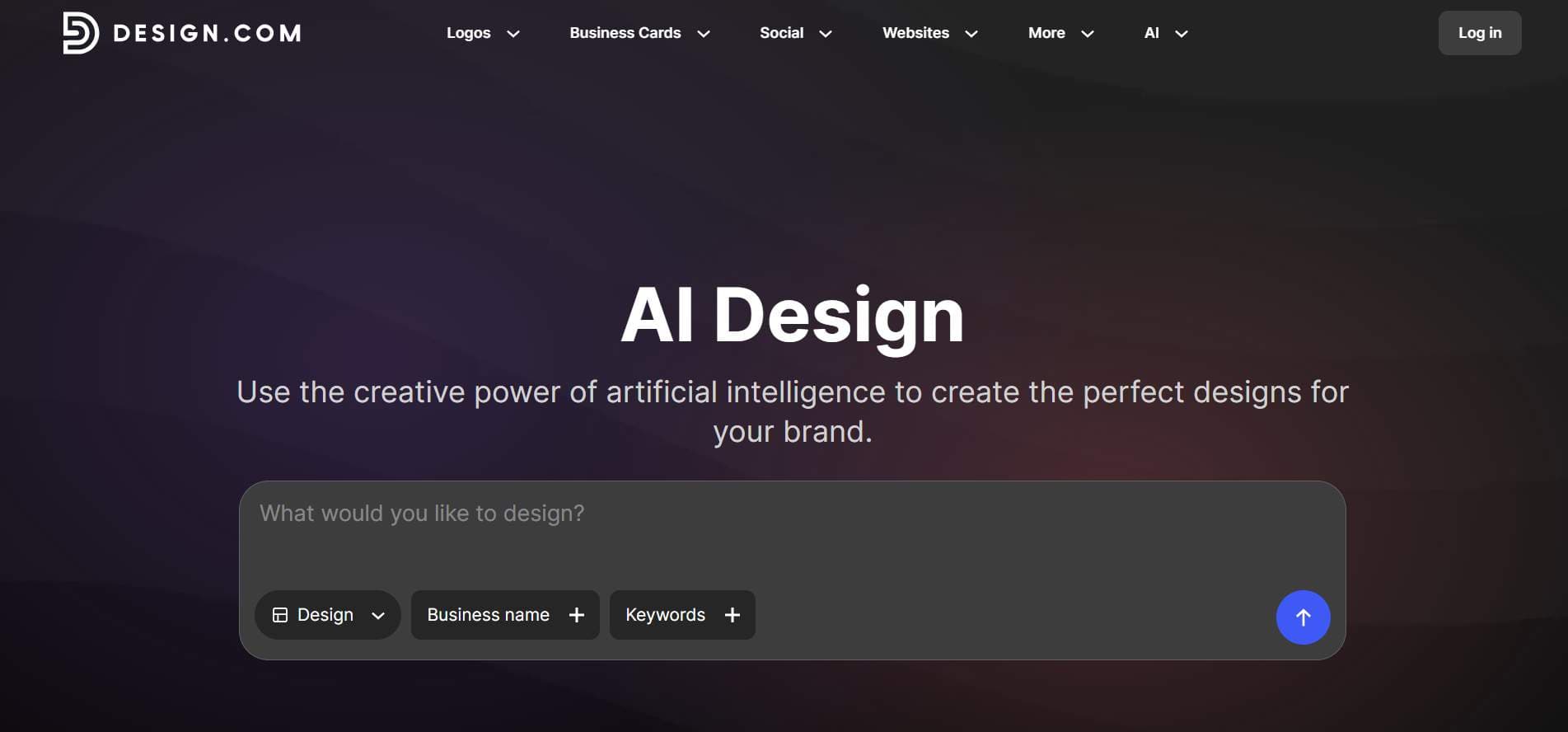
About this app
Design.com’s AI Logo Generator helps you create professional logos in seconds using simple text prompts and your business name. Its AI technology generates multiple logo concepts tailored to your industry, business, and preferred style. Explore thousands of creative logo options, then customize your favorite design with easy-to-use editing tools. Adjust fonts, colors, layouts, and other design elements, or use AI chat prompts to refine your logo. Once your design is ready, download high-quality files in PNG, JPG, SVG, EPS, and PDF formats. You can also use your logo across business cards, websites, social media graphics, and other branded materials. Design.com is ideal for entrepreneurs, startups, small businesses, and creators looking for an easy way to build a professional brand without needing advanced design skills.
Key features
- 1AI logo generation from text prompts with thousands of concept variations and an AI chat editor for refinement.
- 2Vector and print exports in PNG, JPG, SVG, EPS and PDF with full worldwide commercial usage rights.
- 3Brand kit with 1M+ templates, business cards, social graphics, websites, and 500+ exclusive AI-matched fonts.
Target customer profile
Drawn from the product itself, not from a survey.
Demographic
Startup founders and entrepreneurs
Pain points
Limited budget for professional design; need a logo quickly to launch
Primary needs
Affordable, fast, and unique logo that looks professional and is ready for commercial use
Demographic
Small business owners (e.g., cafes, boutiques, service providers)
Pain points
No design skills; struggle to create cohesive branding across materials
Primary needs
Easy-to-use tool that generates a logo and matching business cards, social media posts, etc.
Demographic
Freelancers and solopreneurs (e.g., consultants, photographers)
Pain points
Need a personal brand identity but lack time and resources for custom design
Primary needs
Quick, customizable logo with full commercial rights and brand kit templates
Scout Review
Written by AI from measured evidence, scored out of 100.
Design.com's AI Logo Generator is a competent, feature-rich entry in a crowded field. It delivers on the core promise — text prompt in, logo concepts out, vector files and commercial rights included — and backs it with a large library, brand kits, and 24/7 support. The measured evidence is mixed: accessibility is excellent (98/100), security is solid (10/13 headers), speed is mid-pack (69 mobile / 81 desktop). The real problems are presentation and differentiation. The homepage doesn't show a single sample logo, the messaging contradicts itself, and the design reads as generic AI-startup. Against Canva, Looka and Tailor Brands, it has no clearly articulated reason to win. It's a working product that hasn't figured out how to argue for itself.
Measure by measure
Usability
60The single prompt field makes the first step obvious and the site claims 24/7 chat support, but six competing nav dropdowns flatten the hierarchy, the placeholder text is low-contrast, and the live page omits the prompt-cue chips shown in the promo.
Design
57Coherent dark theme with the prompt field as a clear primary action, but the homepage renders a large empty void below the nav, conflicting 'AI Logo Generator' vs 'AI Design' headlines, and zero sample logos to show the product's value.
Speed
58Lighthouse mobile 69/100 (LCP 2.4s, CLS 0, TBT 1.3s) and desktop 81/100 — a workable but not snappy profile, with 1.3s of main-thread blocking dragging the mobile score. The 'fastest AI logo generator' claim is marketing, not benchmarked.
Security
74Solid baseline: HTTPS enforced, HSTS, frame protection, secure cookies, SPF and DMARC all present (10/13 header checks). Missing CSP and Permissions-Policy, and no SOC 2/ISO audit surfaced in collected evidence despite claims of manual IP review.
Accessibility
80Lighthouse accessibility 98/100 with only one failing audit (missing main landmark) — strong automated results. No published WCAG conformance statement or a11y page found, so the high score rests on the audit rather than documented commitment.
Growth
58A real, recurring problem (cheap fast logos with commercial rights) with genuine differentiators — vector exports, 470k+ logo library, brand kit — but it's a brutally crowded category against Canva, Looka and Tailor Brands with no segment it clearly owns.
Improvement areas
- Homepage shows no sample logos or outputs, undermining trust in a design product.
- Conflicting headlines ('AI Logo Generator' vs 'AI Design') and generic AI-gradient visuals weaken branding.
- Missing CSP and Permissions-Policy headers; no published SOC 2/ISO audit to back IP-review claims.
Design & Usability
Design and usability are the weakest link here. The dark theme is coherent and the prompt field is unmistakably the primary action, which is the right call. But the live homepage renders a large empty void below the nav, the headline ('AI Logo Generator') fights the promo headline ('AI Design'), and — fatally for a design product — there are no sample logos anywhere on the page. You're asked to trust a logo generator that won't show you a logo. Navigation is broad but flat: six dropdowns competing for attention with no clear hierarchy, and the placeholder text is low-contrast grey on dark grey. The prompt-cue chips that would actually help a first-time user exist only in the marketing image, not the live page. It works, but it doesn't sell itself.
Speed & Security
Speed is mid-pack: Lighthouse mobile 69/100 with LCP 2.4s and CLS 0 (good), but 1.3s of total blocking time drags the score, and desktop lands at 81/100. The 'fastest AI logo generator' claim is unverified marketing. Security is genuinely decent for the category: HTTPS enforced, HSTS, frame protection, secure cookies, SPF and DMARC all present — 10 of 13 header checks. The gaps are a missing Content-Security-Policy and Permissions-Policy, which matter on a site handling payments. The site claims manual IP review of every logo and full commercial rights, but no SOC 2, ISO, or third-party audit surfaced in the evidence, so those claims rest on trust.
Accessibility & Growth
Accessibility is the standout: Lighthouse scores 98/100 with a single failing audit — no main landmark. That's a five-character fix away from near-perfect automated results, though there's no published WCAG statement to back it up. Growth is the harder question. The problem is real and recurring — founders and small businesses need a fast, cheap, commercially licensed logo — and Design.com brings genuine differentiators: vector exports (SVG/EPS/PDF), a 470k+ logo library, brand kits, and exclusive licensing. But this is a packed category. Canva bundles logos into a design platform people already use; Looka and Tailor Brands sell the same AI-logo-plus-branding bundle. Nothing in the material names a segment Design.com serves better than those three, so it competes on volume and price rather than a wedge.
Conclusion
If you need a logo today and want vector files without a subscription trap, Design.com will get you there. It's functional, licensed for commercial use, and the accessibility and security fundamentals are better than many peers. But go in knowing you're choosing on price and format convenience, not on a brand story or a workflow nobody else offers. And if you're the maker: put three real logos on that homepage. The blank void is costing you more conversions than any feature you could ship this quarter.
Suggestions for improvement
- Show actual generated logos on the homepage — the blank hero void is the single biggest conversion killer.
- Reconcile the 'AI Logo Generator' and 'AI Design' headlines into one consistent message.
- Add a Content-Security-Policy and Permissions-Policy header to close the security gaps.
- Add a <main> landmark to fix the one failing accessibility audit — it's a one-line change.
Alternatives comparison
Named competitors, point by point. Nobody paid to appear here or to be left out.
 Design.com AI Logo Generator |  Canva Logo Maker |  Looka |  Tailor Brands | |
|---|---|---|---|---|
| AI logo generation from text prompts | Yes — prompt-based, thousands of variations | Yes — AI-powered within Canva's editor | Yes — preference-driven AI generation | Yes — AI-driven logo and branding |
| Vector file export (SVG/EPS/PDF) | Yes — PNG, JPG, SVG, EPS, PDF | SVG on paid plans | Vector files on paid packages | Vector files on paid packages |
| Brand kit and matching templates | Yes — 1M+ templates, brand kit, 50+ tools | Yes — full Canva design platform | Yes — branding materials and kits | Yes — social kits and website builder |
| Commercial usage rights included | Yes — worldwide commercial use, optional buyout | Yes, per Canva license terms | Yes, with paid purchase | Yes, with paid purchase |
| Free tier available | Yes — free AI logos, no usage limits claimed | Yes — free Canva account | Free preview, pay to download | Free preview, pay to download |
Canva Logo Maker
Canva offers a user-friendly logo maker with templates and AI-powered design tools, integrated with its broader design platform.
Looka
Looka uses AI to generate logo options based on your preferences, and offers a range of branding materials.
Tailor Brands
Tailor Brands provides AI-driven logo design and branding tools, including social media kits and website builders.
Comparing options? See Design.com AI Logo Generator alternatives, scored side by side
More Design & Creativity apps
View all Design & Creativity
RoomCreator
92An AI-powered interior and exterior design tool that tran...

QRBliss
91Branded QR codes with AI Brand Sync, 15 free dynamic code...

ThumbnailMaker
90AI YouTube thumbnail maker: paste a video link, get the brief, the thumbnail, and a check at feed size.

All of Us
89Add deceased loved ones to photos with AI and see free pr...

FontPlop
89Browser-based font viewer & tester for TTF, OTF, WOFF, WO...

Cross Stitch Pattern Maker
89Free on-device photo-to-DMC/Anchor chart with skein counts.

What the GIF
89Frame-perfect video-to-GIF maker that runs entirely in yo...

AI Vocals Generator
89Add AI singers or rappers to your own beat, get two takes...

Tracé slides
89Interactive math & physics slides with live graphs and an...

English Test Coach
89English Test Coach checks your IELTS essays and letters, gives an estimated band score across all four criteria, and tells you exactly what to revise next.

BeartIMAGE
88BeartIMAGE is a free, web-based image processing platform engineered for fast, bulk photo editing and conversion directly in your browser.

Portrait Gift
88AI-powered personalized face swap art platform creating c...


A platform dedicated to providing unbiased reviews of newly launched applications, analyzing everything from their features to their full potential.
info@scoutforge.net© 2026 Scoutforge. All rights reserved.
