Cycling through all six. Tap any point to stop.
Measured on six things
Convert Outlook PST files to 15+ formats and cloud servic...
Design
57Standard corporate template with a coherent blue accent and a scannable licensing table, but the hero is a 120-word wall, the logo row is misaligned, and the app UI is stock Windows forms.
Screenshots
1 / 1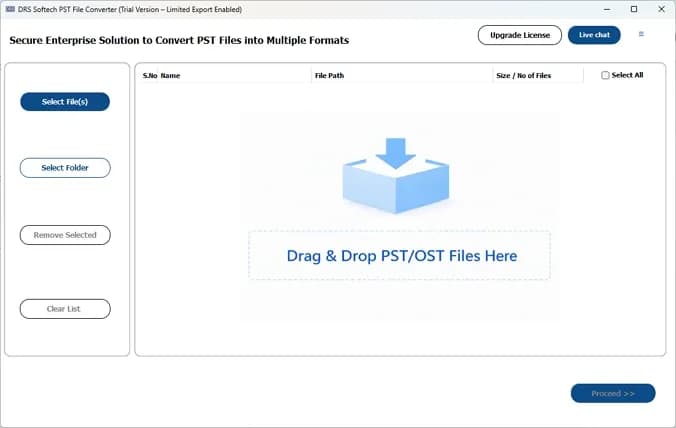
About this app
DRS Softech PST File Converter is a powerful and versatile tool designed to help users migrate, backup, and manage their Outlook data. It supports conversion from PST to over 15 formats including MBOX, EML, MSG, PDF, CSV, and more, and can also migrate emails directly to cloud platforms like Office 365, IMAP, Google Workspace, and Outlook.com. The software preserves data integrity, folder hierarchy, and metadata, and includes advanced features such as batch conversion, selective data extraction, duplicate removal, and preview options. It is compatible with all versions of Windows and Mac, supports both ANSI and Unicode PST files, and does not require Outlook to be installed. With a user-friendly interface and robust customer support, DRS Softech PST Converter is an ideal solution for individuals and organizations looking to efficiently manage their PST data.
Key features
- 1Convert PST to 15+ formats including MBOX, EML, MSG, PDF, CSV, JSON and Thunderbird.
- 2Direct migration to Office 365, IMAP, Google Workspace, Outlook.com and GoDaddy.
- 3Batch conversion, selective extraction, duplicate removal and preview — no Outlook install required.
Target customer profile
Drawn from the product itself, not from a survey.
Demographic
IT administrators and email migration specialists
Pain points
Need to convert large PST files quickly and reliably without data loss
Primary needs
Batch conversion, cloud migration, data integrity preservation
Demographic
Small business owners and office managers
Pain points
Transitioning from Outlook to another email client or cloud service
Primary needs
Easy-to-use interface, comprehensive format support, selective conversion
Demographic
Individual users with old PST files
Pain points
Accessing and managing legacy emails in modern platforms
Primary needs
Affordable solution, preview feature, no Outlook dependency
Scout Review
Written by AI from measured evidence, scored out of 100.
DRS Softech PST File Converter is a workmanlike utility site for a genuinely useful tool. The engineering underneath the marketing is better than the marketing: 96/100 mobile Lighthouse, a full security header stack, and a real product screenshot showing a drag-and-drop zone and file table. The site itself is the weak link — a template hero with a 120-word paragraph, stretched customer logos, unstyled Windows form UI, and accessibility gaps (no alt text, unnamed links, no main landmark). The 4.2-star / 858-review badge and 29K+ downloads are the site's own claims and weren't independently verified. Against SysTools and Stellar it's on par on features and behind on brand recognition, which makes the pricing page and the support promise the things to actually check before buying.
Measure by measure
Usability
62Clear three-step flow (Select → Preview → Export) shown in a real UI screenshot, plus a user manual and video tab. Undercut by equal-weight Download/Purchase CTAs and dense feature cards.
Design
57Standard corporate template with a coherent blue accent and a scannable licensing table, but the hero is a 120-word wall, the logo row is misaligned, and the app UI is stock Windows forms.
Speed
88Lighthouse mobile 96/100 (LCP 2.6s, CLS 0.001, TBT 44ms) and desktop 99/100. Genuinely fast for a page carrying box-shots, logo strips and comparison tables.
Security
74Full header stack verified: HSTS, CSP, frame protection, nosniff, Referrer-Policy, Permissions-Policy (10/12). SPF and DMARC are missing and no SOC 2/ISO claim appears on the site.
Accessibility
58Lighthouse 86/100, but images ship without alt text, several links have no discernible name, there's no main landmark, and touch targets are undersized. No WCAG statement published.
Growth
58Real, recurring problem (PST migration) with a specific wedge — 15+ formats plus direct cloud migration and no Outlook dependency. But SysTools and Stellar already own this shelf.
Improvement areas
- Hero copy is a 120-word paragraph; break it into scannable lines with clear outcomes.
- Accessibility gaps: missing alt text, unnamed links, no main landmark, small touch targets.
- No SPF/DMARC records and no published SOC 2, ISO or pen-test documentation.
Design & Usability
The site is a competent corporate template: consistent blue accent, a licensing comparison table you can actually read, and a technical guide that shows the real three-step flow inside the app. Where it slips is craft — the hero is a 120-word paragraph with no breaks, the customer logo row has visibly stretched and low-res marks, and the actual product UI is unstyled Windows forms. Usability is stronger than design: a user manual, video tab, and a screenshot of the drag-and-drop zone give a nervous IT admin real confidence before download. The equal-weight Free Download and Purchase Now buttons blur the conversion path, and the feature cards pack 3-4 lines of small text each, which slows scanning on desktop.
Speed & Security
Speed is the standout. Lighthouse measured 96/100 on mobile (LCP 2.6s, CLS 0.001, TBT 44ms) and 99/100 on desktop — fast for a page hauling box-shots, logo strips and comparison tables. Security is solid but not airtight: HTTPS is enforced with HSTS, CSP, frame protection, nosniff, Referrer-Policy and Permissions-Policy all present, 10 of 12 checklist points. The two misses are SPF and DMARC, which leaves the sending domain open to spoofing. No SOC 2, ISO 27001 or penetration-test claim appears anywhere in the collected content, so enterprise buyers will have to ask for that paperwork directly rather than read it off a trust page.
Accessibility & Growth
Accessibility lands at 86/100 on Lighthouse, but the failing list is the interesting part: images without alt attributes, links with no discernible name, no main landmark, undersized touch targets, and role=presentation conflicts. That's a site that renders fine for sighted mouse users and degrades for everyone else. No WCAG conformance statement is published, and multi-language support isn't advertised. Growth is a judgement on the idea: PST migration is a real, recurring, painful problem with a specific buyer (IT admins moving off Outlook), and the wedge — 15+ output formats plus direct migration to Office 365, IMAP, Google Workspace and GoDaddy without Outlook installed — is concrete. The limit is the shelf: SysTools and Stellar already occupy it with near-identical feature lists, so DRS has to win on price, support or a niche the incumbents ignore.
Conclusion
If you're an IT admin with a stack of legacy PSTs and no Outlook install, this does the job the page says it does — batch conversion, selective extraction, cloud migration, ANSI and Unicode support. Download the free version first and run it against one real PST before you pay, because the trial limits and the actual price aren't spelled out in the content we could read. Ask support directly for a security questionnaire if you're buying for an organization; the headers are good but there's no published audit. And ignore the 4.2-star badge until you've read the reviews yourself — it's the vendor's number, not a third party's.
Suggestions for improvement
- Break the 120-word hero paragraph into three scannable lines with a bolded outcome per line.
- Add alt text to every image and give the icon-only links discernible names — the Lighthouse list is short and fixable.
- Publish SPF and DMARC records; the rest of the header stack is already in place.
- Put the actual price and trial limits on the page — 'Purchase Now' with no number costs you trust.
Alternatives comparison
Named competitors, point by point. Nobody paid to appear here or to be left out.
 DRS Softech PST File Converter DRS Softech PST File Converter |  SysTools PST Converter SysTools PST Converter |  Stellar Converter for PST Stellar Converter for PST | |
|---|---|---|---|
| Output formats supported | 15+ (PST, MBOX, EML, MSG, PDF, CSV, JSON, DOCX, ICS, VCF, PNG, MD, Thunderbird) | Multiple formats plus cloud export (per vendor page) | Multiple formats and email clients (per vendor page) |
| Direct cloud / email migration | Office 365, IMAP, Google Workspace, Outlook.com, GoDaddy | Cloud services supported | Email client migration supported |
| Requires Outlook installed | No | No (standalone converter) | No (standalone converter) |
| Batch conversion & selective extraction | Yes — batch, filters, duplicate removal | Yes — batch and selective conversion | Yes — batch and selective conversion |
| Platform coverage | Windows, Mac, Linux (per site) | Windows (per vendor page) | Windows (per vendor page) |
SysTools PST Converter
A popular tool for converting PST files to various formats and cloud services with similar features.
Stellar Converter for PST
Offers PST conversion to multiple formats and email clients, known for its user-friendly interface.
Comparing options? See DRS Softech PST File Converter alternatives, scored side by side
More Online Backup apps
View all Online Backup
yourdrive
84YourDrive is a self-hosted file manager and media timeline that runs entirely on your own infrastructure. Organize files in nested folders, move them with drag-and-drop, search instantly, and browse photos and videos by month and year. Files stream straight to your own AWS S3, Azure Blob, MinIO, Cloudflare R2 or Wasabi storage. Install with one command. Free for personal use; teams pay per server, not per seat.

PCDOTS Email Recovery Software
83Recovers emails from corrupt mailboxes across 50+ platforms.

Alcazar Dead Man's Switch
82An encrypted digital legacy service that securely deliver...
PCDOTS Thunderbird Converter
81Recover and migrate Thunderbird profiles & MBOX files wit...

App-Vault
81Encrypted photo and file vault for iPhone. AES-256 on device, pattern lock, decoy vault and calculator disguise. No account, no cloud.

RemoteDrive by FileZilla Pro
80Integrates cloud storage into macOS Finder for seamless file management across services like Google Drive and Dropbox.

SysInfo Google Workspace Backup Tool
80Backup and migrate Google Workspace data locally or to ot...

S3FileHub
80A user-friendly web app for managing AWS S3 storage with AI summarization and analytics.

Filifly
79A secure, web-based file sharing platform with end-to-end encryption and no login requirements for quick transfers.

Softaken Data Recovery Software
79Recover deleted files from Windows with ease.

SysInfo Office 365 Backup Tool
79Backup and export Office 365 mailboxes to PST, MBOX, PDF,...

Very Good Calendar Sync
78Privacy-first on-device Mac calendar sync tool.


A platform dedicated to providing unbiased reviews of newly launched applications, analyzing everything from their features to their full potential.
info@scoutforge.net© 2026 Scoutforge. All rights reserved.
