Cycling through all six. Tap any point to stop.
Measured on six things
Bulk migrate Outlook PST to Google Workspace securely wit...
Design
57Functional but dated: consistent blue accents and a clear step-by-step flow, undermined by a text-dense layout, a low-res product box, and basic Windows form UI.
Screenshots
1 / 1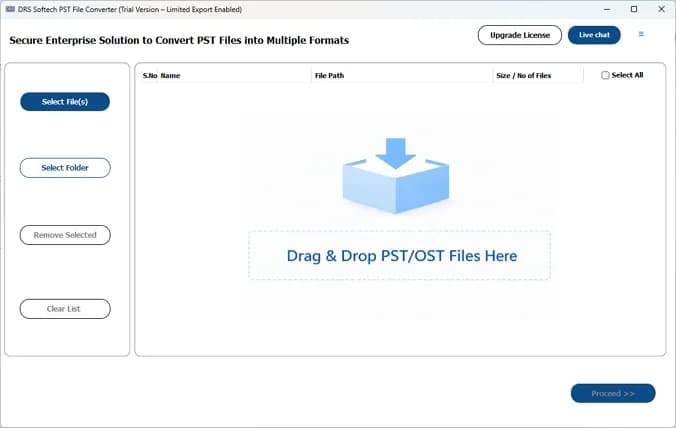
About this app
DRS Softech PST to Google Workspace Migration Tool is a Windows application that enables IT admins and teams to migrate Outlook PST files directly into Google Workspace accounts in bulk. It supports loading multiple PSTs via file, folder, or drag‑and‑drop, previewing emails with advanced search, and authenticating securely using a Service Account JSON Key. Key features include date‑range filters, duplicate detection, skip existing exports, custom folder mapping, and corrupt file alerts. The tool preserves folder hierarchy and handles emails, contacts, calendars, and attachments. Available as a free demo (50 emails per folder) and full license, it’s ideal for organizations moving from on‑premises Outlook to Google Workspace without data loss or manual effort.
Key features
- 1Bulk PST loading via file, folder, or drag-and-drop with full folder-tree preview and advanced search.
- 2Secure Google Workspace auth via Service Account JSON Key (OAuth, revocable through Google Cloud Console).
- 3Date-range filters, duplicate detection, skip-existing exports, and custom folder mapping for clean migrations.
Target customer profile
Drawn from the product itself, not from a survey.
Demographic
IT administrators in mid-to-large enterprises
Pain points
Manual PST migration is slow, error-prone, and risks data loss; ensuring security and compliance.
Primary needs
Bulk migration, secure authentication, data integrity, and minimal downtime.
Demographic
Small business owners without dedicated IT staff
Pain points
Lack of technical expertise for complex migrations; budget constraints.
Primary needs
Simple, guided migration with a free trial; affordable licensing.
Demographic
Compliance and legal teams
Pain points
Need to migrate specific date ranges or filtered emails while preserving evidence integrity.
Primary needs
Date range filters, duplicate removal, and detailed migration logs for audit.
Scout Review
Written by AI from measured evidence, scored out of 100.
DRS Softech's PST to Google Workspace Migration Tool is a focused, competent utility for a genuinely painful enterprise task. The marketing site is fast and well-structured, the workflow is documented end to end, and the feature set — bulk loading, date filters, duplicate detection, skip-existing, JSON-key auth — maps directly to what IT admins need. The weaknesses are polish and proof: a dated, text-heavy homepage, a plain Windows UI, accessibility gaps, and no published compliance certifications despite handling sensitive mailbox data. It's a solid mid-market choice that would benefit from a design refresh and a security/compliance page.
Measure by measure
Usability
63Tabbed nav, a documented 6-step workflow, and a 50-email-per-folder free demo make evaluation easy, though the dense page and Windows-only scope limit it.
Design
57Functional but dated: consistent blue accents and a clear step-by-step flow, undermined by a text-dense layout, a low-res product box, and basic Windows form UI.
Speed
79Lighthouse mobile 93 and desktop 90, with CLS 0.031 and TBT 27ms. LCP at 3.0s is the one soft spot on an otherwise snappy marketing site.
Security
74Strong header hygiene (HSTS, CSP, frame protection, 10/12 checks) and OAuth JSON-key auth, but no SPF/DMARC and no published audits or compliance page.
Accessibility
58Lighthouse 86/100 with real gaps: images missing alt text, links without discernible names, small touch targets, and no main landmark. No a11y statement found.
Growth
60A real, specific problem — bulk PST-to-Workspace migration — with genuine differentiators over free GWMMO and Stellar, but a narrow Windows-only niche caps the ceiling.
Improvement areas
- No published SOC 2/ISO compliance or security page despite handling sensitive mailbox data.
- Accessibility gaps: missing alt text, unnamed links, small touch targets, no main landmark.
- Dated, text-dense homepage and plain Windows UI reduce perceived polish versus competitors.
Design & Usability
The site does the practical things right: a tabbed layout, a documented six-step workflow, and a free demo that processes 50 emails per folder so admins can test before buying. The 'How to Use' section pairs a numbered flow with a real app screenshot, which is more than many competitors bother with. Where it stumbles is density and polish — the homepage stacks long bullet lists with little breathing room, the product box image looks a decade old, and the app itself is plain Windows form controls. Usability is competent rather than delightful: clear CTAs, a Microsoft Store option, and a case study, but nothing that shortens the learning curve for a first-time admin.
Speed & Security
Speed is the standout measured result: Lighthouse mobile 93 and desktop 90, with a 0.031 CLS and 27ms TBT showing a stable, responsive page; the 3.0s LCP is the only metric worth flagging. Security is solid on the transport layer — HTTPS enforced with HSTS, CSP, frame protection, and 10 of 12 header checks passing — and the product's OAuth service-account JSON-key model is a sensible, revocable auth approach for Workspace. The gaps are the unglamorous ones: no SPF or DMARC records on the domain, and no published SOC 2, ISO, pen-test, or bug-bounty page in the evidence. For an enterprise migration tool handling mailbox data, that compliance silence is the thing procurement will ask about first.
Accessibility & Growth
Accessibility lands at 86/100 on Lighthouse but with concrete failures: images without alt attributes, links without discernible names, undersized touch targets, and a missing main landmark — the kind of issues an enterprise accessibility review flags immediately, and there's no WCAG statement to point to. Growth is a judgment on the idea: bulk PST-to-Google Workspace migration is a real, recurring enterprise problem, and the tool differentiates against free GWMMO (which is per-user and limited) and Stellar (broader, less Workspace-focused) with multi-user bulk loading, date filters, duplicate detection, and JSON-key auth. The ceiling is the Windows-only desktop form factor and a crowded migration-tool market, but the wedge is legitimate.
Conclusion
If you're an IT admin staring down a pile of PSTs and a Google Workspace tenant, this tool covers the mechanics well and the free demo lets you verify before committing budget. Go in expecting a workmanlike Windows app rather than a polished SaaS, and ask the vendor directly for their security documentation before you point it at production mailboxes. For teams that need bulk, filtered, duplicate-aware migration without building scripts, it's a reasonable pick — just budget time for a pilot and confirm compliance requirements up front.
Suggestions for improvement
- Publish a security/compliance page with SOC 2 or ISO status, data-handling details, and a contact for procurement reviews.
- Add SPF and DMARC DNS records to close the two missing email-authentication checks.
- Fix accessibility basics: alt text on images, discernible link names, larger touch targets, and a main landmark.
- Refresh the homepage — replace the low-res product box, add whitespace, and modernize the app UI screenshots.
Alternatives comparison
Named competitors, point by point. Nobody paid to appear here or to be left out.
 DRS Softech PST to Google Workspace Migration Tool DRS Softech PST to Google Workspace Migration Tool |  Google Workspace Migration for Microsoft Outlook (GWMMO) Google Workspace Migration for Microsoft Outlook (GWMMO) |  Stellar Migrator for Outlook Stellar Migrator for Outlook | |
|---|---|---|---|
| Bulk multi-user migration | Yes — loads all Workspace users and migrates selected accounts in bulk | No — limited to individual users | Yes — bulk migration supported |
| Price model | Free demo (50 emails/folder) + paid license | Free | Commercial license |
| Date-range filtering | Yes — start/end date filter | Limited | Yes — filter options available |
| Duplicate detection | Yes — based on To, From, Body, Subject, CC | No | Yes |
| Platform | Windows desktop app | Windows | Windows |
Google Workspace Migration for Microsoft Outlook (GWMMO)
Free Google tool that migrates Outlook data but limited to individual users and less advanced features.
Stellar Migrator for Outlook
Commercial tool for PST migration to various destinations including Google Workspace, with similar bulk and filter features.
Comparing options? See DRS Softech PST to Google Workspace Migration Tool alternatives, scored side by side
More Online Backup apps
View all Online Backup
yourdrive
84YourDrive is a self-hosted file manager and media timeline that runs entirely on your own infrastructure. Organize files in nested folders, move them with drag-and-drop, search instantly, and browse photos and videos by month and year. Files stream straight to your own AWS S3, Azure Blob, MinIO, Cloudflare R2 or Wasabi storage. Install with one command. Free for personal use; teams pay per server, not per seat.

PCDOTS Email Recovery Software
83Recovers emails from corrupt mailboxes across 50+ platforms.

Alcazar Dead Man's Switch
82An encrypted digital legacy service that securely deliver...
PCDOTS Thunderbird Converter
81Recover and migrate Thunderbird profiles & MBOX files wit...

App-Vault
81Encrypted photo and file vault for iPhone. AES-256 on device, pattern lock, decoy vault and calculator disguise. No account, no cloud.

RemoteDrive by FileZilla Pro
80Integrates cloud storage into macOS Finder for seamless file management across services like Google Drive and Dropbox.

SysInfo Google Workspace Backup Tool
80Backup and migrate Google Workspace data locally or to ot...

S3FileHub
80A user-friendly web app for managing AWS S3 storage with AI summarization and analytics.

Filifly
79A secure, web-based file sharing platform with end-to-end encryption and no login requirements for quick transfers.

Softaken Data Recovery Software
79Recover deleted files from Windows with ease.

SysInfo Office 365 Backup Tool
79Backup and export Office 365 mailboxes to PST, MBOX, PDF,...

Very Good Calendar Sync
78Privacy-first on-device Mac calendar sync tool.


A platform dedicated to providing unbiased reviews of newly launched applications, analyzing everything from their features to their full potential.
info@scoutforge.net© 2026 Scoutforge. All rights reserved.
